Welcome to the first lesson of our new module on Advanced Financial Analysis and Forecasting. In the previous module, you mastered the art of building and structuring a complete financial model, culminating in protecting your reports to ensure their integrity. Now that you can create robust, dynamic statements, we will shift our focus to using these models for sophisticated analysis and decision-making.
Today's lesson introduces a powerful "what-if" analysis tool: Goal Seek. You'll learn how to use it to work backward from a specific financial target—like a desired profit or break-even point—to determine the exact input value required to achieve it. This skill is invaluable for planning, budgeting, and answering critical business questions quickly and accurately.
What is Goal Seek?
Often in financial analysis, you build a model where you change inputs (like units sold or price) to see the effect on an output (like total profit). Goal Seek flips this process on its head. You know the desired output, and you ask Excel to find the single input value needed to get you there. It automates the tedious trial-and-error process of guessing inputs.
The video below from Leila Gharani provides a perfect introduction to this concept.
Excel Goal Seek Explained in Simple Steps
This video clearly explains the core idea behind Goal Seek and contrasts it with manual calculation or guesswork.
First, watch the introduction from the beginning to the concept to understand the type of business question Goal Seek answers. Next, watch the demonstration from this segment. Pay close attention to how she sets up the Goal Seek dialog box to find the required units sold for a specific revenue target.
As you saw, Goal Seek works by manipulating one variable input to make a formula-driven cell arrive at a specific value.
The Three Components of Goal Seek
The Goal Seek dialog box is simple, containing just three essential fields. Understanding their roles is key to using the tool effectively.

- Set cell: This must be the cell that contains the formula you want to achieve a target for. In the image above, it's the
Total profitcell. This is your output or objective cell. - To value: This is the specific, hard-coded value you want the "Set cell" to become. It's your desired goal or objective value.
- By changing cell: This is the single input cell that Excel is allowed to change to reach the goal. This cell must not contain a formula; it must be a value that directly or indirectly affects the "Set cell". This is your input or variable parameter.
The following article from Becker provides a concise explanation of these arguments in an accounting context.
This article clearly defines the components of the Goal Seek function.
Please read the section that starts just after the first screenshot and explains the three arguments. Focus on the bullet points under the heading Goal Seek Dialog Box.
Application 1: Break-Even Analysis
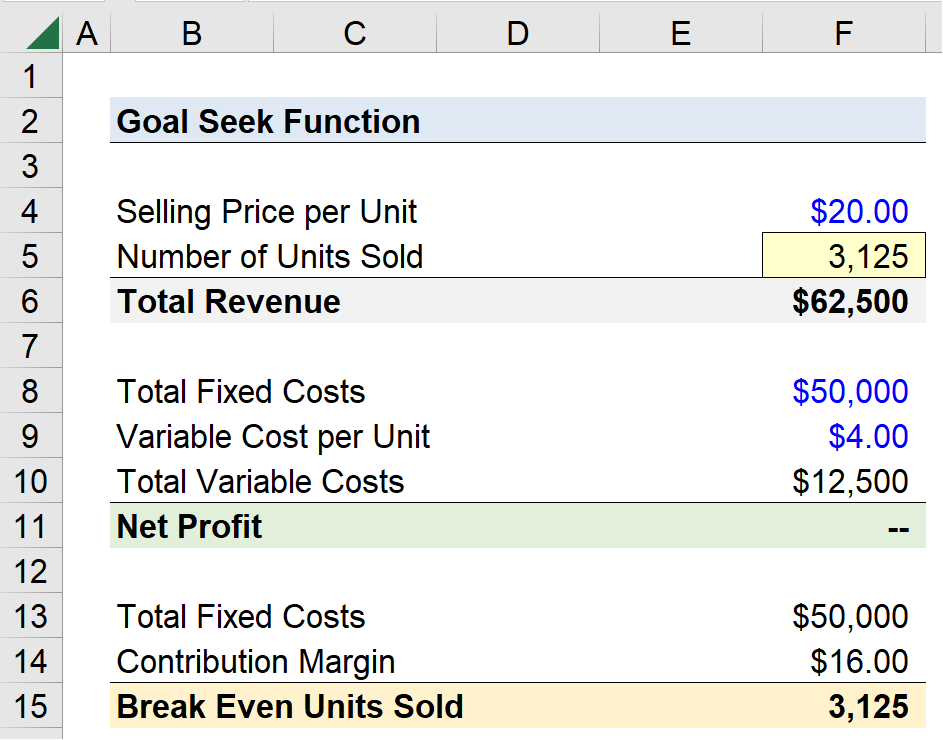
A classic and essential use of Goal Seek in accounting is for break-even analysis. Your BCom and MCom studies have made you very familiar with the concept: finding the point where Total Revenue equals Total Costs, resulting in a Net Profit of zero. Manually calculating this is straightforward, but Goal Seek makes it instantaneous, especially in a complex model.
Let's walk through a practical example of finding the break-even point in terms of units sold.
The Becker article continues with an excellent, step-by-step example of using Goal Seek for a coffee shop's break-even analysis.
Please read the section titled Break-even analysis. Follow the logic of how they set up the profit calculation and then configure the Goal Seek window to find the number of units that makes the profit cell equal zero.
When you complete the steps, Excel finds the precise number of units required to break even, as shown in the model below.
The same logic can be applied to many other "target" scenarios. For example, instead of a break-even target, you could set a specific profit goal.
Using Excel's Goal Seek for data analysis
This article from the Journal of Accountancy provides another clear, simple example focused on hitting a revenue target.
Read the section titled For the first example. Here, the goal is not to break even, but to achieve a revenue of $50,000 by changing the quantity sold.
Application 2: Advanced Financial Ratio Targeting
Goal Seek's power extends beyond simple profit and revenue calculations. It can be used in complex formulas, making it highly effective for financial statement analysis. For instance, a common management goal is to improve the efficiency of the working capital cycle.
The video below demonstrates how Goal Seek can determine the necessary reduction in trade receivables to achieve a specific working capital cycle target in days. This is a fantastic example of applying the tool to ratio analysis.
How to use a Goal Seek in Excel (SIMPLE SOLUTIONS with EXAMPLES)
This video by Will Boardman provides several practical examples, but the third one is particularly relevant to advanced financial analysis.
Please watch the final example in the video, which covers the working capital cycle. It starts at this timestamp. Notice how the "Set cell" is the working capital cycle formula, and the "By changing cell" is the trade receivables value, which is an input to one of the intermediate ratios.
This demonstrates that the "changing cell" doesn't need to be a direct precedent of the "set cell." As long as there is a formulaic link between them, however indirect, Goal Seek can find a solution.
Conclusion
In this lesson, you've added a powerful analytical tool to your Excel toolkit. You learned how to use Goal Seek to reverse-engineer a financial model, finding the precise input needed to hit a specific target. This is a fundamental skill for any accounting professional involved in forecasting, budgeting, and strategic planning.
Key Takeaways:
- Goal Seek is a "what-if" analysis tool that solves for a desired output by changing a single input.
- The three key components are the Set cell (the formula output), To value (the target goal), and By changing cell (the variable input).
- It is perfectly suited for common accounting tasks like break-even analysis and setting profit or revenue targets.
- Its utility extends to more complex models, allowing you to target specific outcomes for financial ratios like the working capital cycle.
Goal Seek is incredibly useful, but it has one primary limitation: it can only vary one input at a time. What if you want to see the impact of changing both the price and the unit costs simultaneously? For that, we need a different tool.
In our next lesson, we will explore Scenario Manager, which allows you to create, store, and compare multiple sets of input assumptions, giving you a much broader view of potential business outcomes.