Hello! Welcome to your eighth lesson in the Computer Hardware course.
In our last lesson, we explored the video card, a component with a significant appetite for power. We saw that high-performance GPUs require dedicated PCIe power connectors to draw hundreds of watts, far more than the motherboard slot can provide. This naturally leads us to the source of that power: the Power Supply Unit (PSU).
Today's lesson will focus on the PSU, the unsung hero of every PC build. A quality PSU is the foundation of a stable and reliable system. We will identify power supply specifications including wattage, efficiency ratings, and modular designs. Understanding these three key aspects will enable you to select the right power supply for any computer you build or upgrade.
1. The Role and Importance of a Power Supply
The power supply unit is responsible for one critical task: taking the high-voltage alternating current (AC) from your wall outlet and converting it into the stable, low-voltage direct current (DC) that your computer's components need to operate.
While it might not be as exciting as a CPU or GPU, choosing the right PSU is arguably one of the most important decisions in a build.
How to Choose A Power Supply for Beginners
To start, let's watch a brief introduction from the video "How to Choose A Power Supply for Beginners" by Tech Guided. It sets the stage by explaining why the PSU is so central to your system's long-term health.
Watch the first minute of the video (from 00:00 to 00:58). Pay attention to the risks associated with a low-quality PSU and the potential for overspending if you don't understand your power needs.
As the video highlights, a poor-quality PSU can lead to system instability, limit performance, or even damage your components. Conversely, overestimating your needs can waste money that could be better spent elsewhere. Let's dive into the specifications that help you find the right balance.
2. Specification 1: Wattage
The first specification you'll see is wattage (e.g., 650W, 850W, 1000W). This number represents the maximum total power the PSU can deliver to your system. The key is to choose a wattage that meets your system's needs with enough extra capacity, or "headroom," to operate efficiently and handle peak loads.
How to Determine Your Wattage Needs
There are a few ways to estimate the required wattage for your build.
How to Choose A Power Supply for Beginners
Let's return to the Tech Guided video, which outlines the common methods for calculating wattage.
Watch the segment on determining wattage (from 01:28 to 02:36). This will introduce you to three approaches: manual calculation, online calculators, and using the GPU manufacturer's recommendation.
The video mentions three key methods:
- Manual Calculation: Add the power consumption of your main components (primarily the CPU and GPU) and then add 100-200W of headroom.
- Online Calculators: Reputable manufacturers like Seasonic and be quiet! offer online tools that estimate your needs based on your specific components.
- GPU Recommendation: Graphics card manufacturers provide a "minimum PSU wattage" recommendation, which is often a safe, if slightly overestimated, starting point.
Power Spikes and Headroom
Modern components, especially high-end graphics cards, can draw very high amounts of power for brief moments. These are known as transient spikes or inrush currents. Your PSU needs enough headroom to handle these spikes without shutting down.
How to pick the right PSU wattage for your Gaming PC!
The video "How to pick the right PSU wattage for your Gaming PC!" from TechteamGB provides an excellent demonstration of real-world power consumption and the importance of oversizing your PSU to handle these spikes.
Watch from the beginning to 06:18. Focus on: The explanation of current spikes and why they can cause a system to shut down. The difference between a GPU's rated power and its actual power draw in a game. The practical formula for estimating wattage: (GPU Power) + (CPU Power) + Headroom.
A common mistake is to dramatically oversize a PSU, thinking more is always better. However, as we'll see next, PSUs are most efficient when running at a fraction of their total capacity, not at very low loads. The goal is to choose a wattage that covers your peak usage and provides headroom, ensuring your typical load falls within the PSU's most efficient range (often 40-60% of its maximum rating).
3. Specification 2: Efficiency Ratings
A PSU doesn't convert 100% of the AC power from the wall into DC power for your components. Some energy is always lost as heat during the conversion. Efficiency is the measure of how much power makes it to your components versus how much is wasted.
For example, an 80% efficient PSU delivering 400W to your PC will actually draw 500W from the wall. The extra 100W is lost as heat.
What do PSU efficiency ratings actually mean?
The article "What do PSU efficiency ratings actually mean?" from LTT Labs gives a clear definition of efficiency and introduces the two main certification programs.
Read the sections "Power Supply Efficiency Rating" and the following paragraphs down to the formula and example. Focus on the definition of efficiency and the names of the different certification levels.
A higher efficiency rating is better for several reasons:
- Lower Energy Costs: Less wasted electricity means a lower power bill.
- Less Heat: A more efficient PSU generates less waste heat, which can help keep your overall system temperature down.
- Quieter Operation: Since there's less heat to dissipate, the PSU's fan doesn't have to spin as fast or as often.
- Higher Quality: Generally, PSUs with higher efficiency ratings are built with higher-quality components.
80 Plus and Cybenetics Certifications
To help consumers, voluntary certification programs rate PSUs based on their efficiency.
-
80 Plus: This is the most widely recognized program. It has several tiers, with each requiring a minimum efficiency at 20%, 50%, and 100% load. The levels are: Standard, Bronze, Silver, Gold, Platinum, and Titanium. 80 Plus Gold is often considered the sweet spot for price and performance.
-
Cybenetics: A newer, more stringent certification program that measures efficiency across thousands of load levels. It also provides a separate noise level certification (Lambda), which is useful for builders prioritizing a quiet system.
How to Choose A Power Supply for Beginners
Let's revisit the Tech Guided video for a more detailed comparison of the 80 Plus and Cybenetics programs.
Watch the segment on efficiency ratings (from 04:41 to 08:15). Note the key difference in testing methodology between the two programs.
4. Specification 3: Modular Designs
The final key specification is modularity, which refers to how the cables are connected to the PSU. This choice primarily affects cable management, airflow, and the ease of the building process.
There are three types:
- Non-Modular: All cables are permanently attached to the PSU. This is the most budget-friendly option, but it leaves you with a bundle of unused cables to hide in your case, which can be messy and impede airflow.
- Semi-Modular: The essential cables—typically the 24-pin motherboard and 8-pin CPU power—are permanently attached. All other cables for components like GPUs and storage drives are detachable, so you only connect what you need.
- Fully-Modular: All cables, including the main ones, are detachable. This offers the greatest flexibility for cable management and allows for the use of custom-sleeved cables for aesthetic purposes.
How to Choose A Power Supply for Beginners
The Tech Guided video provides a concise explanation of these three types.
Watch the section on modularity (from 09:50 to 11:06).
Here are two examples of fully-modular power supplies. You can see the various sockets for connecting only the cables your specific build requires.
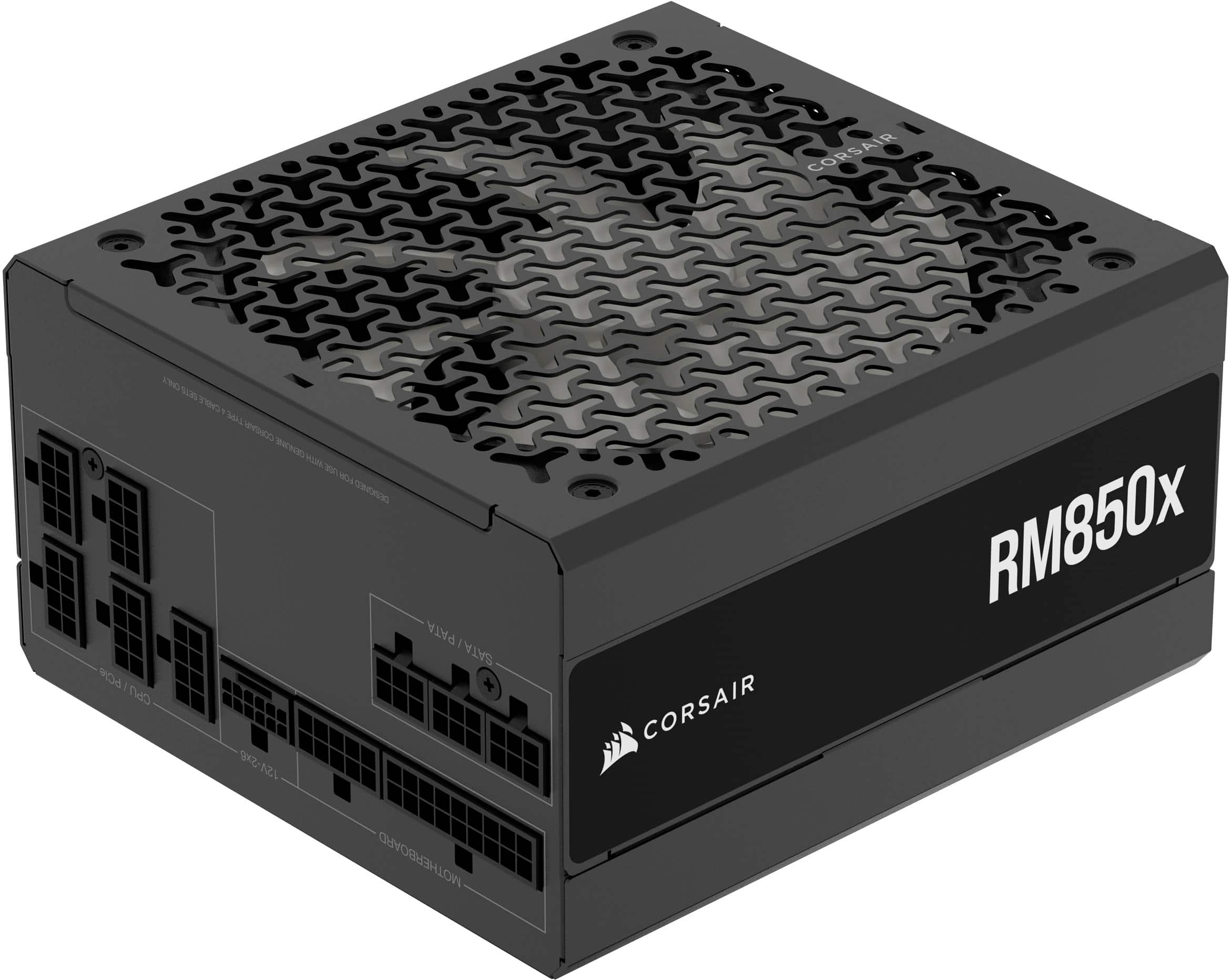

For most builders, a semi-modular or fully-modular PSU is worth the small price premium for the significant improvement in building experience and final aesthetics.
Putting It All Together
To see how these specifications appear on real products, let's look at a buyer's guide.
Best Power Supplies of 2025 - Top PSUs for Gaming PCs
The article "Best Power Supplies of 2025" from Tom's Hardware lists several recommended PSUs. By comparing a couple of them, you can see how wattage, efficiency, and modularity define a product.
Skim the specifications for the first two products listed: MSI MAG A550BN (under "Best Cheap PSU") be quiet! Straight Power 12 (under "Up to 750 Watts") Compare their Wattage, Modularity, and Efficiency Certification. This will give you a practical sense of how these specs differ across budget and mid-range options.
You'll notice the MSI unit is a 550W, non-modular, 80 Plus Bronze PSU aimed at budget builds. In contrast, the be quiet! unit is a 750W, fully-modular, 80 Plus Gold PSU designed for more powerful systems where cable management and efficiency are a higher priority.
Conclusion
You are now equipped to decipher the most important specifications of a PC power supply. Choosing the right PSU is a critical step that ensures your system has a stable, efficient, and reliable source of power for years to come.
Here are the key takeaways from today's lesson:
- Wattage: You must select a PSU with enough wattage to power all your components, plus sufficient headroom (at least 100-200W) to handle transient power spikes and allow for future upgrades.
- Efficiency Rating: An 80 Plus (e.g., Bronze, Gold, Platinum) or Cybenetics rating indicates how efficiently the PSU converts AC to DC power. Higher efficiency means less wasted energy, less heat, and often higher component quality.
- Modular Design: PSUs can be non-modular, semi-modular, or fully-modular. Modular designs make cable management easier, improving airflow and system aesthetics.
In our next lesson, we will begin Module 2, "PC Assembly and Power." Having covered all the core components, we'll now shift our focus to the hands-on process of building a PC, starting with the most important first step: following safety procedures, including electrical safety and ESD protection.