Welcome to our next lesson on JAX's core function transformations. In our previous sessions, we delved into jax.jit for compiling functions and jax.grad for automatic differentiation. You've learned how to create performant, compiled code and how to obtain gradients in a purely functional way, a stark contrast to the imperative style of frameworks like PyTorch.
Today, we complete this foundational trilogy with jax.vmap, JAX's transformation for automatic vectorization. In machine learning, we nearly always process data in batches for efficiency. The traditional approach often involves either writing explicit, sometimes complex, batched code from the start or relying on library layers that hide this complexity. vmap offers a more elegant, functional alternative. You will learn to write clean, simple functions that operate on a single data example, and then use vmap to effortlessly scale them to operate on entire batches of data, with precise control over how the batching is applied using in_axes and out_axes.
1. The Challenge of Batching
In any data processing pipeline, especially in deep learning, you're faced with a choice: write your logic for a single example, or for a batch of examples? Writing for a single example is often simpler and more intuitive. However, processing examples one-by-one with a Python for loop is notoriously inefficient.
The alternative is manual vectorization: rewriting your function to handle batched dimensions. While efficient, this often clutters the logic with dimension indexing, transpositions, and broadcasting, making the code harder to write, read, and debug.
Let's watch a brief segment that introduces this exact problem and sets the stage for vmap.
Machine Learning with JAX - From Zero to Hero | Tutorial #1
This part of Aleksa Gordić's tutorial clearly illustrates the dilemma: a simple, per-example function is easy to write but doesn't work for batches. He then shows the inefficient loop-based approach and the more complex manually-vectorized version.
Please watch from the introduction to Vmap. Pay close attention to the three approaches presented: the simple but batch-incompatible function, the slow for loop, and the fast but rewritten manual version. This perfectly frames the problem that vmap solves.
This tension between simplicity and performance is exactly what jax.vmap is designed to resolve.
2. Automatic Vectorization with jax.vmap
jax.vmap is a function transformation that takes a function written for single examples and returns a new function that can operate on batches of those examples. The core principle is "write your function for one, vmap it for many."
This is not just a convenience; it's a powerful paradigm. It allows your core logic to remain clean and focused on a single data point, while vmap handles the complexity of batching under the hood. When vmap is applied, JAX traces the function on abstract inputs (similar to jit) and automatically adds a batch dimension to all intermediate operations, which is then efficiently executed by the XLA compiler.
Let's see this in action in a common deep learning context using Equinox, the library we'll be using extensively.
Neural Networks in Equinox (JAX DL framework) with Optax
This video from the "Machine Learning & Simulation" channel demonstrates a common scenario: a neural network model defined in Equinox works for a single input but fails on a batch. vmap provides the immediate solution.
Watch from the moment an error occurs when applying the model to batched input. Then, see how jax.vmap is used to fix this from this point onward. This is a perfect, practical demonstration of vmap's primary use case.
As you saw, wrapping the model with jax.vmap(model) instantly made it batch-aware. But what if your batch dimension isn't the first axis? Or what if some inputs shouldn't be batched at all? This is where in_axes and out_axes come in.
3. Controlling the Mapping: in_axes and out_axes
jax.vmap provides fine-grained control over which axes are mapped. This is managed primarily through the in_axes and out_axes arguments.
in_axes: A tuple or list that specifies the axis to map over for each input argument. By default, it's0for all arguments.out_axes: Specifies where the new batch dimension should appear in the output. The default is0.
The most common and important in_axes patterns are:
in_axes=0: The default. Map over the first axis (axis 0) of all inputs.in_axes=(0, 0, ...): Equivalent to the default.in_axes=None: Do not map over this argument. Instead, broadcast it for each mapped execution. This is essential for arguments that are fixed across the batch, like model parameters or a random key.in_axes=(0, None): Map over the first axis of the first argument, but broadcast the second argument.in_axes=(0, 1): Map over the first axis of the first argument and the second axis of the second argument.
The official JAX documentation provides a concise overview of these concepts.
Automatic vectorization - JAX documentation
This section of the JAX documentation introduces vmap and provides clear, simple examples for in_axes and out_axes, including the important None case.
Please read the section "Automatic vectorization". Focus on the examples that demonstrate specifying the batch dimension with in_axes, and how setting an axis to None causes that argument to be broadcast.
4. A Deeper Dive: Composing vmap for Matrix Multiplication
Given your background, you'll appreciate how vmap's composability can be used to build up complex operations from simple ones. Let's construct a matrix-matrix product (A @ B) by starting with a simple vector-vector dot product and applying vmap twice.
Step 1: Vector-Vector Dot Product
This is our base function. It takes two 1D vectors and returns a scalar.def vv(x, y): return jnp.dot(x, y)
Step 2: Matrix-Vector Product from Vector-Vector Product
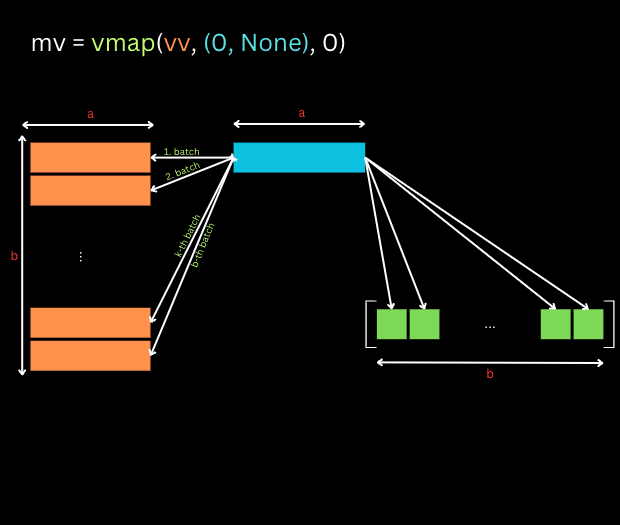
We can create a matrix-vector product by mapping our vv function over the rows of a matrix A while applying the same vector b to each row.
mv = vmap(vv, in_axes=(0, None), out_axes=0)
Here:
in_axes=(0, None)tellsvmapto iterate over the first axis (the rows) of the first argument (A) but to not iterate over the second argument (b). Instead,bis broadcast and used in each dot product.out_axes=0means the scalar results of each dot product are stacked along a new 0-th axis, creating the output vector.
The following diagram perfectly illustrates this process.
Step 3: Matrix-Matrix Product from Matrix-Vector Product
Now, let's take our newly created matrix-vector product function, mv, and vmap it again. This time, we want to apply it to a fixed matrix A while mapping over the columns of a second matrix B.
mm = vmap(mv, in_axes=(None, 1), out_axes=1)
Here, the logic is slightly different:
in_axes=(None, 1): We broadcast the first argument (A) and map over the second axis (the columns) of the second argument (B).out_axes=1: We specify that the resulting vectors from eachmvcall should be stacked along the second axis (as columns) to form the final output matrix.
This process is visualized below.
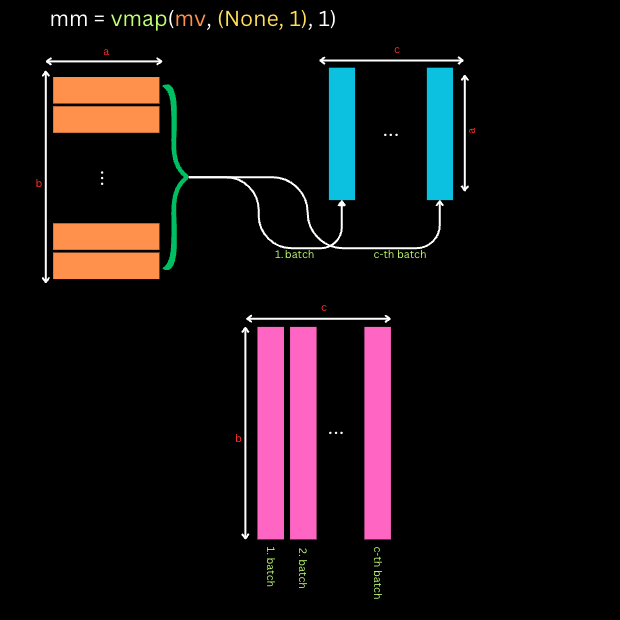
This two-step construction elegantly demonstrates the power and expressiveness of vmap and its in_axes/out_axes controls. You start with the simplest possible building block and compose transformations to build up the desired complexity.
For a more exhaustive exploration of the in_axes and out_axes rules, the following blog post is an excellent resource.
Learning about JAX :axes in vmap()
This blog post provides a detailed, hands-on exploration of how different values for in_axes and out_axes affect the computation. It's a great resource for building a strong mental model of the axis mapping rules.
I recommend skimming through the entire post. Pay close attention to the code examples. The key sections to focus on are the introduction to in_axes and out_axes, the exploration of what happens when you use None, and the final summary of the rules.
Conclusion
In this lesson, you've learned about jax.vmap, the final piece of the jit, grad, vmap trifecta. You now understand how to automate vectorization, enabling you to write clean, per-example functions and efficiently apply them to batches of data.
Key Takeaways:
jax.vmapis a function transformation that converts a function designed for a single data point into one that operates over a batch of data.- It eliminates the need for slow Python
forloops and avoids the complexity of manual vectorization, leading to cleaner, more maintainable code. - The
in_axesargument gives you precise control over which axis of each input is mapped.Noneis used to broadcast an argument across the batch. - The
out_axesargument controls where the new batch dimension appears in the function's output. - The "write for one,
vmapfor many" philosophy is a central idiom in JAX programming.
With jit for compilation, grad for differentiation, and vmap for vectorization, you now have the fundamental tools for building high-performance machine learning models in JAX. In our next lesson, we will see how these three transformations can be composed together to create a complete, efficient, and batched training step—the core of any deep learning workflow.