Introduction
In our last lesson, you learned how to process massive files efficiently using streaming techniques, ensuring your programs are scalable and don't crash due to memory exhaustion. Now that we can handle the size of data, the next critical question is its format. When you need to save a Python object to a file or send it over a network—a process called serialization—which format should you choose?
Python's built-in pickle module seems like an obvious first choice. It's convenient and can serialize almost any Python object with a single line of code. However, this convenience hides significant dangers.
This lesson directly addresses the learning outcome: Explain the security and versioning risks of pickle and prefer explicit formats like JSON for data persistence. We will dissect why pickle is often the wrong choice for production systems and establish why safer, more explicit formats like JSON are the professional standard for storing and transmitting data.
What is Serialization and Why Use pickle?
Serialization is the process of converting an object's state into a byte stream. This stream can be stored in a file, held in memory, or transmitted across a network. Deserialization is the reverse process: reconstructing the original object from the byte stream.
To understand the appeal of pickle, watch this short explanation.
Insecure Deserialization Attack Explained
This video from PwnFunction provides a clear analogy for serialization and deserialization, explaining the core concept of saving and restoring an object's state.
Watch from 01:10 to 02:45. The video explains serialization using the example of saving a game state. Notice how it mentions common use cases like storing machine learning models and web session objects.
The pickle module makes this incredibly easy for Python objects. Consider this simple dataclass:
import pickle
from dataclasses import dataclass

@dataclass
class User:
    id: int
    username: str
    is_active: bool


# 1. Create an instance of a Python object
user_obj = User(id=101, username="alex", is_active=True)


# 2. Serialize the object into a byte stream
pickled_user = pickle.dumps(user_obj)
print(f"Pickled data:\n{pickled_user}\n")


# 3. Deserialize the byte stream back into an object
unpickled_user = pickle.loads(pickled_user)
print(f"Unpickled object:\n{unpickled_user}\n")


# The object is perfectly reconstructed
assert user_obj == unpickled_user
The output shows a binary representation that pickle can use to perfectly rebuild the User object, attributes and all. This seems powerful and simple, which is why it's tempting. But this power is exactly what makes it so dangerous.
The Critical Security Risk: Arbitrary Code Execution
The official Python documentation for pickle contains a stark warning: "The pickle module is not secure. Only unpickle data that you trust."
This is not a minor warning. Unlike data formats like JSON, which only describe data, unpickling a pickle stream can execute arbitrary code. If an attacker can control the byte stream you are deserializing, they can potentially take full control of your system.
This happens because pickle is designed to reconstruct complex Python objects. To do this, it can be instructed to call functions and instantiate classes. An attacker can craft a malicious byte stream that, when unpickled, tells Python to execute system commands instead of just creating a simple data object.
The common mechanism for this attack is to exploit the __reduce__ dunder method, which allows an object to specify exactly how it should be reconstructed.
Python Pickle Risks and Safer Serialization Alternatives
This article from ArjanCodes provides a clear breakdown of the dangers of pickle and includes a concise, powerful example of a malicious payload.
Read the sections 'The dangers' and 'Malicious payloads'. Pay close attention to the Payload class example. Understand how it hijacks the __reduce__ method to return os.system and a command string. This is the core of the pickle exploit.
To see this vulnerability exploited in a real-world scenario (a Capture The Flag challenge), watch the following demonstration.
SnykCon CTF - Sauerkraut - Python Pickle Vulnerabilities
John Hammond, a cybersecurity researcher, demonstrates how to gain remote code execution by exploiting a web application that unsafely deserializes pickled data. This shows the practical impact of this vulnerability.
Watch from 03:46 to 11:03. The video walks through identifying the pickle vulnerability and then crafting a payload with __reduce__ to run commands like whoami and ls on the server.
The takeaway is absolute: Never deserialize data with pickle if that data originated from an untrusted source, such as a user upload, a network request, or any file that could have been modified externally.
The Brittleness Risk: Versioning and Compatibility
Beyond the severe security issues, pickle is also brittle and poorly suited for long-term data storage or interoperability.
- Python Version Incompatibility: The
pickleformat is not guaranteed to be compatible across different Python versions. An object pickled with Python 3.10 might not be loadable by a script running Python 3.8, and vice versa. Thepicklemodule has different "protocols," and managing them adds complexity.
Python Pickle Example: A Guide to Serialization & Deserialization
This article from DigitalOcean includes a useful table comparing the different pickle protocols.
Review the 'Protocol Comparison' table. Notice how different protocols are tied to specific Python versions. This illustrates why pickle is not ideal for data that needs to be portable across different environments.
-
Code Brittleness: A pickled object is tightly coupled to the code that created it. If you rename a class, move it to a different module, or change its attributes, you may no longer be able to unpickle old data.
Consider this scenario:
# V1 of our code
# File: user_v1.py
import pickle

@dataclass
class User:
    username: str


# We pickle and save an object
with open("user.pkl", "wb") as f:
    pickle.dump(User(username="data_v1"), f)
Now, imagine you refactor the code a month later:
# V2 of our code - we renamed 'username' to 'name'
# File: user_v2.py
import pickle

@dataclass
class User:
    name: str  # <-- Field renamed


# Trying to load the old data will fail
with open("user.pkl", "rb") as f:


    # This will raise an error because the pickled data expects
    # a 'User' class that takes a 'username' argument.
    user = pickle.load(f)


    # AttributeError: 'User' object has no attribute 'username'
This brittleness makes
picklea poor choice for any data that needs to persist longer than the current version of your code.
The Safer Alternative: Explicit Data-Only Formats like JSON
The solution is to use a serialization format that is explicitly for data only and is not tied to a specific programming language. The most common and robust choice is JSON (JavaScript Object Notation).
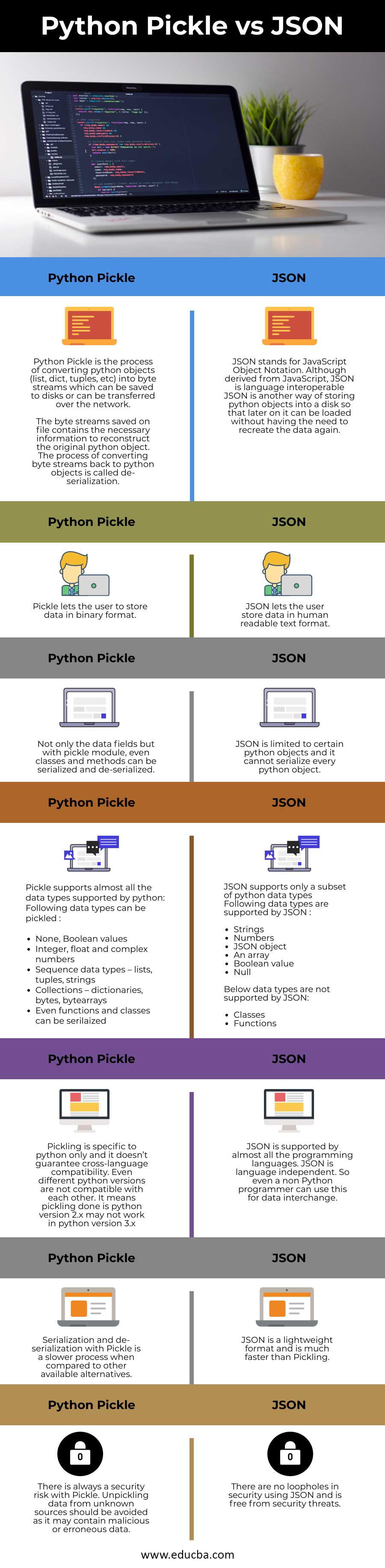
JSON is safer precisely because it is less powerful. It can only represent a limited set of data types: strings, numbers, booleans, lists (arrays), and dictionaries (objects). It has no mechanism to execute code, so deserializing a JSON string is a safe operation.
Let's serialize our User object to JSON. Notice that it requires a bit more work: we must convert our custom object into a dictionary first.
import json
from dataclasses import asdict, dataclass

@dataclass
class User:
    id: int
    username: str
    is_active: bool

user_obj = User(id=101, username="alex", is_active=True)


# 1. Convert the object to a dictionary
user_dict = asdict(user_obj)


# 2. Serialize the dictionary to a JSON string
json_user = json.dumps(user_dict, indent=2)
print(f"JSON data:\n{json_user}\n")


# 3. Deserialize the JSON string back into a dictionary
loaded_dict = json.loads(json_user)


# 4. Reconstruct the object from the dictionary
reconstructed_user = User(**loaded_dict)
print(f"Reconstructed object:\n{reconstructed_user}\n")

assert user_obj == reconstructed_user
The output is human-readable and portable:
{
  "id": 101,
  "username": "alex",
  "is_active": true
}
This small amount of "ceremony"—explicitly converting to and from a dictionary—is the price of security and portability. You are defining a clear, stable contract for your data that is decoupled from your Python code's internal implementation.
When to Use pickle vs. JSON
Based on this, the guidelines are straightforward.
Use pickle only when ALL of the following are true:
- The data will never leave a fully trusted environment. You control both the pickling and unpickling process.
- The data is for short-term storage or caching, not long-term persistence.
- You are working exclusively within Python, and performance with complex, temporary objects is the top priority.
- A common example is using
multiprocessing, wherepickleis used to send Python objects between processes you control.
- A common example is using
Use JSON (or other data formats like YAML, MessagePack, Protocol Buffers) for almost everything else, especially:
- Receiving data from users or external network sources.
- Storing data in files or databases for long-term persistence.
- Communicating between different services, especially if they are written in different languages.
Conclusion
In this lesson, we've dismantled the convenient facade of Python's pickle module to reveal its serious underlying risks. While it offers a quick way to serialize objects, its ability to execute code makes it a major security liability, and its brittleness makes it unsuitable for reliable data persistence.
Key Takeaways:
pickleis not secure: Unpickling data from an untrusted source can lead to arbitrary code execution. Never usepicklewith data you don't control.pickleis brittle: It is tightly coupled to your Python version and class definitions, making it a poor choice for long-term storage or cross-version compatibility.- JSON is the safe, portable standard: It is a data-only format, preventing code execution vulnerabilities. Its language-agnostic, human-readable nature makes it ideal for APIs, configuration files, and persistent storage.
- Prefer explicit data contracts: The small effort of converting objects to/from dictionaries for JSON serialization creates a robust, secure, and maintainable system.
This lesson marks the end of our module on real-world I/O. You are now equipped to handle files of any size and choose the right format for persisting data safely and reliably.
In our next module, we will dive into a cornerstone of robust software: "Master Error Handling: Exceptions and Logging." We'll begin by learning how to define your own custom exception classes to make your program's error conditions clear, specific, and easy to handle.