Introduction
In the previous lesson, you mastered handling csv and json files, two of the most common formats for structured data. You learned to use Python's "batteries-included" philosophy to parse tabular and hierarchical data idiomatically, preferring csv.DictReader and using json.dump with indentation for readability.
This lesson continues our exploration of real-world file handling by focusing on application configuration. Storing settings—like database connections, API endpoints, or feature flags—separately from your code is crucial for creating maintainable, portable, and secure applications. While JSON can be used for this, Python's standard library provides a module specifically designed for this task: configparser.
This lesson will teach you how to manage application configuration using the configparser module. We will cover how to read, write, and update INI-style configuration files, handle different data types, and leverage advanced features like value interpolation.
1. The INI Configuration File Format
Before diving into the code, let's understand the structure of the files configparser is designed to handle. It uses the INI format, a simple text-based standard that is highly human-readable.
An INI file consists of:
- Sections: Declared with square brackets, like
[database]. - Key-Value Pairs: Options within a section, written as
key = valueorkey: value. - Comments: Lines starting with
#or;are ignored.
Here is a typical example of a settings.ini file:
; General application settings
[DEFAULT]
environment = development
log_level = INFO

[database]
host = localhost
port = 5432
user = myapp_user
password = secret_password

[api]
endpoint = https://api.example.com/v1/
timeout = 30
The [DEFAULT] section is special. Any key defined in [DEFAULT] is available in all other sections, unless explicitly overridden.
To see this structure explained, the following short video provides a clear visual breakdown.
Read An INI Config File With ConfigParser | Python Tutorial
This video from Portfolio Courses introduces the INI file format and the configparser module. Pay attention to how sections, key-value pairs, and comments are laid out.
Watch from the beginning until 02:14.
2. Reading, Writing, and Updating Configuration
Working with configparser involves three main operations: creating a config file from scratch, reading an existing file, and updating a file. The ConfigParser object acts like a nested dictionary, making these operations intuitive.
Creating and Writing a Configuration File
You can programmatically create a configuration file. This is useful for generating default settings when your application is first run.
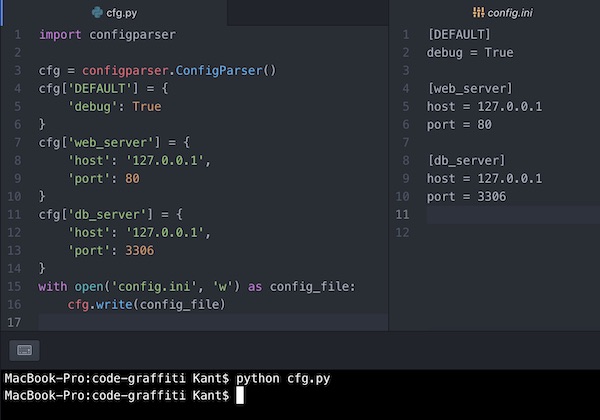
Here's the code to generate a file like the one in the image:
import configparser

config = configparser.ConfigParser()

config['DEFAULT'] = {
    'ServerAliveInterval': '45',
    'Compression': 'yes',
    'CompressionLevel': '9'
}

config['web_server'] = {
    'Host': '127.0.0.1',
    'Port': '8080'
}

config['db_server'] = {
    'Host': '192.168.1.1',
    'Port': '3306'
}

with open('config.ini', 'w') as configfile:
    config.write(configfile)
Reading Configuration Data
Reading a configuration file is the most common use case. You load the file and then access values using dictionary-style key lookup.

The following video demonstrates this fundamental read-and-access workflow.
Read An INI Config File With ConfigParser | Python Tutorial
Let's watch how to initialize a ConfigParser, read a file, and access its values.
Watch from 01:57 to 03:35. Notice the dictionary-like syntax config['section']['key'] for accessing values.
A crucial point to remember is that configparser reads all values as strings. In the [db_server] section of the example above, config['db_server']['Port'] would return the string '3306', not the integer 3306.
3. Handling Data Types and Fallbacks
Since all values are strings by default, you need a way to get them as the correct type. Manually casting with int() or float() works, but it's verbose. configparser provides convenient get*() methods for this.
getint(section, key)getfloat(section, key)getboolean(section, key)
The getboolean() method is particularly useful because it correctly interprets values like 'yes'/'no', 'on'/'off', and 'true'/'false' (case-insensitively), which bool('False') would not.
These methods also support a fallback argument, providing a default value if a key isn't found. This is a robust way to prevent KeyError exceptions.
Read An INI Config File With ConfigParser | Python Tutorial
This segment of the video covers the get*() methods and the fallback argument in detail. This is essential for writing robust code that handles type conversions and missing keys gracefully.
Watch from 06:29 to 11:05. Pay close attention to the various string values that getboolean() accepts and how the fallback argument is used when a key is missing.
Here is a code example summarizing the concept:
import configparser

config = configparser.ConfigParser()
config.read('settings.ini')


# Using get*() methods for type conversion
db_port = config.getint('database', 'port')
print(f"Database port: {db_port} (Type: {type(db_port)})")


# getboolean() handles various string representations
use_compression = config.getboolean('DEFAULT', 'Compression') # Assumes 'yes' is in config
print(f"Use compression: {use_compression} (Type: {type(use_compression)})")


# Using a fallback value for a non-existent key
retry_count = config.getint('api', 'retries', fallback=3)
print(f"API retry count: {retry_count}")
4. Advanced Feature: Value Interpolation
One of the most powerful features of configparser is interpolation, where a value can reference another value. This helps you avoid repeating yourself (DRY principle).
configparser supports two main interpolation styles. The default, BasicInterpolation, uses %(key)s syntax. A more powerful style, ExtendedInterpolation, uses ${section:key}.
To use ExtendedInterpolation, you must pass it to the ConfigParser constructor.
import configparser


# Enable extended interpolation
config = configparser.ConfigParser(interpolation=configparser.ExtendedInterpolation())

config.read_string("""
[paths]
home = /home/user
log_dir = ${paths:home}/logs
app_dir = ${paths:home}/app

[database]
db_path = ${paths:app_dir}/data.db
""")


# The references are resolved automatically
log_directory = config.get('paths', 'log_dir')
print(f"Log directory: {log_directory}") # Output: /home/user/logs

db_file = config.get('database', 'db_path')
print(f"Database file: {db_file}") # Output: /home/user/app/data.db
The video below demonstrates this concept clearly.
Read An INI Config File With ConfigParser | Python Tutorial
Watch this final segment to see how ExtendedInterpolation allows you to create references between configuration values, even across different sections.
Watch from 11:21 to 13:48.
5. Best Practices and When to Use configparser
Now that you've seen json, csv, and configparser, a natural question is when to use each.
| Format | configparser (INI) |
json |
csv |
|---|---|---|---|
| Structure | Sections with key-value pairs | Hierarchical (nested objects/arrays) | Tabular (rows and columns) |
| Best For | Application settings, simple key-value config | Web APIs, complex config, data interchange | Spreadsheets, database exports |
| Comments | Yes (# or ;) |
No (a major drawback for config) | No |
| Readability | High | Medium (depends on indentation) | Medium |
| Data Types | Strings only (requires get* methods) |
Rich types (string, number, bool, null) | Strings only |
For a deeper dive into the module's capabilities, the official documentation is your best resource.
configparser — Configuration file parser
The Python official documentation provides the definitive guide. The 'Quick Start' section is an excellent summary of creating, writing, and reading a configuration file.
Read the sections 'Quick Start', 'Supported Datatypes', and 'Fallback Values' to solidify your understanding of the core API.
Finally, always be mindful of security. Never store sensitive credentials like production passwords or API keys in version-controlled configuration files. Use environment variables or a dedicated secrets management system for production secrets.
Conclusion
You've now learned how to use the configparser module to manage application settings in a clean, standard way. This separates configuration from code, allowing for easier maintenance and deployment across different environments.
Key Takeaways:
- INI Format:
configparserworks with INI files, which use[section]headers andkey = valuepairs. They are human-readable and support comments. - Dictionary-like API: The
ConfigParserobject behaves like a dictionary, making it easy to read (config['section']['key']) and write (config['section'] = {...}). - Type Conversion is Explicit: All values are read as strings. Use
getint(),getfloat(), andgetboolean()for robust type conversion. - Use Fallbacks: Provide a
fallbackvalue inget*()methods to gracefully handle missing keys. - Leverage Interpolation: Use
ExtendedInterpolationwith${section:key}syntax to avoid duplicating values in your configuration. - Choose the Right Tool: Use
configparserfor simple, commented application settings. Preferjsonfor complex, nested data or API communication.
In the next lesson, we will cover another practical aspect of file I/O: creating and managing temporary files and directories with the tempfile module. This is an essential skill for writing robust applications that need scratch space for intermediate data without cluttering the filesystem.