Introduction
In our last lesson, you mastered the use of guard clauses and early returns to flatten nested conditional logic. This technique is excellent for handling predictable, non-exceptional validation at the start of a function, ensuring the main "happy path" remains clean and linear.
Now, we shift our focus from predictable validation to handling unpredictable, exceptional runtime errors. This lesson is dedicated to mastering a cornerstone of robust Python programming. Your learning outcome is to use the try/except/else/finally structure for robust error-control flow.
Coming from a Java background, you might be accustomed to a more defensive style of coding known as "Look Before You Leap" (LBYL), where you check conditions before performing an action. Python, by contrast, often favors a style called "Easier to Ask for Forgiveness than Permission" (EAFP), where you perform an action directly and handle any resulting exceptions. The try/except block is the primary tool for this. We will explore the full structure, including the often-underutilized else and finally clauses, which are critical for writing truly robust and readable code.
1. The Full Structure: try, except, else, and finally
The complete try statement in Python consists of four distinct blocks, each with a specific role in managing control flow when errors occur.
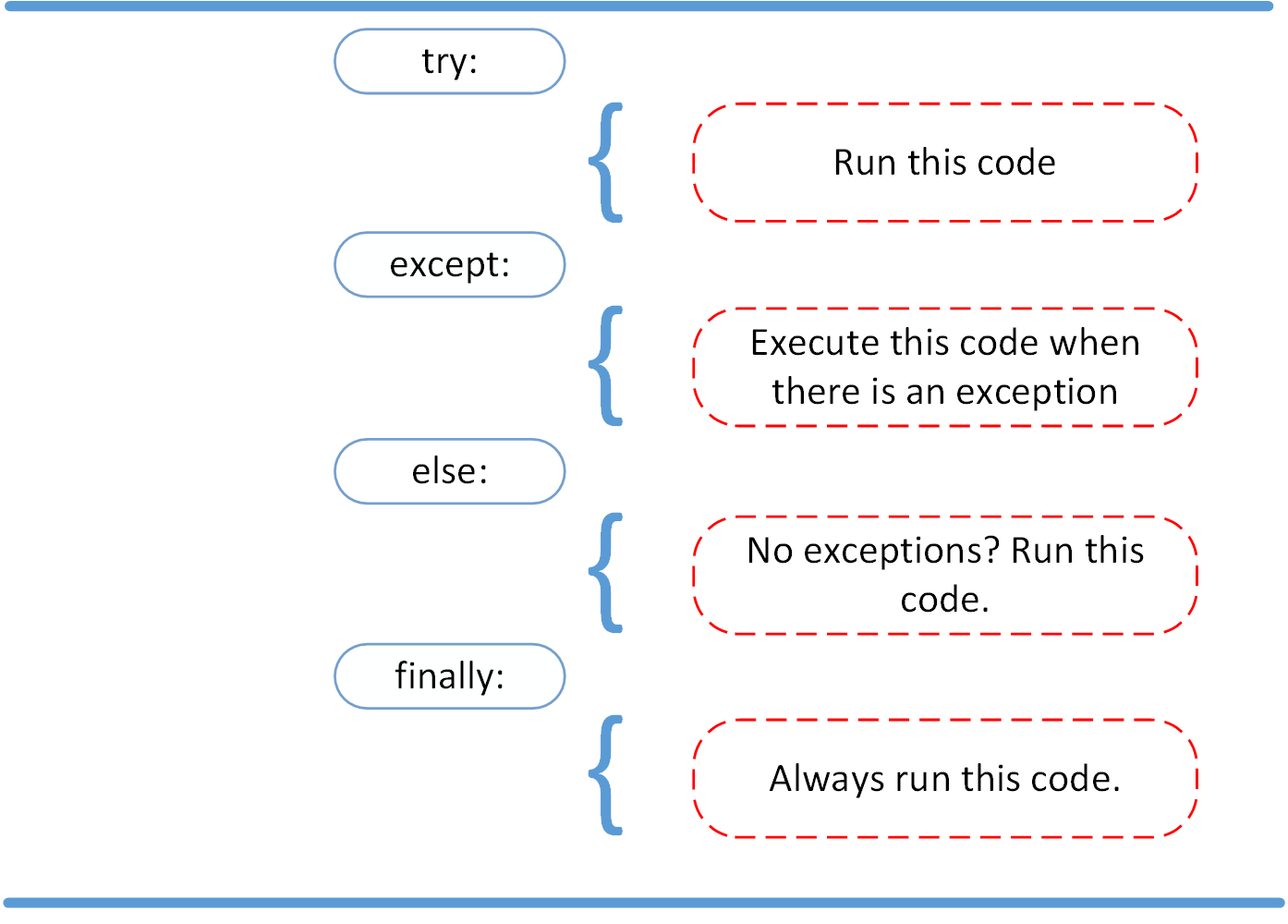
To see how these pieces fit together in practice, let's watch a clear, step-by-step demonstration.
Python Tutorial: Using Try/Except Blocks for Error Handling
This video from Corey Schafer provides an excellent, methodical walkthrough of the entire try/except/else/finally structure. He builds the concept from a simple try/except to the full, four-part block.
Watch from the beginning up to 08:35. Pay close attention to the specific purpose he assigns to each block: try and except (00:00 - 04:53): How to catch specific exceptions like FileNotFoundError instead of a generic Exception. else (05:39 - 07:18): Why the code for the success path is placed here. finally (07:18 - 08:35): How this block is used for actions that must always execute, like resource cleanup.
This video establishes the "how." Now, let's dig deeper into the "why," which is crucial for moving from just using the syntax to designing robust systems.
2. The Critical Role of the else Clause
A common question is, "Why use an else block? Why not just put the success-path code at the end of the try block?"
The answer is the key to writing robust code: You want to minimize the amount of code inside your try block. The try block should only contain the operation(s) that you specifically anticipate might raise an exception. Any subsequent code that should only run upon the success of that operation belongs in the else block.
Placing success-path code inside the try block is a common anti-pattern because it can hide bugs. If that success-path code unexpectedly raises the same type of exception you are trying to catch, your except block will handle it, masking the real source of the error.
This principle is a core tenet of Pythonic error handling. Let's explore the reasoning in more detail.
Is it a good practice to use try-except-else in Python?
This Stack Overflow discussion provides a definitive explanation for the existence and proper use of the else clause. It directly addresses the mindset shift required when coming from other languages.
Read the two answers that begin with: "The else-clause itself is interesting..." (part of Raymond Hettinger's highly-rated answer). "A try block allows you to handle an expected error..." Focus on the argument that the else clause prevents you from catching unexpected errors from code that wasn't intended to be protected. This is the central design principle at play.
To summarize the best practice:
Keep
tryblocks tight. Only wrap the single statement or small group of statements that might actually raise the error you're trying to catch.
3. Best Practices in Action
Let's consolidate what we've learned into a set of rules for robust error control flow, demonstrated with a clear example.
Key Principles:
- Catch Specific Exceptions: Always specify the exception type(s) you intend to handle (e.g.,
except ValueError:). Avoid bareexcept:orexcept Exception:unless you have a very good reason, as they can swallow important system-level exceptions and hide bugs. - Use
elsefor the "Happy Path": The code that follows a successfultryshould live in theelseblock. This clearly separates your core logic from your error-handling logic. - Use
finallyfor Cleanup: Any code that must run, regardless of success or failure—such as closing a file, releasing a lock, or closing a network connection—belongs in thefinallyblock. (Note: For many of these cases, awithstatement, which we'll cover later, is even better). - Don't Silence Errors: An
exceptblock with justpassis usually a bad sign. If you catch an exception, you should generally handle it, log it, or re-raise it. Silently ignoring errors leads to mysterious bugs later.
Here is a practical example that puts all the pieces together.
Is it a good practice to use try-except-else in Python? - Stack Overflow
The following resource provides a simple, runnable example that perfectly illustrates the execution flow through all four blocks, both on success and on failure.
Find the answer that contains the for loop example starting with for i in range(3):. Run this code yourself and analyze the output for i = 0 (exception case) versus i = 1 and i = 2 (success cases). Notice when each print statement executes.
The output of that code clearly demonstrates the flow:
- When
i = 0, theZeroDivisionErroris triggered. Theexceptblock runs, and then thefinallyblock runs. Theelseblock is skipped. - When
i = 1ori = 2, the division is successful. Theelseblock runs, and then thefinallyblock runs. Theexceptblock is skipped.
Exercise: Structure a Robust Processing Function
You are tasked with writing a function that processes a dictionary containing product information. The function should calculate the final price after applying a discount. Several things can go wrong: the keys might be missing, or the values might not be numbers.
Your task is to implement the calculate_final_price function using the full try/except/else/finally structure to handle these potential errors robustly.
Starter Code:
def calculate_final_price(product: dict) -> None:
    """
    Calculates and prints the final price of a product after a discount.
    Handles potential errors in the product data robustly.
    """
    print(f"--- Processing: {product.get('name', 'Unknown Product')} ---")


    # YOUR IMPLEMENTATION GOES HERE
    # Use a try/except/else/finally block to implement the logic.
    # 1. In the `try` block, attempt to get 'price' and 'discount' and calculate `final_price`.
    # 2. Add an `except` block for `KeyError` to handle missing keys.
    # 3. Add an `except` block for `TypeError` to handle non-numeric values.
    # 4. In the `else` block, print the successful result.
    # 5. In the `finally` block, print a "Processing complete." message.


# --- Test Cases ---
valid_product = {"name": "Laptop", "price": 1200, "discount": 0.15}
missing_key_product = {"name": "Mouse", "price": 25} # Missing 'discount'
bad_type_product = {"name": "Keyboard", "price": "75", "discount": 0.10} # 'price' is a string

calculate_final_price(valid_product)
calculate_final_price(missing_key_product)
calculate_final_price(bad_type_product)
Solution
def calculate_final_price(product: dict) -> None:
    """
    Calculates and prints the final price of a product after a discount.
    Handles potential errors in the product data robustly.
    """
    print(f"--- Processing: {product.get('name', 'Unknown Product')} ---")
    try:
        price = product['price']
        discount = product['discount']
        final_price = price * (1 - discount)
    except KeyError as e:
        print(f"Error: Missing key in product data: {e}")
    except TypeError:
        print("Error: Invalid data type. 'price' and 'discount' must be numbers.")
    else:
        print(f"Success! Final price is ${final_price:.2f}")
    finally:
        print("Processing complete.\n")


# --- Test Cases ---
valid_product = {"name": "Laptop", "price": 1200, "discount": 0.15}
missing_key_product = {"name": "Mouse", "price": 25} # Missing 'discount'
bad_type_product = {"name": "Keyboard", "price": "75", "discount": 0.10} # 'price' is a string

calculate_final_price(valid_product)
calculate_final_price(missing_key_product)
calculate_final_price(bad_type_product)
Expected Output:
--- Processing: Laptop ---
Success! Final price is $1020.00
Processing complete.

--- Processing: Mouse ---
Error: Missing key in product data: 'discount'
Processing complete.

--- Processing: Keyboard ---
Error: Invalid data type. 'price' and 'discount' must be numbers.
Processing complete.
Conclusion
You have now learned how to use the complete try/except/else/finally structure to create predictable and robust error-handling logic. This pattern is fundamental to writing Pythonic code that is resilient to real-world, unpredictable inputs.
Key Takeaways:
- One Job Per Block: Each part of the
trystatement has a distinct purpose.try: For the specific operation(s) that might fail. Keep it minimal.except: To handle specific, anticipated errors.else: For the success-path logic that runs only iftrycompletes without error.finally: For essential cleanup that must always run.
- Specificity is Key: Always catch the most specific exceptions possible to avoid masking unrelated bugs.
- Separate Success from Failure: Using the
elseblock makes your code's intent clearer by separating the "happy path" from error-handling paths.
In our previous lesson, you learned to manage expected control flow with guard clauses. In this lesson, you managed exceptional control flow with try/except. In the next lesson, we will examine another unique Python control flow structure: the for/else construct. You will learn how it can be used to create clean search-and-fallback patterns, further expanding your toolkit for writing expressive, flat code.