Hello! Welcome to the final lesson in our module on advanced 3D generation techniques.
In our last session, we implemented the Marching Cubes algorithm, successfully bridging the gap between a volumetric representation like a NeRF and a tangible, polygonal mesh. This gives us a complete pipeline: from a text prompt to a 3D model. However, as with any complex generative process, the output isn't always perfect.
Today, we will tackle the crucial step of quality control. Our learning outcome is to debug multi-view consistency and view-dependent artifacts. This involves identifying common failure modes in 3D generation, understanding their root causes within the text-to-3D framework (especially Score Distillation Sampling), and learning practical strategies to diagnose and fix them.
This lesson will cover:
- Identifying common artifacts like the "Janus problem" and oversaturation.
- Analyzing the theoretical causes of these issues within Score Distillation Sampling (SDS).
- Implementing practical debugging and mitigation strategies, such as pose-aware prompting and improved source distribution estimates.
1. A Gallery of Artifacts: What Can Go Wrong?
When you generate a 3D object using a 2D diffusion prior, the model tries to produce a "good-looking" 2D render from every possible camera angle. Since the 2D model has no inherent understanding of 3D object structure, this can lead to some strange and inconsistent results.
The Janus Problem (Multi-headedness)
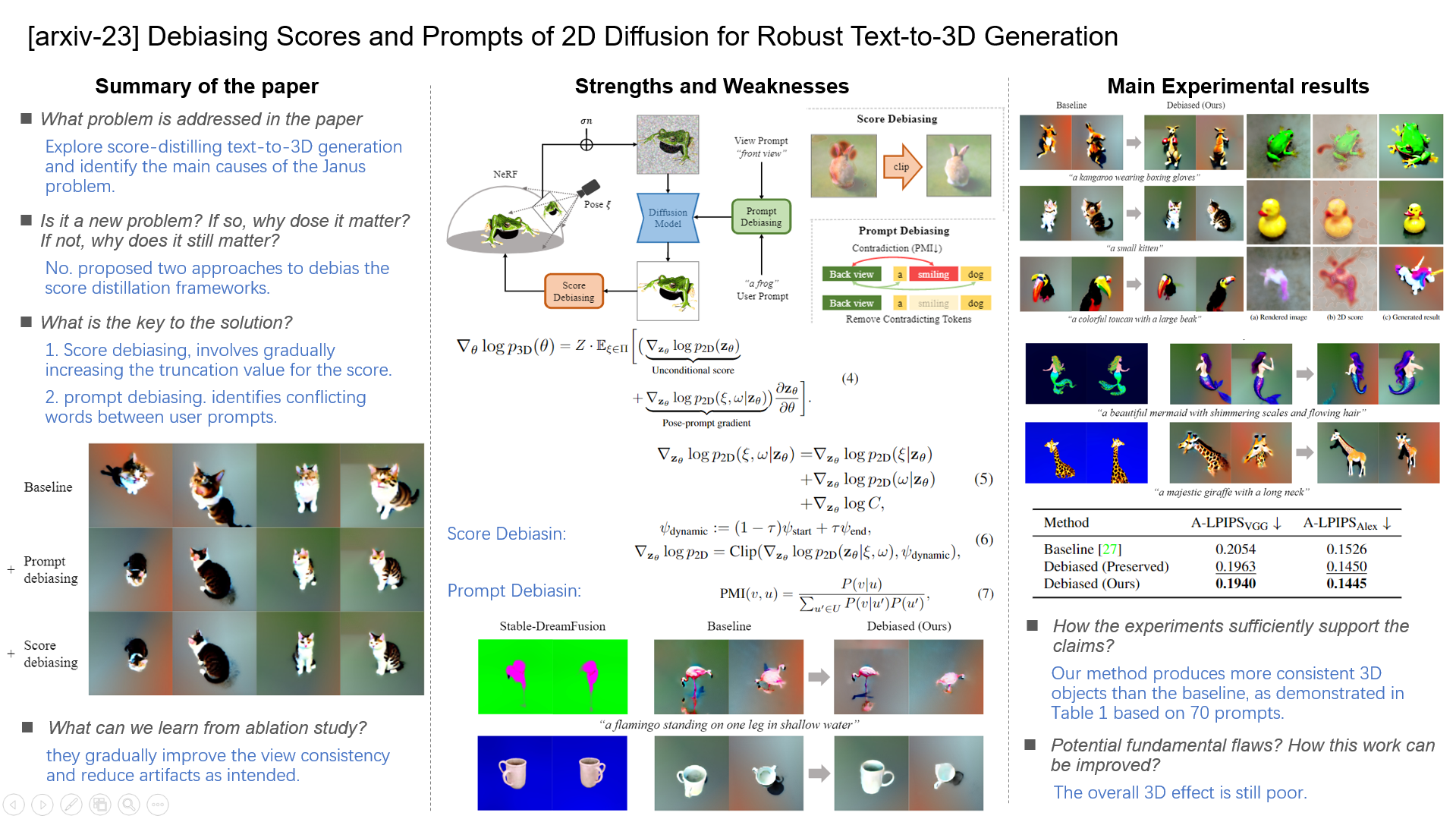
The most infamous artifact is the Janus problem, named after the two-faced Roman god. The model generates an object that has a "front" on multiple sides. For example, a character might have a face on both the front and back of its head.
Oversaturation, Oversmoothing, and the "Plastic" Look
Another common set of artifacts relates to texture and material properties. You may find that your generated objects look:
- Oversaturated: Colors are excessively vibrant and unrealistic.
- Oversmoothed: Fine-grained details are lost, and the surface appears unnaturally smooth, like plastic.
- Inconsistent: Textures don't wrap realistically around the object. A wood grain pattern, for example, might not align correctly from one view to the next.
These issues are not random; they are systematic side effects of the underlying generative process, particularly Score Distillation Sampling (SDS).
2. The Root Cause: Why SDS Creates Artifacts
To effectively debug these problems, we need to understand why they occur. Most issues can be traced back to two fundamental limitations in how SDS uses a 2D diffusion model to guide 3D generation.
Problem 1: Lack of 3D Awareness
A standard text-to-image diffusion model doesn't know anything about camera poses. When SDS asks it to critique a rendered view, it simply asks, "Does this look like a good picture of 'a cat'?" It doesn't know if it's supposed to be the front of the cat or the back. This ambiguity is the direct cause of the Janus problem.

Problem 2: Flaws in the Distillation Process
The second source of artifacts lies in the SDS loss function itself. A key paper, "Rethinking Score Distillation as a Bridge Between Image Distributions," provides an excellent framework for understanding this. You don't need to dive deep into the Schrödinger Bridge math, but the conceptual takeaways are critical for debugging.
Rethinking Score Distillation as a Bridge Between Image Distributions
To understand the core limitations of SDS, please read a few key sections from the paper 'Rethinking Score Distillation as a Bridge Between Image Distributions'. This will give you the theoretical foundation for why artifacts like oversaturation occur.
Please read the Abstract, Section 1 (Introduction), and Section 2.2 ('Optimization with Diffusion Model Approximates a Dual Schrödinger Bridge'). Focus on the two sources of error identified at the end of Section 2.2: First-order approximation error. Source distribution mismatch. This will take about 10 minutes and will clarify the concepts we discuss next.
As the paper explains, the SDS gradient calculation is flawed in two main ways:
-
Source Distribution Mismatch: The SDS gradient is essentially the difference between the score of the target distribution (e.g., a "high-quality photo of a cat") and the source distribution (the current state of your rendered image). Critically, standard SDS approximates the source distribution with an unconditional (empty) prompt. This is a poor approximation. The unconditional model represents "any image" and often generates blurry, low-contrast results. The large discrepancy between this poor source and the high-quality target pushes the optimization to produce oversaturated and over-smoothed results to compensate.
-
First-order Approximation Error: SDS uses a single denoising step to estimate the gradient. This is a very rough, linear approximation of a complex, non-linear path to a clean image. This can lead to optimization instability and noisy gradients.
3. Mitigation and Debugging Strategies
Now that we understand the causes, we can explore concrete strategies to fix them.
Strategy 1: Improving 3D Awareness
To combat the Janus problem, we must provide the diffusion model with camera context.
-
Directional Prompts: Instead of using a static prompt like
"a squirrel", modify it based on the camera position for each view. For example:"a squirrel, front view""a squirrel, back view""a squirrel, view from above"
This simple technique explicitly tells the 2D model what it's supposed to be seeing, drastically reducing view ambiguity.
-
Perpendicular Negative Prompts (Perp-Neg): This is a more advanced technique mentioned in the
stable-dreamfusionrepository. The core idea is to enforce consistency by using orthogonal views to guide each other. For example, when rendering the front view, you can use the prompt for the back view (e.g.,"a squirrel, back view") as a negative prompt. This actively discourages the model from generating front-facing features on the back of the object.
ashawkey/stable-dreamfusion: Text-to-3D & Image- ...
The stable-dreamfusion GitHub repository, which implements text-to-3D, directly references a solution to the Janus problem.
Quickly look at the main README.md file. Notice the 'NEWS' update and the reference to 'Perp-Neg' at the end of the file, which is cited as a way to 'alleviate multi-head problem in Text-to-3D.' This highlights that these strategies are actively being integrated into state-of-the-art implementations.
Strategy 2: Improving the Source Distribution Estimate
To fix oversaturation and oversmoothing, we need to address the "source distribution mismatch" problem from the Rethinking Score Distillation paper. Their proposed solution is simple but highly effective.
The idea is to replace the generic unconditional prompt with a more accurate textual description of the current state of the rendering, including its artifacts. This is often done in a two-stage process:
- Stage 1 (Geometry Generation): Run standard SDS for an initial number of steps (e.g., ~20k iterations). This is good at establishing the coarse geometry of the object, even if it produces artifacts.
- Stage 2 (Texture Refinement): Switch the source prompt from an empty string to a descriptive negative prompt that captures the artifacts of Stage 1. For example:
", oversaturated, smooth, pixelated, cartoon, foggy, hazy, blurry, bad structure, noisy, malformed".
By using a source prompt that accurately describes the flawed input, the gradient target_score - source_score becomes a much more precise signal for refinement, leading to more realistic textures and colors.
Rethinking Score Distillation as a Bridge Between Image Distributions
Now, let's see the practical application of this two-stage approach in the same paper. The visual results demonstrate its effectiveness.
Please read Section 2.4 ('Mitigating Source Distribution Mismatch...'), Section 3.2 ('Text-guided NeRF Optimization'), and look at the visual comparisons in Figure 4 and Figure 10 (in the Appendix). Notice how the 'Ours' method, which uses this two-stage approach, produces much better texture and color fidelity compared to standard SDS.
Test your understanding!
You are training a text-to-3D model for the prompt "a rusty metal treasure chest". After 15,000 steps, you extract a mesh. The shape is correct, but the texture looks like shiny, brown plastic instead of rusty metal. You also notice that from the top view, a face seems to be imprinted on the lid.
What are the two primary artifacts, their likely causes, and what two strategies would you implement to fix this?
Show answer
-
Artifact 1: Shiny, plastic-like texture (oversaturation/oversmoothing).
- Cause: Source distribution mismatch in SDS. The unconditional source prompt is a poor approximation, leading to an exaggerated gradient that produces unrealistic materials.
- Strategy: Implement the two-stage training approach. After the initial geometry is formed, switch the source prompt to a negative prompt like
", shiny, plastic, smooth, oversaturated"to refine the texture.
-
Artifact 2: A face on the lid (Janus problem).
- Cause: Lack of 3D awareness. The 2D diffusion prior is trying to create a "good image" from the top view and hallucinates a familiar pattern (a face) without understanding it's inconsistent with the object's identity.
- Strategy: Implement directional prompts. Change the prompt based on the camera angle, for example:
"a rusty metal treasure chest, top view","a rusty metal treasure chest, side view". This gives the model the necessary context to avoid generating inappropriate features.
Strategy 3: Visual Diagnostics
The most powerful debugging tool is direct observation. Most text-to-3D frameworks, including stable-dreamfusion, allow you to save the intermediate 2D images that are rendered and fed to the diffusion model at each step.
ashawkey/stable-dreamfusion: Text-to-3D & Image- ...
The stable-dreamfusion repo explicitly mentions this capability.
Find the '### Debugging' subsection in the README. It points out the option to save guidance images, warning that it's resource-intensive. This is the feature we're talking about.
By enabling this, you can:
- Create a timelapse: Stitch together the rendered images from a fixed camera angle over thousands of training steps. This lets you watch the object evolve and pinpoint exactly when and how an artifact (like a second head) begins to form.
- Inspect individual views: At a specific training step, look at the rendered images from all different camera angles. If the back view looks strange, you know your guidance for that view is problematic.
This direct visual feedback is invaluable for diagnosing whether your prompting strategy is working or if other hyperparameters need tuning.
Conclusion
You have now reached the end of our deep dive into advanced 3D generation. We've gone from the fundamentals of NeRFs and SDS, through scene composition and mesh extraction, and finally to the critical process of debugging and quality control.
Key Takeaways:
- Multi-view artifacts like the Janus problem, oversaturation, and oversmoothing are common and have systematic causes.
- Most artifacts stem from two core limitations of SDS: a lack of 3D awareness in the 2D diffusion prior and a mismatch in the source distribution estimate.
- We can mitigate these issues with practical strategies:
- Use directional prompts or Perp-Neg to give the model 3D context.
- Employ a two-stage training process with descriptive negative prompts to refine textures and colors.
- Use visual inspection of guidance images as a primary diagnostic tool to observe artifact formation.
Next Lesson Preview:
With this module complete, you have a comprehensive understanding of how to generate and refine 3D assets. Our next module, "Model Optimization and Deployment," will shift our focus from generation quality to performance. We'll begin by tackling a fundamental challenge: how to make these powerful but computationally expensive models faster and more memory-efficient. Our first lesson will cover how to apply quantization and mixed-precision techniques to optimize inference speed and memory.