Hello! Welcome to your next lesson on building complex websites with AI.
In our previous session, we mapped out the core structure of a Hugo project, identifying the specific roles of the content, layouts, data, and static directories. You learned that content holds the raw information, layouts defines its presentation, static stores assets like images, and data provides a flexible way to use structured information across your site.
Today, we'll build on that knowledge by formalizing the exact workflow you'll use throughout this course. This lesson introduces the "vibe coding" development cycle, a five-step process that takes you from a high-level idea to a functional website component. This cycle is the bridge between your vision, the content managed in Google Sheets, and the powerful AI tools that will generate your Hugo site. By the end of this lesson, you will be able to explain this entire workflow from start to finish.
What is "Vibe Coding"?
The term "vibe coding" was popularized by Andrej Karpathy, a founding member of OpenAI. At its heart, it's about shifting from writing every line of code yourself to describing the desired outcome—the "vibe"—in natural language and having an AI assistant handle the implementation.
To get a feel for this concept, let's watch a brief introduction.
Vibe Coding Fundamentals In 33 minutes
In this clip from 'Vibe Coding Fundamentals In 33 minutes,' Tina Huang explains the origin of the term and shows a simple example of prompting an AI to build a web app.
Watch from 01:08 to 02:17 to understand the core concept of vibe coding.
As you can see, this fundamentally changes the development process. Your primary skill becomes articulating your vision clearly and refining the AI's output, which is exactly what we'll be focusing on.
The 5-Step Vibe Coding Cycle
For our purposes, we can break down the vibe coding workflow into a practical, repeatable 5-step cycle:
- Idea -> 2. Google Sheet Data -> 3. AI Prompt -> 4. Generated Code -> 5. Refinement
This cycle forms the backbone of this course. Let's explore each step.
Step 1: Idea (The Planning Phase)
Before you can ask an AI to build anything, you need a clear idea of what you want. This goes beyond a vague notion; it requires thinking through the project's logic, goals, and features. Your experience as an SEO manager, defining strategies and requirements for campaigns, is directly applicable here.
This initial planning phase can be broken down into several layers of thinking.
Vibe Coding Fundamentals In 33 minutes
Let's return to the Tina Huang video, where she explains four levels of thinking that help transform a broad idea into a specific plan, often captured in a Product Requirements Document (PRD).
Watch the section from 02:38 to 05:07. Pay attention to how the four levels—logical, analytical, computational, and procedural—help add detail and clarity to an initial concept.
The key takeaway is that the quality of the final product depends heavily on the quality of your initial plan. In our context, this means thinking about:
- Logical: What am I building? (e.g., A blog section for a corporate website).
- Analytical: What are the key components? (e.g., A list of posts and a page for each individual post).
- Computational: How will the data be structured? (e.g., Each post needs a title, author, date, and body content).
- Procedural: How can I make it effective? (e.g., The post titles on the list page should link to the full post. We need an SEO-friendly URL structure).
The AI tool you'll be using, Memex, has a specific feature for this phase called Plan Mode.
Building with Memex Desktop 101
The 'Building with Memex Desktop 101' documentation explains how its 'Plan Mode' is designed to act like a technical product manager, helping you scope your project.
Read the section titled 'Plan Mode'. Notice how it's designed to ask clarifying questions and create a development plan, formalizing the 'Idea' stage of our cycle.
Step 2: Google Sheet Data (Structuring Content)
This step is tailored to your specific goal of using Google Sheets as a content management system (CMS). Here, you translate the content requirements from your "Idea" into a structured spreadsheet. This is a powerful workflow because it allows content to be managed in a familiar interface, completely separate from the code.
For instance, you're already familiar with using spreadsheets for SEO tasks. The same principle of structuring data in columns applies here. This image of a prompt generator built in Google Sheets is a perfect analogy:

This workflow is explicitly supported by tools like Memex.
The Memex documentation on 'The Basics' explains how the tool can work with external data sources like Google Sheets.
Read the section 'Giving Memex Access to Your Files'. Focus on the part that mentions connecting to external data sources like Google Sheets using 'Connectors'.
This confirms that your vision of using Google Sheets as a CMS is a practical and supported workflow.
Step 3: AI Prompt (Communicating Your Plan)
This is where you communicate your structured idea to the AI. A successful prompt is more than a simple command; it's a comprehensive brief that provides all the necessary information for the AI to succeed. This practice is often called "Context Engineering."
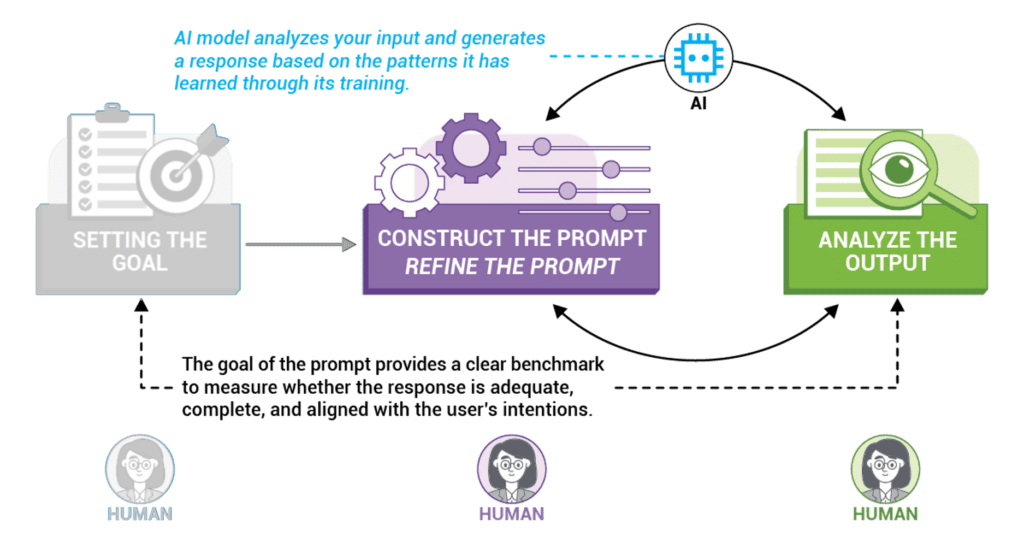
Let's explore what makes a good prompt.
How the 1% ACTUALLY Build Apps with Cursor's Context Engineering
This video from AI LABS discusses 'context engineering' and its importance in getting reliable results from an AI. It elevates 'prompting' to a more structured discipline.
Watch the first 2 minutes and 38 seconds. The key idea is that you're not just 'prompting'; you're engineering the context window with all the relevant facts, rules, and information the AI needs.
So, what does this look like in practice? A good prompt for our Hugo project would include:
- The Goal: "Create a single-page template for a blog post."
- The Framework: "Use Hugo's templating language."
- The Context: "The content will come from Markdown files with front matter for
title,author, anddate." - The Details: "The title should be an
<h1>tag. The author and date should appear below the title in a<p>tag."
This level of detail dramatically reduces ambiguity and leads to better-generated code.
Step 4: Generated Code (The AI's Output)
Once the AI has your prompt, it enters the execution phase. This is where it writes the code, creates the files, and sets up the project structure based on your instructions. In Memex, this corresponds to Build Mode.
The files generated by the AI will map directly to the Hugo directories we studied in the last lesson. For example, if you ask for a homepage layout, the AI will generate an index.html file that you will place in the layouts/ directory. If you sync your Google Sheet of team members, the AI will help create a team.json file destined for the data/ directory.
Your understanding of Hugo's structure is what allows you to verify that the AI is putting things in the right place.
Step 5: Refinement (The Iterative Loop)
The AI's first attempt is rarely the final product. The refinement step is a crucial feedback loop where you review the generated code, identify what works and what doesn't, and provide further instructions to the AI. This is a conversational process of debugging and iteration.
Vibe Coding Fundamentals In 33 minutes
The 'Vibe Coding Fundamentals' video demonstrates this refinement loop perfectly. After generating an app, the developer provides simple, conversational feedback to fix errors and improve the design.
Watch from 20:50 to 22:19. Notice how the developer first identifies an issue (the score isn't changing), points it out to the AI, and then asks for a visual improvement ('make it colorful'). This is a classic example of the refinement cycle.
This iterative approach is a core best practice. Instead of asking for a complete, complex website in one go, you start with a Minimum Viable Product (MVP) and add features one by one.
Test your understanding!
You've asked your AI assistant to generate a list of blog posts, but the posts are sorted alphabetically by title instead of by publication date (newest first). Which step of the 5-step cycle are you in, and what would your next action be?
Show answer
You are in the Refinement step. Your next action would be to provide a new, more specific prompt to the AI, such as: "The blog post list is working, but please modify the template to sort the posts by the date field in the front matter, in descending order, so the newest posts appear first."
Conclusion
You now have a clear model for our AI-assisted development process. This five-step cycle—Idea, Google Sheet Data, AI Prompt, Generated Code, and Refinement—is the foundational workflow you will apply in the upcoming modules to build out your website.
Key Takeaways:
- Vibe Coding is a partnership with AI, where your main role is to provide clear direction and refine the output.
- A strong Idea or plan is the most critical part of the process. Garbage in, garbage out.
- Google Sheets provides a user-friendly way to structure and manage content outside of the codebase.
- Effective AI Prompts are rich with context, specifying the goal, framework, and details.
- Refinement is not a sign of failure but an essential, iterative part of the development conversation.
Preview of the next lesson:
We have now covered Hugo's core concepts and our AI-powered workflow. In the final lesson of this foundational module, we will tackle the last piece of setup: configuring your site's basic settings, such as its title and URL, in the hugo.toml file. With that complete, you'll be fully equipped to start building your first content type in Module 2.