In our last lesson, we established the fundamental principle that everything in Python is an object, each defined by its identity, type, and value. This understanding of variables as labels pointing to objects is the bedrock for our topic today. We now move from what an object is to how it behaves.
This lesson focuses on one of the most critical distinctions in Python's object model: mutability versus immutability. You will learn to differentiate between objects whose values can be changed in-place and those that cannot. More importantly, we will dissect how this property dictates an object's behavior when passed to a function, a concept that is a frequent source of subtle but significant bugs in production systems. Mastering this will sharpen your ability to reason about your code's state and side effects, a key characteristic of a senior developer.
The Core Distinction: Changeable vs. Unchangeable Values
An object's mutability is determined by whether its value can be altered after it has been created.
- An immutable object's value cannot be changed. Any operation that appears to "modify" an immutable object actually creates a new object and rebinds the variable name to it.
- A mutable object's value can be changed in-place. Operations can alter the object's internal state without creating a new object.
To begin, let's get a formal definition and overview of which built-in types fall into which category.
Python's Mutable vs Immutable Types: What's the Difference?
This article from Real Python provides a thorough breakdown of mutability.
First, read the introductory section Mutable and Immutable Objects for a clear definition. Then, jump to the end of the article and review the table in the section A Summary to get a quick overview of which common types are mutable and which are not.
The key takeaway is that simple types like numbers, strings, and booleans are immutable, as are tuples. Collections like lists, dictionaries, and sets are mutable.
Let's visualize this difference.
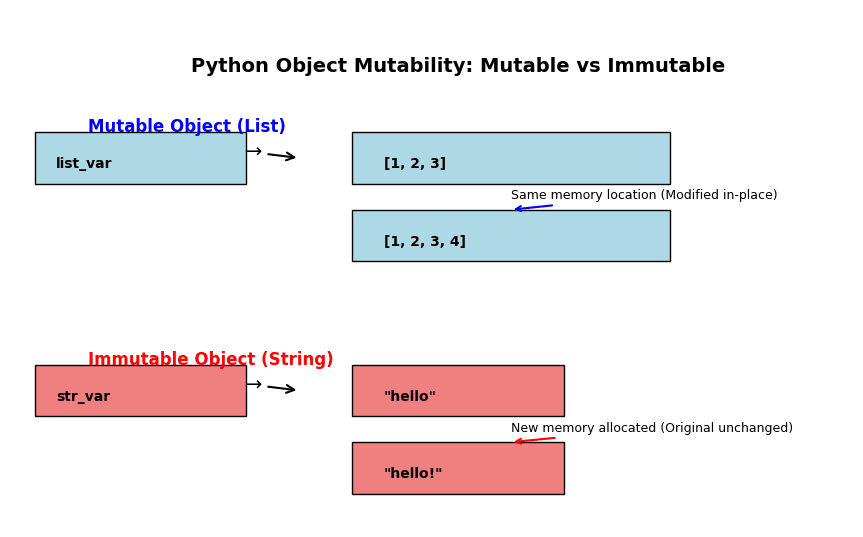
Immutable Objects: Rebinding Names to New Objects
Let's see immutability in action. Consider a simple string. When we "add" to it, we are not changing the original string object. We are creating a brand new string object and rebinding our variable to point to it.
s = "hello"
print(f"Original string: '{s}', ID: {id(s)}")


# This operation creates a new string object
s = s + " world"
print(f"New string:      '{s}', ID: {id(s)}")
Notice how the ID changes. The name s first pointed to the object "hello", and after the operation, it was rebound to point to the completely new object "hello world". The original "hello" object is now unreferenced (assuming no other variable points to it) and will eventually be garbage collected.
The following video segment by Ned Batchelder, a well-respected Python expert, clearly illustrates this process.
Ned Batchelder - Facts and Myths about Python names and values - PyCon 2015
This clip from Ned Batchelder's talk "Facts and Myths about Python names and values" explains how operations on immutable values work.
Watch from 07:19 to 08:00. Pay close attention to the animation showing the creation of a new string object and the rebinding of the name x.
Mutable Objects: In-Place Modification and Aliasing
Now, let's contrast this with a mutable object, like a list.
my_list = [1, 2, 3]
print(f"Original list: {my_list}, ID: {id(my_list)}")


# This operation modifies the list object in-place
my_list.append(4)
print(f"Modified list: {my_list}, ID: {id(my_list)}")
The ID remains the same. We have mutated the object that my_list refers to directly in memory. This has a profound consequence: if more than one name refers to the same mutable object (a situation called aliasing), a change made through one name will be visible through all other names.
This "spooky action at a distance" is a classic source of confusion. Let's see it in code:
list_a = [10, 20, 30]
list_b = list_a  # list_b is now an alias for list_a

print(f"list_a is {list_a}, ID: {id(list_a)}")
print(f"list_b is {list_b}, ID: {id(list_b)}")
print(f"list_a is list_b: {list_a is list_b}") # They are the same object


# Let's mutate the object using the name list_b
list_b.append(99)

print(f"\nAfter mutating via list_b:")
print(f"list_b is now: {list_b}")
print(f"list_a is now: {list_a}") # The change is reflected in list_a!
Again, Ned Batchelder's talk provides a perfect visual explanation of this phenomenon.
Ned Batchelder - Facts and Myths about Python names and values - PyCon 2015
This segment demonstrates the "surprise" of mutable aliasing.
Watch the clip from 05:52 to 07:13. It shows exactly why modifying a list through one name affects another name pointing to the same list.
The Critical Difference: Mutating vs. Rebinding
To solidify your understanding, it is vital to distinguish between two kinds of "change":
- Mutating: Modifying an object's value in-place (e.g.,
my_list.append(4)). The object's identity does not change. - Rebinding: Changing a name to refer to a completely new object (e.g.,
x = x + 1).
Even with lists, you can rebind the name instead of mutating the object:
nums.append(7)mutates the list.nums = nums + [7]rebinds the namenumsto a new list object. The+operator for lists creates a new list.
Using this precise terminology will help you reason correctly about your code's behavior. The following reading selection makes this exact point.
Python Names and Values - Ned Batchelder
Ned Batchelder's article clearly breaks down the two types of "change."
Read the section that begins here. Focus on the distinction between the words "mutating" and "rebinding."
How Mutability Affects Function Arguments
Now we arrive at the most practical application of this knowledge. When you pass an argument to a function, what exactly happens?
Python's argument passing model is often described as "pass-by-object-reference" or "call-by-assignment". When you call a function, the parameter name inside the function is assigned to the object you pass in. It becomes another label for the same object.

This mechanism, combined with mutability, leads to two distinct scenarios:
- Passing an immutable object: Since the object cannot be changed in-place, the function cannot affect the original variable outside its scope. Any reassignment inside the function just rebinds the local parameter name to a new object.
- Passing a mutable object: The function receives a reference to the original object. If the function mutates this object, the changes will be visible outside the function. This is a deliberate language feature, but can be a source of unexpected side effects if not handled carefully.
The following video segments provide a masterclass in this behavior, walking through three versions of a function to demonstrate the difference between mutating an argument, creating and returning a new object, and accidentally doing nothing useful.
Ned Batchelder - Facts and Myths about Python names and values - PyCon 2015
These clips from Ned Batchelder's talk are essential for understanding how functions handle mutable objects.
First, watch the setup from 15:36 to 17:02 to understand that a function call is an assignment. Then, watch the detailed examples of the append_twice function from 17:02 to 19:29. This will clearly demonstrate: How mutating a list inside a function affects the caller. How creating a new list and reassigning the local name does not affect the caller. The correct "functional" style of creating a new list and returning it.
Common Mutability Gotchas
A senior developer is aware of the common traps related to language features. Here are two classic gotchas involving mutability.
1. Mutable Default Arguments
This is perhaps the most famous Python "gotcha". A function's default arguments are created only once, when the function is defined, not each time it's called. If a default argument is a mutable object, it will be shared across all calls that don't explicitly provide a value for that argument.
# A function with a dangerous mutable default argument
def add_item(item, a_list=[]):
    a_list.append(item)
    return a_list

print(add_item(1)) # Returns [1] as expected
print(add_item(2)) # Returns [1, 2], surprise! The list persists.
print(add_item(3)) # Returns [1, 2, 3]
The safe and idiomatic way to handle this is to use an immutable sentinel value (like None) as the default and create a new mutable object inside the function.
Python's Mutable vs Immutable Types: What's the Difference?
The Real Python article explains this gotcha and its solution perfectly.
Read the section Mutable Default Values. It shows the classic problematic example and the standard None-as-default solution.
2. Mutable Objects in Immutable Containers
What happens if you put a list (mutable) inside a tuple (immutable)?
my_tuple = (1, 2, ['a', 'b'])
The tuple itself is immutable. You cannot change what objects it refers to.
# This will raise a TypeError
# my_tuple[2] = ['x', 'y']
However, the immutability of the tuple does not extend to the objects within it. The list inside the tuple is still a list, and it can be mutated.
print(f"Original tuple: {my_tuple}")


# Mutate the list that is *inside* the tuple
my_tuple[2].append('c')

print(f"Modified tuple: {my_tuple}") # Output: (1, 2, ['a', 'b', 'c'])
This behavior can be surprising. It underscores that immutability applies to the container's direct references, not recursively to the objects being referenced. As a general rule, it's best to avoid placing mutable objects inside immutable containers unless you have a specific, well-understood reason to do so.
Key Takeaways
- Mutability is an object property: Objects are either mutable (value can change in-place) or immutable (value cannot).
- Immutable Types:
int,float,str,tuple,bool. Operations create new objects. - Mutable Types:
list,dict,set. Operations can modify the object in-place. - Rebinding vs. Mutating: Distinguish between assigning a name to a new object (
x = ...) and changing an existing object's state (x.append(...)). - Functions and Side Effects: Python uses "call-by-assignment". Mutating a mutable object passed to a function creates a side effect, as the change is visible to the caller.
- Common Gotchas: Avoid mutable default arguments and be aware that mutable objects inside immutable containers can still be mutated.
In our next lesson, we will explore reference counting. Now that you understand how multiple names can refer to the same object (aliasing), we'll investigate how Python keeps track of these references to determine when an object is no longer needed and its memory can be reclaimed.