Hello. In the previous lesson, you used conditions to make one decision from one set of values: Is the wallet connected? Is an amount within the balance? Loops extend that same idea. They let a program apply a block of code repeatedly while a condition remains true.
This lesson focuses on the two essential loop forms: for and while. You will use them to process a small, defined set of simulated block heights and to count through a bounded range. That is the foundation for later scripts that inspect transaction data, calculate totals, or prepare batches of values. Plan for roughly 45 minutes, including the coding activity.
A loop is repetition with a boundary
A loop repeats a block of code. Each pass through the block is an iteration.
The important word is boundary. A useful loop has a clear reason to stop:
- a counter reaches its limit;
- every item in a list has been processed; or
- a changing state reaches a target value.
The condition from the previous lesson controls this boundary. A loop checks a condition, runs its body only when that condition is true, then eventually checks again.
Looping code - Learn web development | MDN
Read “Looping code” from MDN Web Docs for a clear conceptual model of repetition, the parts of a for loop, array indexing, and the relationship between for and while.
Start in the “Why are loops useful?” section. Read the core idea. Then read the “The standard for loop” section, especially the three parts. In “Looping through collections with a for loop,” focus on how an index accesses values in an array; stop before “Exiting loops with break.” Finally, in “while and do...while,” read the introductory explanation and the while example, including the comparison. You do not need to study do...while yet.
A short video can help make the execution order feel concrete:
Watch “JavaScript Loops Made Easy” by codeSTACKr for a compact visual walkthrough of for loops, array traversal, and while loops.
Watch for loop mechanics and follow the order: initialize, test, run the body, then update. Next watch array traversal, focusing on why the counter starts at zero and stops before the array length. Finish with while loop structure, paying particular attention to why the update must be inside the body.
The for loop: a visible counting plan
Use a for loop when the program has a clear counting plan: where to begin, when to stop, and how to move to the next value.
for (initializer; condition; update) {
  // loop body
}
Here is a small example:
for (let index = 0; index < 3; index++) {
  console.log("Current index:", index);
}
Its output is:
Current index: 0
Current index: 1
Current index: 2
Read the header from left to right:
| Part | Code | Meaning |
|---|---|---|
| Initializer | let index = 0 |
Create a counter and give it its starting value. This runs once. |
| Condition | index < 3 |
Continue only while this expression is true. It is checked before every iteration. |
| Update | index++ |
Add one after each completed iteration. |
The execution order is:
- Set
indexto0. - Test whether
index < 3. - If true, run the loop body.
- Run
index++, making the counter one larger. - Return to the condition.
- Stop once the condition is false.
index++ is short for:
index += 1;
Both increase the variable by one. You will often see i++ in examples, where i means “index,” but a descriptive name such as blockIndex is often clearer.
Boundaries: why 0, <, and length matter
JavaScript arrays are ordered lists written between square brackets:
const blockHeights = [22000000, 22000001, 22000002];
This array contains three values. Their positions, called indexes, begin at zero:
| Index | Value |
|---|---|
0 |
22000000 |
1 |
22000001 |
2 |
22000002 |
The array’s .length is 3, but its final valid index is 2. That gives a standard pattern for processing every value:
const blockHeights = [22000000, 22000001, 22000002];

for (let index = 0; index < blockHeights.length; index++) {
  const blockHeight = blockHeights[index];
  console.log("Inspecting block:", blockHeight);
}
Output:
Inspecting block: 22000000
Inspecting block: 22000001
Inspecting block: 22000002
Two details prevent common bugs:
- Start at
0, because the first array item is at index0. - Use
< blockHeights.length, not<= blockHeights.length. Whenindexequals3,blockHeights[3]does not exist.
The loop body can also use the conditional logic from the previous lesson:
const blockHeights = [22000000, 22000001, 22000002, 22000003];
const targetHeight = 22000002;

for (let index = 0; index < blockHeights.length; index++) {
  const blockHeight = blockHeights[index];

  if (blockHeight >= targetHeight) {
    console.log("At or above target:", blockHeight);
  } else {
    console.log("Below target:", blockHeight);
  }
}
The loop decides which value is currently being processed; the if...else decides what to do with that value.
For now, arrays are simply a practical way to hold a defined sequence. You will study arrays and their transformation methods in much more depth later in this module.
The while loop: repeat while a state remains true
A while loop has the same essential components as a for loop, but they are written in different places:
initializer;

while (condition) {
  // loop body
  update;
}
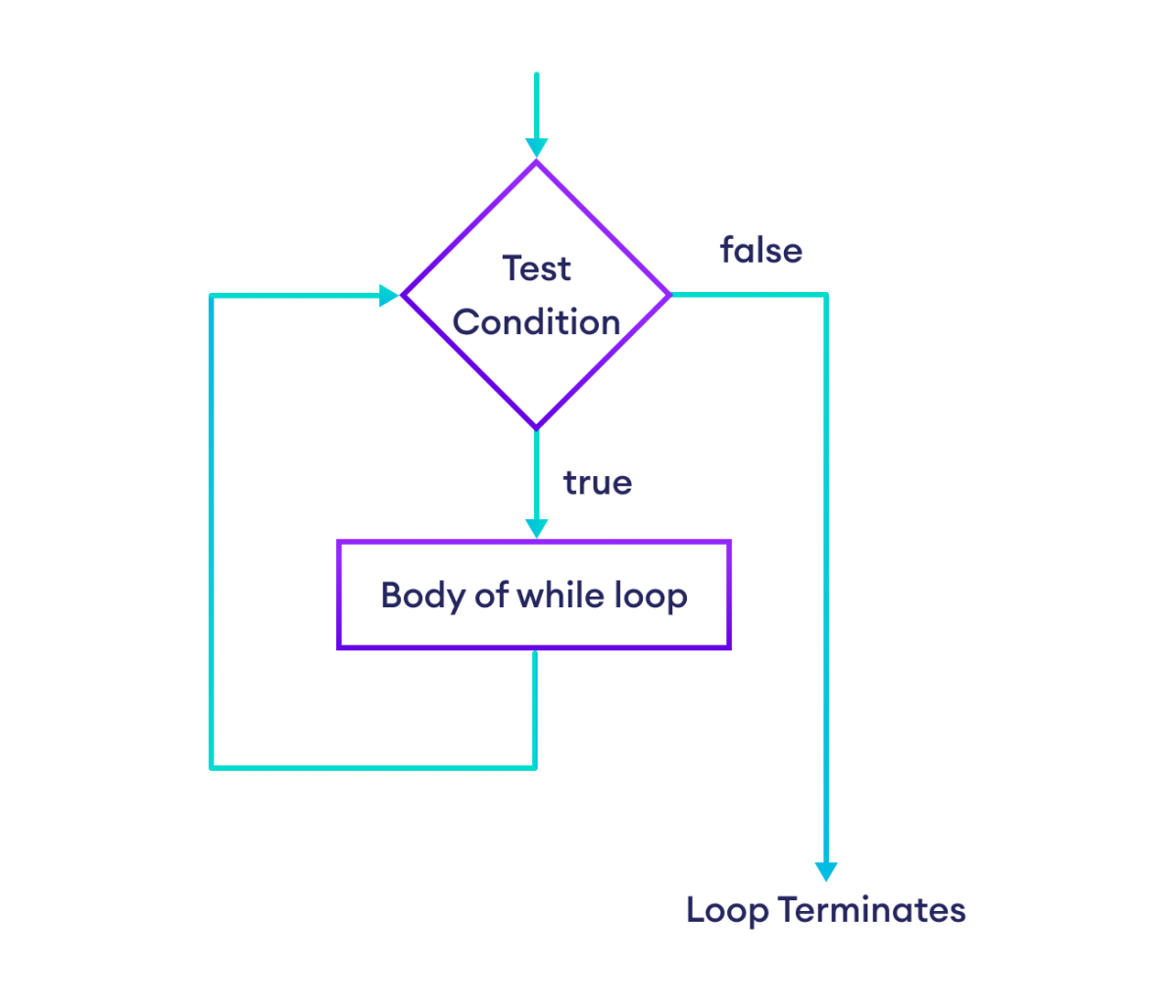
Here is a countdown using while:
let remainingConfirmations = 3;

while (remainingConfirmations > 0) {
  console.log("Confirmations remaining:", remainingConfirmations);
  remainingConfirmations--;
}

console.log("Target reached.");
Output:
Confirmations remaining: 3
Confirmations remaining: 2
Confirmations remaining: 1
Target reached.
The condition is tested before the body runs. So if the initial value is already 0, the body runs zero times:
let remainingConfirmations = 0;

while (remainingConfirmations > 0) {
  console.log("This line will not run.");
}
This is a key difference between a normal while loop and a do...while loop, which is designed to run its body at least once. A standard while loop is the one to learn and use first.
Rewriting a for loop as while
The following loops process the same values.
Using for:
const transactionStatuses = ["pending", "confirmed", "failed"];

for (let index = 0; index < transactionStatuses.length; index++) {
  console.log(transactionStatuses[index]);
}
Using while:
const transactionStatuses = ["pending", "confirmed", "failed"];

let index = 0;

while (index < transactionStatuses.length) {
  console.log(transactionStatuses[index]);
  index++;
}
The while version makes its moving parts explicit:
indexbegins outside the loop.- The condition appears in
while (...). index++must appear in the body.
Choose for when the iteration is naturally described as “start here, continue to this limit, update this counter.” Choose while when the condition is the clearest part of the problem and the update may need to happen within the body.
Both are valid. The central requirement is that the variable controlling the condition must eventually move toward making that condition false.
Avoiding infinite loops
An infinite loop never reaches its stopping condition. For example:
let attempts = 0;

while (attempts < 3) {
  console.log("Trying again...");
}
attempts remains 0 forever, so attempts < 3 never becomes false.
The corrected version changes the controlling state:
let attempts = 0;

while (attempts < 3) {
  console.log("Attempt:", attempts + 1);
  attempts++;
}
When debugging any loop, check these four things:
- Initial value: Does the counter start where you think it does?
- Condition: Does it describe exactly when the loop should continue?
- Update: Does every iteration change the relevant value?
- Direction: Is the update moving toward the stopping condition?
If you accidentally run an infinite loop in Node.js, press Ctrl + C in the terminal to stop the process.
Build a bounded block-inspection script
Create a file named loop-blocks.js in your Node.js practice folder. This script uses simulated data only; it does not connect to an Ethereum network.
const blockHeights = [
  22000000,
  22000001,
  22000002,
  22000003,
];

const targetHeight = 22000002;

console.log("Checking defined block heights:");

for (let index = 0; index < blockHeights.length; index++) {
  const blockHeight = blockHeights[index];

  if (blockHeight >= targetHeight) {
    console.log("At or above target:", blockHeight);
  } else {
    console.log("Below target:", blockHeight);
  }
}

console.log("Starting a bounded countdown:");

let remainingChecks = 3;

while (remainingChecks > 0) {
  console.log("Checks remaining:", remainingChecks);
  remainingChecks--;
}

console.log("All checks complete.");
Run it:
node loop-blocks.js
You should see output in this general form:
Checking defined block heights:
Below target: 22000000
Below target: 22000001
At or above target: 22000002
At or above target: 22000003
Starting a bounded countdown:
Checks remaining: 3
Checks remaining: 2
Checks remaining: 1
All checks complete.
Make a few deliberate changes and observe the result:
- Add another value to
blockHeights. Theforloop automatically processes it because its condition uses.length. - Change
targetHeightand observe how the conditional output changes without altering the loop. - Change
remainingChecksfrom3to1, then to0. Notice that awhileloop with a false initial condition skips its body entirely. - Replace
remainingChecks--withremainingChecks -= 1. The behavior should remain the same.
A good habit is to predict the sequence of counter values before running the script. For the while loop above, the counter moves through 3, 2, 1, then becomes 0; only then does the condition fail.
Wrap-up
You can now use two fundamental JavaScript loop forms to process a bounded sequence:
- A loop repeats its body while its condition is true; each pass is an iteration.
- A
forloop keeps initialization, condition, and update together, making it a strong default for a known range or an array. - An array’s indexes start at
0, so the safe standard condition isindex < array.length. - A
whileloop places initialization before the loop and its update inside the body. - Every loop needs a clear stopping path. If the controlling value never changes appropriately, the program can enter an infinite loop.
Next, you will define and call functions. Functions let you package loop or conditional logic into named, reusable pieces of code—an important step toward structuring larger Node.js and blockchain-oriented programs.