Good to see you again. In the previous lesson, you used for and while loops to repeat a bounded piece of logic. Repetition is useful, but copying the same loop or conditional into several places makes a program difficult to change safely. Functions solve that problem: they give a piece of logic a name, accept inputs when needed, and can produce a result.
In this lesson, you will define and call JavaScript functions, pass values through parameters, return computed results, and understand why variables inside a function are not available everywhere else. These are core habits for writing organized Node.js scripts now and, later, Solidity contracts and JavaScript dApp clients. Plan for about 45 minutes, including watching, reading, and coding.
A function stores instructions for later
A function is a named, reusable block of code. Defining a function tells JavaScript what the function should do; it does not run that code immediately. To run it, you must call (or invoke) the function.
Consider a repeated status message:
console.log("Checking connection...");
console.log("Checking connection...");
If the message or the action becomes more complicated, duplication creates risk: you might update one copy and forget another. Instead, place the action in one function:
function checkConnection() {
  console.log("Checking connection...");
}
At this point, Node.js produces no output. The function exists, but it has not run. Call it with its name followed by parentheses:
checkConnection();
Now the output is:
Checking connection...
You can call the same function again:
checkConnection();
checkConnection();
The body runs once per call.
How To Create/Use Functions - JavaScript Essentials
Watch “How To Create/Use Functions - JavaScript Essentials” from Web Dev Simplified for a compact visual introduction to why functions reduce duplication, how defining differs from calling, and how data moves into and out of a function.
Watch the motivation for putting repeated logic in one named place. Then watch definition and calls; focus on the fact that the code inside curly braces waits until the function is invoked. Continue with parameters and return values. Notice that return gives the calling code a value rather than merely displaying it.
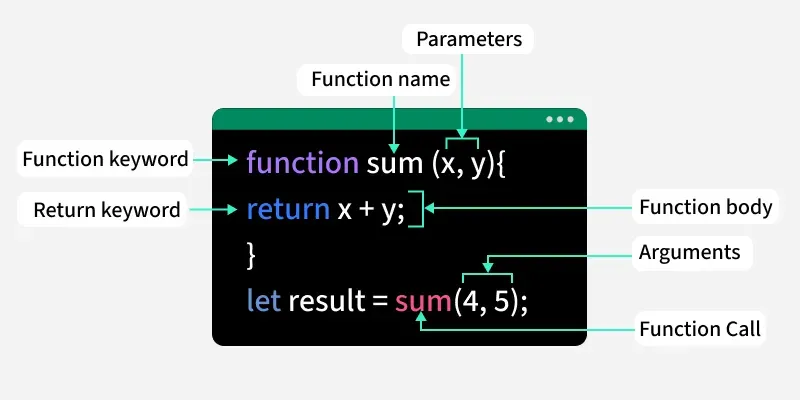
A common function declaration has this shape:
function functionName(parameterOne, parameterTwo) {
  // function body
  return result;
}
Not every function needs parameters, and not every function needs to return a value. But the parts have distinct jobs:
functiontells JavaScript you are defining a function.functionNameis the reusable name you choose.- Parameters are named input variables inside the parentheses.
- The function body is the code in curly braces.
returnsends a result back to wherever the function was called.
Use descriptive action-oriented names. For example, calculateTotalCost, checkBalance, and formatTransactionMessage reveal intent much better than names such as doThing or process.
Parameters receive inputs; arguments supply them
A function without parameters always performs the same action. Parameters make it adaptable.
function greetUser(name) {
  console.log("Hello, " + name);
}

greetUser("Asha");
greetUser("Rahul");
Output:
Hello, Asha
Hello, Rahul
The distinction in terminology is worth learning precisely:
| At the function definition | At the function call |
|---|---|
Parameter: name |
Argument: "Asha" |
| A local variable that receives a value | The actual value supplied to the function |
With multiple inputs, their positions matter:
function calculateTotalCost(value, fee) {
  return value + fee;
}

const firstTotal = calculateTotalCost(150, 3);
const secondTotal = calculateTotalCost(220, 5);

console.log(firstTotal);
console.log(secondTotal);
Output:
153
225
When JavaScript evaluates this call:
calculateTotalCost(150, 3)
it temporarily gives the function these local values:
value = 150
fee = 3
Then it evaluates value + fee, returns 153, and the call itself behaves like that result. In other words:
const firstTotal = calculateTotalCost(150, 3);
ends with the same value as:
const firstTotal = 153;
Parameters let one well-tested calculation work with many different values. Later, programs that interact with a blockchain will use the same pattern: functions take inputs such as an address, amount, or contract setting, then calculate, validate, or format a result.
Missing arguments become undefined
JavaScript does not automatically stop you from calling a function with too few arguments:
function calculateTotalCost(value, fee) {
  return value + fee;
}

const incompleteTotal = calculateTotalCost(150);

console.log(incompleteTotal);
The parameter fee receives undefined. Adding a number to undefined produces NaN, meaning “Not a Number”:
NaN
For the functions you write at this stage, call them with every required argument. In a later lesson, you will learn stronger ways to validate inputs and handle failures.
Sometimes a sensible default exists:
function formatNetworkName(network = "testnet") {
  return "Network: " + network;
}

console.log(formatNetworkName("mainnet"));
console.log(formatNetworkName());
Output:
Network: mainnet
Network: testnet
The second call omits its argument, so network uses the default "testnet". Defaults are useful when there is a genuinely safe, expected fallback—not merely to hide a missing value.
Read Ilya Kantor’s “Functions” tutorial for a clear reference on declarations, local variables, parameters, defaults, and returned values. It reinforces the vocabulary you will use throughout JavaScript and later when reading Solidity function signatures.
In “Function Declaration,” read the opening examples to see the exact structure of a declaration and call. In “Local variables,” study the local-variable example; focus on why code outside the function cannot use that name. Then read “Parameters”, especially how values enter a function, including the distinction between parameters and arguments. Finally, in “Returning a value,” read the return explanation. You may skim the later exercises for now.
return produces a value; console.log displays one
This distinction causes many beginner bugs, so make it explicit.
console.log() is for displaying a value in the terminal:
function showTotal(value, fee) {
  console.log(value + fee);
}

showTotal(150, 3);
This prints:
153
But it does not give the caller a usable calculation result:
const total = showTotal(150, 3);

console.log(total);
Output:
153
undefined
Why? showTotal() logs 153, but it has no return statement. A function without a return value evaluates to undefined.
Use return when the caller needs the result for another calculation, a condition, or a message:
function calculateTotalCost(value, fee) {
  return value + fee;
}

const total = calculateTotalCost(150, 3);

console.log("Total cost:", total);

if (total <= 200) {
  console.log("Within the simulated budget.");
} else {
  console.log("Above the simulated budget.");
}
Here, the function handles one focused job—calculating the total. The calling code decides what to do with that total.
A return statement has a second effect: it immediately ends the function.
function checkAmount(amount) {
  if (amount <= 0) {
    return "Amount must be positive.";
  }

  return "Amount accepted.";
}
For checkAmount(0), the first return runs and the second is skipped. This makes return useful for ending a function as soon as it has a result.
A helpful mental model is:
arguments -> parameters -> function body -> return value
The return value goes back to the precise spot where you wrote the function call.
Local scope: variables belong to their function
A scope is the part of a program where a variable name is available.
Variables declared inside a function with const or let are local variables. They exist only inside that function body. Function parameters are local too.
function createStatusMessage(network, blockHeight) {
  const message = "Connected to " + network + " at block " + blockHeight;

  return message;
}

const status = createStatusMessage("testnet", 22000002);

console.log(status);
This runs correctly because message is used inside createStatusMessage, where it was declared.
This does not work:
function createStatusMessage(network, blockHeight) {
  const message = "Connected to " + network + " at block " + blockHeight;

  return message;
}

console.log(message);
Node.js reports an error similar to:
ReferenceError: message is not defined
The variable message is unavailable outside the function. It is created during the function call, used to form the return value, and then cannot be referenced from top-level code.
This boundary is valuable. Imagine that several functions all use a variable named result. If each function’s result stays local, the functions do not overwrite one another’s working values.
Variables declared outside a function are in an outer scope. In a basic Node.js file, functions in that same file can read them:
const activeNetwork = "testnet";

function showNetwork() {
  console.log("Current network:", activeNetwork);
}

showNetwork();
That is legal, but for most calculations, prefer a function that receives needed values as parameters and returns a result. Compare these approaches:
// Less clear: the function silently depends on outside state
let currentFee = 3;

function calculateCostUsingOuterValue(value) {
  return value + currentFee;
}
// Clearer: the required input is visible at the call
function calculateCost(value, fee) {
  return value + fee;
}
The second version is easier to test and reuse because its behavior is determined by its arguments. This discipline becomes particularly important in smart-contract development, where hidden dependencies and unexpected state changes can lead to expensive bugs.
Learn JavaScript Scoping In 10 Minutes
Watch this short section of Web Dev Simplified’s “Learn JavaScript Scoping In 10 Minutes” to make local versus outer scope concrete.
Watch function scope. Track the two variables: the outer variable can be read inside the function, while the variable created inside the function causes a ReferenceError when code outside tries to access it.
Build a small transaction-decision script
Create a file named functions-transfer.js in your Node.js practice folder. The values here are simple simulated units, not a real transaction or Ether calculation.
function calculateTotalCost(value, fee) {
  const totalCost = value + fee;

  return totalCost;
}

function hasEnoughBalance(balance, totalCost) {
  return balance >= totalCost;
}

function createTransferSummary(balance, value, fee) {
  const totalCost = calculateTotalCost(value, fee);
  const canSubmit = hasEnoughBalance(balance, totalCost);

  return (
    "Balance: " + balance +
    " | Total cost: " + totalCost +
    " | Can submit: " + canSubmit
  );
}

const walletBalance = 200;
const transferValue = 150;
const networkFee = 3;

const summary = createTransferSummary(
  walletBalance,
  transferValue,
  networkFee
);

console.log(summary);
Run it:
node functions-transfer.js
Expected output:
Balance: 200 | Total cost: 153 | Can submit: true
Trace the program in order:
- Node.js reads and defines the three functions. Their bodies do not run yet.
- It stores the three top-level values:
walletBalance,transferValue, andnetworkFee. - It calls
createTransferSummary(...). - Inside that function,
calculateTotalCost(...)returns153. hasEnoughBalance(...)compares200 >= 153and returnstrue.createTransferSummary(...)constructs and returns one string.- The top-level
console.log(summary)displays that returned string.
Notice the scopes:
walletBalance,transferValue,networkFee, andsummaryare available in the outer file scope.totalCostandcanSubmitinsidecreateTransferSummaryare local to that function.- Each function’s parameters are local to that function.
Make these controlled changes:
- Change
transferValueto198. The total becomes201, so the summary should end infalse. - Change
walletBalanceto250. The same transfer should now be allowed. - Add
console.log(totalCost);insidecreateTransferSummary; it works there. Move that line belowconsole.log(summary);at the top level and run the file again. You should get a scope-relatedReferenceError. Remove or comment out the failing line afterward. - Change
calculateTotalCostso that it only logs the total instead of returning it. Observe how this breaks the later comparison, then restorereturn totalCost.
This is a useful pattern to carry forward: one function calculates, another checks a condition, and another creates a human-readable output. Each has one clear responsibility.
Wrap-up
You can now organize JavaScript logic into reusable functions:
- A function declaration defines a named block of instructions; a function call runs it.
- Parameters are local input variables listed in a function definition; arguments are the values provided during a call.
returnsends a value back to the calling code and stops the current function immediately.console.log()displays a value, whilereturnmakes a value available for later code.- Variables declared with
letorconstinside a function, including its parameters, are local to that function’s scope. - Functions that accept explicit inputs and return outputs are easier to test, reuse, and reason about than functions that quietly rely on outer variables.
Next, you will apply functions to arrays: processing lists of values with iteration, map, filter, and reduce. Functions will become even more useful there, because they let you describe exactly what should happen to each item in a collection.