Welcome back! In our previous lesson, you successfully built the entire LLVM toolchain from source, giving you a local, debuggable version of all the core tools. This was a critical step that transformed LLVM from an abstract repository into a tangible development environment on your machine.
Today, we will enhance that environment with one of the most powerful tools in a systems programmer's arsenal: AddressSanitizer (ASan). We will reconfigure and rebuild LLVM to be "sanitized," meaning every memory access within the LLVM tools themselves will be checked for correctness at runtime. This is an indispensable skill for diagnosing the complex memory bugs that are common in large C++ codebases like LLVM. By the end of this lesson, you'll be able to compile LLVM with ASan and interpret its diagnostic reports to pinpoint memory errors.
What is AddressSanitizer (ASan)?
Before we dive into the build commands, it's important to understand what ASan is and why it's so vital. ASan is a fast memory error detector. The compiler instruments your code—adding extra checks around every memory access—to catch invalid operations as they happen.
It's designed to find errors that can be notoriously difficult to debug, such as:
- Buffer overflows: Accessing an array or buffer outside of its allocated bounds (on the stack, heap, or in global variables).
- Use-after-free: Using a pointer to heap memory after it has been
deleted orfreed. - Use-after-return: Using a pointer to a local variable after its function has returned.
- Double-free and invalid free.
- Memory leaks (this capability is built on the same framework).
The following short video provides an excellent overview of the motivation behind ASan and demonstrates its basic usage on a simple program.
find memory errors quickly. (-fsanitize, addresssanitizer)
This video by Jacob Sorber introduces the common problem of memory corruption and shows how to use the -fsanitize=address compiler flag to find a bug.
Please watch the first part of the video, up to the 7-minute mark. Introduction to memory errors A simple C program with a subtle buffer overflow Enabling ASan with the compiler flag Interpreting the ASan report
As the video mentions, ASan is much faster than older tools like Valgrind because its checking mechanism is more efficient. This makes it practical to use even on large, performance-sensitive applications like a compiler.
How ASan Works: Shadow Memory
Your interest in low-level engineering makes the inner workings of ASan particularly relevant. Its efficiency comes from a clever technique called shadow memory.
The core idea is to map every byte of your application's memory to a corresponding "shadow" byte in a separate, reserved region of the address space. This shadow byte acts as metadata, describing the state of the application memory it corresponds to.
Here’s a simplified breakdown:
- Memory Mapping: ASan reserves a large region of virtual address space for this shadow memory. For every 8 bytes of application memory, there is 1 byte of shadow memory.
- Instrumentation: When the compiler sees a memory allocation (e.g., a local variable on the stack or a
newexpression on the heap), it "poisons" the shadow memory corresponding to the surrounding, inaccessible memory regions (the "redzones"). The shadow memory for the valid, accessible region is left "unpoisoned". - Runtime Checks: Before every memory access (read or write) in your code, the compiler inserts a small sequence of instructions. This sequence calculates the address of the shadow byte for the memory being accessed and checks its value.
- Error Reporting: If the shadow byte is "poisoned," it means the access is invalid. The program immediately prints a detailed report and terminates.
This concept is much easier to grasp visually.
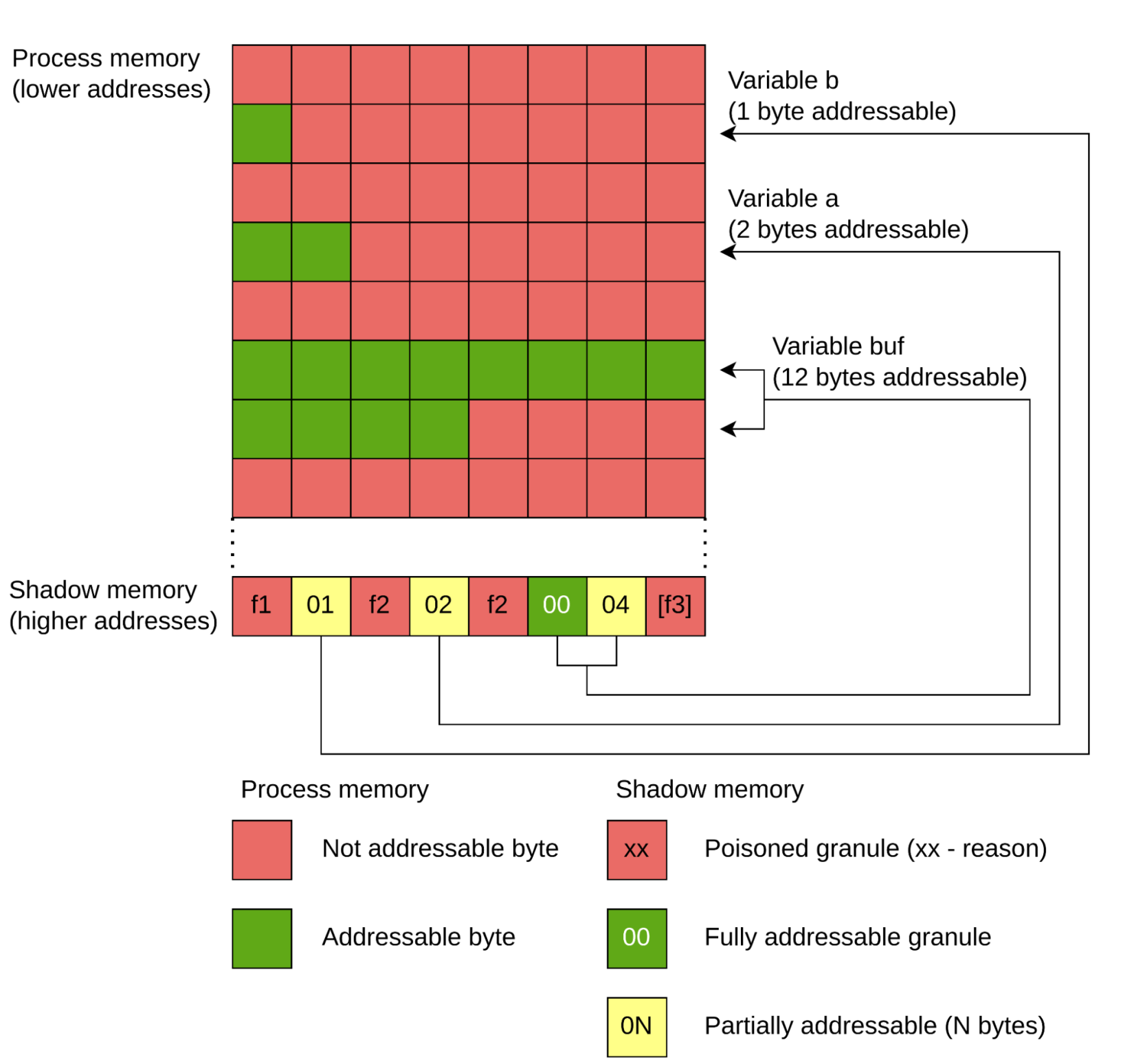
This approach allows ASan to detect an error the moment it occurs, rather than later when corrupted memory causes a seemingly unrelated crash.
Step 1: Configuring an ASan-Enabled Build
Now, let's apply this to our LLVM build. In the last lesson, you created a llvm-build directory for a Debug configuration. It's a best practice to keep different build configurations in separate directories. So, we'll create a new directory for our ASan build.
The key to enabling ASan is the LLVM_USE_SANITIZER CMake variable.
Building LLVM with CMake — LLVM 23.0.0git documentation
The official LLVM CMake documentation lists all available build options. We're interested in the one that controls sanitizers.
In the "LLVM-related variables" section, find the entry for LLVM_USE_SANITIZER. Notice that Address is one of the possible values.
Let's create the new build directory and run CMake. In your terminal, from the same directory that contains llvm-project, run the following commands:
# Create a new, separate directory for the ASan build
mkdir llvm-build-asan
cd llvm-build-asan


# Run CMake with the sanitizer enabled
cmake -G Ninja ../llvm-project/llvm \
      -DCMAKE_BUILD_TYPE=Debug \
      -DLLVM_ENABLE_PROJECTS="clang;lld" \
      -DLLVM_ENABLE_ASSERTIONS=ON \
      -DLLVM_TARGETS_TO_BUILD="X86" \
      -DLLVM_USE_LINKER=lld \
      -DLLVM_USE_SANITIZER=Address
This is the same command as last time, with one crucial addition: -DLLVM_USE_SANITIZER=Address. This tells the build system to compile all of LLVM and Clang with AddressSanitizer instrumentation enabled.
Step 2: Building and Running with ASan
Once CMake finishes configuring, start the build just as before:
# From within the 'llvm-build-asan' directory
ninja
This will recompile the entire project, which will take a significant amount of time. Once it's done, all the binaries in llvm-build-asan/bin (like clang, opt, llc) will have ASan's memory checks built into them.
To see this in action, let's create a small test program with a deliberate heap-buffer-overflow bug.
Create a file named bug.cpp with the following content:
// bug.cpp
int main() {
    int* array = new int[100];
    array[100] = 0; // Error: valid indices are 0-99
    delete[] array;
    return 0;
}
Now, compile this program using the ASan-enabled Clang you just built:
# Make sure you are in the directory containing bug.cpp
../llvm-build-asan/bin/clang++ bug.cpp -o bug
Notice we didn't need to add -fsanitize=address. Because our Clang is itself built with ASan, it links the necessary ASan runtime library by default.
Finally, run the program:
./bug
Instead of running silently (or crashing unpredictably), you will see a detailed error report from AddressSanitizer.

Let's break down the output you're seeing:
- Error Type: The report will start with a clear summary, like
==ERROR: AddressSanitizer: heap-buffer-overflow. - Location: It will point to the exact line in
bug.cppwhere the bad access occurred. - Allocation/Deallocation Sites: Crucially, for heap errors, it shows where the memory was allocated (
new int[100]) and, for use-after-free errors, where it was deallocated. - Shadow Bytes: The report includes a dump of the shadow memory around the faulting address, with a legend explaining the meaning of the poisoned values (e.g.,
fafor heap left redzone,fdfor freed heap memory).
This level of detail is exactly what you need to quickly diagnose and fix memory bugs in a large project.
The next video demonstrates ASan catching several different kinds of memory errors, including the one we just triggered. It provides another excellent walkthrough of the diagnostic output.
Software Development with C++: Debugging with AddressSanitizer
This video provides several C++ examples of common memory errors—buffer overflow, memory leak, double-free, and use-after-free—and shows how ASan diagnoses each one.
Watch the demonstrations for the different error types. Pay close attention to how the ASan output changes for each bug but always provides the critical information: what, where, and why. Overview of ASan Stack buffer overflow example Memory leak example Double-free example Use-after-free example
Having a sanitizer-enabled build of the LLVM tools is essential for contribution. If you encounter a bug where clang or opt crashes, running the ASan-enabled version will often give you an immediate, precise report pointing to the buggy code within LLVM itself, dramatically speeding up your debugging process.
Conclusion
In this lesson, you've added a critical tool to your LLVM development setup. You now understand not only how to enable AddressSanitizer but also the fundamental principles behind its operation. This is a skill that directly supports your goal of contributing to LLVM, as it's a standard part of the bug-fixing workflow.
Key Takeaways:
- AddressSanitizer (ASan) is a compiler feature that instruments code to detect memory errors at runtime with low performance overhead.
- It works by maintaining shadow memory, which tracks the addressability of every byte in your application.
- You enable ASan in an LLVM build by adding the
-DLLVM_USE_SANITIZER=Addressflag to your CMake configuration. - ASan provides detailed reports that pinpoint the exact location and cause of memory errors, including buffer overflows and use-after-free bugs.
- Building the LLVM tools themselves with ASan is a primary method for debugging crashes and memory corruption bugs within the compiler and toolchain.
You now have a robust environment for both development and debugging. With this foundation in place, we are ready to move from the build system to the core of the compiler.
In our next lesson, we will begin our exploration of the LLVM Intermediate Representation (IR). We'll start with the concept of Static Single Assignment (SSA) form, the fundamental principle that makes LLVM IR so regular and easy to analyze and transform.