Hello and welcome to your first lesson! I'm excited to guide you on your journey into the world of UX writing. This course is designed specifically to build on your expertise in translation and localization, providing a solid foundation for a new and rewarding career path.
This first module, "Foundations of User Experience (UX)," will introduce you to the core concepts that every UX professional, including writers, must understand. We'll start from the very beginning, so don't worry if these ideas are new to you.
In this lesson, we will focus on the most fundamental concepts: defining user experience (UX) and explaining its relationship with user interface (UI) design. Understanding this distinction is the bedrock upon which all other UX principles are built. Let's begin.
What is User Experience (UX)?
First, let's establish what "user experience" actually means. It's a term you'll hear constantly, and it refers to the total experience a person has when using a product, service, or system. It's not just about how it looks, but how it feels and how easy it is to achieve a goal.
To get a clear and practical introduction, please watch the first few minutes of the following video. It defines UX and breaks it down into key factors that make an experience a good one.
What Is UX Design? - An Introduction (Full Guide For 2024)
This video from CareerFoundry provides an excellent, beginner-friendly introduction to UX design.
Please watch from 00:30 to 03:10. Focus on the definition of UX and the three main factors (plus the bonus one) that contribute to a good user experience.
As the video explained, a good user experience:
- Meets the user's needs: Does the product do what the user needs it to do?
- Is easy to use and learn: Can the user figure it out quickly and use it efficiently?
- Gives the user control and freedom: Can the user easily undo mistakes or change their mind?
- (Bonus) Surprises and delights: Does the experience offer unexpected moments of pleasure?
The core of UX is its focus on the user. Now, let's see how this plays out with real-world objects. The next segment of the same video uses familiar examples to illustrate the difference between good and bad UX.
What Is UX Design? - An Introduction (Full Guide For 2024)
Let's continue with the same video to see these concepts in action.
Please watch from 03:10 to 05:46. Pay attention to the examples of the microwave, the toaster, and the 'Norman Door'. Think about why one provides a better experience than the other.
The "Norman Door"—a door that looks like it should be pulled but needs to be pushed—is a classic example of bad UX. The user is confused, and it's not their fault; it's the fault of the design. Good UX, like the "a bit more" button on the toaster, anticipates user frustration and provides an elegant solution.
For a slightly more formal definition, let's turn to a text resource from the Interaction Design Foundation (IxDF), a highly respected source in the field.
UX vs UI: What's the Difference?
This article from IxDF provides a comprehensive look at UX and UI. We'll start with its definition of UX.
Please read the section titled 'What is UX design?'. Notice how it describes UX as a holistic process focused on creating relevant, meaningful, and even pleasurable experiences.
What is User Interface (UI)?
Now that we have a handle on UX, let's define its close partner: User Interface (UI). If UX is the overall experience, UI is the specific set of tools you use to interact with the product.
This short video offers a very quick and clear distinction.
What is UI vs. UX Design? | What's The Difference? | UX/UI Explained in 2 Minutes For BEGINNERS.
This video from the Zero To Mastery channel provides a concise, 2-minute explanation of the difference between UX and UI.
Watch from 00:14 to 01:02. The video clearly separates the functional, 'flow and feel' aspect of UX from the aesthetic, 'looks' of UI.
As the video notes, UI focuses on the aesthetics—the screens, icons, buttons, and other visual elements that you see and interact with.
Let's return to the IxDF article for a more detailed definition.
UX vs UI: What's the Difference?
Now, let's read the section on UI design in the same IxDF article.
Read the section titled 'What is UI Design?'. This will solidify your understanding of UI as the design of the interactive elements of an experience.
UX and UI: Two Sides of the Same Coin
You can't have a good experience without both UX and UI working together. A beautiful app (good UI) that is confusing to navigate (bad UX) will fail. Similarly, a logical and easy-to-use app (good UX) that looks ugly and unprofessional (bad UI) will struggle to gain users' trust.
UX designers figure out the journey; UI designers create the signposts and the look of the road.
This Venn diagram provides a great visual summary of how the two disciplines are distinct yet overlapping.

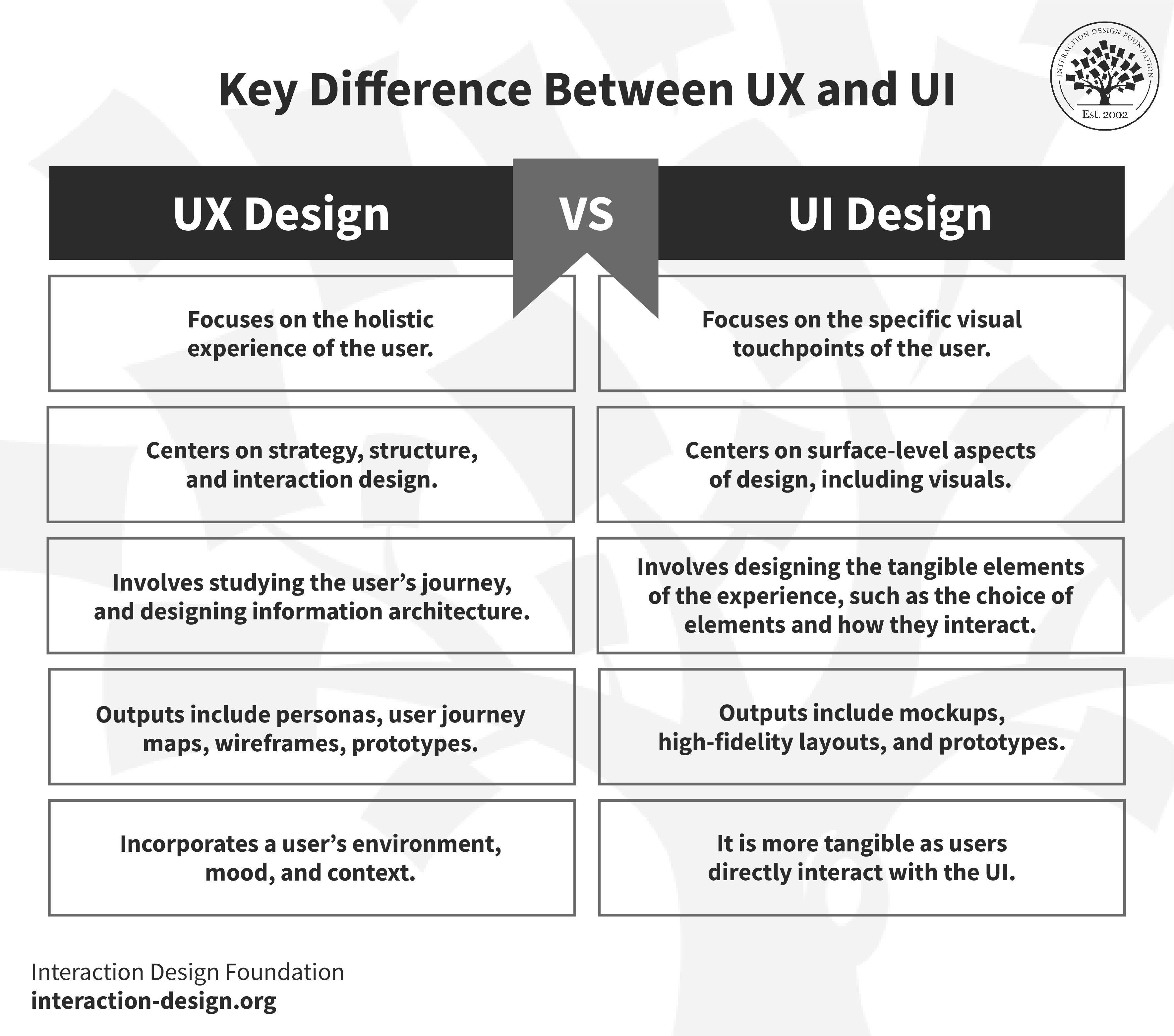
For a more detailed breakdown, the IxDF article we've been using has an excellent summary table and example.
UX vs UI: What's the Difference?
This final reading from the IxDF article explains how UX and UI work together harmoniously.
Please read the sections 'Why Is it Important to Know Both UX and UI?', 'Key Difference Between UX and UI With Example', and 'UX and UI Design: How Do They Work Together?'. Pay close attention to the table comparing the two and the example of the Shazam app.
Here is the comparison table from the article, which neatly summarizes the key differences:
Connecting to Your Background: Localization
Here is where your background in translation and localization gives you a unique advantage. Just as text needs to be localized, not just translated, the entire user experience must be adapted for different cultures. This concept neatly maps onto the UX/UI distinction.
UX Localization Guide: Creating User-Friendly Global Experiences
This article from Lokalise, a company specializing in localization software, directly connects these ideas to your field of expertise.
Read the short section 'What is UX localization and why is it different from UI localization?'. Note the powerful analogy: 'If UX localization is thinking, UI localization is doing.'
This distinction is crucial. UX localization involves adapting the core experience—things like payment methods, date formats, or even the overall flow—to meet local expectations. UI localization is the practical implementation of those decisions, like ensuring translated text fits in the buttons and that the right currency symbol is displayed. As a future UX writer, you will be deeply involved in ensuring the thinking (UX) is sound before the doing (UI implementation) can happen effectively on a global scale.
Lesson Summary
Congratulations on completing your first lesson! Here are the key takeaways:
- User Experience (UX) Design is the holistic process of designing a user's entire journey with a product to be meaningful, easy, and enjoyable. It's about the structure, flow, and feeling.
- User Interface (UI) Design is the craft of designing the visual and interactive elements of that product, such as buttons, icons, and layouts. It's about the look and interactivity.
- Relationship: UX and UI are separate disciplines but are fundamentally intertwined. Good products require a seamless integration of both. A common analogy is that UX is the skeleton and UI is the skin.
- Relevance to Localization: This distinction is mirrored in localization, where UX localization is the strategic adaptation of the experience, and UI localization is its practical, visual implementation.
In our next lesson, we will dive deeper into the philosophy that drives all UX work by exploring the concept of user-centered design and its core principles. This will build directly on our understanding of UX as an experience designed for, and around, the user.