Hello! Welcome to the final lesson of our first module.
Over the last few lessons, we've built a strong theoretical foundation for understanding User Experience. We've defined UX and user-centered design, and you've been introduced to two of the most fundamental tools in a UX practitioner's toolkit: user personas and user journey maps. In our last session, we saw how these tools fit into the wider product design process, helping teams—including writers—define problems and empathize with users.
Today, we shift from theory to practice. Your learning outcome is to create a simple user persona and user journey map for a fictional application. This lesson serves as the hands-on exercise for this module, directly addressing your preference for putting theory into action. By creating these documents yourself, you'll start developing the empathetic, user-focused mindset that is essential for great UX writing.
Let's begin.
Part 1: Creating a User Persona
As a quick refresher, a user persona is a fictional, yet realistic, representation of a key audience segment. It's not an imaginary friend, but a composite character based on research about real users. Its purpose is to answer the question: "Who are we designing for?"
For a UX writer, a persona helps you understand your audience's motivations, vocabulary, tech-savviness, and frustrations, which in turn guides your choices in voice, tone, and terminology.
To see how personas are built and used, let's start with a short video.
This video from UX Mastery, 'How To Create UX Personas', gives a great overview of what personas are and the process of creating them.
Please watch from the beginning to 02:11. Focus on how researchers gather information and look for patterns to create a distinct, memorable representation of a user group.
Now, let's look at the specific components that make up a strong persona. The following article provides a clear, step-by-step guide.
How to Define a User Persona [2025 Complete Guide]
The article 'How to Define a User Persona' from CareerFoundry breaks down the process into manageable steps. We will use its structure for our exercise.
Read the sections '3. How do you define a user persona?', including all four steps, and '4. Additional suggestions'. Pay close attention to the four key components: Header, Demographic Profile, End Goal(s), and Scenario.
Your First Practical Exercise: The Persona
It's time to build your first persona. We'll use a fictional app that should feel familiar given your background:
- Fictional App: "LinguaConnect," a mobile app that helps users practice conversational skills in a new language through interactive dialogues with an AI tutor.
Your task is to create a persona based on the following user description. Use the four-part structure from the CareerFoundry article you just read (Header, Demographics, End Goal, Scenario).
User Description for "LinguaConnect":
Name: Elena. She is a 32-year-old marketing manager who often travels for international conferences. She studied French in university but feels her conversational skills are rusty and lack professional vocabulary. She is tech-savvy and uses apps for productivity and learning. She feels anxious about making mistakes when practicing with native speakers, which has stopped her from improving. Her goal is to confidently handle small talk and basic professional conversations during her next work trip to Paris in three months.
Action:
Take about 15 minutes to write out a full persona for Elena. Don't worry about making it perfect. The goal is to practice organizing user information into a structured, empathetic profile. You can model your output on the example below.

Part 2: Creating a User Journey Map
With our persona, Elena, brought to life, we now have a clear "who." The next step is to map out "what" she does. A user journey map visualizes the step-by-step experience a user has while interacting with a product to achieve a specific goal.
Importantly, it doesn't just list actions; it also captures the user's thoughts, feelings, and pain points at each stage. For a UX writer, this is invaluable. It tells you where communication is needed and what emotional state the user is in, helping you choose the right words and tone.
Let's start by clarifying the components of a user journey map.
User Journey Mapping: What is it & How to do it - Figma
This article from Figma, 'User Journey Mapping', clearly defines the concept and its key components. It also makes an important distinction between a user journey and a customer journey.
Please read the sections 'What is user journey mapping?', 'Key components of a user journey map', and 'How to create a user journey map in five steps'. Focus on understanding the elements like phases, actions, emotions, and opportunities.
The article mentioned a key difference:
- Customer Journey Map: Broad view of the entire lifecycle with a brand (e.g., seeing an ad, buying in a store, calling support).
- User Journey Map: Focused view of a user interacting with the product itself to achieve a goal.
For our exercise, we will create a user journey map. To understand the typical stages of this journey, the following video provides a helpful example.
How To Create a Customer Journey Map 2026 | Customer Journey Mapping Tutorial | Simplilearn
This video from Simplilearn, though titled for a customer journey map, does an excellent job of illustrating the different phases and how to think through each one.
Watch the segment from 04:43 to 08:23. Notice how the user's goals, touchpoints, emotions, and pain points are considered at each stage of their journey.
Your Second Practical Exercise: The Journey Map
Now, let's map out Elena's experience with the "LinguaConnect" app.
Scenario & Goal:
Elena has heard about language apps and wants to find one to help her prepare for her Paris trip. Her goal for this journey is: "Find, sign up for, and complete her first AI conversation on LinguaConnect."
Action:
Take about 15 minutes to create a simple journey map. You can draw a table with the following rows and columns. For each phase, brainstorm what Elena is doing, thinking, and feeling.
Journey Map Template:
| 1. Awareness | 2. Consideration | 3. Onboarding | 4. First Use | |
|---|---|---|---|---|
| Actions | What does she do? | What does she do? | What does she do? | What does she do? |
| Thoughts | What is she thinking? | What is she thinking? | What is she thinking? | What is she thinking? |
| Feelings | How does she feel? | How does she feel? | How does she feel? | How does she feel? |
| Pain Points & Opportunities | What are the friction points? | What are the friction points? | What are the friction points? | What are the friction points? |
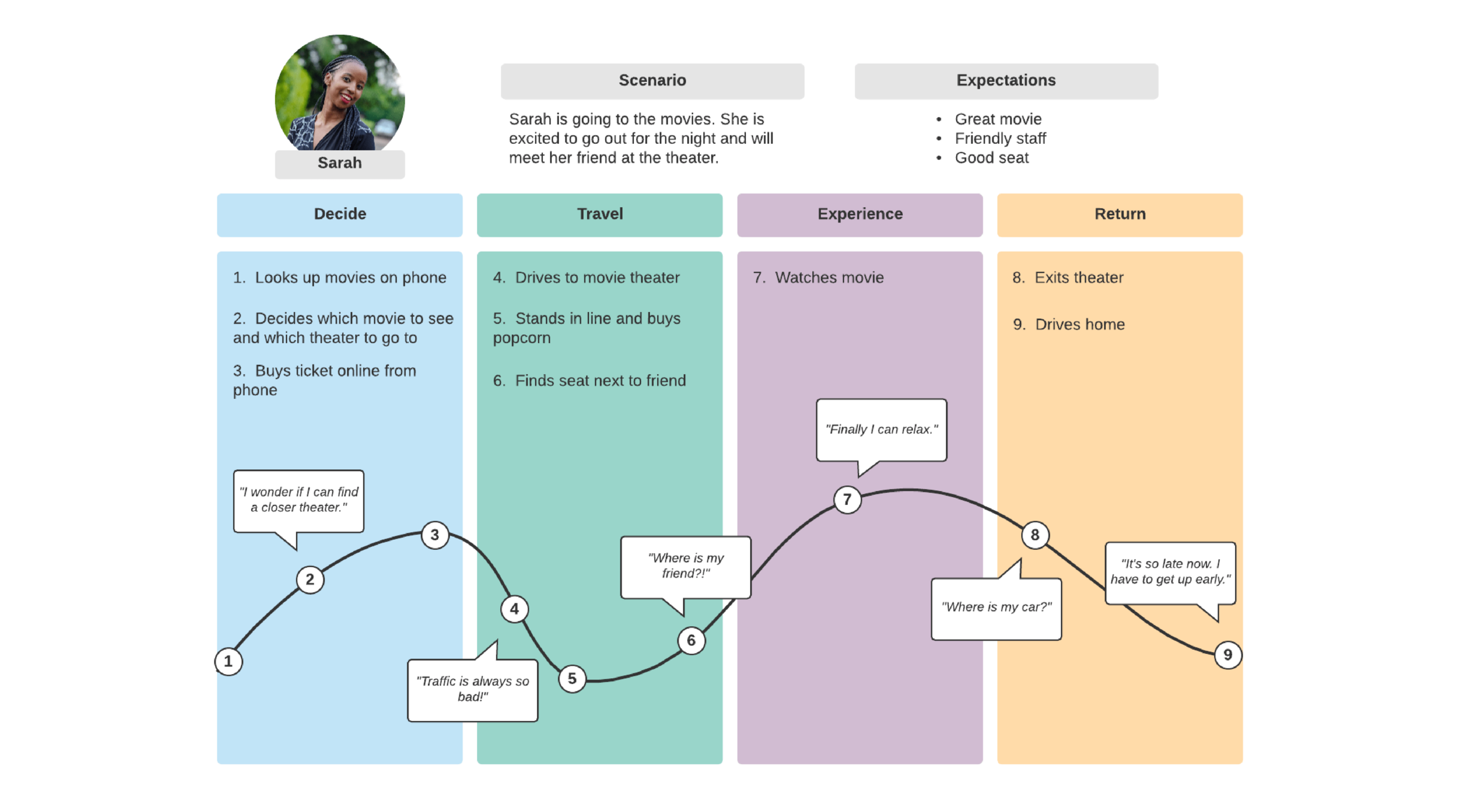
To help you visualize the final output, here is an example of a simple journey map.
Conclusion
Congratulations on completing the first practical workshop of this course! Today you moved from abstract concepts to tangible artifacts. By creating a user persona and a user journey map, you've practiced the foundational skill of building empathy for your users.
Here are the key takeaways:
- User Personas are research-based profiles that answer "Who are we designing for?" They typically include demographics, goals, motivations, and a background scenario.
- User Journey Maps visualize the steps, thoughts, and feelings of a persona achieving a goal within a product.
- These tools are not just for designers; they are critical for UX writers to understand the user's context, mindset, and emotional state at every point of interaction.
- The "Thoughts," "Feelings," and "Pain Points" sections of a journey map are goldmines for identifying where clear, helpful, and empathetic language is most needed.
You have now completed the first module, "Foundations of User Experience." You've built a solid base upon which we can now construct your UX writing skills.
In our next lesson, we will begin Module 2, "Introduction to UX Writing." We will formally define what UX writing is and, crucially, distinguish it from other forms of writing you may know, such as copywriting, technical writing, and the work you've done in translation.