Hello! Welcome to the final lesson of your Kubernetes crash course.
Throughout this week, we've journeyed from the foundational architecture of Kubernetes to managing workloads, networking, storage, and security. In our last lesson, you learned how to harden your applications by configuring securityContext for Pods and containers, enforcing the principle of least privilege at the process level.
Now, we'll tie everything together. This lesson addresses the final learning outcome: Describe high-level approaches for integrating Kubernetes deployments into CI/CD pipelines. We will explore how to automate the deployment of the declarative YAML manifests you've learned to write, moving from manual kubectl apply commands to robust, automated workflows.
Given your background as a Platform Engineer using Azure DevOps, Terraform, and various scripting languages, the concepts of Continuous Integration and Continuous Deployment (CI/CD) are already very familiar to you. This lesson will bridge your existing expertise with the Kubernetes ecosystem, focusing on the specific strategies and patterns used to deploy applications to a cluster. This is a crucial topic for any Platform Engineering interview.
1. The Anatomy of a Kubernetes CI/CD Pipeline
A CI/CD pipeline for Kubernetes follows the same high-level goals as any other pipeline: automate the process of building, testing, and releasing software. However, the specific steps are tailored to a containerized, declarative world.
The pipeline is typically divided into two main parts:
- Continuous Integration (CI): This phase focuses on the application code. It involves compiling code, running tests, scanning for vulnerabilities, and—most importantly—packaging the application as a container image.
- Continuous Deployment (CD): This phase focuses on the infrastructure state. It takes the container image produced by the CI phase and deploys it to the Kubernetes cluster by updating the relevant Kubernetes manifests.
To get a comprehensive overview of what a modern pipeline looks like from start to finish, the following video provides an excellent walkthrough, framed perfectly for a DevOps interview context.
HOW TO ANSWER CICD PROCESS IN AN INTERVIEW| DEVOPS INTERVIEW QUESTIONS #cicd#devops#jenkins #argocd
Watch this video from Abhishek.Veeramalla to understand the end-to-end flow of a typical CI/CD pipeline that targets Kubernetes. It covers all the essential stages from code commit to deployment.
Watch from the beginning until 11:19. Pay close attention to the distinction between the CI stages (checkout, build, test, scan, image build, image scan, push to registry) and the CD stages that follow.
As the video explains, the CI process concludes with a versioned container image being pushed to a container registry (like Docker Hub, AWS ECR, or Azure ACR). The critical question for the CD phase is: How do we get this new image running in our cluster?
There are two dominant architectural approaches to answer this question: the Push model and the Pull model.
2. Deployment Strategies: Push vs. Pull
The fundamental difference between these two models lies in what initiates the deployment and where the cluster credentials live.
- Push-based Deployment: An external system (like Jenkins, GitLab CI, or your familiar Azure Pipelines) actively "pushes" the new configuration to the Kubernetes cluster. This is often done by running commands like
kubectl applyorhelm upgradefrom the CI/CD server. - Pull-based Deployment (GitOps): An agent running inside the Kubernetes cluster "pulls" the desired configuration from a Git repository. The CI pipeline's only job is to update the manifests in that Git repository; it never directly communicates with the cluster.
The article below provides an excellent breakdown of these two approaches.
Pull vs Push Kubernetes Deployment: Which to Choose?
Let's dive into the details of push vs. pull deployments with this article from Plural. It clearly contrasts the two models and discusses their implications for security and scalability.
Please read the following sections: 'Pull vs. Push: What’s the Difference in Kubernetes Deployments?' to understand the core concepts. 'How Their Architectures Differ' for a look at the communication flow. 'Comparing Security and Access Control' to grasp the critical security differences. 'Integrate with Your CI/CD Pipeline' to see how the role of the CI pipeline changes in each model.
To visualize these two workflows, consider the following diagrams.
This first image shows a detailed, real-world example of a push-based pipeline using Azure DevOps, which should look very familiar to you. Notice the final steps where the CD pipeline connects to AKS to deploy the application. This requires the Azure DevOps service to have credentials for the cluster.

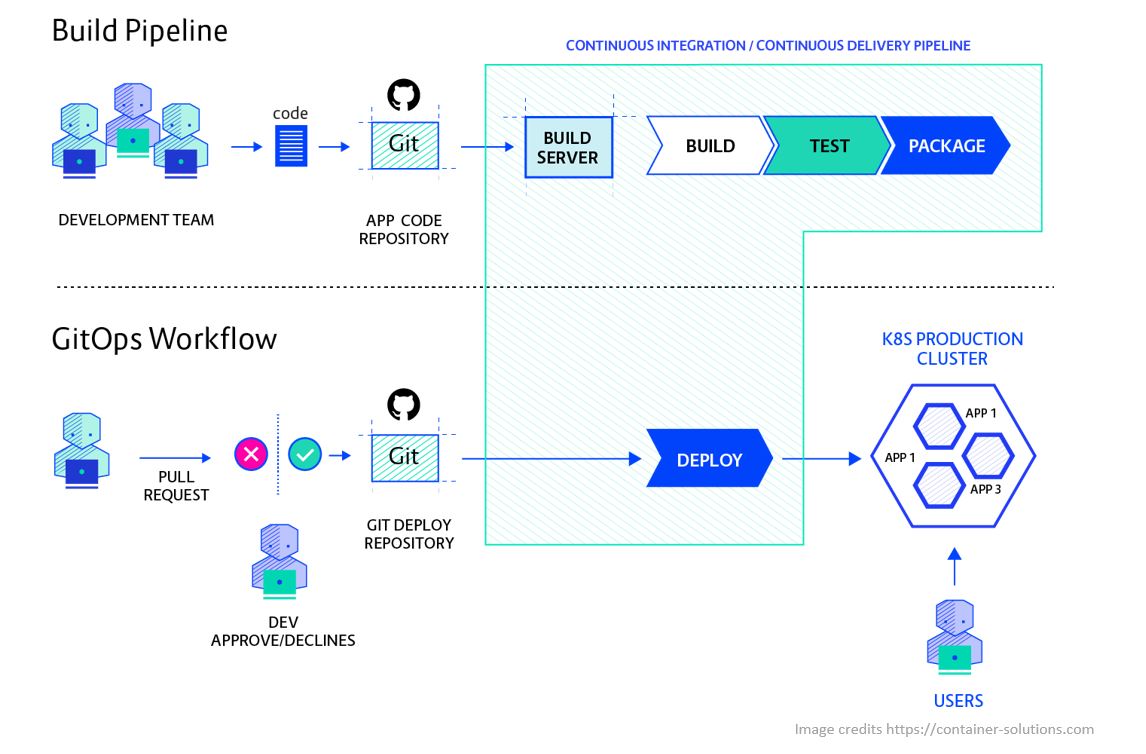
In contrast, the pull-based model introduces a different flow, often referred to as GitOps.
3. A Deeper Look into GitOps (The Pull Model)
GitOps is a powerful paradigm for managing Kubernetes and other cloud-native systems. It treats a Git repository as the single source of truth for the desired state of your infrastructure. Any changes to the system—whether deploying a new application or updating a configuration—are made via a pull request to this repository.
This approach has several significant advantages:
- Enhanced Security: The CI system and developers don't need direct access to the Kubernetes cluster. The API server can even be kept on a private network.
- Improved Auditability: Every change to the system is a commit in a Git repository, giving you a complete, auditable history of who changed what, when, and why.
- Consistency and Reliability: An in-cluster agent continuously compares the live state with the state defined in Git, automatically correcting any configuration drift.
- Easy Rollbacks: Reverting a change is as simple as running
git revertand letting the GitOps agent sync the previous state.
The following video provides one of the clearest explanations of GitOps.
What is GitOps, How GitOps works and Why it's so useful
The video 'What is GitOps' from TechWorld with Nana is a fantastic resource for understanding the principles and benefits of the pull-based model.
Watch from 4:23 to 11:18. Focus on: How GitOps uses pull requests for collaboration and review (4:23). The difference between push and pull-based deployment models (6:38). The key benefits, including easy rollbacks and improved security (8:49).
The diagram below offers a simplified but effective visual contrast between a traditional push pipeline and a GitOps workflow.
Test your understanding!
Imagine you are a Platform Engineer responsible for 50 Kubernetes clusters running in different geographic regions, some with restricted network access. Your CISO is concerned about storing cluster administrator credentials in your central CI/CD tool (e.g., Jenkins or Azure DevOps).
Which deployment model, push or pull, would be more suitable for this scenario, and why? Name at least two specific reasons.
Show answer
The pull-based (GitOps) model would be far more suitable.
Reasons:
- Security: The pull model eliminates the need to store credentials for all 50 clusters in the central CI/CD tool. Each cluster's GitOps agent uses its own local ServiceAccount to apply changes, drastically reducing the attack surface. A compromise of the central CI tool would not immediately lead to a compromise of all clusters.
- Scalability & Networking: With clusters in different regions and with restricted network access, a push model would be a nightmare. You would need to configure complex networking (VPNs, bastion hosts) to allow the central CI server to "push" to each cluster's API server. In a pull model, each agent only needs outbound internet access to "pull" from the Git repository, which is much simpler and more secure to manage at scale.
4. Choosing the Right Tools
The ecosystem of CI/CD tools for Kubernetes is vast. Your choice depends on your specific needs, existing environment, and preferred deployment model. Based on your experience, you'll recognize many of these.
| Category | Push Model Examples | Pull Model (GitOps) Examples |
|---|---|---|
| CI/CD Orchestrator | Jenkins, Azure DevOps, GitLab CI, GitHub Actions | Jenkins, Azure DevOps, GitLab CI, etc. (But their role ends after pushing to Git) |
| Deployment Executor | The CI/CD Orchestrator itself (kubectl, helm) |
Argo CD, Flux CD (in-cluster agents) |
| Manifest Management | Plain YAML, Kustomize, Helm | Plain YAML, Kustomize, Helm |
As you can see, tools like Azure DevOps are highly flexible. You can use them to implement a traditional push-based pipeline, or you can adapt them to a GitOps workflow where their final step is simply to commit a change to a Git repository.
Conclusion and Course Wrap-up
Congratulations on completing this Kubernetes crash course!
In this final lesson, we've explored how to bring automation to your Kubernetes deployments. You now understand the key approaches for integrating Kubernetes into a CI/CD pipeline.
Key Takeaways:
- A Kubernetes CI/CD pipeline consists of a CI phase (building and pushing a container image) and a CD phase (deploying that image to the cluster).
- The two primary deployment strategies are push-based and pull-based (GitOps).
- Push models are a direct extension of traditional CI/CD, where the CI server executes deployment commands. This is simpler to start with but poses security and scalability challenges.
- Pull models (GitOps) use an in-cluster agent (like Argo CD or Flux) to pull the desired state from a Git repository. This is considered the modern standard for being more secure, scalable, and resilient.
- In a GitOps workflow, the CI pipeline's responsibility shifts: instead of deploying to the cluster, it updates manifests in a Git repository, creating a clean separation of concerns.
You started this week with a foundational understanding of containers and have rapidly progressed through Kubernetes architecture, workloads, networking, storage, security, and now, automated deployments. You have built a solid, broad understanding of the entire ecosystem, which will be invaluable in your role as a Platform Engineer and in any upcoming interviews.
What's Next?
- Practice: Leverage your homelab! Set up a small K8s cluster (using minikube, kind, or k3s) and try to build a simple CI/CD pipeline. Start with a push-based model using GitHub Actions, then try installing Argo CD to convert it to a pull-based workflow.
- Go Deeper: We kept topics like Helm, Kustomize, and StatefulSets at a high level. Diving deeper into these will further strengthen your practical skills.
- Certification: If you want to formalize your knowledge, consider studying for the Certified Kubernetes Administrator (CKA) or Certified Kubernetes Application Developer (CKAD) exams.
It has been a pleasure guiding you through this course. Best of luck with your continued learning and career goals