Hello! Welcome to the fifth and final lesson in our "Kubernetes Core Concepts" module.
In our last session, we contrasted the imperative and declarative approaches to managing Kubernetes objects. We established that using declarative YAML manifests with kubectl apply is the cornerstone of building reliable, version-controlled infrastructure, a practice that aligns well with your experience using Terraform.
Today, we'll address a fundamental question: now that we can declare resources, how do we organize them? This lesson covers Kubernetes Namespaces, the primary tool for resource isolation and organization. By the end of this 60-minute lesson, you will be able to explain how namespaces are used to create logical partitions within your cluster, a crucial skill for managing multi-team, multi-environment, or multi-application setups.
What are Namespaces?
Imagine your Kubernetes cluster is a large, open-plan office. If everyone works in the same space, it can get chaotic. People might accidentally use each other's equipment, naming mix-ups can occur, and it's hard to tell which resources belong to which team.
Namespaces act like virtual walls within that office, creating separate rooms for different teams or projects. Each room has its own set of resources, and what happens in one room generally doesn't affect another.
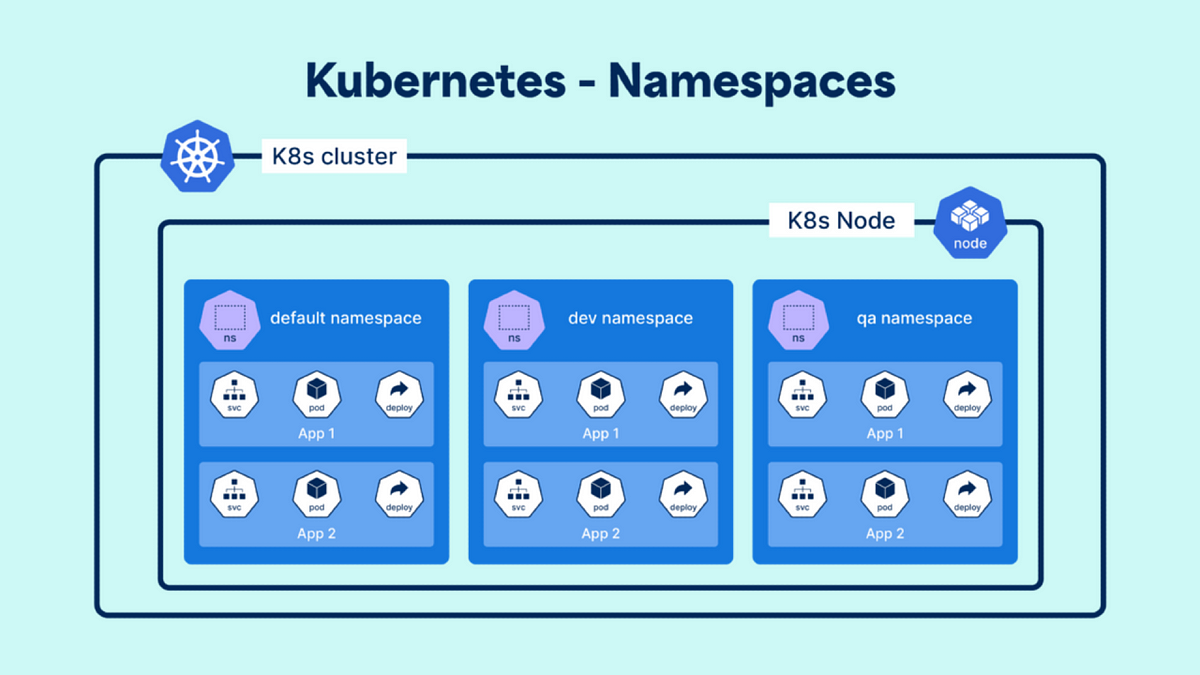
In technical terms, a namespace provides a scope for names. A resource name only needs to be unique within a namespace, not across the entire cluster. This simple feature unlocks several powerful use cases.
Why Use Namespaces?
Using namespaces is a best practice for anything beyond a small, single-user cluster. They are essential for:
- Organization: Grouping all resources related to a specific application or microservice (e.g., pods, services, configmaps for a
billing-service). - Preventing Naming Conflicts: A
developmentteam and atestingteam can both deploy a service nameddatabasein their respective namespaces without any collision. - Access Control: You can use Role-Based Access Control (RBAC) to grant a team permissions to manage resources only within their own namespace, preventing them from accidentally modifying production services.
- Resource Management: You can set
ResourceQuotason a namespace to limit the total amount of CPU, memory, or storage a specific team or application can consume. This prevents one tenant from starving others of resources.
The following video from "TechWorld with Nana" provides an excellent overview of these use cases and the core concepts behind namespaces.
Kubernetes Namespaces Explained in 15 mins | Kubernetes Tutorial 21
This video explains the fundamental 'what' and 'why' of namespaces and discusses their most common use cases, which are directly relevant to your work as a Platform Engineer managing shared infrastructure.
Please watch the following segments: Use Case: Grouping Resources (02:46 - 04:55): This covers the basic organization benefits. Use Case: Avoiding Conflicts (04:55 - 06:05): Explains how namespaces enable multi-tenancy. Use Case: Different Environments (06:05 - 07:29): Shows how to run dev/staging/prod in one cluster. Use Case: Limiting Resources (07:29 - 08:45): Introduces RBAC and ResourceQuotas for isolation.
Working with Namespaces in Practice
Default Namespaces
When a Kubernetes cluster is provisioned, it comes with a few namespaces already created:
default: The namespace for objects you create without specifying one. It's fine for initial experimentation but should be avoided for real applications.kube-system: This is where components of the Kubernetes control plane itself live, likeetcd, the API server, and the scheduler. You should almost never create or modify anything in this namespace.kube-public: Readable by all users (even unauthenticated ones). It's reserved for cluster information that needs to be publicly visible.kube-node-lease: Contains objects related to node heartbeats to determine availability.

Creating and Managing Namespaces
You can manage namespaces using kubectl.
-
List all namespaces:
kubectl get namespaces # Short alias kubectl get ns -
Create a namespace (Imperative):
kubectl create namespace development -
Create a namespace (Declarative):
As we learned in the last lesson, the declarative approach is best for production. You define the namespace in a YAML file.development-ns.yaml:apiVersion: v1 kind: Namespace metadata: name: developmentThen apply it:
kubectl apply -f development-ns.yaml
Deploying Resources into a Namespace
To place an object into a specific namespace, you have two options:
-
Use the
-n(or--namespace) flag withkubectl:kubectl apply -f my-pod.yaml -n development -
Specify it in the YAML file's metadata (Best Practice):
This is the recommended approach for Infrastructure as Code, as it keeps the desired state fully declared in your version-controlled files.my-nginx-pod.yaml:apiVersion: v1 kind: Pod metadata: name: my-nginx namespace: development # <-- Specify the namespace here spec: containers: - name: nginx image: nginx:1.14.2
Understanding Namespace Isolation
While namespaces provide logical separation, it's crucial to understand what they do and do not isolate.
Resource Scoping
Most common resources like Pods, Deployments, Services, ConfigMaps, and Secrets are namespaced. However, some low-level resources are cluster-scoped, meaning they are not tied to any single namespace. These include:
NodePersistentVolume(though the claim to use it,PersistentVolumeClaim, is namespaced)StorageClassClusterRoleandClusterRoleBinding
This distinction is important. You can't, for example, assign a worker node to a single namespace.
Network Communication
By default, namespaces do not provide network isolation. A Pod in one namespace can communicate with a Pod in any other namespace if it knows its IP address.
The key difference lies in service discovery. Kubernetes provides an internal DNS service. A service's DNS name (e.g., my-service) resolves only within its own namespace. To reach a service in a different namespace, you must use a Fully Qualified Domain Name (FQDN).
The FQDN format is: <service-name>.<namespace-name>.svc.cluster.local
The following video demonstrates this crucial concept by trying to connect services across namespaces. The exploration of /etc/resolv.conf inside the Pod is particularly insightful for understanding how this DNS resolution works under the hood.
Day 10/40 - Kubernetes Namespace Explained - CKA Full Course 2025
This video from 'Tech Tutorials with Piyush' provides an excellent hands-on demonstration of cross-namespace communication, highlighting the difference between IP-based and DNS-based connections.
Watch the following two segments closely: Pod-to-Pod Communication (12:59 - 16:27): This shows that pods can reach each other directly via their cluster-wide IP addresses, regardless of namespace. Service-to-Service Communication (19:40 - 25:22): This is the most important part. It demonstrates that connecting via a simple service name fails across namespaces, but succeeds when using the Fully Qualified Domain Name (FQDN). Pay attention to the inspection of the resolv.conf file.
Test your understanding!
You are deploying a web application that consists of a frontend deployment in the webapp-ns namespace and a user-api service in the backend-ns namespace. The frontend application needs to make HTTP requests to the user-api.
How would you configure the frontend application's connection URL to reliably connect to the user-api service?
Show answer
You would configure the frontend application to use the Fully Qualified Domain Name (FQDN) of the backend service. The URL would look something like this:
http://user-api.backend-ns.svc.cluster.local
Using just http://user-api would fail because the DNS lookup would be performed within the webapp-ns namespace, where the user-api service does not exist.
Conclusion
This lesson concludes our module on Kubernetes Core Concepts. We've seen that namespaces are a simple but powerful feature for imposing order and control on a cluster. As a Platform Engineer, you will constantly use namespaces to carve out environments for development teams, separate production workloads, and enforce security and resource policies.
Key Takeaways:
- Namespaces are virtual clusters that provide logical isolation and organization for resources.
- Their primary use cases are preventing name collisions, managing access control (RBAC), and enforcing resource limits (ResourceQuotas).
- Most Kubernetes objects are namespaced, but some low-level resources like
NodeandPersistentVolumeare cluster-scoped. - Deploying resources into a namespace is best done by adding the
namespacefield to the object'smetadatain its YAML manifest. - By default, namespaces are not network-isolated. Service discovery across namespaces requires using a Fully Qualified Domain Name (FQDN).
With this foundational knowledge of the Kubernetes architecture, the control plane, declarative management, and resource organization, you are now ready to get your hands dirty. In our next module, "Cluster Interaction and Troubleshooting," we will dive into the practical kubectl commands you'll use daily to inspect, manage, and debug applications running in your cluster.