Hello! Welcome to your one-week crash course on Kubernetes. I'm excited to guide you through the essentials to prepare you for your Platform Engineering interviews.
In this first lesson, we'll start with the heart of Kubernetes: the control plane. Your experience with managed services like EKS, AKS, and GKE involves interacting with a Kubernetes cluster where the control plane is managed for you. Today, we'll pull back the curtain to understand the "brain" behind the operations. By the end of this lesson, you will be able to describe the role and responsibilities of the four core control plane components: the API server, scheduler, controller manager, and etcd.
Let's begin.
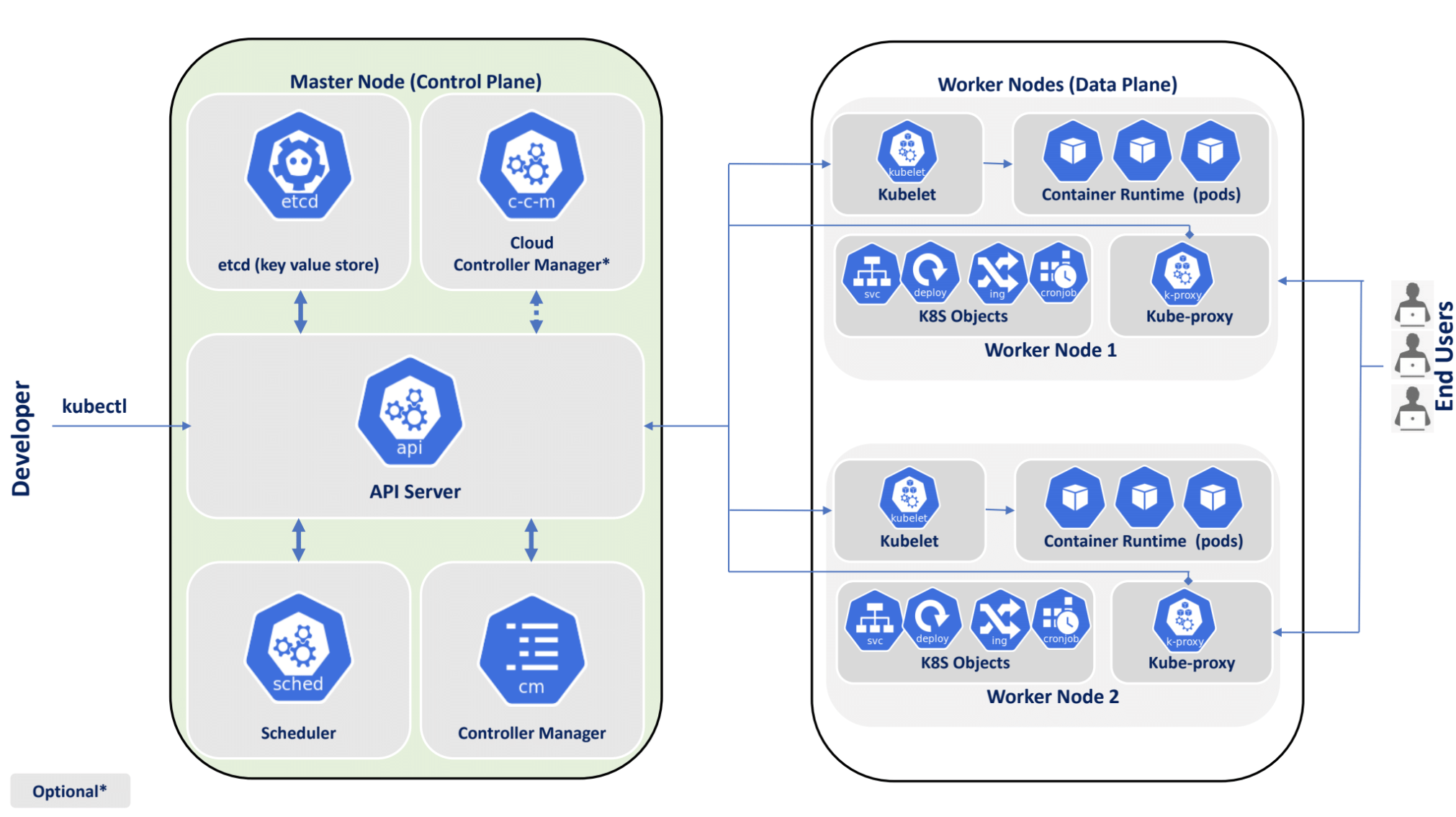
The Kubernetes Architecture: A High-Level View
At its core, a Kubernetes cluster is a distributed system composed of two main types of machines, or nodes:
- Control Plane Nodes (formerly Master Nodes): These nodes run the components that collectively form the cluster's "brain." They make global decisions about the cluster (like scheduling applications) and are responsible for detecting and responding to cluster events.
- Worker Nodes: These are the "muscles" of the cluster. They run the actual applications and workloads you deploy.
This separation of concerns between decision-making (control plane) and execution (worker nodes) is a fundamental design principle that enables Kubernetes to be so scalable and resilient.
To better visualize this, let's start with a short, introductory video.
Kubernetes Architecture Explained: Exploring etcd, Schedulers, Managers, and Node Components
The following clip from KodeKloud uses a great ship analogy to explain the high-level architecture. It will help you build a mental model of the control plane's role before we dive into its specific components.
Watch the segment from the beginning until 02:30. Focus on the distinction between the 'control ships' (control plane) and the 'cargo ships' (worker nodes).
Now that you have a high-level picture, let's explore each component of the control plane in detail.
The Control Plane Components
The control plane consists of four main services that can run on a single control plane node or be replicated across multiple nodes for high availability.
For a comprehensive overview, I recommend reading the following article. It provides an excellent deep dive into the architecture from a distributed systems perspective, which should align well with your platform engineering background.
Kubernetes Internal Architecture: Deep Dive
This article, 'Kubernetes Internal Architecture: Deep Dive' by Alex Razkevich, offers a thorough explanation of the control plane. We will refer to different parts of it as we discuss each component.
Please read the 'Introduction' and 'The Control Plane: The Brain of the Distributed System' sections to solidify your understanding of the control plane's overall function.
Now, let's break down the components.
1. etcd: The Cluster's Source of Truth
Every Kubernetes cluster has an etcd instance. Think of it as the cluster's database or its memory.
- Role:
etcdis a consistent and highly-available distributed key-value store used as Kubernetes' backing store for all cluster data. - Responsibilities:
- It stores the entire state of the cluster, including the configuration data (e.g., Pod definitions, Deployments, Services) and the runtime state (e.g., which Pod is running on which node, health status).
- It ensures data consistency across the cluster.
etcduses the Raft consensus algorithm, which guarantees that all control plane nodes have a consistent view of the data, even if some nodes fail. This is crucial for making reliable decisions.
Given your experience with Kafka, you can think of etcd's role as being conceptually similar to the role ZooKeeper plays in managing broker metadata, topic configurations, and consumer offsets in older Kafka setups. It's the central, reliable source of truth for the distributed system.
Kubernetes Internal Architecture: Deep Dive
To understand etcd's role in more detail, let's return to the 'Kubernetes Internal Architecture' article.
Read the section titled 'etcd'. Pay close attention to the concepts of 'Raft Consensus Protocol' and 'Strong Consistency'.
2. kube-apiserver: The Gateway to the Cluster
The API Server is the front door to the control plane and, by extension, the entire cluster.
- Role: It exposes the Kubernetes API, acting as the central management point.
- Responsibilities:
- Processes API Requests: Any time you use
kubectl, or any other tool interacts with the cluster, it's talking to the API Server. - Authentication & Authorization: It validates who is making a request and whether they have permission to perform the requested action.
- Validation: It validates the syntax and structure of the objects (like a Pod manifest) being created or updated.
- Orchestration: It's the only component that communicates directly with
etcd. All other components must go through the API Server to read or write the cluster state. This centralization ensures consistency and security.
- Processes API Requests: Any time you use
The API Server is stateless, meaning it doesn't store data itself. This allows you to run multiple instances and put them behind a load balancer for high availability.
Kubernetes Internal Architecture: Deep Dive
Let's explore the API Server's responsibilities further.
Read the 'API Server' section in the same article. Focus on its role as a 'Gateway' and its 'Stateless Service Design'.
3. kube-scheduler: The Matchmaker
Once a request to create a Pod is accepted by the API Server and stored in etcd, the Pod exists in the cluster's "desired state," but it isn't running anywhere yet. That's where the Scheduler comes in.
- Role: To assign newly created Pods to a healthy Worker Node that can run them.
- Responsibilities:
- It continuously "watches" the API Server for Pods that have been created but do not yet have a node assigned.
- For each Pod, it performs a two-step process:
- Filtering: It finds a set of possible nodes that can run the Pod. This involves checking constraints like resource requirements (CPU, RAM), port availability, and whether the node has specific labels.
- Scoring: It ranks the suitable nodes based on a set of scoring rules (e.g., picking the node with the least-utilized resources) and picks the one with the highest score.
- Finally, it informs the API Server of its decision, and the API Server updates the Pod's definition in
etcdto include the assigned node's name.
It's important to note: the Scheduler only decides where the Pod should run; it doesn't actually run the Pod.
Kubernetes Architecture explained | Kubernetes Tutorial 15
This short clip from 'TechWorld with Nana' provides a very clear and concise explanation of the Scheduler's role.
Watch the segment from 06:36 to 08:00. Notice how the scheduler calculates resource needs and selects the best node.
4. kube-controller-manager: The Reconciliation Engine
The Controller Manager is the component that works tirelessly to make the cluster's actual state match the desired state stored in etcd.
- Role: It runs various "controllers," each responsible for managing a specific aspect of the cluster.
- Responsibilities:
- Each controller operates on a reconciliation loop (or control loop): it watches the API server for changes to resources it cares about, compares the desired state with the current state, and takes action to correct any discrepancies.
- Examples of controllers include:
- Node Controller: Responsible for noticing when nodes go down and taking appropriate action.
- Replication Controller: Ensures that the specified number of Pod replicas are running at all times.
- Deployment Controller: Manages rolling updates for applications.
This declarative, self-healing model is one of Kubernetes' most powerful features. You declare what you want (e.g., "I want 3 replicas of my web server"), and the controllers work to make it so. This aligns perfectly with the principles of Infrastructure as Code you're familiar with from using Terraform.
Kubernetes Internal Architecture: Deep Dive
The concept of reconciliation loops is central to how Kubernetes works. This section explains it well.
Read the section 'Controller Manager: The Reconciliation Pattern'. Focus on understanding the 'Reconciliation loop', 'Watch Pattern', and 'Controller Independence'.
Test your understanding!
You use kubectl to scale a Deployment from 3 to 5 replicas. Match the control plane component to the primary role it plays in this process.
Components:
etcdkube-apiserverkube-schedulerkube-controller-manager
Actions:
A. Receives the kubectl command, validates it, and updates the desired state.
B. Notices the mismatch between desired (5) and actual (3) replicas and starts creating new Pods.
C. Stores the updated state of the Deployment object.
D. Watches for the two new, unscheduled Pods and assigns them to suitable nodes.
Show answer
- A -> 2. kube-apiserver: It's the entry point for the
kubectlcommand and updates the state inetcd. - B -> 4. kube-controller-manager: The deployment controller within the manager detects the state mismatch and initiates the creation of two new Pods to meet the desired replica count.
- C -> 1. etcd: It's the database that durably stores the change from 3 to 5 replicas.
- D -> 3. kube-scheduler: It is responsible for finding homes for the two newly created Pods that don't have a node assigned yet.
Conclusion
In this lesson, we've unpacked the "brain" of a Kubernetes cluster—the control plane. You now understand the distinct yet collaborative roles of its core components.
Key Takeaways:
- etcd: The distributed, consistent key-value store that acts as the single source of truth for all cluster data.
- API Server: The central gateway that validates and processes all administrative requests, acting as the sole entry point to the cluster's state.
- Scheduler: The intelligent matchmaker that decides which worker node is best suited to run a new Pod based on various constraints.
- Controller Manager: A collection of controllers that run reconciliation loops to continuously drive the cluster's actual state toward the desired state.
Understanding these components is the first and most crucial step in mastering Kubernetes. It provides the "why" behind the commands you'll be running and the YAML files you'll be writing.
In our next lesson, we will shift our focus to the worker nodes and examine the components that bring your applications to life: the kubelet, kube-proxy, and the container runtime.