Hello! Welcome back to your Kubernetes crash course.
In our last lesson, we explored the "brain" of the cluster: the control plane, comprising etcd, the API server, the scheduler, and the controller manager. You learned how these components make global decisions and maintain the cluster's desired state.
Today, we shift our focus from the decision-makers to the "muscles"—the worker nodes. These are the machines where your applications actually run. By the end of this lesson, you will be able to describe the role and responsibilities of the three essential components that must be present on every worker node: the kubelet, the container runtime, and kube-proxy.
The Anatomy of a Worker Node
While the control plane orchestrates, the worker nodes execute. For a machine to join a Kubernetes cluster as a worker node, it must run specific software that allows it to be managed by the control plane and to run containerized workloads. These are known as the node components.

Let's begin with a video that provides a quick overview of these three components before we dive into each one individually.
Kubernetes Architecture explained | Kubernetes Tutorial 15
This short video from 'TechWorld with Nana' introduces the three key processes that run on every worker node. It's a great way to build an initial mental model.
Watch the segment from 01:12 to 04:23. Pay attention to the primary function assigned to each of the three node components.
Now that you have a high-level picture, let's examine each component's responsibilities in detail. For a definitive, high-level summary, you can also refer to the official Kubernetes documentation.
The official Kubernetes documentation provides concise, authoritative definitions for each node component. It's a great reference to have.
Read the section titled 'Node components'. This will give you the official definitions of kubelet, kube-proxy, and the container runtime.
1. The kubelet: The Node's Agent
The kubelet is the primary "node agent." It's the bridge between the control plane and the worker node. After the kube-scheduler assigns a Pod to a node, it's the kubelet on that node that takes over to bring the Pod to life.
Key Responsibilities:
- Registers the Node: When a node starts, the
kubeletregisters it with the control plane's API server, making it available for scheduling workloads. - Watches for Pods: It constantly watches the API server for Pods that have been scheduled to its node.
- Manages Container Lifecycles: For each Pod, the
kubeletreads the container specifications (thePodSpec) and instructs the container runtime to pull the required images and run the containers. - Health Monitoring: It continuously monitors the health of the containers and the Pod, running any configured liveness and readiness probes. If a container fails, the
kubeletcan restart it based on the Pod's restart policy. - Status Reporting: It reports the status of the node and its running Pods back to the API server, updating the cluster's "actual state."
Think of the kubelet as the on-site foreman for each worker node, carrying out the architectural plans sent down from the central office (the control plane).
For a deeper look into the many hats the kubelet wears, the following video provides an excellent breakdown.
Kubernetes Architecture: Deep Dive - Part 2
This video from Anton Putra offers a comprehensive deep dive into the kubelet's functions, including its interaction with the API server, resource management, and storage duties.
Watch the section on the 'kubelet' from 16:11 to 18:13. Note the different responsibilities listed, such as communicating with the API server, interacting with the container runtime, and managing resources.
2. The Container Runtime: The Engine
Kubernetes itself does not run containers. Instead, it relies on a separate piece of software called a container runtime. Your extensive experience with Docker means you're already very familiar with the most famous container runtime.
Key Responsibilities:
- Image Management: Pulling container images from registries (like Docker Hub, ACR, or ECR).
- Container Execution: Running and managing the lifecycle of containers (start, stop, pause) based on instructions from the
kubelet. - Resource Isolation: Utilizing low-level Linux kernel features like namespaces and cgroups to isolate container processes, filesystems, and networking.
A crucial concept here is the Container Runtime Interface (CRI). In the past, Kubernetes was tightly coupled with Docker. To support a wider ecosystem, Kubernetes introduced the CRI, a standardized API that allows any compatible container runtime to plug into the kubelet.
This is why modern Kubernetes clusters often use runtimes like containerd or CRI-O directly. They are lightweight runtimes designed to implement the CRI standard efficiently. Your Docker installation actually uses containerd under the hood.
Kubernetes Node Deep Dive: Kubelet, Container Runtime ...
This article provides a great scenario-based explanation of how the kubelet and container runtime work together to start a Pod. This should feel very familiar given your background.
Read the section 'The Role of the Container Runtime in Kubernetes'. Focus on 'Scenario 1: How Kubernetes Uses the Container Runtime to Start a Pod' to see the step-by-step interaction.
3. kube-proxy: The Network Plumber
The kube-proxy is a network proxy that runs on each node and is a key component in enabling Kubernetes networking. Its primary job is to make sure network traffic gets to the right Pods.
Key Responsibilities:
- Service Discovery: It watches the API server for the creation and removal of Service and Endpoint objects. (Endpoints are the lists of Pod IPs that back a Service).
- Network Rule Management: When a Service changes,
kube-proxyupdates network rules on the node itself. These rules capture traffic destined for a Service's virtual IP (ClusterIP) and redirect it to one of the backing Pods. - Load Balancing: By distributing traffic across all the Pods that are part of a Service,
kube-proxyprovides basic load balancing.
It typically does this using one of three modes: iptables, IPVS, or userspace. iptables and IPVS are both built-in Linux kernel features, making them highly efficient. IPVS is generally preferred for very large clusters with thousands of services.
Your experience with Envoy proxy is relevant here. While kube-proxy is simpler, they share the fundamental goal of intelligently routing traffic based on a dynamic configuration. kube-proxy handles the basic L4 (TCP/UDP) routing for Services, while tools like Envoy are often used for more advanced L7 (HTTP) routing, which we'll touch on when we discuss Ingress.
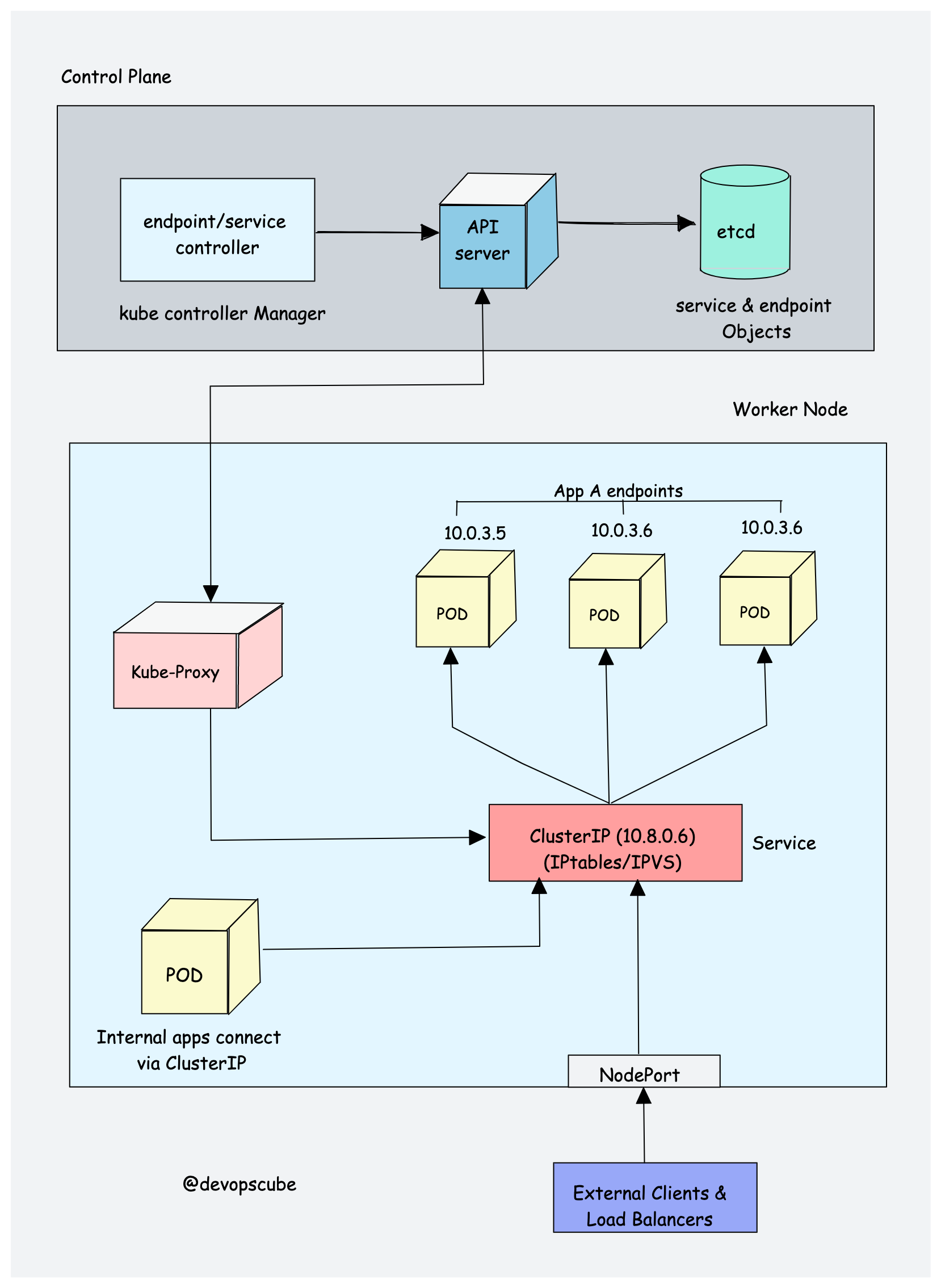
The following reading provides excellent scenarios that illustrate how kube-proxy enables service communication and handles failures.
Kubernetes Node Deep Dive: Kubelet, Container Runtime ...
Let's review two scenarios that demonstrate kube-proxy's critical role in service discovery and high availability.
Read the section 'Kube-Proxy’s Impact on Networking in Kubernetes'. Focus on the two scenarios to understand how it routes traffic and reacts to Pod failures.
Test your understanding!
A new Pod has just been scheduled to one of your worker nodes by the kube-scheduler. A chain of events is triggered on that node.
Arrange the following actions in the correct order and identify which node component is primarily responsible for each.
Components:
kubeletcontainer runtimekube-proxy
Actions:
- The container image is pulled from a registry.
- The node's network rules are updated to include the new Pod in a Service's load-balancing pool.
- The new Pod assignment is detected by watching the API server.
- The container is started, and its process is isolated.
- A request is sent to the component responsible for running containers.
Show answer
Here is the correct sequence of events:
- (Action 3, Component:
kubelet): Thekubeletis constantly watching the API server and is the first to detect that a new Pod has been assigned to its node. - (Action 5, Component:
kubelet): Thekubeletreads thePodSpecand instructs thecontainer runtimeto create the specified containers. - (Action 1, Component:
container runtime): Thecontainer runtimereceives the request and, if the image isn't available locally, pulls it from the configured image registry. - (Action 4, Component:
container runtime): Thecontainer runtimecreates and starts the container, setting up the necessary isolation. - (Action 2, Component:
kube-proxy): Meanwhile,kube-proxy, which is also watching the API server for endpoint changes, sees that the new, healthy Pod is now an endpoint for a Service and updates the node'siptablesorIPVSrules to include the Pod's IP in the service routing.
Conclusion
In this lesson, we've detailed the components that make a worker node functional within a Kubernetes cluster. You now understand how the control plane's decisions are translated into running applications.
Key Takeaways:
kubelet: The essential node agent that acts as the control plane's representative, managing the Pod lifecycle on the node.container runtime: The underlying engine responsible for pulling images and running the containers themselves, abstracted via the Container Runtime Interface (CRI).kube-proxy: The network utility that manages network rules on each node, enabling reliable service discovery and load balancing by routing traffic to the correct Pods.
Together, these three components provide the robust, manageable runtime environment that is the foundation of Kubernetes' power at the node level.
In our next lesson, we will take a deeper look at the heart of the control plane: the API server and etcd. We'll explore the mechanics of how API requests are handled and how etcd ensures the cluster state is stored consistently and reliably.