Introduction
Welcome to our second lesson on low-level system control. In our last session, we dissected the linker script, the blueprint that maps your compiled code and data into the microcontroller's Flash and RAM. We discovered that for initialized global variables in the .data section, the linker script defines two different addresses: a Load Memory Address (LMA) in Flash and a Virtual Memory Address (VMA) in RAM.
This left us with a critical question: what mechanism actually performs the work of copying that data from Flash to RAM at runtime? And what about the uninitialized .bss section? What ensures it's zeroed out before your code uses it?
The answer to both questions lies in the startup file. This is a small but essential piece of code that runs immediately after the MCU powers on, but before your main() function is ever called. Its job is to prepare the entire C runtime environment.
In this lesson, you will interpret the MCU's startup file and its role in initializing RAM. Understanding this process is fundamental to advanced debugging and building complex firmware like bootloaders, where you have full control over the system's memory and execution flow.
1. From Power-On to the First Instruction
Before any of our custom code can run, the ARM Cortex-M processor core executes a hardwired sequence upon receiving a reset signal.
- Fetch Initial Stack Pointer: The processor looks at memory address
0x00000000. On our STM32, this address is mapped to the beginning of the Flash memory at0x08000000. The 32-bit value stored here is loaded into the Main Stack Pointer (MSP) register. - Fetch Reset Vector: The processor then looks at the next address,
0x00000004. The value here is the starting address of the code it must execute. This address is called the Reset Vector. - Jump to Reset Handler: The processor loads the Reset Vector into the Program Counter (PC) and begins executing instructions from that address. The function located at this address is called the Reset Handler.
This entire sequence happens in hardware. The Reset Handler is the entry point to our software—and it's defined inside the startup file.
This image provides a simplified view of this initial state.
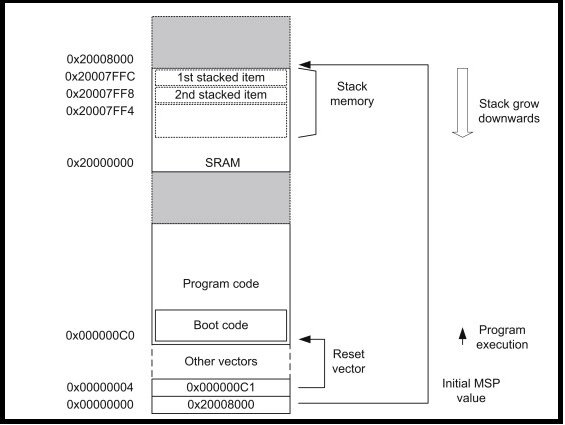
To see this process explained in the context of a real project, the following video segment is very helpful.
This video from Artful Bytes sets up a project and uses a debugger to explore exactly what happens from power-on until main() is reached. This first segment explains the hardwired startup steps and the role of the vector table.
Watch from 03:16 to 05:25. Focus on how the stack pointer and program counter are initialized from the interrupt vector table before the first line of our code is ever executed.
2. The Core Task: Preparing RAM for the C Environment
The Reset_Handler has one primary responsibility: to transform the MCU from its raw, post-reset state into an environment where a C program can run predictably. Since RAM contains random garbage values at power-on, this primarily involves initializing RAM.
This is typically done in assembly language (in a file like startup_stm32f103xb.s) because these operations are too low-level for standard C. The code performs two critical steps, using the symbols we saw in the linker script from our previous lesson.
Step 1: Copy Initialized Data from Flash to RAM (.data section)
The code needs to copy every variable from the .data section's LMA (in Flash) to its VMA (in RAM). To do this, it uses three symbols defined in the linker script:
_sidata: The start address of the.datasection's initial values in Flash (LMA)._sdata: The start address of the.datasection in RAM (VMA)._edata: The end address of the.datasection in RAM.
The assembly code effectively implements a loop: for (i = _sdata; i < _edata; i++) { *destination_in_ram++ = *source_in_flash++; }.
Step 2: Zero-Out the Uninitialized Data Section (.bss section)
For variables that are uninitialized or zero-initialized, their values aren't stored in Flash. The startup code just needs to clear the corresponding RAM region. It uses two linker symbols for this:
_sbss: The start address of the.bsssection in RAM._ebss: The end address of the.bsssection in RAM.
The assembly code implements a simple loop to write 0 to every memory location between _sbss and _ebss.
The following video provides an excellent line-by-line walkthrough of the assembly code that performs these two memory initialization tasks.
Let's dive into the assembly code. This video from Gene Schroeder Tech provides a clear, detailed explanation of the Reset_Handler function within the startup file.
Watch from 08:31 to 14:50. Don't worry about understanding every single assembly instruction. Your goal is to follow the logic: see how the code uses linker symbols as addresses and then executes loops to copy the .data section and clear the .bss section. This is the heart of the lesson.
3. The Full Startup Sequence
With RAM properly initialized, the startup file has a few more tasks before handing control over to you.
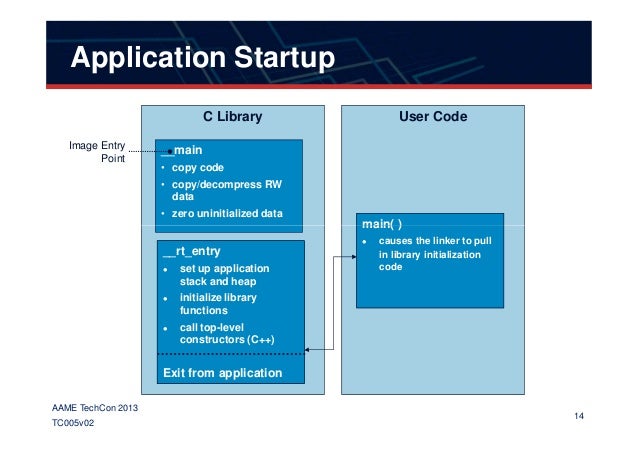
The complete sequence within the Reset_Handler is as follows:
- System Initialization (
SystemInit): A call is made to theSystemInit()function. This is a standard CMSIS function (located insystem_stm32f1xx.c) that typically configures the system clock (e.g., switching from the internal HSI to an external HSE crystal) and may enable the FPU if present. It's called early because a stable clock is required for peripherals to function correctly. - RAM Initialization: The
.datacopy and.bsszeroing loops are executed, as we just analyzed. - C Library Initialization (
__libc_init_array): A call may be made to initialize parts of the standard C library. For C++ projects, this is where constructors for global static objects are called. - Call
main(): The startup code finally calls yourmain()function. This is the official hand-off from the low-level system setup to your application code. - Trap in a Loop: A standard
main()function in a bare-metal system should never return. However, as a safeguard, the startup code includes an infinite loop immediately after the call tomain(). If yourmain()function ever accidentally returns, the processor gets caught here instead of executing random memory, which would likely cause a crash.
To reinforce these concepts, let's look at an article that creates a bare-metal C program from scratch. The section on the C startup code provides a clear, commented C implementation that mirrors the logic of the assembly file.
Run a C program bare metal on an ARM Cortex M3 - C startup code
This article, "Run a C program bare metal on an ARM Cortex M3", walks through the entire process of building a bare-metal application, including writing a custom startup file in C. It's a great way to see the RAM initialization logic in a more familiar language.
Please read the section titled "C startup code". Observe how it declares the linker symbols (like _DATA_ROM_START and _BSS_START) and then uses them in a simple C function to perform the data copy and BSS clearing before calling main().
4. What Happens if You Don't Initialize RAM?
Understanding the why is as important as the how. What if the startup file just jumped directly to main() without initializing RAM?
- Any access to a
.bssvariable (e.g.,my_array[0] = 5;) would be operating on a random garbage value, leading to unpredictable behavior. - Any read from a
.datavariable (e.g.,if (my_flag == 10)wheremy_flagwas initialized to 10) would fail, as the variable's location in RAM would still hold a garbage value. - Any write to a
.datavariable could corrupt the program, as the compiler might have incorrectly placed it in Flash memory if the linker wasn't configured properly.
The following video powerfully demonstrates this by first creating a program without a proper C runtime initialization and showing it crash, then adding the initialization code to make it work.
Let's return to the Artful Bytes video. The instructor builds a custom C program and linker script but initially omits the RAM initialization code in the startup file. This provides a practical demonstration of why this step is so crucial.
Watch from 18:45 to 23:48. Notice how the program hits a hard fault when it tries to write to a variable that hasn't been properly placed in RAM. Then, see how adding the data copy and BSS clearing loops in the startup file fixes the problem entirely.
This experiment solidifies the startup file's role as the foundation upon which the entire C environment is built. Without it, even the simplest C program will fail.
Conclusion
In this lesson, we pulled back the curtain on the first few microseconds of our MCU's life. We've traced the execution path from the hardware reset sequence to the Reset_Handler in the startup file, and unpacked its critical responsibility of preparing the RAM for our C application.
Key Takeaways:
- The startup file is the first piece of our software that runs, executed immediately after a system reset.
- Its entry point is the
Reset_Handler, whose address is specified in the vector table at the start of Flash. - The most important task of the
Reset_Handleris to initialize RAM by:- Copying initial values for the
.datasection from Flash to RAM. - Clearing the
.bsssection in RAM to all zeros.
- Copying initial values for the
- It relies on linker-defined symbols (e.g.,
_sdata,_sbss) to know the precise memory locations for these operations. - After preparing the memory and clocks, it finally calls
main().
You now understand the complete low-level sequence: the linker script plans the memory layout, and the startup file executes that plan at runtime. With this knowledge, you are no longer just a user of the toolchain; you are beginning to master it.
In our next lesson, we will put this knowledge into practice. We will modify a linker script to place a specific function or variable in a custom memory location, a powerful technique used for performance optimization, bootloader design, and managing special memory regions.