Hello! Welcome to the sixth lesson in our course on using regular expressions for your mail triage project.
In our last lesson, you mastered the art of "escaping." You learned how to use the backslash (\) to tame metacharacters, forcing them to be treated as literal characters. This gave us two modes of matching: the ultra-specific literal character (a) and the ultra-flexible wildcard (.).
Introduction
Today's Goal: What if you need something in between? Imagine your emails contain reference numbers like Ref-123, Ref:123, and Ref_123. You want to match the separator, but only if it's a hyphen, colon, or underscore—not just any character. This lesson will give you that precise level of control.
By the end of our session, you will be able to use character sets ([]) to match one of several specified characters (e.g., Ref[-:]123).
Why it matters: This technique is a workhorse in the world of regex. For your mail triage project, it's essential for handling the minor but common variations in formatting you'll find in real-world emails. It allows you to build patterns that are both flexible and precise, capturing the data you need without grabbing junk.
Time to complete: This lesson should take you about 40 minutes.
1. The Concept of a "Character Set"
In philosophy, you're familiar with the idea of defining a set or a category based on shared properties. A character set in regex works on a similar principle. It allows you to define a small, private category of characters and tell the regex engine: "Match any single character, as long as it belongs to this specific list."
This provides a powerful middle ground between the "anything" of a dot (.) and the "one specific thing" of a literal character (a or \.).
The syntax is simple: you enclose the characters you want to allow inside square brackets []. For example, the pattern gr[ae]y will match "gray" or "grey", but not "grby". The character set [ae] matches a single character, which must be either 'a' or 'e'.
Activity 1: Read the Core Idea (5 minutes)
The following article gives a perfect introduction to this concept. Please read the first section.
- Article: Character Classes or Character Sets by an unlisted author.
- Section to Read: Focus on the section titled "Character Classes or Character Sets".
- What to focus on:
- How
[ae]works in thegr[ae]yexample. - The crucial rule: a character set, no matter how many characters are inside it, only ever matches one character in the text.
- How
2. Character Sets in Action
Now let's see this principle applied to a problem very similar to the ones you'll face in your mail triage project.
Activity 2: Watch a Practical Demonstration (10 minutes)
Corey Schafer's tutorial provides a clear, practical example of using character sets to match different separators in phone numbers. The logic is identical to matching different separators in reference codes.

- Watch from 12:09 to 14:11.
- What to focus on:
- Notice how he replaces the dot (
.) with a character set[-.]to specifically match either a dash or a dot. - Pay close attention to his comment at
12:55: you don't need to escape the dot inside a character set. Most metacharacters lose their special meaning inside[], which simplifies your patterns.
- Notice how he replaces the dot (
For a quick second look, this clip from The Net Ninja demonstrates the same idea with a different example.
- Watch from 00:45 to 01:52.
- This video shows how
[ng]injacan match both "ninja" and "ginger", reinforcing the idea of matching one character from a list in a specific position.
3. Hands-On Practice: Building Flexible Patterns
Time to put this into practice. Let's solve the reference number problem we discussed earlier.
Activity 3: Mastering Separators in Regex101 (15 minutes)
-
Click this link to open a pre-configured Regex101 session: https://regex101.com/r/Yp1bK0/1
- In the Test String pane, you'll see a list of reference numbers with different separators. Our goal is to write one pattern that matches the first three.
-
Task 1: Match Multiple Separators
- We want to match
REF-9012,REF:9012, andREF 9012. - The part that varies is the single character after "REF".
- In the Regular Expression box, type the pattern
REF[-: ]9012. - Observe the result. The pattern successfully matches the first three lines. The character set
[-: ]tells the engine to match a single character that is either a hyphen, a colon, or a space.
- We want to match
-
Task 2: The Hyphen's Special Role
- In the next lesson, we'll see that the hyphen (
-) is used inside character sets to create ranges (like[a-z]). So, how do we match a literal hyphen? - Our pattern
[-: ]already works because of a special rule: To match a literal hyphen, place it at the very beginning or very end of the character set. - To see this, try changing your pattern to
RE[F:- ]9012(with the hyphen in the middle). Regex101 might be smart enough to handle this, but in many regex engines, this could be misinterpreted as a "range from F to space," which is invalid and could cause an error. Placing it at the start[-...]or end[...-]is the universally safe way to include a literal hyphen.
- In the next lesson, we'll see that the hyphen (
-
Task 3: Metacharacters are (mostly) Normal Inside
[]- Add a new line to the test strings in Regex101:
REF.9012 - Now, modify your pattern to match this as well. The solution is
REF[-: .]9012. - Notice that you did not need to escape the dot. Inside a character set, it's just a literal dot, not a wildcard. This is true for most metacharacters (
*,+,?, etc.), which makes character sets easier to write.
- Add a new line to the test strings in Regex101:
This table provides a great visual summary of common character sets. We're focusing on the top three rows for now.
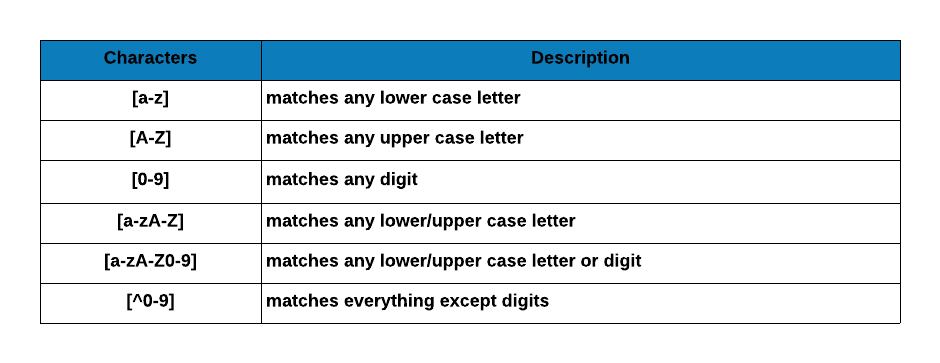
A table summarizing common character sets. We've focused on creating custom sets like [abc], but the same principle applies to predefined ranges for letters and numbers, which we'll cover soon.
Conclusion
Excellent work! You've just added one of the most practical and frequently used tools in the regex toolkit to your skillset. You can now move beyond the simple "all or nothing" choice of a wildcard vs. a literal and define your own precise list of allowed characters.
Key Points We've Covered:
- Character Sets (
[]): Match a single character from a list of possibilities you define (e.g.,[abc]). - Precision and Flexibility: They are more specific than a dot (
.) but more flexible than a literal character. - Metacharacters Inside Sets: Most metacharacters, like
.and*, lose their special meaning inside[]and can be used without escaping. - The Literal Hyphen: To include a literal hyphen (
-) in your set, place it at the very beginning or very end (e.g.,[-_.]or[_.-]) to avoid it being interpreted as a range operator.
What's Next?
We've seen how the hyphen can be treated as a literal character within a set. In our next lesson, we will unlock its special power: defining character ranges. You'll learn how to write [a-z] to match any lowercase letter or [0-9] to match any digit, saving you from typing them all out. This is the next logical step in building even more powerful and concise patterns for your mail triage project.