Hello! Welcome to your next lesson in machine learning.
In our previous lessons, we've explored several key steps in a machine learning project. We used StandardScaler to scale our features for K-Means, and we applied PCA to reduce the dimensionality of our data. These are both examples of data transformations. After transforming the data, we would then train a model.
Performing these steps one by one can be tedious and, more importantly, can lead to subtle but serious errors. For example, if you scale your data before splitting it into training and testing sets, information from the test set "leaks" into your training process, giving you an overly optimistic sense of your model's performance.
Today, we will learn how to solve these problems by building a clean, robust, and reproducible workflow. Your learning outcome for this lesson is to build a complete modeling workflow using scikit-learn's Pipeline object.
By the end of this lesson, you will be able to:
- Understand the benefits of using pipelines for machine learning projects.
- Chain multiple data processing steps and a final model into a single
Pipeline. - Use
ColumnTransformerto apply different transformations to different types of columns (e.g., numerical vs. categorical). - Train and evaluate a complete workflow encapsulated in a single pipeline object.
Let's get started!
1. What is a Pipeline?
At its core, a scikit-learn pipeline chains together multiple steps so that the output of one step becomes the input to the next. These steps usually consist of transformers and a final estimator.
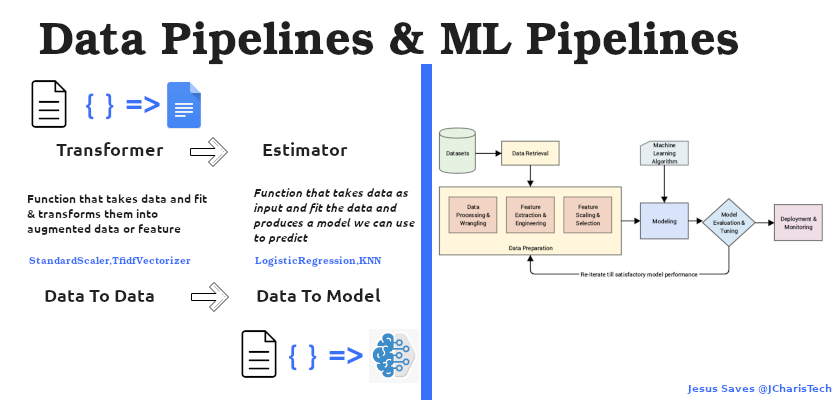
Let's build a simple pipeline to see how this works in practice.
Implementing Machine Learninng Pipelines USsing Sklearn And Python
This video by Krish Naik provides a great introduction to the concept and a hands-on demonstration of a basic pipeline. It will help you see the syntax and the immediate benefits.
Watch from the beginning until 08:30. Focus on: The definition of a pipeline. The syntax for creating a list of steps, where each step is a (name, object) tuple. How to visualize the pipeline using set_config(display='diagram'). How the pipeline is fitted and used for predictions with a single command.
As you saw in the video, a pipeline is created by providing a list of steps. Each step is a tuple containing a name (a string you choose) and a scikit-learn object (a transformer or an estimator).
Here is the basic structure for a simple pipeline that first scales the data and then trains a logistic regression model:
from sklearn.pipeline import Pipeline
from sklearn.preprocessing import StandardScaler
from sklearn.linear_model import LogisticRegression
from sklearn.model_selection import train_test_split
from sklearn.datasets import make_classification

# Create a sample dataset
X, y = make_classification(n_samples=100, n_features=10, random_state=42)
X_train, X_test, y_train, y_test = train_test_split(X, y, random_state=42)

# Define the steps for the pipeline
steps = [
    ('scaler', StandardScaler()),         # Step 1: Scale the data
    ('classifier', LogisticRegression())  # Step 2: Train a model
]

# Create the pipeline
pipe = Pipeline(steps)

# Fit the entire pipeline on the training data
pipe.fit(X_train, y_train)

# Evaluate the pipeline on the test data
score = pipe.score(X_test, y_test)
print(f"Pipeline Accuracy: {score:.4f}")
Notice that we call .fit() just once on the pipeline object. Internally, scikit-learn handles everything:
- It calls
fit_transform()on thescalerusingX_train. - It then feeds the transformed training data to the
classifierand callsfit()on it.
When we call.score()or.predict(), it automatically applies the already-fittedscaler(using just.transform()) to the new data before passing it to the classifier. This prevents data leakage and simplifies the code immensely.
2. Handling Different Data Types with ColumnTransformer
The simple pipeline above works well when all features are of the same type (e.g., all numerical). But what about a more realistic scenario where you have a mix of numerical and categorical features? Numerical features might need imputation (filling missing values) and scaling, while categorical features need imputation and one-hot encoding.
This is where ColumnTransformer comes in. It's a special tool that allows you to create separate preprocessing pipelines for different subsets of your data columns and then combine them.
Streamline Your Machine Learning Workflow with Scikit-learn Pipelines
This article from KDnuggets provides a clear, side-by-side comparison of processing data manually versus using a pipeline with ColumnTransformer. It's a great way to understand the structure and benefits.
Read the section Data Processing Pipeline. Compare the 'Simple Scikit-learn Code' with the 'Scikit-learn Pipelines Code'. Pay close attention to how numerical_transformer and categorical_transformer are defined as separate pipelines and then combined in ColumnTransformer.
The core idea is to build a "preprocessor" that knows how to handle each type of column. This preprocessor can then be used as the first step in a larger pipeline.

Let's see this powerful combination of Pipeline and ColumnTransformer being built step-by-step.
Implementing Machine Learninng Pipelines USsing Sklearn And Python
Let's return to the Krish Naik video. This section demonstrates exactly how to build separate pipelines for numerical and categorical data and then combine them using ColumnTransformer.
Watch from 15:46 to 25:30. This is the most critical part of the lesson. Follow along as he: Creates a numeric_processor pipeline with SimpleImputer and StandardScaler. Creates a categorical_processor pipeline with SimpleImputer and OneHotEncoder. Uses ColumnTransformer to apply these processors to specific (though hypothetical) columns. Integrates this preprocessor into a final pipeline with a model.
3. Building the Complete Workflow
Now we have all the pieces to assemble a complete, end-to-end modeling workflow. The final structure will be a Pipeline object that contains two main steps:
- Preprocessor: A
ColumnTransformerthat handles all data cleaning and feature engineering. - Model: The final estimator (e.g.,
RandomForestClassifier,SVC, etc.).
Let's see a complete, practical example.
Machine Learning Pipelines in Python: Step-by-Step Guide with Scikit-Learn
This video from Code with Josh walks through a full project, putting all these concepts together to predict vehicle CO2 emissions. We'll focus on the part where the pipelines are constructed and combined.
Watch from 11:58 to 18:20. This segment clearly demonstrates: Creating a numerical_pipeline (imputer + scaler). Creating a categorical_pipeline (imputer + one-hot encoder). Using ColumnTransformer to create a preprocessor that applies these pipelines to the correct columns from a real dataset. Creating the final_pipeline by combining the preprocessor and a RandomForestRegressor. Finally, splitting the data and fitting the final_pipeline with a single command.
Here's what the complete code structure looks like, bringing together all the concepts:
import pandas as pd
from sklearn.model_selection import train_test_split
from sklearn.pipeline import Pipeline
from sklearn.compose import ColumnTransformer
from sklearn.impute import SimpleImputer
from sklearn.preprocessing import StandardScaler, OneHotEncoder
from sklearn.ensemble import RandomForestClassifier

# Assume 'data' is a pandas DataFrame with features and a 'target' column
# X = data.drop('target', axis=1)
# y = data['target']

# Identify numerical and categorical columns
# (You would get these from your DataFrame's dtypes)
numerical_features = ['age', 'balance', 'num_of_products']
categorical_features = ['geography', 'gender']

# Create the preprocessing pipeline for numerical data
numerical_transformer = Pipeline(steps=[
    ('imputer', SimpleImputer(strategy='median')), # Fill missing values
    ('scaler', StandardScaler())                  # Scale data
])

# Create the preprocessing pipeline for categorical data
categorical_transformer = Pipeline(steps=[
    ('imputer', SimpleImputer(strategy='most_frequent')), # Fill missing values
    ('onehot', OneHotEncoder(handle_unknown='ignore'))     # One-hot encode
])

# Combine preprocessing steps with ColumnTransformer
preprocessor = ColumnTransformer(
    transformers=[
        ('num', numerical_transformer, numerical_features),
        ('cat', categorical_transformer, categorical_features)
    ])

# Create the final pipeline with the preprocessor and the model
model = RandomForestClassifier(random_state=42)

complete_pipe = Pipeline(steps=[
    ('preprocessor', preprocessor),
    ('classifier', model)
])

# Now, we use this single pipeline object for everything
# X_train, X_test, y_train, y_test = train_test_split(X, y, test_size=0.2, random_state=42)

# complete_pipe.fit(X_train, y_train)
# print("Model accuracy:", complete_pipe.score(X_test, y_test))
This organized structure is the standard for building robust machine learning models in scikit-learn.
Test your understanding!
In the code block above, imagine you call complete_pipe.fit(X_train, y_train). Describe, in order, the steps that happen internally to the gender column from the X_train data before it reaches the RandomForestClassifier.
Show answer
- The
complete_pipepasses the data to thepreprocessorstep. - The
ColumnTransformer(preprocessor) identifies thatgenderis a categorical feature. - It directs the
gendercolumn to thecategorical_transformerpipeline. - Inside this pipeline, the
'imputer'step runs first. It uses theSimpleImputerwith the'most_frequent'strategy to fill any missing values in thegendercolumn, learning the most frequent value fromX_train. - The imputed
gendercolumn is then passed to the'onehot'step. TheOneHotEncodertransforms the column (e.g., 'Male', 'Female') into numerical columns (e.g., a 'gender_Male' column and a 'gender_Female' column with 0s and 1s). - Finally, these new one-hot encoded columns are combined with the processed numerical columns and passed to the
classifierstep (RandomForestClassifier) for training.
Conclusion
Fantastic work today! You've learned how to build organized, robust, and reproducible machine learning workflows. Encapsulating your preprocessing and modeling logic in a scikit-learn Pipeline is a critical skill for any data scientist. It not only makes your code cleaner but also prevents common errors like data leakage, leading to more reliable models.
Key Takeaways:
- Pipelines streamline ML workflows by chaining transformers and an estimator into a single object.
- They simplify code, prevent data leakage during preprocessing, and improve reproducibility.
ColumnTransformeris essential for real-world datasets, allowing you to apply different transformation sequences to different columns (e.g., numerical vs. categorical).- A complete workflow involves creating a final
Pipelinethat includes aColumnTransformeras a preprocessing step followed by a model estimator. - This single pipeline object can be trained, evaluated, and even saved as one unit, simplifying deployment.
Preview of the Next Lesson:
Now that you know how to build a complete modeling workflow, the next step is to make smart decisions about what goes inside that workflow. In our next lesson, you will learn to implement a solution for a representative problem by selecting and justifying the choice of ML model. We will take a problem from start to finish, using pipelines as our foundation, and focus on why we might choose one algorithm (like Logistic Regression) over another (like a Random Forest).