Hello! Welcome to the first lesson in our second module, "Mathematical Foundations: Linear Algebra."
In the previous module, you built a strong foundation in Python for data science, culminating in learning how to use NumPy and Pandas to manipulate data. You've seen that data, especially numerical data, is often organized into arrays and tables. Linear algebra is the mathematical language that describes these arrays (vectors and matrices) and the rules for operating on them. Understanding these principles is essential, as they are the bedrock upon which many machine learning algorithms, from linear regression to deep learning, are built.
This lesson directly addresses the learning outcome: Apply vector operations including dot product, cross product, and projections. We will start by defining what vectors are and then explore three fundamental operations that allow us to understand the relationships between them. We will cover both the mathematical theory and the practical implementation using NumPy, connecting back to what you've already learned.
1. What is a Vector?
Before we can operate on vectors, let's clarify what they are. You've already worked with them implicitly as one-dimensional NumPy arrays. Formally, a vector is a mathematical object that has both magnitude (or length) and direction. This is in contrast to a scalar, which has only magnitude (like temperature or mass).
Vectors can be represented in a few ways:
- Geometrically: As an arrow in a 2D or 3D space, where the arrow's length is the magnitude and where it points is the direction.
- Analytically: As an ordered list of numbers called components, like
[x, y]in 2D or[x, y, z]in 3D.
In data science, a single data point is often represented as a vector. For instance, a house could be represented by a vector [area, num_bedrooms, age], where each component is a feature.
To get a more formal introduction, please read the first part of the following tutorial.
Vectors Tutorial - MATH 1046 Main Page
The 'Vectors Tutorial' from Nipissing University provides a clear and concise introduction to vectors.
Read the 'Introduction' section. Focus on understanding the difference between a vector and a scalar, how vector components are represented, and what it means for two vectors to be equivalent.
2. The Dot Product and Vector Norm
One of the most fundamental operations is the dot product. It takes two vectors and returns a single scalar number.
For two vectors and , their dot product (written as ) is the sum of the products of their corresponding components:
The dot product is not just a calculation; it tells us about the geometric relationship between the two vectors. This relationship is defined by an alternative formula for the dot product:
Here:
- is the norm or magnitude (length) of vector . For a vector , the most common norm (the L2 norm) is calculated as . This is essentially an application of the Pythagorean theorem.
- is the angle between the two vectors.
Let's watch a short video that explains these concepts and shows how to compute them in Python using NumPy.
Basics of Linear Algebra for AI and ML [with code]: Part 1
This video from ChemCoder quickly introduces vectors, the dot product, and the concept of a vector norm (magnitude), along with their NumPy implementations.
Watch from 02:41 to 08:35. Pay attention to how vector addition, the dot product, and the L1 and L2 norms are calculated, both conceptually and with code.
Orthogonality
A critical concept derived from the dot product is orthogonality. Look at the geometric formula: if the angle between two non-zero vectors is 90° ( radians), then . This means their dot product will be zero.
Therefore, two vectors and are orthogonal (perpendicular) if and only if . This is a simple and powerful way to check if vectors are at a right angle to each other.
To dive deeper into the properties and applications of the dot product, please review the following resource.
Vectors Tutorial - MATH 1046 Main Page
Let's return to the Nipissing University tutorial for a more detailed look at the dot product and its associated concepts.
Read the section 'The Dot Product'. Focus on the properties of the dot product, how it relates to vector length (norm), the formula for the angle between vectors, and the definition of orthogonality.
Test your understanding!
Given two vectors, and .
- Calculate their dot product .
- Are these vectors orthogonal? Why or why not?
Show answer
- To calculate the dot product, we multiply the corresponding components and sum the results:
- Yes, the vectors are orthogonal because their dot product is 0.
3. Vector Projection
The concept of projection involves figuring out how much of one vector "points" in the direction of another. Imagine the sun is directly above vector . The shadow that vector casts onto the line containing is the projection of onto .
This "shadow" is itself a vector. Its formula uses the dot product:
Let's break this down:
- is a scalar value. It determines how long the projection vector is and in which direction it points (same as if positive, opposite if negative).
- We then multiply this scalar by the vector to create the new vector along the direction of .
The following image provides an excellent visual and formulaic summary.

The formula can be implemented in NumPy by combining the np.dot() and np.linalg.norm() functions you've already seen. For a good reference, check out the "Projection" section in the article Exercises in NumPy Vector Algebra by George Marklow.
4. The Cross Product
While the dot product results in a scalar, the cross product is an operation between two vectors that results in a new vector. This operation is defined only for vectors in 3D space.
Given and , their cross product is a new vector with two very important properties:
- Direction: The resulting vector is orthogonal to both and .
- Magnitude: The magnitude of the resulting vector, , is equal to the area of the parallelogram formed by and .
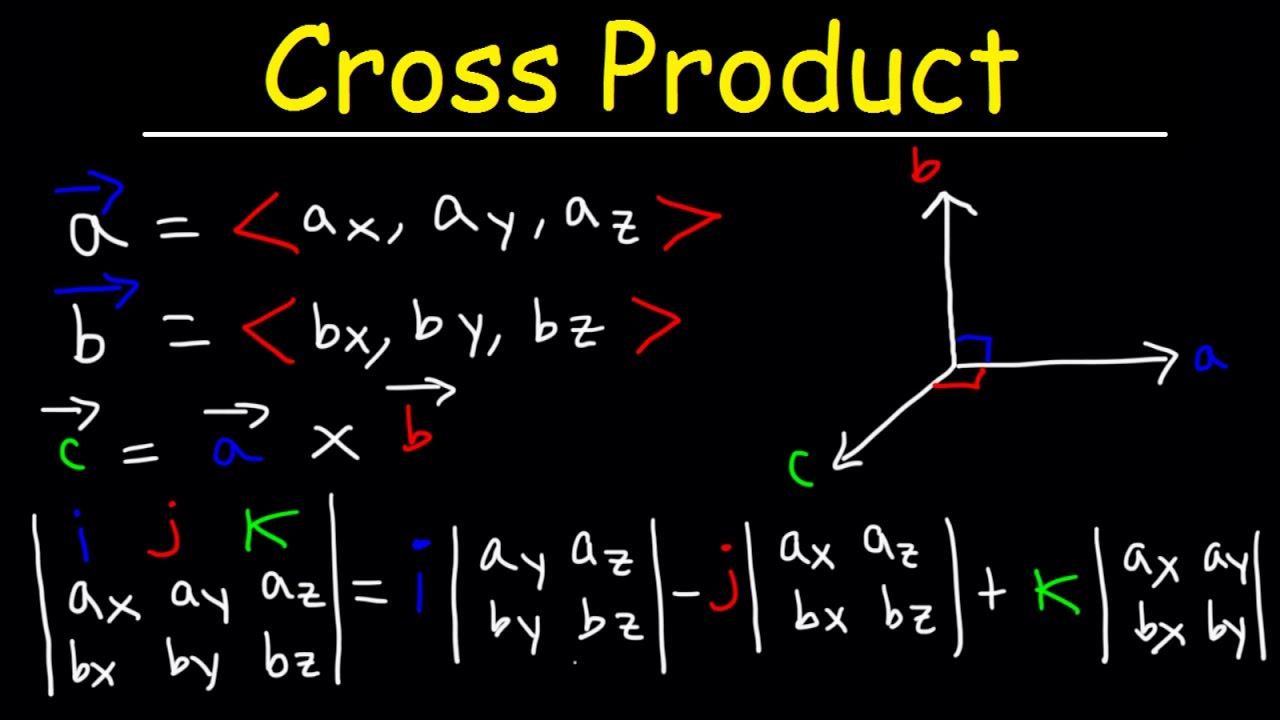
The calculation and properties of the cross product are best explained visually.
The video 'The Vector Cross Product' by Professor Dave Explains is an excellent, concise tutorial on this topic. It covers the calculation, geometric meaning, and key properties.
Watch the entire video (around 5 minutes). Pay close attention to: How the cross product is calculated using a 3x3 determinant (00:44). The fact that the result is orthogonal to the original vectors (02:10). The right-hand rule for determining the direction (02:25). The formula for its magnitude, ||A|| ||B|| sin(theta), and what it implies for parallel vectors (03:07).
In Python, the cross product is easily calculated with NumPy's np.cross() function.
5. Applying Vector Operations in Python
Let's bring all these concepts together in a single Python example using NumPy. This will demonstrate how the mathematical formulas translate directly into code.
First, make sure you have NumPy imported:
import numpy as np
Now, let's define two 3D vectors:
u = np.array([2, 1, 0])
v = np.array([1, -1, 3])
1. Dot Product and Angle:
We can find the angle between u and v using the dot product formula .
# Calculate the dot product
dot_product = np.dot(u, v)

# Calculate the norms (magnitudes)
norm_u = np.linalg.norm(u)
norm_v = np.linalg.norm(v)

# Calculate the cosine of the angle
cos_theta = dot_product / (norm_u * norm_v)

# Calculate the angle in radians, then convert to degrees
angle_rad = np.arccos(cos_theta)
angle_deg = np.degrees(angle_rad)

print(f"Dot Product: {dot_product}")
print(f"Angle between vectors: {angle_deg:.2f} degrees")
2. Vector Projection:
Let's calculate the projection of v onto u.
# proj_u(v) = ( (v . u) / ||u||^2 ) * u
projection_vector = (dot_product / (norm_u**2)) * u

print(f"Projection of v onto u: {projection_vector}")
3. Cross Product:
Finally, let's compute the cross product and verify its orthogonality.
# Calculate the cross product
cross_product_vec = np.cross(u, v)
print(f"Cross Product u x v: {cross_product_vec}")

# Verify orthogonality: dot product of the result with the original vectors should be 0
dot_with_u = np.dot(cross_product_vec, u)
dot_with_v = np.dot(cross_product_vec, v)

# We use np.isclose to handle potential floating-point inaccuracies
print(f"Is cross product orthogonal to u? {np.isclose(dot_with_u, 0)}")
print(f"Is cross product orthogonal to v? {np.isclose(dot_with_v, 0)}")
For more examples of how to implement these and other vector algebra concepts in NumPy, the following article is a useful reference.
Exercises in NumPy Vector Algebra - George Marklow - Medium
The article 'Exercises in NumPy Vector Algebra' provides a code-first look at all the operations we've discussed today.
Skim through the sections on 'Dot Product and Orthogonality', 'Norm', 'Projection', and 'Cross Product'. You don't need to read in-depth, but notice how the NumPy functions np.dot(), np.linalg.norm(), and np.cross() are used to implement the concepts we've covered.
Conclusion
In this lesson, you have taken your first step into the world of linear algebra. You've moved from seeing vectors as just NumPy arrays to understanding their geometric meaning and the powerful operations that define their relationships.
Key Takeaways:
- A vector has both magnitude (norm) and direction, while a scalar has only magnitude.
- The dot product of two vectors results in a scalar. It is used to find the angle between them and to determine if they are orthogonal (dot product is 0).
- Vector projection uses the dot product to find the "shadow" of one vector onto another.
- The cross product (for 3D vectors) results in a new vector that is orthogonal to both original vectors. Its magnitude represents the area of the parallelogram they form.
- All these operations are efficiently implemented in Python using the NumPy library.
In our next lesson, we will expand from individual vectors to matrices. You will learn how to perform matrix operations like addition and multiplication. This is a crucial step, as matrices are the primary way we represent and manipulate entire datasets in machine learning.