Hello! Welcome to your second lesson in the "Python for Data Science: Foundations" module.
In our last session, you learned the building blocks of Python: variables, data types, and operators. You saw how comparison operators (>, ==, !=) and logical operators (and, or) produce boolean (True or False) values. Today, we'll put those boolean values to work. We'll learn how to control the very flow of your program, making it smart enough to make decisions and repeat tasks.
By the end of this lesson, you will be able to implement program flow control using conditional statements (if, elif, else) and loops (for, while). This is a fundamental skill that transforms your code from a simple, sequential script into a dynamic and powerful program.
Let's begin by visualizing what "control flow" means.

1. Making Decisions with Conditional Statements
Conditional statements allow your program to execute certain blocks of code only if a specific condition is met. This is the primary way programs make decisions. The keywords for this are if, elif (short for "else if"), and else.
A key aspect of Python's syntax is the use of a colon (:) at the end of if, elif, and else lines, followed by an indented block of code. This indentation is not just for readability; it's how Python knows which code belongs to which statement.
The following video provides a great overview of how to use these statements. Since you are preparing for the GATE exam, you might appreciate the direct style of the "Gate Smashers" channel.
Lec-24: If else, elif in Python 🐍 | Nested If | Python for Beginners
This video, 'If else, elif in Python', will walk you through the four main types of conditional structures. Pay close attention to the syntax: the condition, the colon, and the indented code block.
Watch the following segments: Simple if statement: from 00:56 to 03:10. if-else statement: from 03:10 to 04:31. if-elif-else ladder: from 04:31 to 07:00.
Let's break down the logic with a clear, common example: assigning a grade based on a score.
The if Statement
An if statement checks a condition. If it's True, the indented code block runs. If not, the program just skips it.
score = 95
if score > 90:
    print("Excellent work! You get an A.")

print("End of program.")
# Output:
# Excellent work! You get an A.
# End of program.
The if-else Statement
This provides an alternative path for when the if condition is False.
num = 7
if num % 2 == 0:
    print("The number is even.")
else:
    print("The number is odd.")

# Output: The number is odd.
The if-elif-else Ladder
This is for checking multiple, mutually exclusive conditions in order. Python checks each condition from top to bottom and executes the first block where the condition is True. If none are true, the else block runs.
score = 85

if score > 90:
    grade = "A"
elif score > 80:
    grade = "B"
elif score > 70:
    grade = "C"
else:
    grade = "D"

print(f"Your grade is: {grade}") # The f-string is a handy way to format strings!
# Output: Your grade is: B
Notice that even though score > 70 is also true for a score of 85, the elif score > 80: block was executed first, and the rest of the chain was skipped. The order matters!
Test your understanding!
Write a program that asks the user for their age.
- If the age is less than 13, print "You are a child."
- If the age is between 13 and 19 (inclusive), print "You are a teenager."
- Otherwise, print "You are an adult."
Show answer
age_str = input("Please enter your age: ")
age = int(age_str) # Don't forget to convert the input string to an integer!

if age < 13:
    print("You are a child.")
elif age >= 13 and age <= 19: # or you could write: 13 <= age <= 19
    print("You are a teenager.")
else:
    print("You are an adult.")
2. Repeating Actions with Loops
Loops are used to execute a block of code repeatedly. This saves you from writing the same code over and over again. Python has two main types of loops: while and for.
The while Loop
A while loop repeats a block of code as long as a condition remains true. It's crucial that something inside the loop eventually makes the condition false, otherwise you'll create an infinite loop!
Python While Loops & For Loops | Python tutorial for Beginners
Let's watch a segment from 'Python While Loops & For Loops' by Dave Gray. This part introduces the while loop with a simple counter example.
Watch from 00:50 to 02:18. Notice how the value variable is incremented inside the loop. This is the step that prevents an infinite loop.
Here’s a typical example of a while loop that counts down:
count = 5
while count > 0:
    print(count)
    count = count - 1 # This is the crucial update step. Can also be written as count -= 1

print("Blast off!")
# Output:
# 5
# 4
# 3
# 2
# 1
# Blast off!
The for Loop
A for loop is used for iterating over a sequence, like a list, a string, or a range of numbers. It's often more convenient than a while loop when you know how many times you want to loop.
To loop a specific number of times, we use the built-in range() function.
range(5)generates numbers from 0 up to (but not including) 5:0, 1, 2, 3, 4.range(1, 5)generates numbers from 1 up to 5:1, 2, 3, 4.range(1, 10, 2)generates numbers from 1 to 10, with a step of 2:1, 3, 5, 7, 9.
Let's see how for loops work with sequences and the range() function.
Python While Loops & For Loops | Python tutorial for Beginners
Continuing with the same video, these two clips will show you how to use for loops to iterate over items in a list and how to use the range() function for more controlled looping.
Watch the following segments: Basic for loop: from 05:37 to 07:26. This shows iteration over a list of names and the characters in a string. Using range(): from 08:49 to 11:30. This explains how to use range() to generate number sequences for your loops.
Example of iterating over a list:
fruits = ["apple", "banana", "cherry"]
for fruit in fruits:
    print(f"I like to eat {fruit}s.")
# Output:
# I like to eat apples.
# I like to eat bananas.
# I like to eat cherrys.
Example using range():
# Print the first 3 multiples of 5
for i in range(1, 4): # Loop will run for i = 1, 2, 3
    print(f"5 * {i} = {5 * i}")
# Output:
# 5 * 1 = 5
# 5 * 2 = 10
# 5 * 3 = 15
3. Altering Loop Behavior with break and continue
Sometimes you need more control over your loops. The break and continue statements give you this power.
break: Immediately terminates the loop entirely.continue: Immediately skips to the next iteration of the loop.
This video demonstrates both statements in action.
Python While Loops & For Loops | Python tutorial for Beginners
Let's see how break and continue can change the flow within a loop. This is useful for handling special cases or stopping early.
Watch the following segments: break and continue in while loops: from 02:18 to 04:32. break and continue in for loops: from 07:26 to 08:49.
Here is a summary:
Using break: Stop the loop when a condition is met.
# Find the first number divisible by 7 in a range
for number in range(1, 20):
    if number % 7 == 0:
        print(f"Found it! The first number divisible by 7 is {number}.")
        break # Exit the loop immediately
    print(f"Checking {number}...")
# Output:
# Checking 1...
# ...
# Checking 6...
# Found it! The first number divisible by 7 is 7.
Using continue: Skip an iteration.
# Print only odd numbers
for number in range(1, 10):
    if number % 2 == 0:
        continue # If the number is even, skip to the next number
    print(number)
# Output:
# 1
# 3
# 5
# 7
# 9
Conclusion
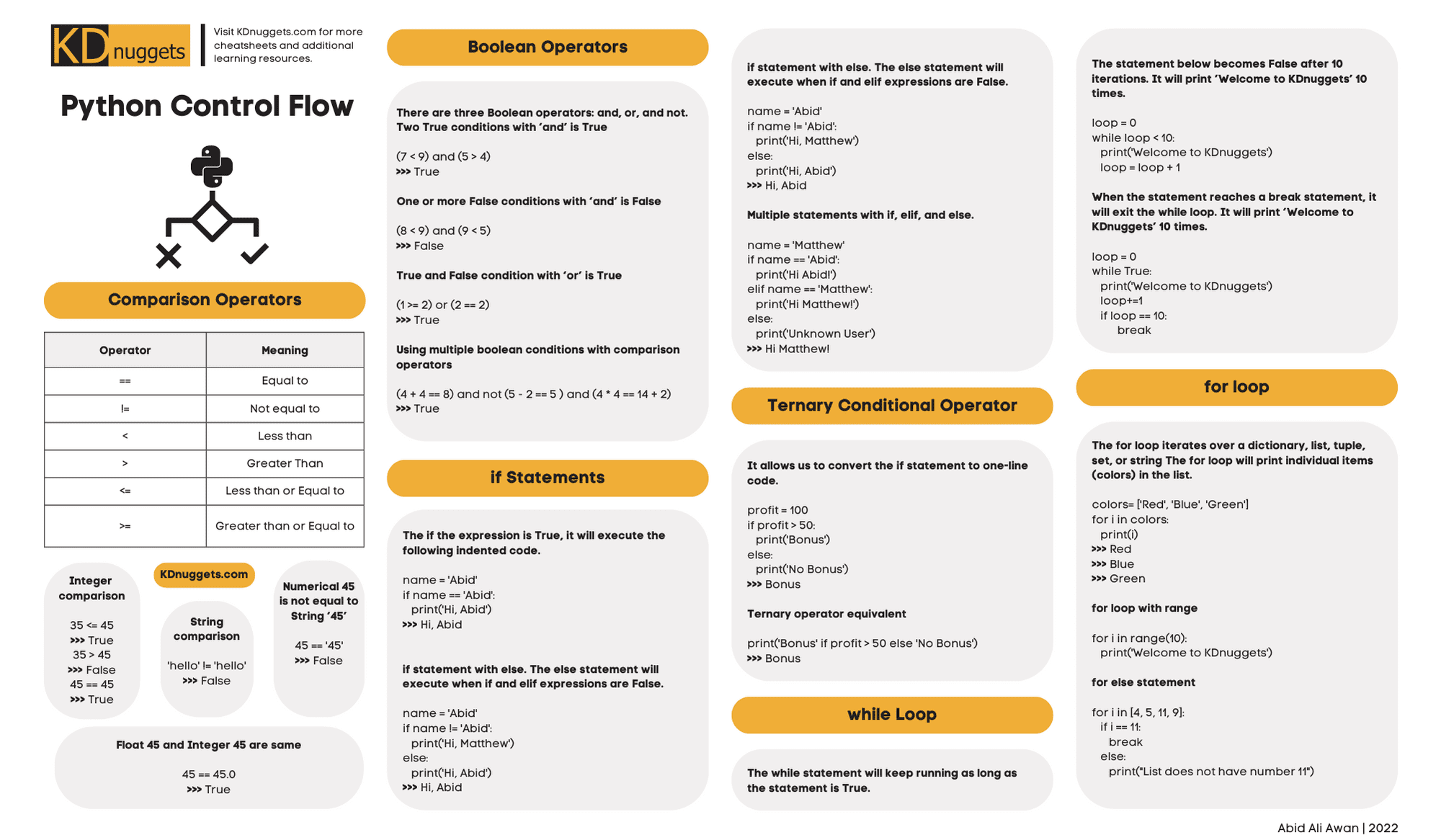
You have now learned the essential tools for controlling program flow in Python. This is a massive step forward in your coding ability. For a quick reference of everything we've covered, this cheatsheet is an excellent resource to keep handy.
Key Takeaways:
- Conditional Statements (
if,elif,else) let your program make decisions and execute different code paths based on boolean conditions. - Loops allow you to repeat code. The
whileloop is for repeating as long as a condition is true, while theforloop is perfect for iterating over sequences like lists or arangeof numbers. - Indentation and colons (
:) are mandatory parts of Python's syntax for defining code blocks within these structures. breakandcontinuegive you fine-grained control to exit a loop or skip an iteration.
In our next lesson, we will explore functions. Now that you can write more complex logic, functions will provide a way to organize that logic into reusable, named blocks, making your code cleaner, more modular, and easier to manage.