Hello! Welcome to your first lesson in the "Python for Data Science: Foundations" module. As we discussed, building a strong programming foundation is the first critical step on your journey to mastering Data Science and AI for the GATE exam.
This lesson will cover the absolute essentials of Python programming. By the end of our 60 minutes, you will be able to:
- Write and execute basic Python programs.
- Use variables to store information.
- Understand fundamental data types like numbers, text, and booleans.
- Use operators to perform calculations and comparisons.
Let's begin by setting up your coding environment.
1. Setting Up Your Programming Environment
To write and run Python code, you need two things: the Python interpreter itself and a code editor. A code editor is a program that makes writing code easier. We will use PyCharm, which is a popular and powerful Integrated Development Environment (IDE) for Python.
The following video will guide you through the installation process for both Python and PyCharm.
Python for Beginners - Learn Coding with Python in 1 Hour
This segment from 'Python for Beginners' by Programming with Mosh will walk you through downloading and installing Python and the PyCharm Community Edition. Follow the steps carefully to set up your development environment.
Watch the video from 01:12 to 03:38. Pay close attention to the instruction for Windows users to check the 'Add Python to PATH' box during installation—this is a crucial step.
2. Your First Python Program: "Hello, World!"
With your environment set up, it's time to write your first line of code. The "Hello, World!" program is a classic tradition in programming. It's a simple program that just prints the text "Hello, World!" to the screen. This will help you verify that your installation works and introduce you to the print() function.
Python for Beginners - Learn Coding with Python in 1 Hour
Let's continue with the same video to create a new project in PyCharm and run your first program. This will introduce you to the print() function and the concept of a string.
Watch from 03:38 to 05:22. Follow along and create an 'app.py' file in your 'hello-world' project and run the code as shown.
The code you wrote, print("Hello, World!"), does two things:
"Hello, World!"is a string, which is how programmers refer to textual data. Strings are always enclosed in single (') or double (") quotes.print()is a built-in function in Python that displays the value given to it (in this case, our string) in the terminal window.
3. Storing Information: Variables
In any useful program, you'll need to store and manage data. We do this using variables. A variable is like a labeled box where you can store a value. You give the box a name, and you can change what's inside it.
An assignment statement creates a variable and gives it a value, using the equals sign (=).
# A variable named 'age' storing the number 20
age = 20

# A variable named 'price' storing a number with a decimal
price = 19.95

# A variable named 'first_name' storing a string
first_name = "Ankit"

# A variable named 'is_online' storing a boolean value
is_online = True
Let's watch a short video that explains this concept and introduces Python's basic data types.
Python for Beginners - Learn Coding with Python in 1 Hour
This part of the 'Python for Beginners' video explains how to declare variables to store different kinds of data, like numbers, text (strings), and boolean (True/False) values.
Watch from 05:22 to 08:51. Notice how you can change (reassign) the value of a variable and how Python is case-sensitive (e.g., True is different from true).
Rules for Naming Variables
Choosing good variable names makes your code readable. Python has a few rules:
- Variable names must start with a letter or an underscore (
_). They cannot start with a number. - They can only contain letters, numbers, and underscores.
- Variable names are case-sensitive (
age,Age, andAGEare three different variables). - You cannot use Python's reserved words (keywords like
if,for,class, etc.) as variable names.
A common convention in Python is to use snake_case for variable names that have multiple words, like first_name.
4. Understanding Data Types
Every value in Python has a data type. The type determines what kind of data the variable holds and what operations you can perform on it. Python is dynamically typed, meaning you don't have to declare the type of a variable; Python figures it out automatically.
The four fundamental data types we've just seen are:
- Integer (
int): A whole number (e.g.,20,-150,0). - Float (
float): A number with a decimal point (e.g.,19.95,3.14,-0.5). - String (
str): A sequence of characters, or text (e.g.,"Ankit","Hello Python"). - Boolean (
bool): Represents one of two values:TrueorFalse. Used for logical conditions.
This image provides a helpful summary:
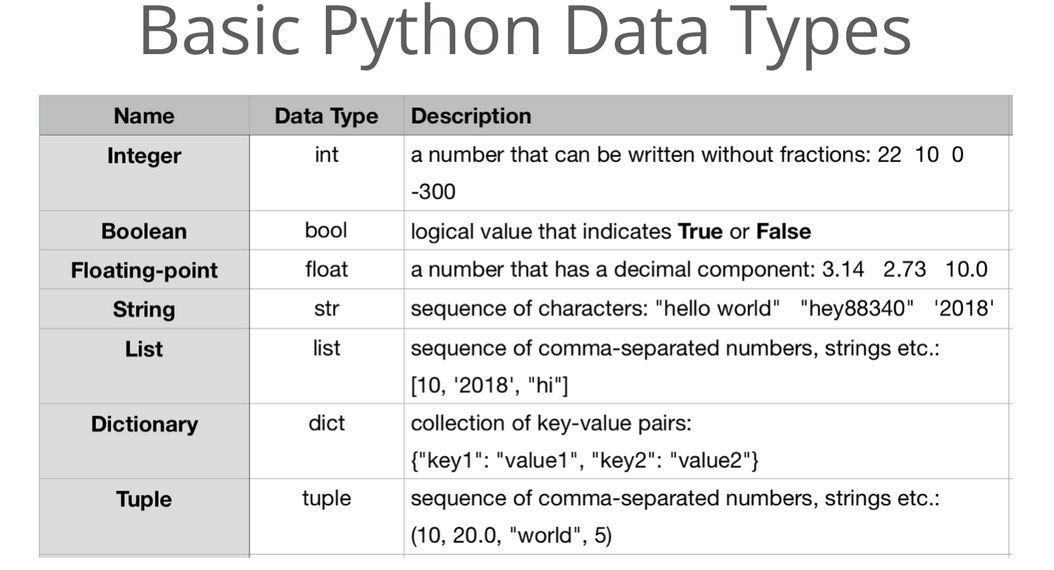
To better understand these types with real-world analogies, you can explore the following resource.
Master Python Variables, Data Types, and Type Conversion
This article, 'Master Python Variables, Data Types, and Type Conversion,' uses simple stories to explain each data type, which can help solidify your understanding.
Read the section '2. Data Types in Python'. Focus on the stories for int (Bakery's Order Counter), float (Grocery Store Weighing Machine), str (Library's Book Catalog), and bool (Online Order Status). This should take about 5-7 minutes.
Test your understanding!
What are the data types of the following values?
10034.5"False"False-10
Show answer
100is an integer (int).34.5is a float (float)."False"is a string (str) because it is enclosed in quotes.Falseis a boolean (bool).-10is an integer (int).
5. Using Operators
Operators are special symbols that perform computations. The values that an operator acts on are called operands.
Arithmetic Operators
These are used for mathematical calculations.
+(Addition)-(Subtraction)*(Multiplication)/(Division) - always results in a float.//(Floor Division) - performs division and discards the remainder, resulting in an integer.%(Modulus) - gives the remainder of a division.**(Exponentiation) - raises to a power.
x = 10
y = 3
print(x / y)   # Output: 3.333...
print(x // y)  # Output: 3
print(x % y)   # Output: 1
print(x ** y)  # Output: 1000
Python follows the standard mathematical order of operations (PEMDAS/BODMAS): Parentheses, Exponents, Multiplication/Division, Addition/Subtraction.
Comparison and Logical Operators
These are used to compare values and result in a boolean (True or False). They are essential for making decisions in your code.
- Comparison:
==(equal to),!=(not equal to),>(greater than),<(less than),>=(greater than or equal to),<=(less than or equal to). - Logical:
and,or,not.
Python for Beginners - Learn Coding with Python in 1 Hour
This final segment from the 'Python for Beginners' video covers the different types of operators in Python, including arithmetic, comparison, and logical operators.
Watch from 23:29 to 30:57. The first part (until 27:19) covers arithmetic operators and precedence. The second part (from 27:19) explains comparison and logical operators, which are used to build conditions.
6. Putting It All Together: A Simple Calculator
Let's combine these concepts to create a program that takes input from a user and performs a calculation.
We use the input() function to get user input. A key thing to remember is that input() always returns a string. If you want to perform math on the input, you must first convert it to a numeric type (int or float). This is called type conversion or type casting.
int(some_value)converts the value to an integer.float(some_value)converts it to a float.str(some_value)converts it to a string.
The following video demonstrates this perfectly by building a simple calculator, showing a common error and how to fix it with type conversion.
Python for Beginners - Learn Coding with Python in 1 Hour
Let's see a practical example of getting user input, dealing with the resulting data type, and using type conversion to perform calculations.
Watch from 08:51 to 18:56. This is a longer but very important section. It shows how trying to do math with a string from input() causes a TypeError, and how using int() or float() solves the problem. Try to code along in your own PyCharm file.
Here is a summary of a similar program:

Test your understanding!
Assume we have width = 17 and height = 12.0. Predict the value and data type for each of the following expressions. You can check your answers in the Python interpreter.
width / 2width // 2height / 31 + 2 * 5
Show answer
- Value:
8.5, Type:float. Standard division (/) always results in a float. - Value:
8, Type:int. Floor division (//) discards the fractional part. - Value:
4.0, Type:float. An operation involving a float (height) results in a float. - Value:
11, Type:int. Due to operator precedence, multiplication (2 * 5) is done first, then addition (1 + 10).
Conclusion
Congratulations on completing your first lesson! You've taken a significant step into the world of programming.
Here are the key takeaways:
- Variables are named containers for storing data (e.g.,
my_age = 21). - Python has several core data types, including
int(whole numbers),float(decimal numbers),str(text), andbool(True/False). - Operators allow you to perform operations: arithmetic (
+,*,/), comparison (==,>), and logical (and,or). - The
print()function displays output, and theinput()function gets data from the user, always as a string. - Type conversion (e.g.,
int(),float()) is crucial for converting data from one type to another, especially when working with user input.
In our next lesson, we will explore program flow control. You'll learn how to use if, elif, and else statements to make your programs execute different code based on certain conditions, and how to use for and while loops to repeat actions. This will allow you to start writing much more powerful and dynamic programs.