Hello! Welcome to your eighth lesson in C programming.
In our last lesson, we saw how to use printf for debugging and briefly touched upon a professional technique using a macro to enable or disable debug messages. We used a construct like #ifdef DEBUG to make this happen. That was a sneak peek into today's topic.
The magic behind those conditional debug messages, and indeed behind the #include <stdio.h> you've been using all along, is the C Preprocessor. This lesson is dedicated to understanding and applying its most important features. The learning outcome is to apply C preprocessor directives for file inclusion, conditional compilation, and simple macros.
Mastering the preprocessor is fundamental to organizing any non-trivial C project and is a key step in understanding the journey from source code to an executable program.
The First Step of Compilation: The Preprocessor
Before your C code is turned into machine instructions, it goes through a preliminary phase of text manipulation. This is the preprocessor's job. Think of it as a separate program that scans your source code for special commands, called directives, which all start with a #. It doesn't understand C; it just performs text substitution, file inclusion, and conditional code removal.

Your experience with build tools and transpilers in web development is conceptually similar. Just as a tool might process your TypeScript into JavaScript, the C preprocessor transforms your source files into a "pure" C translation unit that is then fed to the compiler.
A great practical tip is that you can ask the compiler to stop after the preprocessing stage. With GCC, you use the -E flag. This is incredibly useful for debugging complex macros.
# This command will output the preprocessed code of my_program.c to the terminal
gcc -E my_program.c
1. File Inclusion with #include
You've already been using #include <stdio.h> to get access to functions like printf. But what does it actually do?
It's a surprisingly simple text operation: the preprocessor replaces the #include line with the entire content of the specified file. It's a literal copy-and-paste.
There are two forms:
#include <filename.h>: Used for standard library headers. The preprocessor searches for the file in system-wide directories.#include "filename.h": Used for your own project's headers. The preprocessor first searches in the same directory as the current file, and then in the system directories.
So, why do we do this? Why not just put all our code in one giant file? The following video gives an excellent explanation of the roles that header (.h) and source (.c) files play and why this separation is crucial for managing complexity and avoiding errors.
why do header files even exist?
The video 'why do header files even exist?' explains the fundamental purpose of header files and how they relate to the compilation and linking process.
Watch from 02:07 to 10:10. Pay close attention to: The distinction between compile-time and link-time errors (02:07 - 05:12). How a header file provides a declaration (the 'what') to satisfy the compiler (05:12 - 06:59). How this model extends to organizing your own multi-file projects (07:45 - 10:10).
The key takeaway is that header files provide declarations (function prototypes, type definitions), which act as a contract or API. The source files provide the definitions (the actual implementation). This allows different parts of your program to know about each other's functions without causing the linker to complain about multiple definitions of the same thing.
2. Macros with #define
The #define directive is used to create macros. It instructs the preprocessor to replace all subsequent occurrences of a macro's name with its content.
Object-Like Macros (Constants)
The simplest use is for defining constants.
#define PI 3.14159
#define BUFFER_SIZE 1024

double circumference = 2 * PI * radius;
char my_buffer[BUFFER_SIZE];
Before compilation, PI is replaced by 3.14159 and BUFFER_SIZE by 1024. By convention, macro names are in ALL_CAPS to distinguish them from regular variables.
Function-Like Macros
Macros can also take arguments, making them look like functions. However, they are fundamentally different and have significant pitfalls.
// A macro to find the maximum of two numbers
#define MAX(A, B) ((A) > (B) ? (A) : (B))
When you write int m = MAX(x, 5);, the preprocessor expands it to int m = ((x) > (5) ? (x) : (5));.
Critical Pitfalls of Function-Like Macros:
-
Operator Precedence: Notice the extra parentheses around the arguments (
A,B) and the entire expression. This is vital to prevent errors when the macro is used within a larger expression. The article "C/C++ Preprocessor Macros" has an excellent example of howMAX(n & 0xFF, 8)would fail without these parentheses. -
Side Effects: What happens if you call
MAX(i++, j++)? The macro might expand to((i++) > (j++) ? (i++) : (j++)). The variable that is not the maximum will be incremented once, but the variable that is the maximum will be incremented twice! This is a classic C bug. A true function call evaluates its arguments only once.
Because of these issues, modern C practice often prefers inline functions for simple operations, but macros remain essential for many preprocessor tasks.
The article 'C/C++ Preprocessor Macros' provides a detailed look at object-like and function-like macros, emphasizing the common pitfalls.
Read the sections 'Object-Like Macros', 'Function-Like Macros', and 'Properly Using Parameters'. This will reinforce the concepts and provide clear examples of why parentheses and caution with side effects are so important.
3. Conditional Compilation
This is one of the most powerful features of the preprocessor. It allows you to include or exclude blocks of code from compilation based on certain conditions. This is used for:
- Creating different builds (e.g., debug vs. release).
- Writing code that adapts to different operating systems or hardware.
- Preventing the same header from being included multiple times.
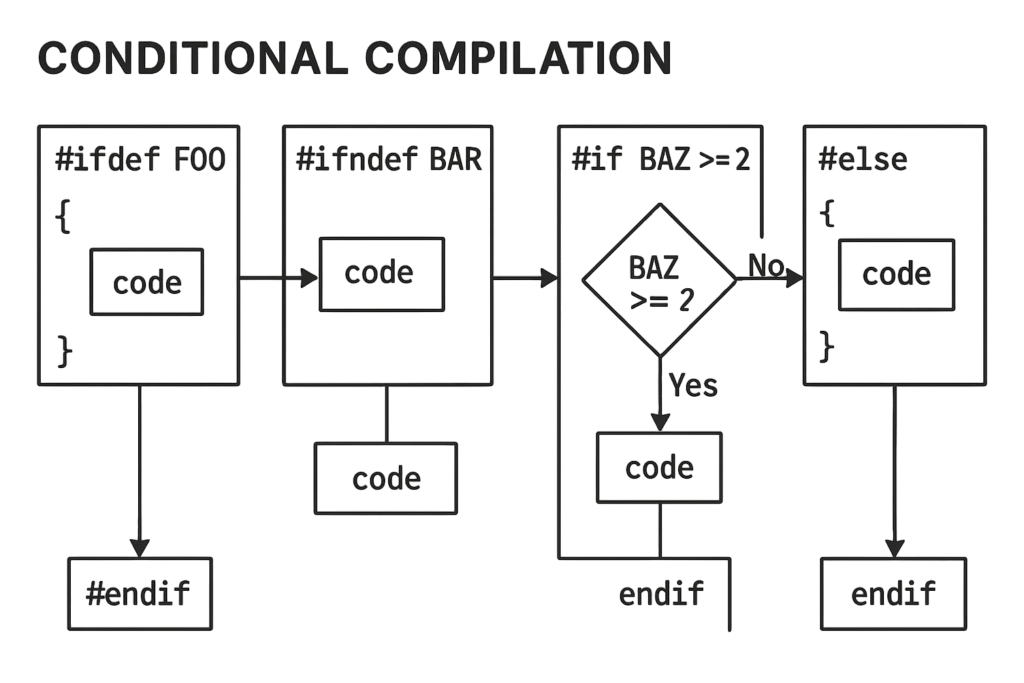
The following video provides a clear, practical demonstration of these directives.
#ifdef #ifndef Conditional Compilation Directives | C Programming Tutorial
This video, '#ifdef #ifndef Conditional Compilation Directives', walks through the syntax and common use cases for conditional compilation.
Watch these two key segments: #ifdef and #ifndef basics (01:49 - 04:06): This covers the core mechanism for including code based on whether a macro is defined. This is exactly how our debug macro from the last lesson worked. Real-world applications (06:19 - 08:24): This demonstrates how to use these directives for debugging and for creating platform-specific code, which are very common professional use cases.
The Most Important Use Case: Include Guards
If file_A.h includes file_B.h, and your main.c includes both file_A.h and file_B.h, the contents of file_B.h will be pasted into your code twice. This will cause the compiler to fail with "redeclaration" or "redefinition" errors.
To solve this, every header file you write should be wrapped in an include guard. It's a standard and non-negotiable C idiom.
Example: my_utils.h
#ifndef MY_UTILS_H  // If the macro MY_UTILS_H has not been defined yet...
#define MY_UTILS_H  // ...define it now.

// All your header content goes here:
// function declarations, struct definitions, etc.
void my_awesome_function();

#endif // MY_UTILS_H // End of the conditional block
The first time the preprocessor sees this file, MY_UTILS_H is not defined, so it defines it and includes the content. On any subsequent attempt to include the same file during the same compilation, MY_UTILS_H will already be defined, and the preprocessor will skip the entire block.
Conclusion
You've now explored the three pillars of the C preprocessor: including files, defining macros, and conditionally compiling code. While it's a powerful tool, remember that it's a simple text-based one, which is the source of its quirks and pitfalls.
Key Takeaways:
- The preprocessor runs before the compiler, performing text-based operations.
#includeis a literal copy-paste operation.<...>is for system files,"..."is for local project files.#definecreates macros. For function-like macros, always wrap arguments and the entire body in parentheses to avoid precedence issues, and beware of side effects.- Conditional compilation (
#ifdef,#ifndef,#if) is used for platform-specific code, build configurations (debug/release), and most importantly, include guards in every header file.
In our next lesson, we will begin Module 2 by diving into the memory layout of a C program. We'll explore the stack and the heap, which will be our first major step into understanding how C manages memory—a topic central to mastering the language.
Practice Exercises
Apply what you've learned with these exercises. They are designed to test your understanding of macros, conditional compilation, and include guards.
-
The Perils of Macro Side Effects
Create a function-like macroSQUARE(x)that calculates the square of a number. Write a smallmainfunction to test it. First, test it with a simple integer (SQUARE(5)). Then, declare an integerint i = 5;and test it withSQUARE(i++). Useprintfto show the value ofiafter the macro is called. Explain why the result might be surprising. -
Building a Debug Macro
In our previous lesson, we saw aDEBUG_LOGmacro. Recreate a simplified version from scratch. It should print a debug message only if aDEBUGmacro is defined. The message should include the file and line number where it was called.
Hint: Use#ifdef,__FILE__, and__LINE__.
Compile your program once normally (gcc your_file.c) and once with the debug flag (gcc -DDEBUG your_file.c -o your_app_debug) to see the difference. -
Platform-Specific Compilation
Write a program that defines a macroOS_NAME. Use conditional compilation (#if,#elif,#elsewithstrcmp) to set the value ofOS_NAMEto "Windows", "macOS", or "Linux". Useprintfto print the "detected" operating system. Control which OS is "detected" by defining a macro likePLATFORM_WINDOWSat the top of your file. -
Implementing Include Guards
Create a small project with three files:main.c,string_util.h, andmath_util.h.math_util.h: Declares a functionint add(int a, int b);.string_util.h: Includesmath_util.hand declares a functionvoid print_sum(int a, int b);.main.c: Includes bothstring_util.handmath_util.h.
First, try to compile this project without include guards in the header files (gcc main.c ...). You should get a "redefinition" error. Then, add proper include guards to bothstring_util.handmath_util.hand confirm that it compiles successfully.
-
An
ASSERTMacro with Stringification
A common use of macros is to create anassertfunction. Create a macroASSERT(condition)that checks if a condition is true.- If the condition is true, it should do nothing.
- If the condition is false, it should print an error message to
stderrthat includes the failed condition as a string, the file name, and the line number, and then exit the program.
Hint: The#operator (stringification) turns a macro argument into a string literal.ASSERT(x > 10)would use#conditionto get the string"x > 10".
Test your macro inmainby asserting both a true condition and a false one to see it in action.