Hello! Welcome to your fifth lesson on C programming.
In our last lesson, we explored how functions work in C, focusing on the crucial concept of pass-by-value. You learned that all function arguments are copies and that to modify a caller's data, we must explicitly pass a pointer to it. This understanding of functions, memory, and pointers is the bedrock for everything that follows.
Today, we'll apply this knowledge to a special function: main. We will explore how a C program receives input directly from the command line when it's launched. The learning outcome for this lesson is to parse basic command-line arguments using argc and argv to create simple interactive tools. This is your first step towards building the powerful command-line utilities, compilers, and system tools that are central to your goals.
The main Function's Special Signature
You've been writing int main(void) or just int main(), but main has an alternative, more powerful signature:
int main(int argc, char *argv[])
This form allows the operating system's shell (like bash) to pass information from the user directly into your program when it starts. Let's break down these two parameters:
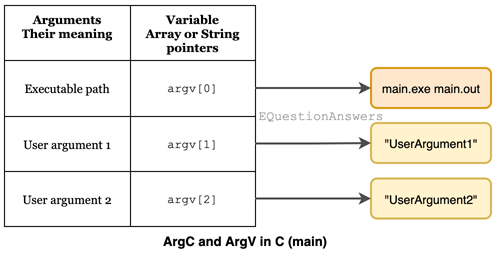
int argc(argument count): An integer that holds the number of command-line arguments supplied. This count always includes the name of the program itself, soargcis at least 1.char *argv[](argument vector): This is the "argument vector." It's an array of strings. Since strings in C are pointers to characters (char *),argvis an array of character pointers. Each element of this array is one of the command-line arguments.
Here's a visual breakdown:
Accessing and Printing Arguments
Since argv is an array and argc tells us its size, we can easily loop through it to see what was passed to our program.
The following video provides a clear, practical demonstration of argc and argv and how to iterate through them.
What are command line arguments (argc and argv)?
The video 'What are command line arguments (argc and argv)?' from CodeVault clearly introduces these concepts.
Watch the first four and a half minutes (from 00:00 to 04:47). Pay attention to how argc is used as the boundary for the for loop and how argv[i] is used to access each string argument. The demonstration of running the program from a real command prompt is particularly useful.
As the video shows, a typical program to display all arguments looks like this:
#include <stdio.h>

int main(int argc, char *argv[]) {
    printf("Total number of arguments: %d\n\n", argc);

    for (int i = 0; i < argc; i++) {
        printf("Argument %d: %s\n", i, argv[i]);
    }

    return 0;
}
If you compile this program to an executable named my_program and run it from your terminal like this:
./my_program hello world 123
The output will be:
Total number of arguments: 4

Argument 0: ./my_program
Argument 1: hello
Argument 2: world
Argument 3: 123
Notice how the shell splits the command at the spaces to create the separate strings in the argv array.
Test your understanding!
Modify the code above to print only the arguments provided by the user, skipping the program's own name. For the command ./my_program hello world, it should only print "hello" and "world".
Show answer
You can achieve this by starting the loop from index 1 instead of 0.
#include <stdio.h>

int main(int argc, char *argv[]) {
    printf("User-provided arguments:\n");

    // Start loop at 1 to skip the program name
    for (int i = 1; i < argc; i++) {
        printf("%s\n", argv[i]);
    }

    return 0;
}
A Deeper Look at argv's Memory Structure
Given your interest in how things work under the hood, let's look closer at char *argv[]. This syntax can also be written as char **argv, which means "a pointer to a pointer to a character."
This sounds complex, but it makes sense:
argvis a pointer that points to the beginning of an array.- Each element in that array (e.g.,
argv[0],argv[1]) is also a pointer. - Each of those pointers points to the first character of a null-terminated string stored somewhere else in memory.
This video offers a great visual model of this memory layout.
All you need to know about the command line arguments argc and *argv[ ]
The video 'All you need to know about the command line arguments' by Oceano has an excellent visual explanation of argv's structure in memory.
Watch the section from 02:57 to 05:08. The diagram clearly shows argv as an array of pointers, with each pointer pointing to a distinct string. This visual will help solidify the concept of a 'pointer to a pointer'.
Understanding this structure is key to mastering C, as this pattern of using pointers to manage collections of data is very common.
From Strings to Numbers: Building a Simple Tool
Command-line arguments are powerful, but they have one major catch: they are always passed as strings. If you want to perform arithmetic, you must first convert the string representation of a number (e.g., "123") into an actual integer type (e.g., 123).
Let's build a tool that multiplies numbers given on the command line. This requires conversion.
There are two common functions for this in C:
atoi(ASCII to Integer): Simple, but not robust. It's defined in<stdlib.h>. If you give it a string that isn't a number (like"hello"), it returns0. This is problematic because you can't tell if the user entered"0"or invalid text.strtol(String to Long): More complex, but far more powerful and safe. It's the professional choice. It can tell you if a conversion failed and where it stopped parsing.
To start, let's see a practical example that uses strtol.
What are command line arguments (argc and argv)?
Let's return to the CodeVault video, which now demonstrates building a simple multiplication tool.
Watch the section from 04:47 to 09:36. The author explains why a numeric conversion is necessary and introduces strtol. Note the three arguments to strtol: the string to convert, a pointer for error checking (passed as NULL here for simplicity), and the numeric base (10 for decimal).
Professional-Grade Conversion with strtol
The example in the video uses strtol in a simple way. To write truly robust code—the kind expected in production systems or at a top-tier tech company—you need to use strtol's full error-checking capabilities.
This involves checking two things:
endptr:strtolcan update a pointer you provide to show you where it finished parsing. If it couldn't parse anything,endptrwill still point to the start of the string. If it contains leftover characters (like in"123xyz"),endptrwill point to the'x'.errno: This is a global variable from<errno.h>that C library functions use to report errors. If the number is too big or too small to fit in along,strtolwill seterrnotoERANGE.
Let's examine how to use these features to write a truly solid conversion function.
How do I convert a number from the command line to an integer using strtol in C?
This Stack Overflow answer provides an excellent, concise example of how to use strtol with full error checking. This is what professional C code looks like.
Read the first answer provided by user 'chux'. First, review the code block in the section that starts 'Good strtol() usage involves...'. Notice how it checks errno and endptr to handle multiple failure cases. Then, review the section below it that explains the function prototype: long int strtol(const char *str, char **endptr, int base). This will clarify what each part does.
This level of rigor—checking arguments, handling conversion errors—is what separates beginner code from professional, reliable C programs.
Conclusion
You've now learned how to make your C programs interactive by accepting input from the command line. This is a fundamental skill for building everything from simple utilities to complex applications like compilers and servers.
Key Takeaways:
- The
mainfunction can be declared asint main(int argc, char *argv[])to receive command-line arguments. argcis the count of arguments, andargvis an array of strings (char *) containing them.argv[0]is always the path to the program executable. User arguments start atargv[1].- All arguments are passed as strings. For numeric operations, you must convert them.
strtolis the robust, professional function for string-to-number conversion, offering superior error handling compared to the simpleratoi.
In our next lesson, we will formalize error handling. We briefly saw errno today, and next time we will dive deep into checking function return values and using perror and errno to report errors gracefully. This is another essential skill for writing reliable software.
Practice Exercises
Now it's time to build some simple tools yourself. This will solidify your understanding of parsing command-line arguments.
-
Echo Tool: Write a program that prints all of its command-line arguments to the screen, but with each argument on a new line. The program name should not be printed.
- Example:
./echo one two three - Output:
one
two
three
- Example:
-
Reverse Echo: Write a program that prints its command-line arguments in reverse order, again skipping the program name.
- Example:
./reverse one two three - Output:
three
two
one
- Example:
-
Summing Tool: Write a program that takes any number of integer arguments and prints their sum. Use
strtolfor conversion. If an argument is not a valid integer, print an error message tostderr(e.g.,fprintf(stderr, "Error: '%s' is not a valid number.\n", argv[i]);) and skip it.- Example:
./sum 10 20 five 30 - Output:
Error: 'five' is not a valid number.
Sum: 60
- Example:
-
Greeter: Write a program that expects exactly one command-line argument: a name. If the name is provided, it should print "Hello,
<name>!". If the wrong number of arguments is given, it should print a usage message tostderr.- Example 1:
./greet_user - Output:
Usage: ./greet_user <name> - Example 2:
./greet_user World - Output:
Hello, World!
- Example 1:
-
Simple Calculator: Create a command-line calculator that takes exactly three arguments: two integers and an operator (
+,-,*,/).- Check that
argcis exactly 4. If not, print a usage message. - Use
strtolto parse the first and third arguments as numbers. - The second argument is the operator. Check if it's a single character:
+,-,*, or/. - Perform the calculation and print the result.
- Include a check for division by zero.
- Example:
./calc 30 / 3 - Output:
30 / 3 = 10
- Check that