Welcome back. In our last lesson, we configured persistent storage with named volumes and created secure communication channels using custom networks. We ended by identifying a critical race condition: what happens if our application service starts before its database is fully initialized and ready to accept connections? The application will crash.
This lesson directly solves that problem. We will learn how to manage the startup sequence of your services using Docker Compose's depends_on feature. Your goal is to create a predictable and resilient startup process where services only begin their work after their dependencies are confirmed to be fully operational. This is a crucial step in moving from a simple setup to a robust, production-like environment.
1. The Startup Race Condition
When you execute docker compose up, Docker Compose begins starting all the services defined in your docker-compose.yml file, often concurrently. This parallelism is efficient but introduces a common failure scenario in distributed systems: the startup race condition.
Imagine a simple stack: a Python API service and a PostgreSQL database.
docker compose upis executed.- Compose starts both the
apianddbcontainers. - The
apicontainer might start very quickly. The Python application initializes and immediately tries to establish a connection pool to the database. - Meanwhile, the
dbcontainer is also starting, but PostgreSQL needs several seconds to initialize its data directory, load configuration, and begin listening for connections. - The API's connection attempt fails because the database isn't ready. The API application, unable to connect to its database, throws an exception and exits. The
apicontainer stops.
This highlights a critical distinction: a container being in a "running" state does not mean the application inside it is "ready" to serve requests.
2. Basic Startup Order with depends_on
Docker Compose provides a simple mechanism to control the startup sequence: the depends_on attribute. When you specify that one service depends_on another, Compose ensures the dependency is started before the dependent service. It also reverses this order for shutdown.

Here's how you would use it in your docker-compose.yml:
version: '3.8'

services:
  api:
    build: ./api


    # This ensures the 'db' container is started before the 'api' container
    depends_on:
      - db

  db:
    image: postgres:15-alpine


    # ...
This is a step in the right direction, but it does not solve the race condition. The default depends_on only waits for the db container to be started, not for the PostgreSQL process inside it to be ready to accept connections.
3. The Robust Solution: Health Checks and Conditions
To create a truly reliable startup sequence, you need to combine depends_on with two other features: healthcheck and condition.
a) Defining a healthcheck
A healthcheck is a directive you add to a service definition that tells Docker how to test if the application inside the container is actually working. Docker runs this test command periodically, and the container's status will be starting, healthy, or unhealthy.
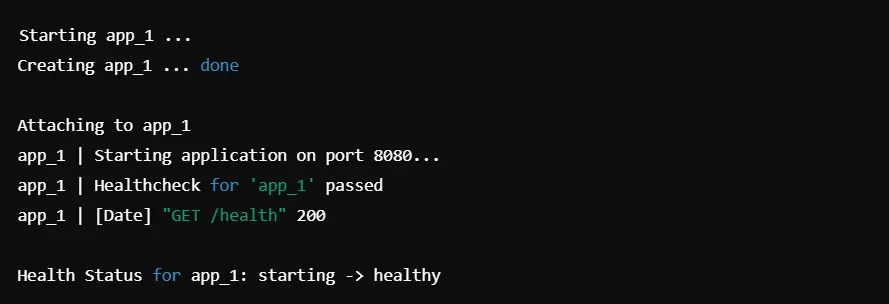
The article from Last9, "Docker Compose Health Checks: An Easy-to-follow Guide," provides an excellent breakdown of this feature. Please read the following sections to understand what health checks are and how to configure them.
Docker Compose Health Checks: An Easy-to-follow Guide
This resource explains the purpose of health checks and how to define them in Docker Compose.
Read the introduction ("What Are Docker Compose Health Checks") to understand the problem they solve. Then, focus on the section "Set up Your First Docker Compose Health Check" to learn about the test, interval, timeout, retries, and start_period options. Pay close attention to the examples for different services.
Here are some common health check patterns for services we'll be using:
- PostgreSQL: Use the
pg_isreadyutility, which is designed for this exact purpose. - Redis: Use
redis-cli ping, which should returnPONG. - Web Service/API: Use
curlto hit a dedicated/healthor/statusendpoint. The-fflag makescurlfail if it receives an HTTP error code (4xx or 5xx).
b) Using depends_on with a condition
Once you have a health check defined for a dependency, you can tell other services to wait for it to become healthy. This is done by adding a condition to the depends_on block.
This is the key to solving our startup problem. Now, the api service won't just wait for the db container to start; it will wait until pg_isready returns a success code.
The following video demonstrates this powerful combination clearly.
What is Docker Compose? Multiple Containers & Docker Networking
This video from Monis Yousuf explains and demonstrates how to use depends_on with health check conditions to ensure services start in the correct, ready state.
Watch the section from "Controlling Startup Order". The video explains why the basic depends_on is not enough and then walks through the configuration of healthcheck and depends_on with condition: service_healthy.
To formalize this concept, let's turn to the official Docker documentation.
Control startup and shutdown order in Compose - Docker Docs
This is the official documentation for controlling startup order.
Read the "Control startup" section to understand the condition attribute and its options (service_started, service_healthy, service_completed_successfully). Then, study the YAML example provided, which shows a web service depending on a PostgreSQL database with a healthcheck.
4. Example: A Multi-Tier Application
Let's assemble these concepts into a complete example for a three-tier application: a web frontend, a backend API, and a database.
version: '3.8'

services:


  # Tier 3: The database
  db:
    image: postgres:15-alpine
    environment:
      - POSTGRES_USER=user
      - POSTGRES_PASSWORD=password
      - POSTGRES_DB=app
    volumes:
      - db-data:/var/lib/postgresql/data
    healthcheck:
      test: ["CMD-SHELL", "pg_isready -U user -d app"]
      interval: 5s
      timeout: 5s
      retries: 5


  # Tier 2: The API, which depends on the database
  api:
    build: ./api
    environment:
      - DATABASE_URL=postgresql://user:password@db/app
    depends_on:
      db:


        # Wait until the healthcheck for 'db' passes
        condition: service_healthy
    healthcheck:
      test: ["CMD", "curl", "-f", "http://localhost:8000/health"]
      interval: 10s
      timeout: 5s
      retries: 3
      start_period: 15s


  # Tier 1: The frontend, which depends on the API
  web:
    build: ./web
    ports:
      - "80:80"
    depends_on:
      api:


        # Wait until the healthcheck for 'api' passes
        condition: service_healthy

volumes:
  db-data:
This configuration establishes a reliable startup chain:
- Docker Compose starts the
dbservice. - It waits for the
pg_isreadycommand to succeed. - Once
dbis healthy, Compose starts theapiservice. - It waits for the API's
/healthendpoint to return a200 OK. - Once
apiis healthy, Compose starts thewebservice.
This eliminates the startup race condition and ensures your application stack initializes predictably every time.
5. Hands-on Exercise
It's your turn to apply this pattern. Below is a docker-compose.yml for an application using an API, a PostgreSQL database, and a Redis cache. The file is missing startup-order controls.
Your task is to modify the file to ensure the api service only starts after both the db and redis services are healthy.
Starting docker-compose.yml:
version: '3.8'

services:
  api:
    build: ./api
    ports:
      - "8000:8000"
    environment:
      - DATABASE_HOST=db
      - REDIS_HOST=redis


    # TODO: Add dependency declarations here

  db:
    image: postgres:15-alpine
    environment:
      - POSTGRES_PASSWORD=secret


    # TODO: Add a healthcheck here

  redis:
    image: redis:7-alpine


    # TODO: Add a healthcheck here
Instructions:
- Add a
healthcheckto thedbservice that usespg_isready. - Add a
healthcheckto theredisservice that usesredis-cli ping. - Add a
depends_onblock to theapiservice that waits for bothdbandredisto beservice_healthy.
Click for solution
Here is the completed docker-compose.yml file:
version: '3.8'

services:
  api:
    build: ./api
    ports:
      - "8000:8000"
    environment:
      - DATABASE_HOST=db
      - REDIS_HOST=redis
    depends_on:
      db:
        condition: service_healthy
      redis:
        condition: service_healthy

  db:
    image: postgres:15-alpine
    environment:
      - POSTGRES_PASSWORD=secret
    healthcheck:
      test: ["CMD-SHELL", "pg_isready"]
      interval: 10s
      timeout: 5s
      retries: 5

  redis:
    image: redis:7-alpine
    healthcheck:
      test: ["CMD", "redis-cli", "ping"]
      interval: 10s
      timeout: 5s
      retries: 5
Conclusion
You have now learned how to create a robust and predictable startup sequence for your multi-service applications. This is not just a "nice-to-have"; it's an essential practice for building reliable systems, whether for local development, CI/CD pipelines, or production.
Key Takeaways:
- The default behavior of
docker compose upcan lead to startup race conditions. - "Running" does not equal "ready."
- Basic
depends_ononly controls the container start order, which is insufficient. - The definitive solution is to combine
healthcheckdefinitions withdepends_onandcondition: service_healthyto ensure services only start after their dependencies are fully operational.
Preview of the Next Lesson
We have now covered all the core components of building a multi-service application with Docker Compose: writing Dockerfiles, defining services, managing persistent data with volumes, creating secure networks, and controlling startup order.
In the next lesson, "Build and run a complete multi-service application using Docker Compose," we will synthesize everything you've learned. We will take a practical application—a FastAPI gateway and a gRPC service—and build, configure, and run the entire stack from scratch.