Welcome back! In the last lesson, we mastered the art of creating a resilient startup sequence for our services using depends_on and healthcheck. This ensures that our application stack boots up predictably, with each service starting only after its dependencies are fully ready.
This lesson is where we bring it all together. Our goal is to build and run a complete multi-service application using Docker Compose. We'll move beyond individual configurations and define our entire stack—a FastAPI gateway and a gRPC service—in a single, declarative docker-compose.yml file. By the end of this lesson, you'll be able to launch a complex microservices environment with a single command, a cornerstone skill for modern backend development.
1. The Challenge of Manual Orchestration
Imagine you've followed best practices and have separate Dockerfiles for your FastAPI gateway and your gRPC recommendations service. How would you run them together? Manually, the process is cumbersome:
- Create a Network: You'd first need to create a custom network so the containers can find each other by name.
docker network create my_app_network - Run the gRPC Service: You'd start the gRPC service container, attaching it to the network and giving it a name.
docker run --network my_app_network --name recommendations-svc -d recommendations-image - Run the FastAPI Gateway: Then, you'd start the gateway, attaching it to the same network, passing an environment variable so it knows the hostname of the gRPC service, and mapping a port for external access.
docker run --network my_app_network -p 8000:8000 -e RECOMMENDATIONS_HOST=recommendations-svc -d gateway-image
This process is tedious, error-prone, and not easily reproducible by other developers. Every time you want to start the environment, you have to remember this sequence of complex commands. This is the exact problem Docker Compose was designed to solve.
The following video demonstrates this manual setup, highlighting the inefficiencies that Docker Compose elegantly addresses.
Ultimate Docker Compose Tutorial
In this video, "Ultimate Docker Compose Tutorial" from the TechWorld with Nana channel, you'll see the manual process of setting up interdependent containers.
Watch the section showing the manual setup. Notice all the individual commands and flags required to create a network, run a MongoDB container, and then run a dependent UI container that needs to connect to the database. This illustrates the complexity we're about to simplify.
2. Docker Compose: Your Application's Blueprint
Docker Compose allows you to define your entire multi-service application in a single YAML file, typically named docker-compose.yml. This file serves as a blueprint for your application's architecture, specifying the services, networks, volumes, and configurations.
With this file, the tedious multi-step process from before is reduced to a single command: docker compose up.
The beauty of this is how directly the manual docker run commands map to the YAML structure. Let's see how this translation works.
Ultimate Docker Compose Tutorial
This next segment from the same video shows how to convert the manual docker run commands into a structured docker-compose.yml file.
Focus on the part that introduces the docker-compose.yml file structure. Pay close attention to how keywords like image, ports, and environment in the YAML file directly correspond to the flags used in the docker run command.
3. Anatomy of a docker-compose.yml File
A docker-compose.yml file has a clear, hierarchical structure. Let's break down the key components for our target application: a FastAPI gateway that communicates with a gRPC recommendations service.
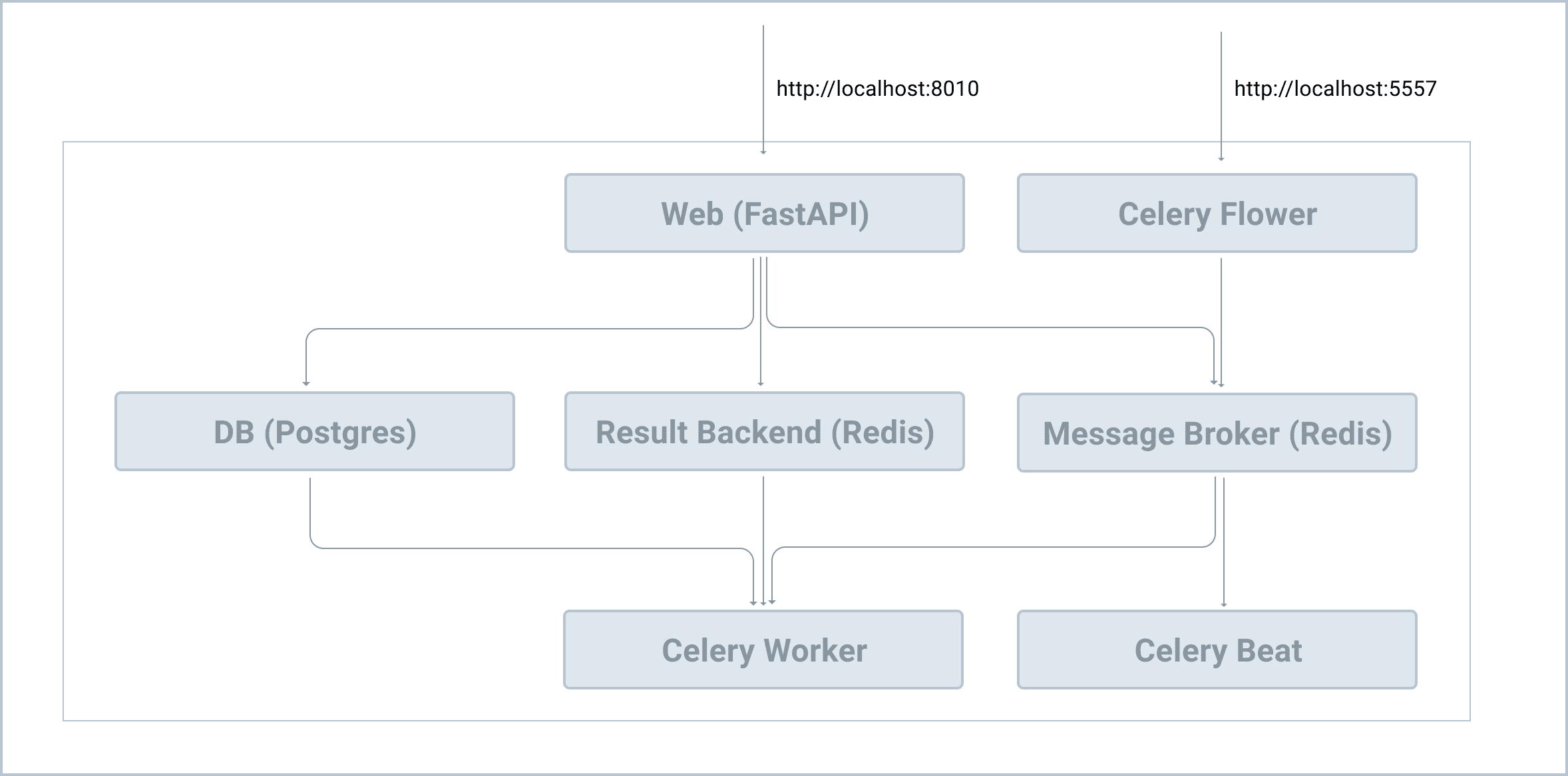
Here is a conceptual docker-compose.yml file that we will build towards.
# docker-compose.yml
version: '3.8' # Specifies the file format version. Optional in newer versions.

services: # The main section where you define each of your containers.


  # Definition for our gRPC service
  recommendations:
    build:
      context: .
      dockerfile: recommendations/Dockerfile
    networks:
      - microservices-net
    healthcheck:
      test: ["CMD", "grpc_health_probe", "-addr=:50051"]
      interval: 10s
      timeout: 5s
      retries: 5


  # Definition for our FastAPI API Gateway
  gateway:
    build:
      context: .
      dockerfile: gateway/Dockerfile
    ports:
      - "8000:8000"
    networks:
      - microservices-net
    environment:
      - RECOMMENDATIONS_HOST=recommendations
    depends_on:
      recommendations:
        condition: service_healthy

networks: # Top-level section for defining networks.
  microservices-net:
    driver: bridge
Let's dissect the keywords used here:
services: This is the heart of the file. Each key underservices(e.g.,recommendations,gateway) is a distinct service in your application. The service name also becomes its hostname on the Docker network, which is how our gateway can find therecommendationsservice.build: This tells Compose how to build the image for a service.context: .: Specifies the build context (the directory containing the source code andDockerfile)..means the current directory wheredocker-compose.ymlis located.dockerfile: ...: Specifies the path to theDockerfilefor that service relative to the context. This is essential for your custom Python services.
image: For services that don't need to be built from aDockerfile(likepostgresorredis), you can simply specify the image name and tag, likeimage: postgres:15-alpine.ports: Maps ports from the host machine to the container (HOST:CONTAINER). In our example,8000:8000exposes the gateway's port 8000 to port 8000 on your local machine. Note that the internalrecommendationsservice doesn't need its port exposed to the host, as it's only accessed by thegatewayover the internal Docker network.environment: Passes environment variables into the container. This is the standard way to provide configuration, such as database connection strings or, in this case, the hostname of a dependency (RECOMMENDATIONS_HOST=recommendations).networks: Specifies which networks the service should connect to. We define a custombridgenetwork at the bottom of the file to provide an isolated environment for our services.depends_onandhealthcheck: As we covered in the last lesson, this powerful combination ensures a resilient startup order. Thegatewaywill wait until therecommendationsservice is not just started, but fully healthy and ready to accept connections.
The Real Python article "Python Microservices With gRPC" provides a fantastic, concise example that puts all these pieces together for an application stack almost identical to ours.
Python Microservices With gRPC - Docker Compose Section
This section of the article demonstrates how to tie a gRPC service and a web service together using Docker Compose.
Read the section titled "Docker Compose". It presents a complete docker-compose.yaml file and explains how it replaces all the manual docker network create and docker run commands. This will solidify your understanding of how to structure the file for our specific use case.
4. Managing Your Application Stack
With your docker-compose.yml file in place, managing your entire application stack boils down to a few simple commands.
-
docker compose up: This is your primary command. It performs the following:- Checks for the defined networks and volumes, creating them if they don't exist.
- Builds the images for services that have a
buildinstruction, if they haven't been built yet. - Pulls any required pre-built images.
- Starts all the service containers in the correct dependency order.
- Attaches to the logs of all services, streaming them to your terminal in an interleaved fashion. This is incredibly useful for debugging.
You can add the
-d(or--detach) flag to run the containers in the background:docker compose up -d. -
docker compose down: This command stops and removes all the containers, networks, and (optionally) volumes associated with your application. It's the perfect way to clean up your environment.- To also remove named volumes, use
docker compose down -v.
- To also remove named volumes, use
-
docker compose build: If you make changes to your application code or aDockerfile, Docker Compose won't automatically rebuild the image on the nextup. You must explicitly tell it to rebuild with this command.
This video provides a great visual demonstration of these commands in action.
Ultimate Docker Compose Tutorial
This final clip from the "Ultimate Docker Compose Tutorial" shows the up and down commands in action.
Watch the demonstration from "executing a Docker Compose file". Observe how the network is created automatically, how containers are named, and how the up and down commands manage the entire lifecycle of the application.
5. Hands-on Exercise: Complete the Stack
You're now ready to assemble a complete docker-compose.yml for our FastAPI gateway and gRPC service. Below is a nearly complete file. Your task is to fill in the missing pieces to enable communication and ensure a proper startup sequence.
Assume you have the following project structure:
.
├── docker-compose.yml
├── gateway/
│   └── Dockerfile
└── recommendations/
    └── Dockerfile
Starting docker-compose.yml:
version: '3.8'

services:
  recommendations:
    build:
      context: .
      dockerfile: recommendations/Dockerfile


    # TODO: Connect this service to the 'microservices-net' network.
    healthcheck:
      test: ["CMD", "grpc_health_probe", "-addr=:50051"]
      interval: 10s
      timeout: 5s
      retries: 5

  gateway:
    build:
      context: .
      dockerfile: gateway/Dockerfile
    ports:
      - "8000:8000"


    # TODO: Connect this service to the 'microservices-net' network.
    # TODO: Pass an environment variable named RECOMMENDATIONS_HOST with the value 'recommendations'.
    # TODO: Add a dependency to wait for the 'recommendations' service to be healthy before starting.


# TODO: Define the 'microservices-net' network below.
Instructions:
- Define the
microservices-netnetwork at the bottom of the file. - Connect both the
gatewayandrecommendationsservices to this network. - Add the necessary
environmentvariable to thegatewayservice so it can find therecommendationsservice by its service name. - Add the
depends_onblock to thegatewayservice to enforce the correct startup order based on the health check.
Click for solution
Here is the completed docker-compose.yml file:
version: '3.8'

services:
  recommendations:
    build:
      context: .
      dockerfile: recommendations/Dockerfile
    networks: # Added network connection
      - microservices-net
    healthcheck:
      test: ["CMD", "grpc_health_probe", "-addr=:50051"]
      interval: 10s
      timeout: 5s
      retries: 5

  gateway:
    build:
      context: .
      dockerfile: gateway/Dockerfile
    ports:
      - "8000:8000"
    networks: # Added network connection
      - microservices-net
    environment: # Added environment variable
      - RECOMMENDATIONS_HOST=recommendations
    depends_on: # Added dependency block
      recommendations:
        condition: service_healthy

networks: # Added network definition
  microservices-net:
    driver: bridge
Conclusion
Congratulations! You have successfully synthesized all the core Docker concepts—Dockerfiles, networking, volumes, and health checks—into a single, powerful Docker Compose file. You are now equipped to define, build, and run a complete multi-service application with simplicity and reproducibility.
Key Takeaways:
- Docker Compose replaces complex, manual
docker runcommands with a single, declarativedocker-compose.ymlfile. - This file acts as the blueprint for your entire application stack, defining services, builds, networks, ports, and environment configurations.
- Service discovery is handled automatically: services on the same custom network can reach each other using their service names as hostnames.
- The commands
docker compose up,down, andbuildprovide complete lifecycle management for your application environment.
Preview of the Next Lesson
Now that we can reliably build and run our interconnected services, we must consider how to make them robust in the face of the inevitable failures that occur in distributed systems. In our next lesson, "Microservice Security and Resilience Patterns," we will tackle this head-on. We'll start by implementing one of the most critical resilience patterns: the circuit breaker, which prevents a failing service from causing cascading failures throughout the entire system.