Hello! In our last lesson, we focused on using asyncio.gather to concurrently run I/O-bound operations and build resilient services. This is a powerful pattern, but it hinges on one crucial assumption: that your tasks spend most of their time waiting.
This lesson tackles a fundamental question: what happens when a task doesn't wait, but instead needs to perform intensive calculations? We will draw a sharp distinction between I/O-bound and CPU-bound tasks. Understanding this difference is one of the most important aspects of designing high-performance systems in Python. You'll learn why asyncio is the wrong tool for CPU-heavy work and discover Python's standard library solution for true parallelism: multiprocessing.
By the end of this lesson, you will be able to analyze a task, identify its nature as either I/O-bound or CPU-bound, and select the appropriate concurrency model—asyncio or multiprocessing—to maximize performance.
The Two Types of Work: I/O-Bound vs. CPU-Bound
In computing, most performance bottlenecks fall into two categories. It's essential to identify which one you're facing before you try to optimize your code.
-
I/O-Bound Tasks: The program's speed is limited by input/output operations. The CPU spends most of its time idle, waiting for data from a slow external resource like a network, a database, or a disk.
- Examples: Making API requests, querying a database, reading/writing files.
- Goal of Concurrency: Overlap the waiting periods. While one task waits for a network response, the CPU can work on another task.
-
CPU-Bound Tasks: The program's speed is limited by the processor's speed. The CPU is running at or near 100% capacity, performing computations.
- Examples: Mathematical calculations (like in scientific computing), image or video processing, data compression, complex sorting.
- Goal of Parallelism: Distribute the computational work across multiple CPU cores to get the final result faster.
The following article provides a superb introduction to this concept with helpful diagrams.
This section from "Speed Up Your Python Program With Concurrency" on Real Python clearly defines and contrasts I/O-bound and CPU-bound problems.
Focus on the definitions and the diagrams for I/O-bound and CPU-bound operations. The summary table at the end provides a concise recap of the differences.
To visualize this, we can use an analogy.
- Concurrency (
asyncio) is like a single chef in a kitchen juggling multiple recipes. They start boiling water for pasta (an I/O wait), and while it heats up, they chop vegetables for a salad (CPU work). They are managing multiple tasks, but only doing one thing at any given instant. - Parallelism (
multiprocessing) is like having multiple chefs in the kitchen, each with their own stove and cutting board. One chef makes the pasta, another makes the salad, and a third bakes a dessert. They are all working simultaneously, leading to a faster overall meal preparation.
This table provides a great summary of the distinction between concurrency and parallelism.

Why asyncio Fails for CPU-Bound Tasks
As we've learned, asyncio operates on a single thread using an event loop. It achieves concurrency through cooperative multitasking: a coroutine must explicitly await an operation, which signals to the event loop that it can pause this task and run another one.
A CPU-bound function, however, has nothing to await. It's a solid block of computation. If you run a CPU-bound function inside a coroutine, it will take over the event loop and run to completion without ever yielding control. This blocks the event loop, freezing all other concurrent tasks.
Let's see a practical demonstration of this. The following video shows an animation of what happens when a blocking call, time.sleep(), is used in an async function. A CPU-bound task behaves exactly the same way—it monopolizes the event loop.
Python Tutorial: AsyncIO - Complete Guide to Asynchronous Programming with Animations
This segment from Corey Schafer's "AsyncIO - Complete Guide" is perfect for visualizing a blocked event loop.
Watch the section from blocking the event loop. Observe how the synchronous time.sleep() call prevents any other tasks from running, defeating the purpose of concurrency.
The Real Python article you read earlier includes a powerful experiment. It runs a CPU-bound Fibonacci calculation using four different models. The results are telling:
- Synchronous: Base time.
- Multi-threaded: Slightly slower due to thread management overhead.
- Asyncio: Much slower due to event loop and
awaitoverhead with no actual I/O to wait for. - Multiprocessing: Significantly faster.
This confirms our understanding: for CPU-bound problems, asyncio and threading are not the right tools.
The Solution: multiprocessing and the Global Interpreter Lock (GIL)
So why can't threading solve this? Even on a multi-core machine, Python's Global Interpreter Lock (GIL) prevents multiple threads from executing Python bytecode at the very same time within a single process. While one thread runs a CPU-bound task, other threads in the same process must wait.
This is a key reason for the architectural diagram below. Threads share memory and are managed within a single process, all constrained by one GIL.
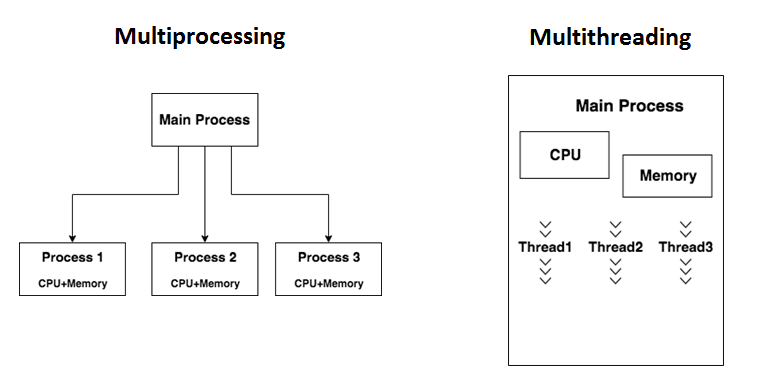
The multiprocessing module sidesteps the GIL by creating separate processes instead of threads. Each process gets its own Python interpreter and memory space, and therefore its own GIL. This allows your Python code to run in true parallel on different CPU cores.
The following video provides an excellent explanation of the GIL and how multiprocessing overcomes its limitations for CPU-bound work.
Unlocking your CPU cores in Python (multiprocessing)
In "Unlocking your CPU cores in Python", the mCoding channel explains the GIL and introduces multiprocessing as the solution.
Watch the explanation of the Global Interpreter Lock to understand why threading doesn't work for CPU-bound tasks. Then, see how multiprocessing provides a powerful solution using a Pool of processes.
Choosing the Right Model: A Practical Workflow
In a real-world application, you'll often encounter a mix of I/O-bound and CPU-bound work. For example, a service might download an image (I/O) and then resize it (CPU). The key is to use the right tool for each part of the job.
Here’s a practical workflow:
- Profile Your Code: Before optimizing, find the bottleneck. Is your code spending time waiting for I/O or is the CPU maxed out? Tools like
cProfileorscalinecan tell you exactly where your program is spending its time. - Apply
asynciofor I/O: For the parts of your code dominated by network or disk I/O, useasynciowith compatible libraries (likehttpxfor HTTP requests) to run operations concurrently. - Offload CPU Work to a Process Pool: For the CPU-intensive parts, use
multiprocessing. In anasyncioapplication, you can useloop.run_in_executor()to offload a blocking function to a separate thread or process pool without blocking the event loop.
Let's watch a complete example that puts this all together. The presenter refactors a script that downloads and processes images, applying the exact workflow described above.
Python Tutorial: AsyncIO - Complete Guide to Asynchronous Programming with Animations
Returning to Corey Schafer's guide, we see the full pattern in action.
First, watch how a profiler is used to identify I/O vs. CPU bottlenecks. Then, watch the full refactoring process. Pay close attention to how: I/O-bound downloads are converted to asyncio using httpx. CPU-bound image processing is offloaded to a ProcessPoolExecutor. This is the hybrid model you will often use in practice.
The key pattern from the video for integrating a CPU-bound function into an asyncio program is:
import asyncio
from concurrent.futures import ProcessPoolExecutor

def cpu_bound_function(data):


    # Heavy computation here...
    print("Running in a separate process")


    # ...
    return "result"

async def main():
    loop = asyncio.get_running_loop()


    # Create a process pool
    with ProcessPoolExecutor() as pool:


        # Offload the blocking, CPU-bound function to the executor
        result = await loop.run_in_executor(
            pool, cpu_bound_function, "some_data"
        )
        print(result)

if __name__ == "__main__":
    asyncio.run(main())
loop.run_in_executor() is the bridge between the async world and the blocking world. It tells the event loop, "Run this blocking function in the provided executor (a process pool in this case), and let me know when it's done. In the meantime, I'll go run other tasks."
Summary: Your Decision-Making Framework
When faced with a performance bottleneck, your decision-making process should be clear.
| If Your Task Is... | Choose... | Reasoning |
|---|---|---|
| I/O-bound (waiting for network, disk, database) | asyncio |
Maximizes efficiency by allowing other tasks to run during wait times. The bottleneck is the external resource, not the CPU. |
| CPU-bound (heavy computation, data processing) | multiprocessing |
Distributes the load across multiple CPU cores, bypassing the GIL to achieve true parallelism and directly reducing execution time. |
| I/O-bound but uses a blocking library | threading |
As a fallback, you can use loop.run_in_executor with a ThreadPoolExecutor to prevent a blocking I/O call from stalling the event loop. |
Conclusion
You have now established one of the most critical mental models for writing performant Python applications. You can differentiate between tasks that wait (I/O-bound) and tasks that compute (CPU-bound) and select the right tool for the job.
Key Takeaways:
- I/O-bound tasks benefit from
asyncio, which uses concurrency on a single thread to overlap waiting times. - CPU-bound tasks require
multiprocessingto achieve true parallelism by distributing work across multiple CPU cores, thus bypassing the GIL. - Using
asynciofor CPU-bound work will block the event loop and degrade performance. - The
loop.run_in_executor()method is the bridge to run blocking code (both I/O and CPU-bound) in an async application without stalling it.
Preview of the Next Lesson:
We've explored how to run independent tasks and how to choose the right model for them. But what if our concurrent tasks need to communicate with each other? In the next lesson, we will explore asyncio.Queue, a fundamental data structure for creating producer-consumer workflows. This is a powerful pattern for building pipelines where one set of coroutines produces work and another set consumes it for processing.