Welcome back! In our last lesson, we built a crucial defense mechanism by implementing rate limiting at the API Gateway. This protects our services from being overwhelmed by excessive traffic at runtime. Now, we'll shift our focus from runtime resilience to a foundational aspect of security: protecting the sensitive data our application needs to function.
This lesson is about securely managing application secrets—such as database passwords, API keys, and JWT signing keys—for local development. Hardcoding this information is a common but dangerous practice. You will learn the standard, secure way to handle these secrets using Docker Compose and environment files, ensuring your sensitive data never accidentally ends up in your version control history.
By the end of this lesson, you will be able to manage application secrets securely for local development using Docker Compose and environment files.
1. The Dangers of Exposed Secrets
First, what is a "secret"? It's any piece of configuration that grants access or is otherwise sensitive. Passwords and API keys are obvious examples. If these are exposed, the consequences can be severe.
Leaking secrets can happen easily, especially when an application is in debug mode or misconfigured. The following image shows a real-world example from a Django application where sensitive environment variables, including database credentials and AWS keys, were leaked on a public-facing error page.
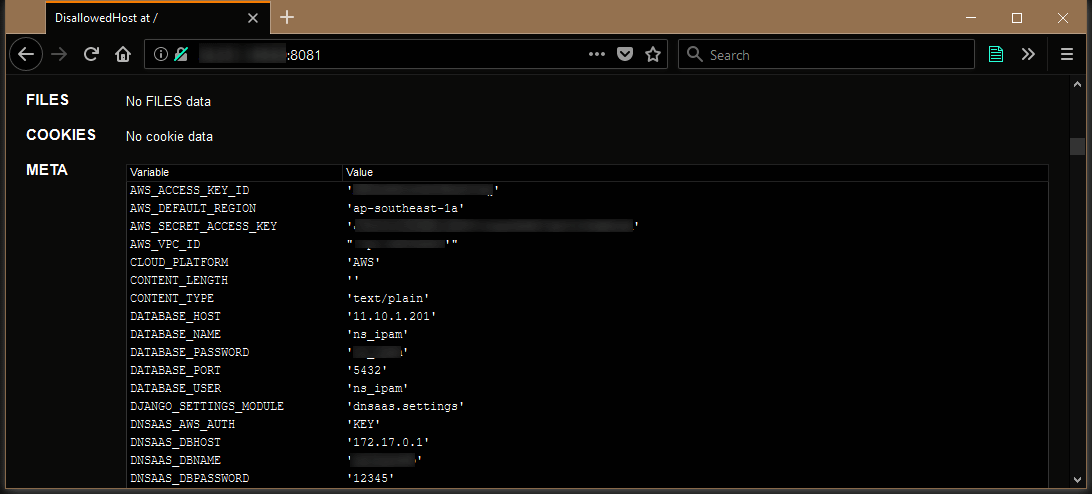
The most common way secrets are unintentionally exposed is by hardcoding them in source code or configuration files (like docker-compose.yml) and then committing them to a Git repository.
To understand why this is such a critical issue, let's watch a short explanation.
Environment Variables in Docker Compose: Secure Your Secrets!
This video from Oluwaseun Alausa introduces the core problem of hardcoding secrets.
Watch the introduction to understand the risks. Pay close attention to the mention of GitHub's secret scanning, which actively looks for committed secrets, and the general best practice of never checking sensitive data into version control, even in private repositories.
2. The Standard Solution: Environment Files
The industry-standard solution for managing secrets in local development is to use environment files (commonly named .env).
An environment file is a simple text file that stores configuration as KEY=VALUE pairs. Your application or orchestration tool (like Docker Compose) reads this file at runtime to load the configuration. The crucial rule is: the .env file is never committed to version control. It is always listed in your project's .gitignore file.
This diagram illustrates the basic workflow:
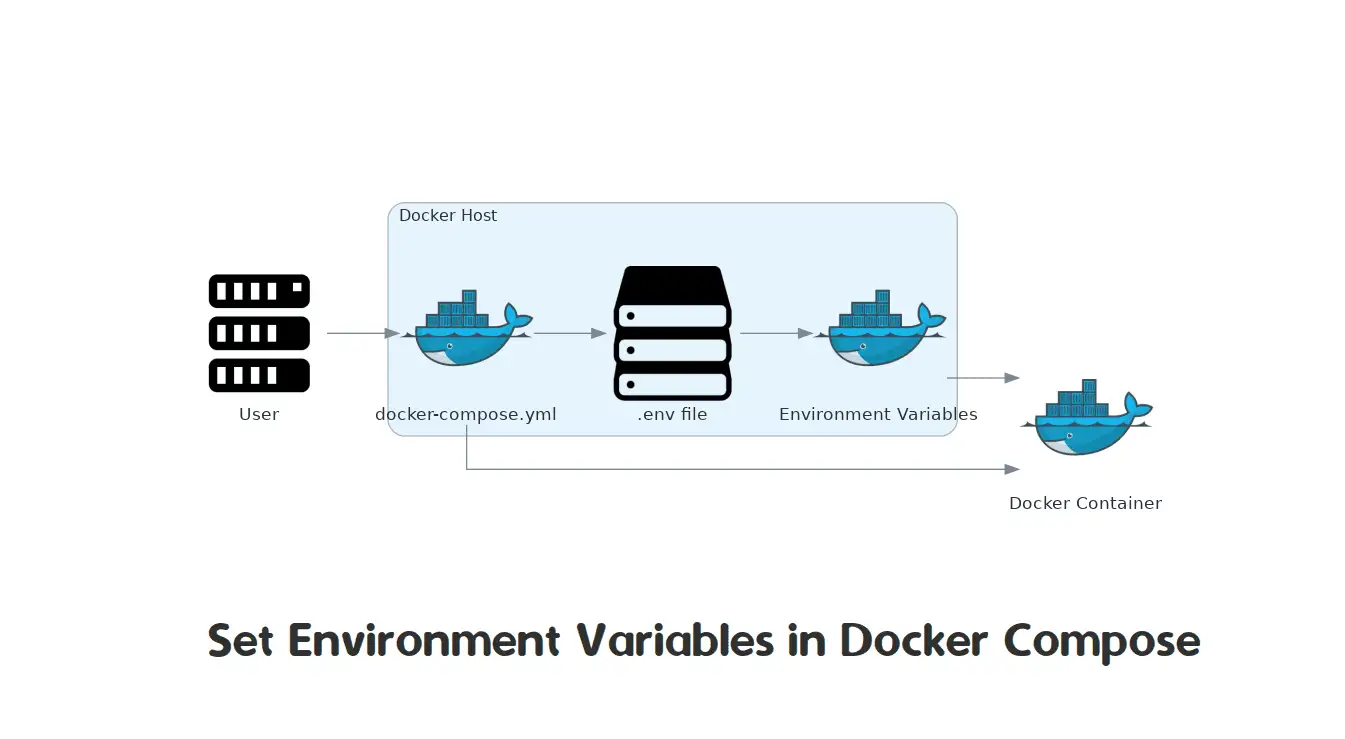
While the concept is simple, the mechanics of how Docker Compose uses these variables can be nuanced. Let's dig into the details.
3. How Docker Compose Manages Environment Variables
Docker Compose provides several ways to get variables into your services, and understanding their differences and precedence is key to using them correctly.
Docker Compose env_file vs environment Variables
This article from Build with Matija provides an excellent, clear breakdown of how Docker Compose handles variables.
First, read the section "The Three Mechanisms" to understand the difference between: environment:: Defining variables inline in the compose.yml file, which supports interpolation. env_file:: Explicitly telling a service to load variables from a specified file. Automatic .env pickup: How Compose automatically finds and uses a .env file in the project root, primarily for substituting variables within the compose.yml file itself. Next, study "The Full Precedence Order". This is vital for debugging. It explains which source "wins" when a variable is defined in multiple places (e.g., in a .env file and also under the environment: key).
To summarize the key points from the reading:
- A
.envfile in your project root is loaded automatically by Docker Compose. Its primary purpose is to provide values for variable substitution inside yourdocker-compose.ymlfile (e.g.,POSTGRES_PASSWORD: ${DB_PASSWORD}). - The
env_file:directive loads a file's contents directly into a container's environment. It does not support variable substitution within the file itself. - The
environment:directive has the highest precedence (besides the command line) and will override values fromenv_file:or an image'sENVinstruction.
The most important security practice, repeated in all professional guides, is ensuring your secrets file is never committed.
Your .env File Is Lying to You
This video from LearnThatStack reinforces the fundamental rule of .env files.
Watch this short segment on why .env files must be git-ignored. It makes a critical point: even if you accidentally commit a secret and then delete it in a later commit, the secret still exists in your Git history.
4. Hands-On Exercise: Securing a Service
Let's put this into practice. Below is a docker-compose.yml file with hardcoded database credentials—a clear security anti-pattern. Your task is to refactor it to use a .env file securely.
Setup:
- Create a new project folder.
- Inside it, create a file named
docker-compose.ymlwith the content below.
docker-compose.yml (Your workspace)
version: '3.8'

services:
  db:
    image: postgres:16-alpine
    container_name: my_postgres_db
    environment:


      # TODO: Move these hardcoded secrets to a .env file
      POSTGRES_USER: admin
      POSTGRES_PASSWORD: a_very_bad_password
      POSTGRES_DB: myapp
    ports:
      - "5432:5432"
    volumes:
      - postgres_data:/var/lib/postgresql/data

volumes:
  postgres_data:
Instructions:
- Create a
.envfile in the same directory. Inside it, define the three secret variables:POSTGRES_USER,POSTGRES_PASSWORD, andPOSTGRES_DB. Assign them secure, non-default values.# .env POSTGRES_USER=myuser POSTGRES_PASSWORD=somesecurepassword123 POSTGRES_DB=servicedb - Modify
docker-compose.yml. Change theenvironmentsection for thedbservice to use variable substitution to read the values from your.envfile.
Hint: Use the${VARIABLE_NAME}syntax. - Create a
.gitignorefile. Add the.envfile to it to ensure it's never committed to version control. This is a critical step. - Run and Verify. Start the service using
docker compose up -d. Then, inspect the running container's environment variables to confirm it received the values from your.envfile:
You should see the values you set in yourdocker inspect my_postgres_db | grep POSTGRES_.envfile, not the old hardcoded ones.
Solution
docker-compose.yml (modified):
version: '3.8'

services:
  db:
    image: postgres:16-alpine
    container_name: my_postgres_db
    environment:
      POSTGRES_USER: ${POSTGRES_USER}
      POSTGRES_PASSWORD: ${POSTGRES_PASSWORD}
      POSTGRES_DB: ${POSTGRES_DB}
    ports:
      - "5432:5432"
    volumes:
      - postgres_data:/var/lib/postgresql/data

volumes:
  postgres_data:
.env file (example):
POSTGRES_USER=myuser
POSTGRES_PASSWORD=somesecurepassword123
POSTGRES_DB=servicedb
.gitignore file:
.env
5. Limitations and More Secure Alternatives
Using .env files is a great practice for local development, but it's important to understand its limitations, especially as you approach production environments.
The primary weakness is that any variable passed via the environment or env_file key is stored in plain text in the container's configuration and can be easily viewed by anyone with Docker access using docker inspect.
Managing Secrets in Docker Compose
This article from Phase demonstrates the security weakness of using environment variables.
Read the first section of the article, which starts with a code block showing environment variables. Focus on the docker inspect and docker exec commands that demonstrate how easily these variables can be read from a running container. This highlights why this method isn't ideal for highly sensitive production secrets.
For more sensitive scenarios, even in development, Docker Compose offers a more secure mechanism: the top-level secrets directive. Instead of injecting secrets as environment variables, this feature mounts them as files in a temporary in-memory filesystem inside the container at /run/secrets/.
Your application can then read the secret from this file. This is more secure because:
- The secrets are not exposed via
docker inspect. - The files are read-only and exist only in memory.
- You can control file permissions with fine-grained access.
Many official Docker images, including Postgres, support this pattern out-of-the-box. They look for a _FILE suffix on environment variables. For example, if you set POSTGRES_PASSWORD_FILE=/run/secrets/db_password, the Postgres container will read its password from that file instead of from the POSTGRES_PASSWORD environment variable.
The following article shows how to implement this pattern.
Managing Secrets in Docker Compose
This is the same article as before, but we'll focus on the more advanced patterns.
First, read the "Prerequisites" section and pay close attention to the Python code snippet get_secret. This is a robust pattern for a Python app to prioritize reading secrets from files (the _FILE convention) while falling back to environment variables. Next, review "Approach 2: File-Based Secrets". This shows how to use the top-level secrets block in docker-compose.yml to mount a local file (e.g., ./db_password.txt) into a container's /run/secrets/ directory. This is the next logical step in securing your secrets.
While we won't implement this more advanced pattern today, it's crucial to know it exists as you move toward production-grade security.
Conclusion
You have now mastered a fundamental security practice for local development. By externalizing secrets into a git-ignored .env file, you drastically reduce the risk of accidentally exposing sensitive credentials.
Key Takeaways:
- Never hardcode secrets in source code or configuration files that are checked into version control.
- For local development, use a
.envfile to store secrets and add it to your.gitignorefile. - Docker Compose automatically loads a
.envfile from the project root for variable substitution withindocker-compose.yml. - Environment variables injected into a container are visible via
docker inspect, making them less secure than file-based secrets. - For a more secure approach, use the top-level
secretsdirective in Docker Compose to mount secrets as in-memory files.
Preview of the Next Lesson
We have now covered several patterns for making our system more resilient and secure. In the next lesson, we will return to runtime resilience by exploring how to design for graceful degradation when a non-critical downstream service is unavailable. This will ensure our system remains partially functional even when parts of it fail, a core tenet of robust microservice architecture.