Welcome back. In our last lesson, we mastered FastAPI's dependency injection system, understanding how it manages the lifecycle of resources like database sessions within a request. This ensures that every request gets what it needs and that everything is cleaned up properly once the response is sent.
But what about work that doesn't need to be finished before you send a response? Imagine a user signs up, and you need to send them a welcome email. This email can take a few seconds to send. Making the user stare at a loading spinner for those seconds is poor practice. Today's lesson addresses this exact problem by exploring how to offload non-blocking work using FastAPI's background tasks. You'll learn how to immediately return a response to the user while computationally inexpensive but slow I/O operations complete in the background.
1. The Problem: Blocking the Request-Response Cycle
In a high-performance async framework like FastAPI, the goal is to handle requests as quickly as possible to free up the server to handle other users. Any operation that takes a significant amount of time within an endpoint function will delay the response to the client.
Common examples of such operations include:
- Sending an email notification.
- Generating a PDF report.
- Processing an uploaded image.
- Calling a slow third-party API.
While these tasks are important, the user often doesn't need to wait for their completion. They just need confirmation that their initial action (like "Create Account" or "Submit Report Request") was successful.
The following video demonstrates this problem perfectly, showing the noticeable delay when an email-sending function is called directly within an endpoint.
Background Tasks with FastAPI Background Tasks and Celery + Redis - FastAPI Beyond CRUD (Part 20)
The video "Background Tasks with FastAPI Background Tasks and Celery" from the Ssali Jonathan channel clearly illustrates why long-running operations are a problem and how they impact user experience.
First, watch the introduction to understand what background tasks are and why they are important for performance. Then, observe the demonstration of a blocking operation. Notice the API response time—it's several seconds, which is the time it takes for the simulated email function to run. This is the exact behavior we want to avoid.
2. FastAPI's Built-in Solution: BackgroundTasks
FastAPI provides a simple and elegant solution for this problem directly within the framework: the BackgroundTasks class. It allows you to add one or more "fire-and-forget" tasks that will be executed after the response has been sent to the client.
The mechanics integrate perfectly with the dependency injection system we studied in the last lesson:
- Import
BackgroundTasksfromfastapi. - Declare it as a parameter in your endpoint function, just like you did with the database session. FastAPI will automatically create and provide an instance.
- Add a task to it using the
background_tasks.add_task()method. You pass the function to be called, followed by any arguments it requires.
To see this in action, the next video provides a very clear, step-by-step implementation.
How to Create Background Tasks in Fast API
This video, "How to Create Background Tasks in Fast API" by Pretty Printed, gives a concise and practical walkthrough of implementing BackgroundTasks.
Watch the entire short video. Pay close attention to the implementation details: How BackgroundTasks is injected into the endpoint. The syntax of background_tasks.add_task(function_name, arg1, arg2, ...). The "before" and "after" result: the response becomes instantaneous, and the task's output appears in the server logs a few seconds later.
To solidify your understanding, let's also consult the official documentation, which is the ultimate source of truth.
The official FastAPI documentation provides the foundational knowledge and code examples for using BackgroundTasks.
Please read the introduction and the sections titled "Using BackgroundTasks", "Create a task function", and "Add the background task". This will reinforce what you saw in the video and show you that the task function itself can be either a standard def or an async def function.
Here is a complete example combining these concepts. Notice that the task function send_email_notification is an async def function, which is suitable for I/O-bound operations like making network calls.
import asyncio
from fastapi import FastAPI, BackgroundTasks

app = FastAPI()

async def send_email_notification(email: str, message: str):
    """
    Simulates sending an email. In a real app, this would use
    a library like 'aiosmtpd' or a third-party email service API.
    """
    print(f"Sending email to {email} with message: '{message}'")
    await asyncio.sleep(5)  # Simulate the I/O delay of sending an email
    print("Email sent.")

@app.post("/register/{email}")
async def register_user(email: str, background_tasks: BackgroundTasks):


    # The main endpoint logic is fast.
    # It might create a user in the database here.
    user_data = {"email": email, "message": "User registration successful."}


    # Offload the slow email sending to a background task.
    background_tasks.add_task(
        send_email_notification,
        email,
        "Welcome! Thanks for signing up."
    )


    # Return the response to the user immediately.
    return user_data
If you run this code and call the /register/test@example.com endpoint, you will get an immediate JSON response. Then, if you watch the server console, you will see the "Sending email..." message appear, followed by "Email sent." five seconds later.
3. Knowing the Limits: When to Use a Task Queue
FastAPI's BackgroundTasks is incredibly useful, but it has important limitations you must understand to build production-grade systems. The tasks run within the same process as your web server.
This has several implications:
- No Guarantees: If your server process crashes or is restarted for any reason, any pending background tasks are lost forever.
- Shared Resources: A CPU-intensive background task (e.g., complex data analysis) can still block the async event loop, slowing down your entire application.
- No Distribution: You cannot scale your workers independently of your web server or distribute tasks across multiple machines.
For tasks that are critical, long-running, CPU-intensive, or need to be managed across multiple servers, you must use a dedicated task queue system like Celery.
The following diagram illustrates the architecture of a system using Celery.
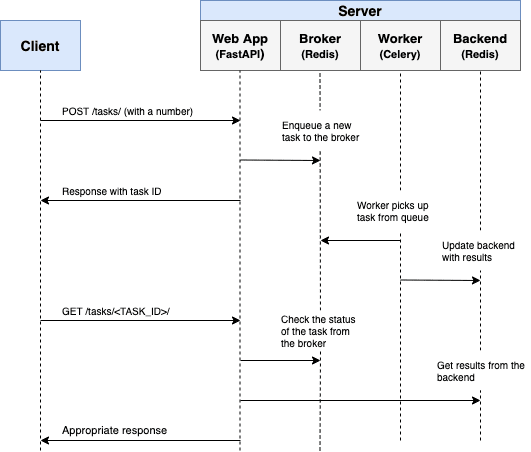
This architecture provides:
- Decoupling & Resilience: The web application and the workers are separate processes. If a worker crashes, it doesn't affect the web server. The message broker ensures tasks are not lost if a worker is temporarily down.
- Scalability: You can run many worker processes, even on different machines, to handle a high volume of tasks independently of your web server traffic.
- Advanced Features: Systems like Celery provide automatic retries, scheduled tasks, and complex workflows.
To understand when to choose one over the other, it's helpful to read a direct comparison.
Asynchronous Tasks with FastAPI and Celery
The "Background Tasks" section of this TestDriven.io article provides an excellent summary of when to use FastAPI's BackgroundTasks versus a more robust solution like Celery.
Read the section titled "Background Tasks". Focus on the comparison table that contrasts BackgroundTasks with Celery. This clearly articulates the trade-offs. Also, read the "Caveat" section in the official FastAPI documentation (resource LINK that you read earlier), which gives the same recommendation.
As you requested in our initial discussion, we will cover Celery in-depth in a later module, as it's a critical tool for building scalable microservices. For now, the key is to recognize the distinction.
Conclusion
You've now learned a vital technique for improving the responsiveness of your FastAPI applications. By offloading non-blocking work, you ensure a snappy user experience while still performing necessary operations behind the scenes.
Key Takeaways:
- Long-running I/O operations in an API endpoint block the response and lead to poor user experience.
- FastAPI's
BackgroundTasksallows you to "fire-and-forget" simple tasks that run after the response is sent. - It is implemented using FastAPI's dependency injection system, making it easy to integrate.
BackgroundTasksis suitable for simple, non-critical, in-process tasks like sending notifications.- For critical, heavy, or distributed background work, a dedicated task queue system like Celery with a message broker (e.g., Redis) is the production-grade solution.
Preview of the Next Lesson
So far in this module, we've built a solid foundation for a single FastAPI service. In the next lesson, we will begin to connect services, exploring the API Gateway pattern. You'll build a FastAPI service that acts as the public-facing entry point to our system, routing requests to internal gRPC microservices. This is a core pattern in microservice architecture, and your async skills will be essential for orchestrating calls to multiple downstream services efficiently.