Welcome back! In our previous lesson, we built the Inventory Service, which consumes OrderCreated events and publishes the outcome—StockReserved or StockRejected. This event-driven communication is the backbone of a loosely coupled microservices architecture.
Today, we will build the crucial Payment Service, the next link in our e-commerce saga. This service will listen for the StockReserved event and attempt to process a payment. The core focus of this lesson is on implementing idempotent transaction handling, a non-negotiable requirement for any system that deals with money. By the end of this lesson, you will have a resilient payment service that can safely handle network retries without the risk of charging a customer twice.
1. The Critical Need for Idempotency in Payments
In distributed systems, a client (like our Inventory Service) might send a request (an event) and not receive a confirmation due to a network timeout, even if the server (our Payment Service) processed it successfully. The natural reaction for a resilient system is to retry. But what happens if you retry a "charge customer" request? You charge them twice. This is where idempotency becomes critical.
An idempotent operation is one that can be applied multiple times without changing the result beyond the initial application. Let's watch a video that explains this concept and the standard patterns for implementing it.
Idempotency - What it is and How to Implement it
This video provides an excellent and concise explanation of idempotency.
First, watch the introduction to understand the problem of duplicate requests. Next, understand the formal definition of idempotency and which operations are naturally idempotent. Notice how POST requests, which create new resources, are typically not idempotent. Pay close attention to the core solution: using an idempotency key to uniquely identify a request. Finally, learn about the server-side implementation pattern of storing the key and the response to handle retries.
As the video explains, the key is to have a unique identifier for each distinct operation. In our e-commerce flow, the order_id serves as a perfect natural idempotency key for the payment transaction.
2. High-Level Design of a Payment Service
Our Payment Service will be a coordinator. It won't process credit cards itself but will integrate with an external Payment Service Provider (PSP) like Stripe or Adyen. Its job is to manage the payment lifecycle for an order.
The following video provides a system design perspective on building a payment system. While we are only building one component, it's valuable to understand the broader context.
Design a Payment System - System Design Interview
This video discusses the design of a complete payment system.
Watch the section on the payment transaction flow to understand the different actors involved (merchant, PSP, banks). Our Payment Service acts on behalf of the merchant. Next, see the core features of a payment coordinator. Note the steps: store the event, call the external PSP, and update internal records (like a ledger). This is the pattern we will follow. Finally, reinforce your understanding by watching the section on how idempotency prevents double payments. It perfectly summarizes the pattern we are about to implement.
A payment transaction moves through several distinct states. Visualizing this as a state machine helps clarify the logic.
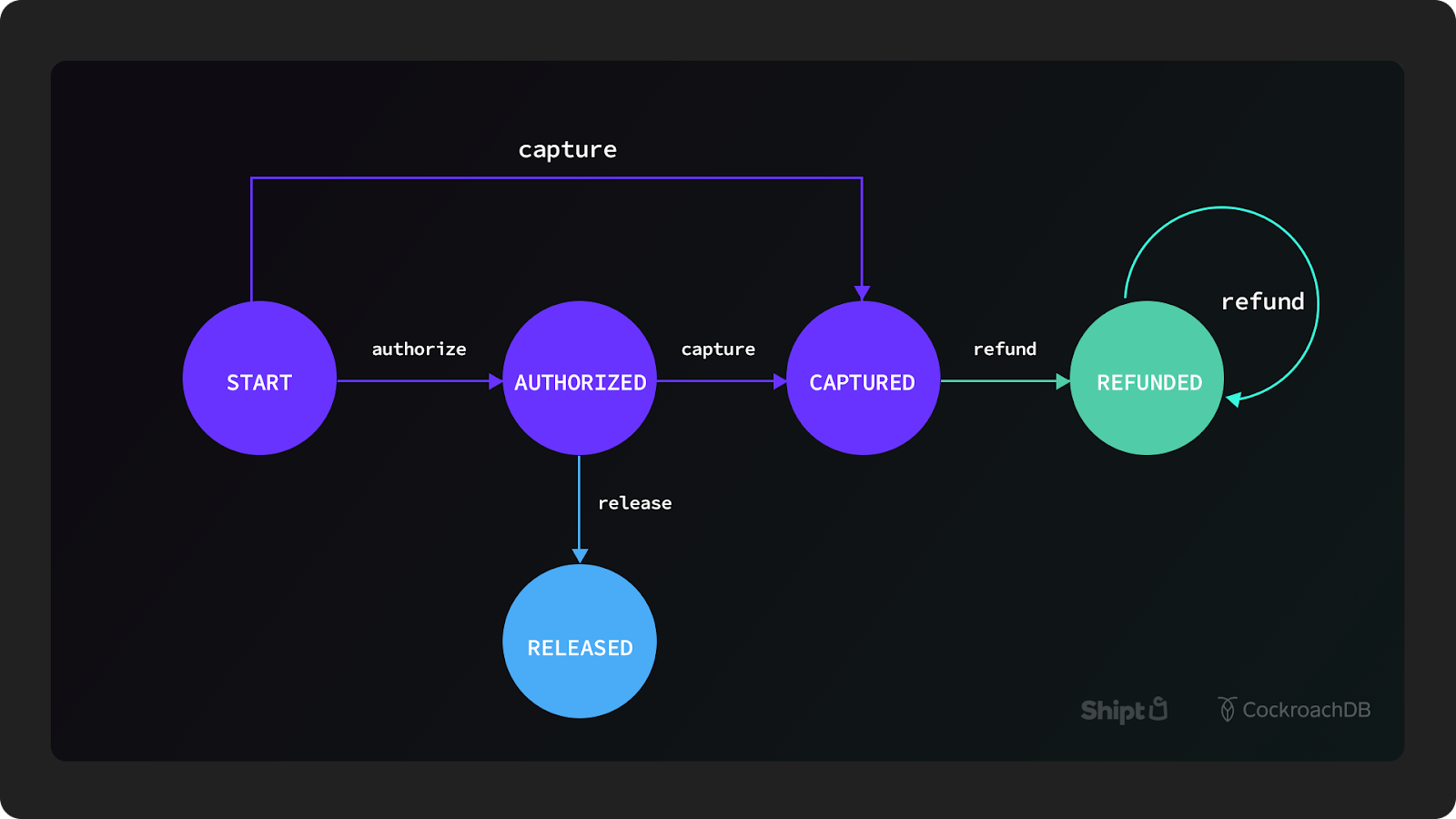
3. Implementing the Idempotent Payment Service
We will now build the Payment Service. Unlike the Inventory Service that used Redis as its primary database, here we will use PostgreSQL. This is a more traditional and robust choice for storing critical financial records. Your experience with PostgreSQL and Django will be helpful here. We will use the asyncpg library for non-blocking database operations, fitting our async stack.
Project Setup
In your microservices-platform/services/ directory, create a new folder payment-service:
services/
└── payment-service/
    ├── app/
    │   ├── __init__.py
    │   ├── consumer.py     # Main logic: consumes events, processes payments
    │   ├── database.py     # Database connection and schema setup
    │   ├── main.py         # FastAPI app (for health checks)
    └── requirements.txt
Your requirements.txt will need the following libraries:
fastapi
uvicorn
redis
asyncpg
Step 1: Database Setup (database.py)
This file will contain functions to initialize our database schema and manage the connection pool. A unique constraint on the idempotency_key is the cornerstone of our idempotency strategy. The database will reject any attempt to insert a duplicate key, which we can catch in our application logic.
# services/payment-service/app/database.py

import asyncpg


# In a real application, get these from environment variables
DB_USER = "your_db_user"
DB_PASSWORD = "your_db_password"
DB_NAME = "payments_db"
DB_HOST = "localhost"

DATABASE_URL = f"postgresql://{DB_USER}:{DB_PASSWORD}@{DB_HOST}/{DB_NAME}"


# A global variable for the connection pool
db_pool = None

async def get_db_pool():
    """Returns the existing pool or creates a new one."""
    global db_pool
    if db_pool is None:
        db_pool = await asyncpg.create_pool(DATABASE_URL)
    return db_pool

async def init_db():
    """Initializes the database by creating the payments table."""
    pool = await get_db_pool()
    async with pool.acquire() as connection:
        await connection.execute("""
            CREATE TABLE IF NOT EXISTS payments (
                id SERIAL PRIMARY KEY,
                idempotency_key VARCHAR(255) UNIQUE NOT NULL,
                order_id VARCHAR(255) NOT NULL,
                amount INT NOT NULL,
                status VARCHAR(50) NOT NULL,
                created_at TIMESTAMP WITH TIME ZONE DEFAULT NOW(),
                updated_at TIMESTAMP WITH TIME ZONE DEFAULT NOW()
            );
        """)
        print("Database initialized and 'payments' table is ready.")
Make sure to create the payments_db database in your PostgreSQL instance and update the connection details.
Step 2: The FastAPI App (main.py)
For this service, the FastAPI app will be minimal. Its main purpose is to provide a health check endpoint, which is essential for production monitoring. We'll also trigger the init_db function on startup.
# services/payment-service/app/main.py

from fastapi import FastAPI, Request
from app.database import init_db

app = FastAPI()

@app.on_event("startup")
async def startup_event():
    await init_db()

@app.get("/health")
def health_check():
    return {"status": "ok"}
Step 3: The Idempotent Consumer (consumer.py)
This is where all the action happens. The consumer will listen to the stock_events stream published by the Inventory Service. For each RESERVED event, it will execute the payment logic idempotently.
This implementation is inspired by the database-backed deduplication pattern.
How to Handle Idempotency in Microservices
This article provides excellent code patterns for implementing idempotency.
First, review the "Database-Level Idempotency" section. Notice the CREATE TABLE statement with a UNIQUE constraint on the idempotency key. This is exactly what we did in our database.py. Next, study the Python code in the "Idempotent Event Processing" section. Although it uses Kafka, the core logic of using a database transaction to check for and insert an event_id before processing is directly applicable to our consumer. We will adapt this pattern for Redis Streams and asyncpg.
Here is the implementation for our consumer.py:
# services/payment-service/app/consumer.py

import asyncio
import redis.asyncio as redis
import asyncpg
import random

from app.database import get_db_pool


# Stream and group configuration
STOCK_STREAM_KEY = 'stock_events'
PAYMENT_GROUP_NAME = 'payment-group'
PAYMENT_STREAM_KEY = 'payment_events'

redis_client = redis.Redis(decode_responses=True)

async def mock_charge_card(order_id: str, amount: int) -> bool:
    """
    A mock function to simulate calling a Payment Service Provider (PSP).
    In a real system, this would involve a secure API call to Stripe, Adyen, etc.
    """
    print(f"Charging card for order {order_id} with amount {amount}...")
    await asyncio.sleep(1)  # Simulate network latency


    # Simulate a 75% success rate
    if random.random() < 0.75:
        print(f"Charge successful for order {order_id}.")
        return True
    else:
        print(f"Charge failed for order {order_id}.")
        return False

async def process_payment(event_data: dict):
    """Processes a payment event idempotently."""
    pool = await get_db_pool()
    order_id = event_data['order_id']
    idempotency_key = order_id  # Using order_id as the idempotency key


    # For this example, we'll hardcode an amount. In a real system,
    # this would come from the order data.
    amount = 1000

    async with pool.acquire() as conn:
        async with conn.transaction():


            # 1. Check if this payment has been processed already
            existing_payment = await conn.fetchrow(
                "SELECT status FROM payments WHERE idempotency_key = $1", idempotency_key
            )

            if existing_payment:
                print(f"Duplicate event for order {order_id}. Current status: {existing_payment['status']}.")


                # If already completed, maybe republish the success event or just ignore.
                if existing_payment['status'] == 'COMPLETED':
                    await redis_client.xadd(PAYMENT_STREAM_KEY, {
                        'order_id': order_id,
                        'status': 'SUCCEEDED'
                    })
                return # Stop processing


            # 2. If not a duplicate, insert a new payment record in 'PENDING' state
            try:
                await conn.execute(
                    """
                    INSERT INTO payments (idempotency_key, order_id, amount, status)
                    VALUES ($1, $2, $3, 'PENDING')
                    """,
                    idempotency_key, order_id, amount
                )
            except asyncpg.UniqueViolationError:


                # This can happen in a rare race condition where two consumers pick up the same event.
                # The first one will succeed, the second will hit this error.
                print(f"Race condition detected for order {order_id}. Another consumer is processing it.")
                return


    # 3. Call the external PSP (outside the initial DB transaction)
    charge_successful = await mock_charge_card(order_id, amount)


    # 4. Update the payment status based on the PSP result
    new_status = 'COMPLETED' if charge_successful else 'FAILED'
    async with pool.acquire() as conn:
        await conn.execute(
            "UPDATE payments SET status = $1, updated_at = NOW() WHERE idempotency_key = $2",
            new_status, idempotency_key
        )


    # 5. Publish the final result
    result_event = {
        'order_id': order_id,
        'status': 'SUCCEEDED' if charge_successful else 'FAILED'
    }
    await redis_client.xadd(PAYMENT_STREAM_KEY, result_event)
    print(f"Published payment result for order {order_id}: {result_event['status']}")


async def main():
    """The main consumer loop."""
    try:
        await redis_client.xgroup_create(STOCK_STREAM_KEY, PAYMENT_GROUP_NAME, id='0', mkstream=True)
        print("Consumer group 'payment-group' created.")
    except redis.ResponseError as e:
        print(f"Group already exists: {e}")

    while True:
        try:
            results = await redis_client.xreadgroup(
                PAYMENT_GROUP_NAME, f"consumer-{random.randint(1,1000)}",
                {STOCK_STREAM_KEY: '>'}, count=1
            )

            if results:
                for stream, messages in results:
                    for message_id, data in messages:
                        if data.get('status') == 'RESERVED':
                            print(f"Received stock reservation event for order {data['order_id']}")
                            await process_payment(data)


                        # Acknowledge the message
                        await redis_client.xack(STOCK_STREAM_KEY, PAYMENT_GROUP_NAME, message_id)

        except Exception as e:
            print(f"Error in consumer loop: {e}")
            await asyncio.sleep(1)

if __name__ == "__main__":
    asyncio.run(main())
4. Testing the Full, Idempotent Flow
Let's test everything working together. You'll need four terminals.
-
Terminal 1 (Inventory Service): Start the Inventory service API.
cd services/inventory-service
uvicorn app.main:app --reload --port 8002
Make sure you have a product in your inventory via its API.
-
Terminal 2 (Inventory Consumer): Start the inventory consumer.
cd services/inventory-service python app/consumer.py -
Terminal 3 (Payment Consumer): Start our new payment consumer.
cd services/payment-service
python -m app.consumer # Use -m to handle package imports correctly
You should see the database initialization message.
-
Terminal 4 (Trigger): Use a script to simulate an
OrderCreatedevent. This kicks off the whole saga.Create
test_order_publisher.pyin your project root:# microservices-platform/test_order_publisher.py import redis import uuid r = redis.Redis(decode_responses=True) # Get a product ID from your inventory service product_id = "YOUR_PRODUCT_ID_HERE" order = { 'order_id': str(uuid.uuid4()), 'product_id': product_id, 'quantity': '1' } r.xadd('order_events', order) print(f"Published OrderCreated event: {order}")Now, run the trigger:
# Replace the product ID in the script first!
python test_order_publisher.py
Observe the magic! You should see logs chaining through the terminals:
- Inventory consumer receives
OrderCreated. - It reserves stock and publishes
StockReserved. - Payment consumer receives
StockReserved. - It inserts a
PENDINGpayment, calls the mock PSP, updates the status toCOMPLETEDorFAILED, and publishes aPaymentSucceeded/PaymentFailedevent.
- Inventory consumer receives
The Idempotency Test
Now, let's prove our system is robust. We need to manually re-publish the exact same StockReserved event that the inventory service created.
- Look at the logs from your inventory consumer to find the event data it published. It will look like
{'order_id': '...', 'product_id': '...', 'status': 'RESERVED'}. - Use
redis-clior another script to publish this exact event to thestock_eventsstream.# Using redis-cli XADD stock_events * order_id <the_order_id> product_id <the_product_id> status RESERVED - Watch the payment consumer's terminal. It will receive the event, but the log should say "Duplicate event for order...". It will not call the mock PSP again. It has correctly identified and ignored the duplicate request. Your system is now safe from double payments!
Conclusion
Congratulations! You have successfully implemented a Payment Service with robust, database-backed idempotency. This is a critical, production-level pattern that ensures financial transactions are handled safely and reliably in a distributed environment.
Key Takeaways:
- Idempotency is Essential: You understand why idempotency is non-negotiable for payment processing and how retries can lead to serious bugs without it.
- Database-Level Idempotency: You implemented a powerful idempotency strategy using a
UNIQUEconstraint on an idempotency key (order_id) in a PostgreSQL table. - Transactional Logic: You learned to use database transactions (
BEGIN,COMMIT,ROLLBACK) to safely check for duplicates and insert new records as an atomic unit. - Event-Driven Sagas: You've built another link in our e-commerce saga, with the Payment Service reacting to events from the Inventory Service and publishing its own results.
Preview of the Next Lesson
We have now built all the core services for our e-commerce application: User, Order, Inventory, and Payment. They communicate through a mix of synchronous gRPC calls and asynchronous Redis Streams events. In the next lesson, we will move towards a production-like setup by learning how to containerize all services and orchestrate them using Docker Compose. This will allow us to define, build, and run our entire multi-service application with a single command.