Hello! Welcome to your first lesson.
This course is designed to give you a solid, practical understanding of how to work with tensors, which are the fundamental building blocks of modern machine learning. We'll cover everything from reshaping and broadcasting to tensor multiplication.
In this introductory lesson, we will focus on the most basic, yet crucial, concepts. Our goal is to define what a tensor is in the context of machine learning and learn how to inspect its key properties: rank, shape, and data type.
Given your background in computer science and familiarity with multi-dimensional arrays from libraries like NumPy, you can think of this lesson as formalizing and extending those concepts into the specialized world of deep learning frameworks. We'll be using PyTorch for our examples, but the principles apply across all major frameworks like TensorFlow and JAX.
What is a Tensor in Machine Learning?
You may have encountered the term "tensor" in physics or mathematics, where it has a very specific, formal definition related to coordinate system transformations. In machine learning, the term is used much more pragmatically.
To see this distinction and get a high-level overview, please watch the following video from StatQuest.
Tensors for Neural Networks, Clearly Explained!!!
This video clarifies the difference between the mathematical and machine learning definitions of a tensor, and explains why they are more than just fancy names for multi-dimensional arrays.
Watch the segments from 00:57 to 01:26 and from 05:26 to 07:31. The first part sets the context, and the second explains how familiar data structures are re-framed as tensors and why this is beneficial for performance.
As you saw, in the context of ML, a tensor is essentially a container for numerical data—a multi-dimensional array. The key takeaway is that these data structures are specifically designed to be highly efficient for the mathematical operations required in deep learning, especially on hardware like GPUs (Graphics Processing Units) and TPUs (Tensor Processing Units).
Let's break down how familiar concepts map to tensor terminology.
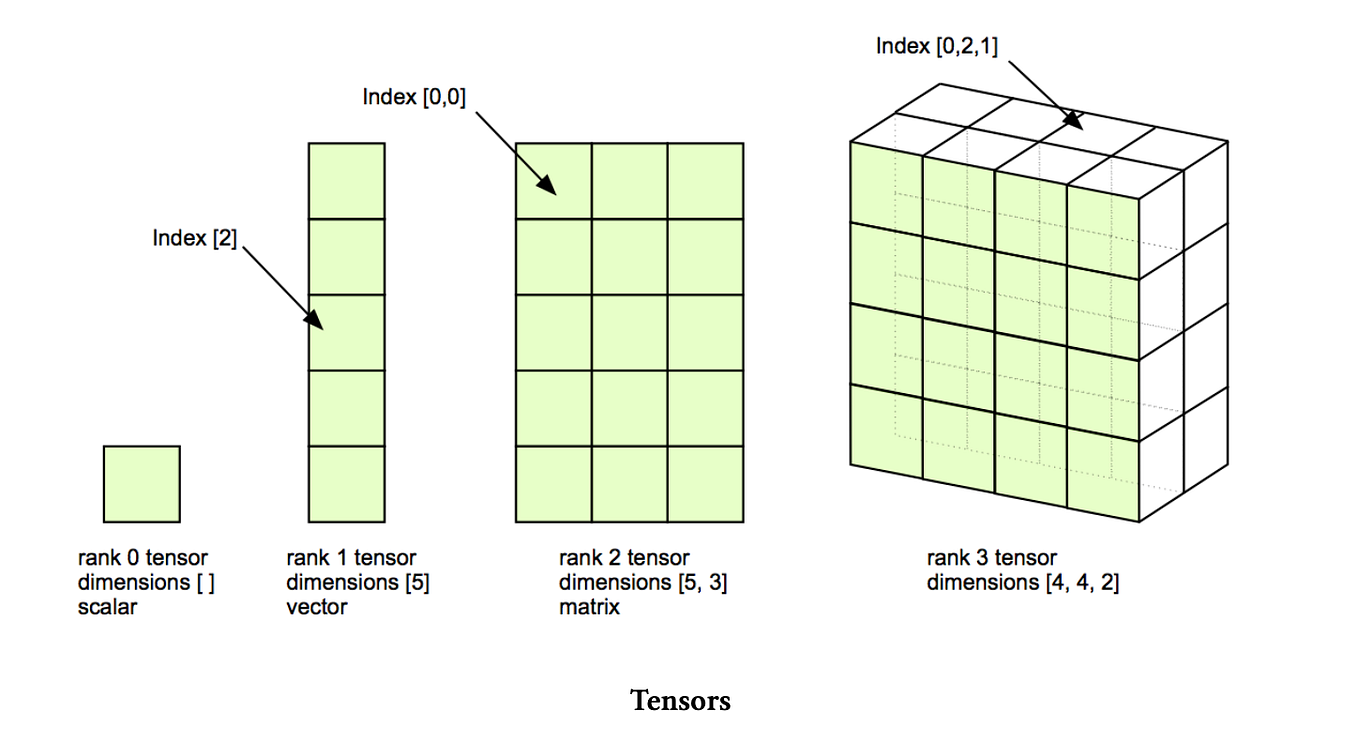
For a more detailed explanation, please read the following sections from the book "Deep Learning with Python."
The mathematical building blocks of neural networks
This reading introduces tensors as a generalization of matrices and connects them to NumPy arrays, which you're already familiar with. It then defines tensors of different ranks.
Read the sections from 'Data representations for neural networks' up to and including 'Rank-3 tensors and higher-rank tensors'. This will walk you through scalars (rank-0), vectors (rank-1), matrices (rank-2), and higher-rank tensors.
To summarize:
- Scalar: A single number. This is a rank-0 tensor.
- Vector: A 1D array of numbers. This is a rank-1 tensor.
- Matrix: A 2D array of numbers (with rows and columns). This is a rank-2 tensor.
- Higher-Rank Tensors: By nesting arrays, we can create rank-3, rank-4, and even higher-rank tensors. For example, a rank-3 tensor can be thought of as a cube of numbers.
The Key Attributes of a Tensor
Every tensor is defined by three fundamental attributes: rank, shape, and data type. Understanding these is essential for debugging and building neural networks.
A great, concise explanation of these interconnected concepts is available in the following video.
Rank, Axes, and Shape Explained - Tensors for Deep Learning
This video from deeplizard provides clear, step-by-step definitions for rank, axes, and shape, showing how they build on each other.
Watch from 00:53 to 05:39. Pay close attention to how the rank determines the number of axes, and how the length of each axis defines the shape.
Let's formalize these definitions, incorporating what you've just watched and building on the previous reading.
The mathematical building blocks of neural networks
This section from 'Deep Learning with Python' explicitly lists and explains the three key attributes.
Read the short section titled 'Key attributes'. It provides a concise summary of Rank, Shape, and Data Type.
Here is a breakdown of those attributes:
-
Rank (Number of Axes)
- The rank of a tensor is the number of dimensions it has. For instance, a matrix has a rank of 2, and a vector has a rank of 1.
- In Python libraries, this is often referred to as
ndim(number of dimensions). - The rank tells you how many indices you need to access a specific scalar value within the tensor. For a rank-3 tensor
T, you would need three indices, likeT[i, j, k].
-
Shape
- The shape is a Python tuple of integers that describes the size of the tensor along each of its axes.
- For a rank-2 tensor (matrix) with 3 rows and 5 columns, the shape is
(3, 5). - For a rank-1 tensor (vector) with 5 elements, the shape is
(5,). - A scalar (rank-0) has an empty shape
(). - The
len()of the shape tuple is equal to the tensor's rank.
-
Data Type (
dtype)- This attribute specifies the type of the data held in the tensor, such as
float32,float64,int32,uint8, orbool. - The
dtypeis crucial for two main reasons that will be very familiar from your software development experience:- Memory Footprint: Different types consume different amounts of memory. A
float64tensor will take up twice the memory of afloat32tensor of the same shape. - Numerical Precision:
float32is the standard for training deep learning models, as it offers a good balance between precision and computational efficiency on GPUs.float16(half-precision) is also gaining popularity for training very large models.
- Memory Footprint: Different types consume different amounts of memory. A
- This attribute specifies the type of the data held in the tensor, such as
Inspecting Tensors in Practice
Now, let's see how to create and inspect these attributes in code using PyTorch. The following reading provides a helper function and examples for tensors of different ranks.
What is a Tensor - CodingNomads
This article from CodingNomads gives practical PyTorch code for creating tensors and a handy function to print their attributes.
Read the section 'Informative Tensor Methods' and then review the code examples under 'Create a Scalar Tensor', 'Create a Rank 1 Tensor', 'Create a Rank 2 Tensor', and 'Create a Rank 3 Tensor'. You don't need to run the code yourself right now, but focus on how the .shape, .ndim, and .dtype attributes correspond to the tensor being created.
As you saw, you can easily access these properties on any tensor object:
import torch


# A rank-2 tensor (matrix)
t = torch.tensor([[1., 2., 3.], [4., 5., 6.]])


# Inspect its attributes
print(f"Tensor:\n {t}")
print(f"Rank (ndim): {t.ndim}")
print(f"Shape: {t.shape}")
print(f"Data Type (dtype): {t.dtype}")


# --- Output ---
# Tensor:
#  tensor([[1., 2., 3.],
#         [4., 5., 6.]])
# Rank (ndim): 2
# Shape: torch.Size([2, 3])
# Data Type (dtype): torch.float32
This simple inspection is one of the most common debugging steps when working with neural networks. Shape mismatches are a very frequent source of errors.
Real-World Examples of Data Tensors
To connect this back to your goal of understanding machine learning applications, let's look at how different types of real-world data are structured as tensors.

The following reading provides excellent examples of how common data formats are represented.
The mathematical building blocks of neural networks
This reading will solidify your understanding by showing how vector data, time series, images, and video are commonly represented as tensors in machine learning projects.
Read the section 'Real-world examples of data tensors'. Pay attention to the conventional shapes used for each data type, particularly the concept of a 'samples' or 'batch' axis, which is almost always the first axis.
Here's a quick summary of those common tensor structures:
- Vector Data: Rank-2 tensor with shape
(samples, features).- Example: A dataset of 100,000 users, where each user is described by 10 features (age, location, etc.). Shape:
(100000, 10).
- Example: A dataset of 100,000 users, where each user is described by 10 features (age, location, etc.). Shape:
- Time Series Data: Rank-3 tensor with shape
(samples, timesteps, features).- Example: A year of daily stock price data for 500 stocks. For each day, we record 4 features (open, high, low, close). Shape:
(500, 365, 4).
- Example: A year of daily stock price data for 500 stocks. For each day, we record 4 features (open, high, low, close). Shape:
- Image Data: Rank-4 tensor with shape
(samples, height, width, channels).- Example: A batch of 64 color images for a classifier, each 256x256 pixels. "Channels" would be 3 (Red, Green, Blue). Shape:
(64, 256, 256, 3).
- Example: A batch of 64 color images for a classifier, each 256x256 pixels. "Channels" would be 3 (Red, Green, Blue). Shape:
- Video Data: Rank-5 tensor with shape
(samples, frames, height, width, channels).- Example: A batch of 10 video clips, each with 150 frames of 144x256 resolution. Shape:
(10, 150, 144, 256, 3).
- Example: A batch of 10 video clips, each with 150 frames of 144x256 resolution. Shape:
Conclusion
In this lesson, we established the foundational concepts for the entire course.
Key Takeaways:
- In machine learning, a tensor is a multi-dimensional array that serves as the primary data structure. They are generalizations of scalars, vectors, and matrices.
- Tensors are defined by three key attributes:
- Rank: The number of axes/dimensions (e.g., accessed via
.ndim). - Shape: A tuple describing the size of each axis (e.g., accessed via
.shape). - Data Type (
dtype): The type of numerical data stored in the tensor (e.g.,torch.float32), which affects memory and precision.
- Rank: The number of axes/dimensions (e.g., accessed via
- Different types of real-world data (tabular, image, sequence) have conventional tensor shapes, where the first axis is typically the
samplesorbatchaxis.
You now have the vocabulary and conceptual framework to describe and inspect the data that flows through machine learning models.
Preview of the Next Lesson:
Now that we know how to define a tensor, we need to learn how to work with it. In the next lesson, we'll dive into a critical topic for any developer: memory management. We will explore the difference between a tensor view and a copy, a distinction that has significant implications for performance and can be a source of subtle bugs.