Hello! Welcome to your second lesson.
In our last session, we defined what a tensor is in the context of machine learning and looked at its three key attributes: rank, shape, and data type. We saw how these concepts allow us to represent various kinds of data, from simple vectors to complex image batches.
Today, we'll address a topic that's critical from a software development perspective: memory management. The learning outcome for this lesson is to explain the difference between a tensor view and a copy in memory. Understanding this distinction is essential for writing efficient, bug-free code in any deep learning framework, as it directly impacts performance and can be a source of unexpected behavior.
1. View vs. Copy: A Fundamental Distinction
When you perform an operation on a tensor, the result can be either a completely new tensor or a "view" into the original one.
- A copy creates a new tensor with its own, separate block of memory. The data from the original tensor is duplicated into this new location.
- A view creates a new tensor object that shares the underlying data with the original tensor. It's a different way of looking at the same block of memory.
From your development experience, you can think of this like passing variables. A copy is like passing by value, where the function gets its own duplicate of the data. A view is like passing by reference, where the function gets a pointer to the original data.
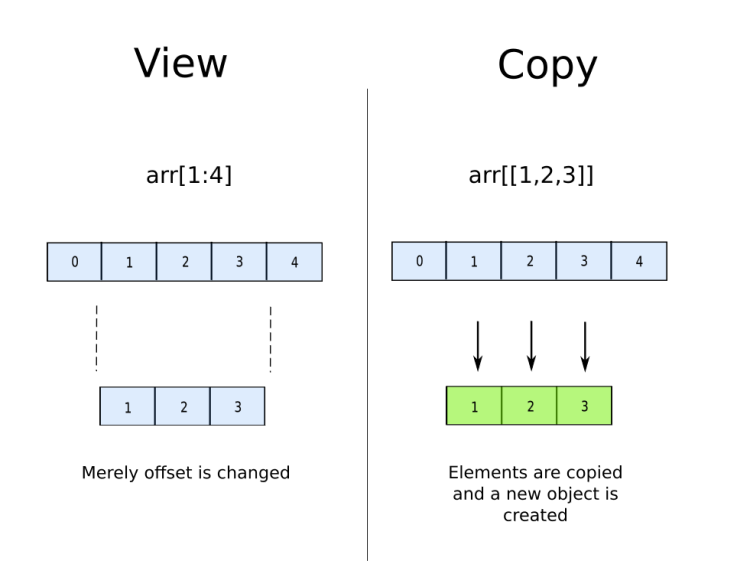
To see this concept in action, let's watch a short, practical demonstration. The video uses NumPy, which you're familiar with, and the principles are identical in PyTorch.
Numpy Array Copy Vs View - Numpy For Machine Learning 4
This video from Codemy.com clearly demonstrates the behavioral difference between making a view and a copy of an array.
Watch the following segments: Introduction (00:28 - 00:43): A quick overview of the difference. View in Action (01:06 - 03:11): See how changing the original array also changes the view. Copy in Action (03:11 - 04:55): Notice how changing the original array does not affect the copy. Changing the View (04:55 - 05:48): Observe that the connection is bi-directional; modifying the view also modifies the original array.
The key takeaway from the video is that views and their base tensors are linked. A change in one is immediately reflected in the other because they are both interfaces to the same underlying data. Copies are completely decoupled.
2. How Views Work: Storage and Strides
So, how is it possible for two different tensor objects to point to the same data? This is where your computer science background will be helpful. The implementation is both clever and efficient.
In PyTorch, the numerical data of a tensor is stored in a one-dimensional, contiguous block of memory called a torch.Storage. The torch.Tensor object itself is essentially a "header" that contains metadata, including:
- A pointer to the
Storage. - The tensor's
shape(e.g.,(3, 3)). - The tensor's
stride.
The stride is a tuple of integers indicating the number of steps to take in memory to move to the next element along each dimension. For a 3x3 tensor of integers, the stride might be (3, 1). This means:
- To move to the next row (dimension 0), you jump 3 elements forward in memory.
- To move to the next column (dimension 1), you jump 1 element forward in memory.
When you create a view, PyTorch creates a new Tensor object with new metadata (like a different shape or stride) but has it point to the exact same Storage. No data is moved or duplicated.
The following article gives an excellent high-level explanation of this internal structure.
Taking PyTorch for Granted - wh
This blog post, 'Taking PyTorch for Granted,' dives into the internal data structures of PyTorch tensors. It will clarify how operations can create views by simply manipulating metadata without touching the underlying data.
Please read the following sections: Start at 'But what is a tensor?' and read through the first two code examples. This introduces the idea of pointers and shared data. Continue with the section 'Implementing Storage'. Focus on the concept of storing n-dimensional data in a 1-dimensional array and the motivation behind it (performance). Finally, read the paragraphs right after that, which explain how .reshape(), .view(), and .transpose() work by changing the mapping function or stride attribute, not the underlying data. Pay close attention to the RuntimeError example at the end, as it highlights the difference between .view() and .reshape().
This underlying mechanism—separating the data (Storage) from its interpretation (Tensor metadata)—is what makes many tensor operations incredibly fast. Operations like transposing a massive matrix don't require shuffling any data in memory; PyTorch just swaps the values in the stride tuple.
3. PyTorch Operations: Which Return Views?
Now for the practical part: when you call a function in PyTorch, how do you know if you're getting a view or a copy? While the most reliable way is to check the documentation, there are some general rules.
The official PyTorch documentation provides a great summary.
Tensor Views — PyTorch 2.10 documentation
The official PyTorch documentation on 'Tensor Views' provides the definitive guide on this topic. It lists which operations create views and clarifies the behavior of some special cases.
Please read the following parts: The introductory paragraphs, which define a view and its benefits. Skim the 'full list of view ops' to get a sense of how common they are. You don't need to memorize it, but notice that many reshaping and slicing operations are on this list (e.g., transpose, squeeze, permute, view). Carefully read the section 'It’s also worth mentioning a few ops with special behaviors'. This part is crucial, as it explains the behavior of reshape() and flatten().
Let's summarize the key points for day-to-day use:
Operations that always return a new tensor (a copy):
- Arithmetic or element-wise operations:
x + y,torch.add(x, y),x * 2. - Explicit copying methods:
x.clone(),x.detach().clone(). The.clone()method is the standard way to create an independent copy. - Changing the data type:
x.to(torch.float64)will create a copy if the original type is different, as the underlying memory representation must change.
Operations that usually return a view:
- Slicing:
x[:, 1] view()transpose(),permute()squeeze(),unsqueeze()expand()
Ambiguous operations:
reshape(),flatten(): These functions are designed for convenience. They will try to return a view if the underlying data is laid out in a compatible way (i.e., contiguous). If not, they will create a copy. The documentation explicitly warns: user code shouldn’t rely on whether it’s a view or not.
This is a critical point for you as a developer. If you need to ensure you're not modifying the original tensor, use .clone(). If you need to ensure you are getting a view and want the operation to fail otherwise, use .view(). Use .reshape() for general-purpose reshaping where you don't care about the view/copy distinction.
Conclusion
In this lesson, we explored the crucial difference between tensor views and copies, a concept with major implications for performance and code correctness.
Key Takeaways:
- A copy is an independent tensor with its own data in a separate memory location. You create one using
.clone(). - A view is a tensor that shares the underlying data with another tensor. Changes to the view affect the original tensor and vice-versa.
- This is made possible because a
torch.Tensoris a metadata object (containing shape, stride) that points to atorch.Storagewhere the data actually lives. View operations create new metadata pointing to the same storage. - Many common operations like
transpose(),squeeze(), and slicing return views for memory efficiency. - Operations like
reshape()are ambiguous; they may return a view or a copy depending on the memory layout. Don't rely on their behavior if the distinction matters.
Understanding this concept moves you from simply using tensors to understanding how they work, allowing you to write more efficient code and debug tricky, memory-related bugs.
Preview of the Next Lesson:
We've now seen that many operations for changing a tensor's dimensionality create views. In the next lesson, we will focus on these operations directly. You will learn to use reshape, squeeze, and unsqueeze to deliberately and precisely alter tensor dimensions. This is a fundamental skill for preparing and matching data shapes between different layers of a neural network.