Hello! Welcome to your fourth lesson.
In our last session, we explored the practical tools for altering tensor dimensions: reshape, squeeze, and unsqueeze. We ended with a crucial observation: reshape() is flexible, but its behavior can vary—sometimes it returns a memory-efficient view, and other times it creates a full copy.
Today, we will solve that mystery. This lesson focuses on a single, important goal: to predict whether a reshaping operation will produce a view or a copy. Understanding this is not just theoretical; it's a practical skill that helps you write more efficient, predictable, and bug-free code, especially when handling the large datasets common in machine learning.
1. A Quick Refresher: Copy vs. View
Before we dive in, let's quickly refresh our memory on the fundamental difference between a copy and a view of a tensor. A copy is a completely new, independent tensor with its own data in a new memory location. A view is a different "look" at the same underlying data, meaning it shares memory with the original tensor.
To revisit this core concept, here's a short, clear video. Although it uses NumPy, the principle is identical in PyTorch.
Numpy Array Copy Vs View - Numpy For Machine Learning 4
This video from Codemy.com gives a concise demonstration of the difference between a copy and a view.
Watch the segments from 00:01:06 to 00:03:11 (demonstrating a view) and 00:03:11 to 00:05:48 (demonstrating a copy and the bidirectional link of a view). Focus on how changing one tensor affects the other in each case.
As the video shows, changes to a view affect the original tensor, and vice-versa. Changes to a copy are completely isolated. Now, let's find out what determines whether reshape() gives you one or the other.
2. The Deciding Factor: Memory Contiguity
The ability to create a view hinges on a single property: whether a tensor is contiguous in memory.
A tensor is contiguous if its elements are stored in memory one after the other, in the same order as if you were to iterate through them. When you create a simple tensor, it is contiguous by default.
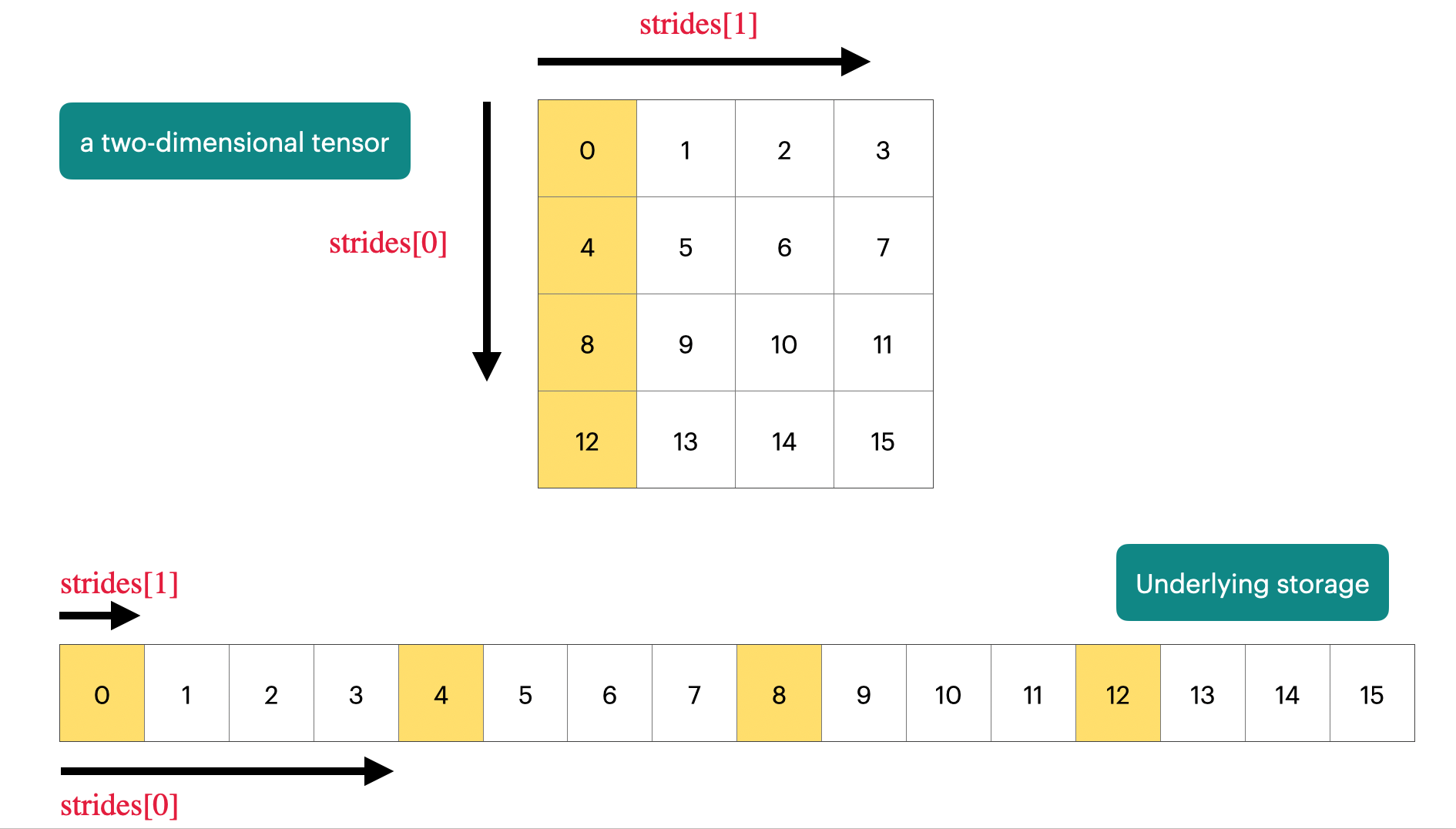
A great way to conceptualize this is by thinking about a tensor's strides. A stride is the number of memory steps (or bytes) you need to take to move to the next element along a specific dimension.
Consider a 2x4 tensor:
In memory, this is likely stored as a flat block: [0, 1, 2, 3, 4, 5, 6, 7].
- To get to the next element in the same row (dimension 1), you just move 1 step in memory. So,
stride[1] = 1. - To get to the next element in the same column (i.e., the next row, dimension 0), you need to jump over an entire row's worth of elements, which is 4 steps. So,
stride[0] = 4.
The strides for this tensor would be(4, 1).
This layout is contiguous. The image below provides a great visual for this concept.
When do tensors become non-contiguous?
Certain operations change how a tensor is interpreted without moving the underlying data. The most common example is transpose(). When you transpose a tensor, you are just swapping the strides.
If we transpose our 2x4 tensor into a 4x2 tensor, the underlying data [0, 1, 2, 3, 4, 5, 6, 7] doesn't move. PyTorch just re-interprets the strides. The new shape is (4, 2) and the new strides become (1, 4).
Now, to get to the next element in a row (dimension 1), we have to jump 4 steps in memory. This is no longer contiguous! The elements in a row are not next to each other in the underlying memory block.
3. view() vs. reshape() in Practice
This brings us to the practical difference between view() and reshape().
-
torch.Tensor.view(): This method requires the tensor to be contiguous. It's a direct command to create a view, and if the memory layout doesn't allow for it, the operation will fail with an error. It's fast but strict. -
torch.Tensor.reshape(): This method is more flexible. It first checks if a view is possible (i.e., if the tensor is contiguous).- If yes, it returns a view, just like
view(). - If no, it automatically performs a memory copy to make the data contiguous and then creates a view of that new, copied data. The end result is a tensor that is a copy of the original.
- If yes, it returns a view, just like
The following reading explains this distinction clearly and provides the essential code to see it in action.
This tutorial page provides a perfect, concise explanation of the 'View vs Copy' behavior, including the concept of contiguity.
Please read the section titled 'View vs Copy'. It will show you: The definition of a contiguous tensor and how to check for it with .is_contiguous(). How an operation like transpose makes a tensor non-contiguous. The critical final example where .reshape() succeeds on a non-contiguous tensor (by making a copy), while .view() fails.
Let's break down the code from that article, which is the key takeaway for this lesson:
import torch


# 1. Create a contiguous tensor
x = torch.randn(2, 3, 4)
print('Is x contiguous?', x.is_contiguous()) # True


# 2. Transpose it, which makes it non-contiguous
t = x.transpose(0, 2) # Shape becomes (4, 3, 2)
print('Is t contiguous?', t.is_contiguous()) # False


# 3. Try to reshape the non-contiguous tensor
# .reshape() succeeds by creating a copy
t_reshaped = t.reshape(6, 4)
print('Reshape successful, t_reshaped is contiguous:', t_reshaped.is_contiguous()) # True


# .view() will fail because t is not contiguous
try:
    t_viewed = t.view(6, 4)
except RuntimeError as e:
    print('\nView failed with error:', e)
This behavior is also thoroughly discussed in a popular Stack Overflow thread, which confirms the same principle.
What's the difference between `reshape()` and `view()` in PyTorch?
For a slightly different perspective with another great code example, have a look at this highly-rated answer on Stack Overflow.
Read the second answer on the page (the one with over 100 upvotes). Pay attention to the code blocks that show z.fill_(1) propagating to the view x but not to the reshaped-from-transpose tensor x.
This confirms the rule: when you reshape a transposed tensor (z.t()), reshape() has to make a copy, so changes to the original tensor z are not reflected in the final reshaped tensor.
Conclusion
You can now confidently predict the behavior of reshaping operations. This understanding of the interplay between memory layout and tensor methods is what separates a novice from an expert user of libraries like PyTorch.
Key Takeaways:
- Whether a reshape operation produces a view or a copy depends on memory contiguity.
- A tensor is contiguous if its elements are laid out sequentially in memory for its given shape.
- Operations like
transpose()andpermute()change a tensor's strides without moving the data, often resulting in a non-contiguous tensor. view()requires a contiguous tensor and will raise an error otherwise.reshape()is more flexible: it returns a view for contiguous tensors and creates a copy for non-contiguous ones.- You can always check if a tensor is contiguous using the
.is_contiguous()method.
Preview of the Next Lesson:
We've seen how transpose() is a primary cause of non-contiguous tensors. In the next lesson, we will dive deeper into transpose() and its more powerful sibling, permute(). You will learn how to use these functions to expertly reorder tensor axes, a common requirement when preparing data for different types of neural network layers or aligning tensors for complex calculations.