Hello! Welcome to the fourth lesson in our Marketing Automation Foundations module.
In our last lesson, we designed our first automation: a welcome sequence for new newsletter subscribers. We learned how to use triggers, actions, and delays to create a simple, linear flow that makes a great first impression.
Today, we're taking the next step. We'll focus on a more specific, high-intent audience: potential guests who have downloaded a brochure or a guide from your hotel's website. Our learning outcome is to design a lead nurturing sequence for these users. This is a powerful technique to guide interested prospects toward making a booking or an inquiry.
1. From Welcome to Nurture: A Shift in Strategy
A welcome sequence is for general subscribers. A lead nurturing sequence is for qualified leads. What's the difference? Intent.
Someone who downloads your "Wedding Packages" brochure or your "Guide to Local Attractions" isn't just casually interested; they have a specific need or plan. They are "warmer" leads, and our communication with them needs to reflect that.
The goal of a lead nurturing sequence is not just to say hello, but to build on their initial interest, provide targeted value, and gently guide them toward the next step in their journey with your hotel.
To start, let's get a clear definition of what a lead nurturing sequence is and why it's so important to avoid selling immediately.
Email Marketing: Setting Up a Lead Nurturing Email Sequence
This video from 3Bug Media provides an excellent overview of lead nurturing. It explains the core philosophy: build comfort and familiarity before you ask for the sale.
Watch the first 1 minute and 32 seconds of this video. Pay close attention to the distinction between nurturing and selling.
As the video explains, the key is to nurture the relationship. You've captured their interest; now it's time to prove that your hotel is the right choice by being helpful and informative.
2. Anatomy of a Hotel Lead Nurturing Sequence
Just like our welcome sequence, a lead nurturing automation is built with triggers, actions, and delays. However, the content and structure are more specific.
- The Trigger: The sequence begins when a user submits a form to download a specific piece of content (a lead magnet). This action automatically segments them into a specific list, for example, a "Wedding Leads" list.
- The Emails: A series of emails are sent over days or weeks. The content is directly related to the topic of the downloaded guide.
- The Goal: The sequence aims to achieve a specific conversion, such as scheduling a venue tour, requesting a personalized quote, or booking a room.
The article "How To Automate Hotel Lead Follow-Ups" provides a great hotel-specific example of how to structure the timing and content of such a sequence.
How To Automate Hotel Lead Follow-Ups
This article from M1 Intel is focused on hotel sales automation. It contains a very useful table outlining a multi-touch follow-up sequence.
Scroll down to the section titled 'Follow-Up Message Sequences' and examine the table under 'Email and Text Message Plans'. Note the progression from a welcome message to value-added content and finally to a time-sensitive incentive.
3. Designing Your Sequence: A Practical Blueprint
Let's use the principles from the video and the structure from the article to design a lead nurturing sequence. Imagine a potential guest has just downloaded your hotel's "Guide to Hosting Corporate Events."
Our sequence should be a mix of education, information, and eventually, a clear offer. The aim is to build your hotel's authority as the best place for corporate events in the area.
This template provides a fantastic visual structure for a multi-email sequence following a lead magnet download.
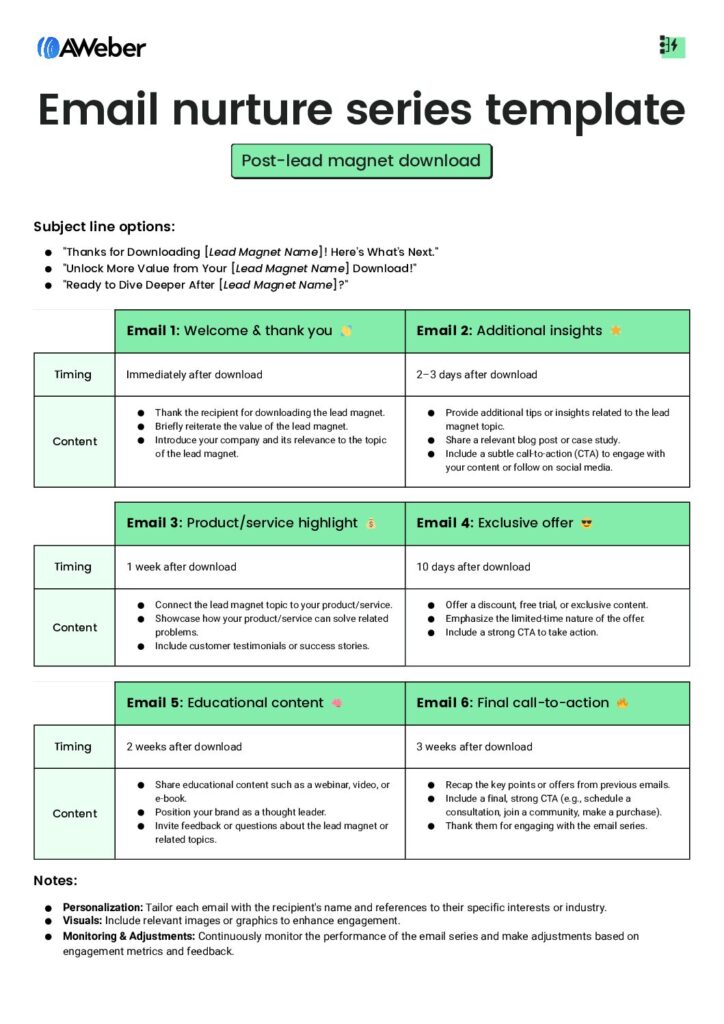
Let's adapt this framework for our "Corporate Events Guide" lead:
Lead Magnet: The Ultimate Guide to Seamless Corporate Events
-
Email 1 (Immediate): The Delivery
- Subject: Here's Your Corporate Events Guide!
- Content: A warm thank you, a direct link to the guide, and a brief introduction to your hotel's event coordinator. This immediately adds a human touch.
-
Email 2 (Day 3): Add Value & Build Trust
- Subject: 3 Mistakes to Avoid When Choosing an Event Venue
- Content: Link to a short blog post or share a tip directly in the email. Showcase a testimonial from a corporate client who held a successful event at your hotel. This provides value beyond the original guide and builds social proof.
-
Email 3 (Day 7): Showcase the Experience
- Subject: More than a meeting room.
- Content: Use high-quality photos or a short video to highlight your event spaces, catering options, and any unique features (e.g., breakout rooms with a view, state-of-the-art A/V). The goal is to help them visualize their event at your property.
-
Email 4 (Day 12): The Soft Offer
- Subject: See our event spaces in action
- Content: Feature a case study of a recent successful event. The Call to Action (CTA) is not "Book Now," but something with lower commitment, like "Explore our Event Packages" or "View the Gallery."
-
Email 5 (Day 16): The Direct Offer
- Subject: Ready to plan your next event?
- Content: This is where you make a clear ask. The CTA should be to take the next logical step. For corporate events, this is likely "Request a Quote" or "Schedule a Tour with our Events Manager." You could add a small incentive, like "Book a tour this month and receive complimentary coffee service for your event."
-
Email 6 (Day 21): Final Reminder
- Subject: A quick question about your event planning
- Content: A short, plain-text email from the events coordinator. "Hi [First Name], just wanted to follow up on the corporate events guide you downloaded. Are you currently planning an event? I'd be happy to answer any questions you might have." This feels personal and opens the door for a direct conversation.
Test your understanding!
Imagine your hotel wants to attract more wedding bookings. You create a lead magnet called the "Dream Wedding Venue Checklist." A user downloads it.
Using the 6-part sequence above as a model, what would be the subject line and primary Call to Action (CTA) for Email 5 (The Direct Offer) in this wedding-focused nurture sequence?
Show answer
- Subject Line: Something like "Let's bring your dream wedding to life" or "A special invitation for you." It should be inspiring and lead into the offer.
- Call to Action (CTA): The most logical next step for a wedding lead is to see the venue. So, an effective CTA would be "Book a Private Tour" or "Schedule Your Personal Consultation."
4. Making Your Automation Smarter with Branching
The sequence we just designed is linear—everyone gets the same emails in the same order. But what if we could make it smarter?
This is where conditions, or if/then logic, come in. We can tell our automation: "IF a lead clicks the link in Email 3, THEN send them a targeted follow-up about that specific package. IF they don't, THEN continue the standard sequence."
This creates a personalized experience based on the user's behavior. The following tutorial, while using HubSpot, gives a clear visual demonstration of how if/then branches work in an automation workflow.
HubSpot Tutorial | How To Create a Lead Nurturing Workflow
In this HubSpot tutorial, you'll see how to build a workflow that includes triggers, delays, and a critical feature: if/then branching. This allows you to create different paths for users based on their engagement.
Watch the segment from 13:30 to 15:53. Focus on how the presenter sets up an 'if/then branch' based on whether a contact has opened an email. This is the core concept of behavioral branching.
By adding branches, you can:
- Send more relevant content to engaged leads.
- Avoid overwhelming leads who aren't interacting with your emails.
- Automatically identify your most interested prospects for a personal follow-up from your sales team.
Conclusion
You have now moved from creating a general welcome mat to designing a guided tour for your most interested prospects. A well-designed lead nurturing sequence demonstrates your hotel's value, builds trust, and systematically converts interest into revenue.
Key Takeaways:
- Lead nurturing is for "warm" leads who have shown specific intent (e.g., by downloading a guide).
- The sequence's content must be highly relevant to the lead magnet's topic.
- A proven structure is to provide value and build trust first before making a direct offer.
- You can make your automations more effective by using
if/thenbranches to create personalized paths based on user behavior.
What's Next?
We've seen how the trigger for our nurture sequence was a form of segmentation (everyone who downloaded the guide). We also touched on using behavior (opening an email) to create branches. In our next lesson, we will dive much deeper into this powerful concept. We will learn how to use segmentation to send targeted emails based on user behavior or stated interests, allowing for even more precise and effective marketing automation.