Introduction
In our last lesson, we dissected the pivot selection strategies that make Quick Sort a robust, production-grade algorithm. We operated at a high level of abstraction, focusing on algorithmic design and trade-offs. Today, we're diving deep into the hardware, moving from abstract strategies to the fundamental operations that computers use to manipulate data: bitwise operations.
This lesson addresses the learning outcome: Apply bitwise operations (AND, OR, XOR, NOT, shifts) to solve low-level manipulation problems. Mastering these operations is crucial for certain classes of optimization problems, low-level systems programming, and a favorite category of brain-teasers that appear in elite technical interviews. We will explore what these operators are, how they work "under the hood," and how to apply them to solve classic problems with remarkable efficiency.
Concept 1: The Building Blocks - Logical Bitwise Operations
At the lowest level, all data is just a sequence of bits (0s and 1s). Logical bitwise operators allow us to perform Boolean logic on each pair of corresponding bits in two numbers.
Technical Explanation
The four main logical bitwise operators are AND (&), OR (|), XOR (^), and NOT (~). They work by comparing the bits at each position in their binary representations.
- AND (
&): Returns a1in a bit position only if both corresponding bits are1. - OR (
|): Returns a1if either of the corresponding bits is1. - XOR (
^): (Exclusive OR) Returns a1if the corresponding bits are different. - NOT (
~): A unary operator that flips all the bits of a single number (0becomes1,1becomes0).
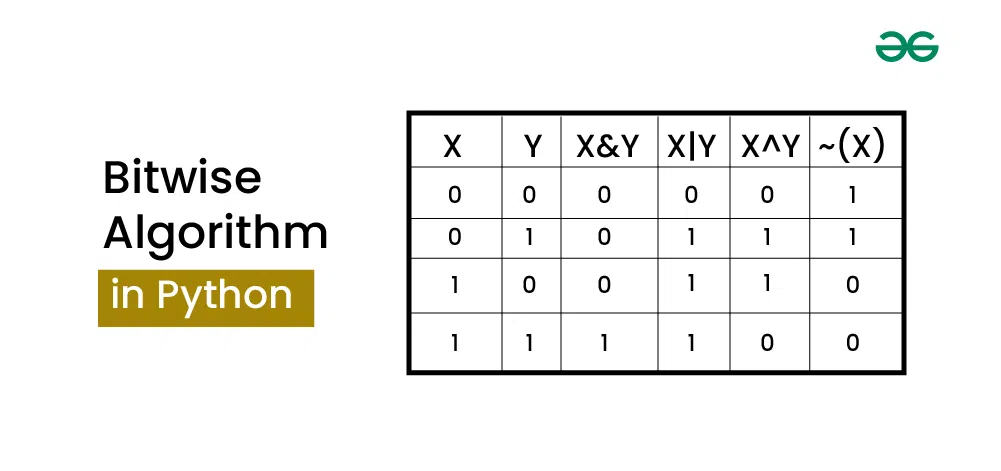
A crucial point in Python: integers are signed. The ~ operator behaves according to a number's two's complement representation, which is a standard way computers represent negative numbers. For a positive integer x, ~x will always result in -(x+1). For example, ~5 is -6.
Python's bitwise operations: What they are, how they work, and how to use them
For a clear, Python-focused demonstration of these core operators, let's watch this video by Reuven Lerner. It walks through each operation with practical examples.
Watch the following segments: Bitwise AND (&): 03:39 - 04:42 Bitwise OR (|): 04:42 - 05:30 Bitwise XOR (^): 05:30 - 06:14 Bitwise NOT (~): 08:43 - 10:27 Pay close attention to how each operation combines the bits of two numbers and the specific explanation for the behavior of the NOT operator in Python.
Metaphor: A Panel of Light Switches
Imagine a number is a long panel of light switches, where 1 is "ON" and 0 is "OFF". You have two such panels, A and B, aligned one above the other.
A & B: A new panel where a switch is ON only if the switches in bothAandBat that same position were ON.A | B: A new panel where a switch is ON if the switch in eitherAorB(or both) was ON.A ^ B: A new panel where a switch is ON only if exactly one of the corresponding switches inAorBwas ON, but not both.~A: Take panelAand just flip every single switch to its opposite state.
Python Code Snippet
a = 92  # Binary: 01011100
b = 51  # Binary: 00110011

# AND: Common ON switches
print(f"a & b = {a & b:3d}  # Binary: {a & b:08b}") # 00010000 -> 16

# OR: Any ON switches
print(f"a | b = {a | b:3d}  # Binary: {a | b:08b}") # 01111111 -> 127

# XOR: Different switches
print(f"a ^ b = {a ^ b:3d}  # Binary: {a ^ b:08b}") # 01101111 -> 111

# NOT: Flip all switches
# Remember ~a = -(a+1) in Python
print(f"~a    = {~a:3d} # In two's complement: 10100011")
Concept 2: Shifting Bits for Power - The Shift Operators
Bit shifts move all bits in a number to the left or right. These are not just for repositioning bits; they are the low-level equivalent of multiplication and division by powers of two.
Technical Explanation
- Left Shift (
<<):x << kshifts all bits inxto the left bykpositions. The newly opened positions on the right are filled with zeros. This is equivalent to multiplyingxby . For example,12 << 1is24. - Right Shift (
>>):x >> kshifts all bits inxto the right bykpositions. Thekrightmost bits are discarded. This is equivalent to the integer division ofxby . For example,13 >> 1is6.
A critical distinction for right shifts is how the new bits on the left are filled. This depends on whether the shift is arithmetic or logical.
- Logical Right Shift: Always fills the new left-side bits with
0. - Arithmetic Right Shift: Fills the new left-side bits by copying the original sign bit (the most significant bit). This preserves the number's sign. If the number is positive (sign bit
0), it fills with0s. If negative (sign bit1), it fills with1s.
Python's >> operator performs an arithmetic right shift. This ensures that x >> k behaves like x // (2**k) for both positive and negative numbers.
To understand the crucial difference between logical and arithmetic shifts, let's watch this explanation from HackerRank's video series.
Watch the segment from 04:26 to 06:33. Focus on how a logical right shift can corrupt a negative number's value, while an arithmetic right shift preserves its arithmetic properties by copying the sign bit.
Metaphor: Sliding Seats on a Bus
Imagine bits are people sitting in seats on a bus.
- Left Shift (
<< k): Everyone slideskseats to the left.knew empty seats appear on the right, and they are filled by new passengers (zeros). Thekpeople on the very left fall off the bus. - Arithmetic Right Shift (
>> k): Everyone slideskseats to the right. Thekpeople on the very right fall off. To fill theknew empty seats on the left, we look at the person who was originally in the driver's seat (the sign bit). If they were happy (0for positive), we fill the empty seats with happy people (0s). If they were grumpy (1for negative), we fill the empty seats with grumpy people (1s) to maintain the mood of the bus.
Python Code Snippet
x = 21  # Binary: 00010101

# Left shift by 2 (multiply by 2^2 = 4)
# 00010101 -> 01010100
print(f"x << 2 = {x << 2}  # Expected: {21 * 4}")

# Right shift by 2 (integer divide by 2^2 = 4)
# 00010101 -> 00000101
print(f"x >> 2 = {x >> 2}  # Expected: {21 // 4}")

# Arithmetic right shift on a negative number
y = -21
# -21 // 4 = -6
print(f"y >> 2 = {y >> 2}  # Expected: {-21 // 4}")
Concept 3: Precision Surgery - Bitmasking
Bitmasking is the technique of using bitwise operations to selectively read or modify specific bits within a number, leaving the others untouched. This is one of the most common and powerful applications of bitwise logic.
Technical Explanation
A bitmask is a specially crafted number used to target specific bits. By combining this mask with a logical or shift operator, we can perform precise manipulations.
-
Get a bit (Check if a bit is set): To check the -th bit, we create a mask with only the -th bit set (
1 << i). Then weANDit with the number. If the result is non-zero, the bit was set.is_set = (number & (1 << i)) != 0
A common optimization is to shift the number right and check the last bit:(number >> i) & 1which gives you a clean1or0. -
Set a bit (Turn a bit ON): To force the -th bit to
1, weORthe number with the mask1 << i.number = number | (1 << i) -
Clear a bit (Turn a bit OFF): To force the -th bit to
0, we need a mask with every bit set except the -th bit. We can create this by inverting our simple mask:~(1 << i). Then weANDthis with our number.number = number & ~(1 << i) -
Toggle a bit (Flip a bit): To flip the -th bit, we
XORthe number with the mask1 << i.number = number ^ (1 << i)
The Real Python article on bitwise operators provides an excellent, detailed guide on these masking techniques. It's a great reference to solidify your understanding.
Read the section titled 'Bitmasks'. It provides clear explanations and Python functions for getting, setting, unsetting (clearing), and toggling a bit. Focus on the one-line logic inside each function.
Metaphor: The Configuration Panel
Imagine your number represents a set of 8 boolean configuration flags for an application, stored in a single byte to save space. Bit 0 is enable_logging, bit 1 is use_https, bit 2 is show_debug_info, etc.
- Get bit 2: "Is the
show_debug_infoflag turned on?" - Set bit 1: "I need to turn on
use_https, without touching any other settings." - Clear bit 0: "I need to turn off
enable_logging." - Toggle bit 2: "The user pressed a key to flip the
show_debug_infosetting."
Python Code Snippet
# Our 'configuration' byte
# 10101100 -> Logging OFF, Caching ON, DarkMode ON, ...
config = 0b10101100
print(f"Initial Config: {config:08b}")

# 1. Get bit 3 (is DarkMode ON?)
# Mask: 1 << 3 -> 00001000
is_dark_mode = (config >> 3) & 1
print(f"Is DarkMode ON? {'Yes' if is_dark_mode else 'No'}")

# 2. Set bit 0 (Enable logging)
# Mask: 1 << 0 -> 00000001
config |= (1 << 0)
print(f"Enable Logging:   {config:08b}") # Becomes 10101101

# 3. Clear bit 6 (Disable caching)
# Mask: ~(1 << 6) -> ~(01000000) -> 10111111
config &= ~(1 << 6)
print(f"Disable Caching:  {config:08b}") # Becomes 00101101

# 4. Toggle bit 5 (Flip UI mode)
# Mask: 1 << 5 -> 00100000
config ^= (1 << 5)
print(f"Toggle UI Mode:   {config:08b}") # Becomes 00001101
Concept 4: The XOR Trick - Solving "Single Number"
Now let's apply this knowledge. The "Single Number" problem is a classic interview question where bitwise operations provide an elegant and highly efficient solution.
Technical Explanation
Problem: Given a non-empty array of integers, every element appears twice except for one. Find that single one.
Example: [4, 1, 2, 1, 2] -> The single number is 4.
Solution: The XOR operator has two key properties:
- A number XORed with itself is zero:
x ^ x = 0. - A number XORed with zero is itself:
x ^ 0 = x.
If we XOR all the numbers in the array together, every number that appears twice will cancel itself out (a ^ b ^ a = (a ^ a) ^ b = 0 ^ b = b). The only number remaining will be the one that appeared just once.
This approach has a time complexity of because we iterate through the array once, and a space complexity of because we only use a single variable to store the accumulated XOR result. This is vastly more efficient than a hash map solution which would require space.
Coding Interview Prep - Bit Manipulation
This problem is so foundational that it's often used as the first example of bit manipulation in interview prep. Let's look at a resource that explains it concisely.
Read the section titled '1. Single Number'. It perfectly summarizes the XOR properties, the approach, and provides the Python implementation and complexity analysis.
Metaphor: The Light Switch Tally
Imagine a room with a bank of light switches, one for each possible number. A group of people enters. Each person who is part of a pair goes to their assigned switch and flips it twice (ending up in the original state). The one person who is alone goes to their switch and flips it only once. To find the "single" person, you just need to find the one switch that is in a different state from how it started. The final XOR result is like looking at the state of all switches simultaneously.
Python Code Snippet
def find_single_number(nums: list[int]) -> int:
    """
    Finds the single element in an array where every other element appears twice.
    """
    single = 0
    for num in nums:
        single ^= num
    return single

# Example
my_nums = [4, 1, 2, 9, 1, 4, 2]
print(f"The array is: {my_nums}")
print(f"The single number is: {find_single_number(my_nums)}") # Should be 9
Test your understanding!
What would happen if exactly one number appeared three times and all others appeared twice? Could you still use this XOR trick?
Show answer
No, the simple XOR trick would not work. If a number x appears three times, the final XOR would be x ^ x ^ x, which simplifies to x. The result would be the number that appeared three times, not the single number (if there was one). This problem requires a more advanced bit manipulation technique, often involving counting the set bits at each position across all numbers.
Concept 5: Reversing the Flow - Solving "Reverse Bits"
This final problem combines bit shifting and masking to perform a complete transformation of a number's binary representation.
Technical Explanation
Problem: Reverse the bits of a given 32-bit unsigned integer.
Example: Input n = 43261596 (binary 00000010100101000001111010011100) should become 964176192 (binary 00111001011110000010100101000000).
Solution: We can build the reversed number bit by bit.
- Initialize a
resultto0. - Loop 32 times (for a 32-bit integer).
- In each loop:
a. Left-shift theresultby 1 (result <<= 1). This "makes room" for the next bit from the input.
b. Get the last bit of the input numbernusing a mask:n & 1.
c. Add (orOR) this last bit to ourresult.
d. Right-shift the input numbernby 1 (n >>= 1) to discard the last bit and expose the next one for the following iteration.
Coding Interview Prep - Bit Manipulation
The same interview prep resource also covers this classic problem. Let's study its explanation.
Read the section '2. Reverse Bits'. It provides a clear description of the bit-shifting approach and the corresponding Python code. Trace the logic of how the result is built up while n is broken down.
Metaphor: Reversing a Stack of Books
Imagine you have a stack of books n, and you want to create a new stack result with the books in reverse order.
- You take the top book from stack
n(n & 1). - You want to place this book at the bottom of your new stack,
result. - To do this, you magically lift the entire
resultstack (result <<= 1) and slide the new book underneath (| (n & 1)). - You discard the book you just moved from stack
n(n >>= 1). - You repeat this process until stack
nis empty.
Python Code Snippet
def reverse_bits(n: int) -> int:
    """
    Reverses the bits of a 32-bit unsigned integer.
    """
    result = 0
    for i in range(32):
        # Make space in the result for the next bit
        result <<= 1

        # Get the last bit of n
        last_bit = n & 1

        # Add it to the result
        result |= last_bit

        # Move to the next bit of n
        n >>= 1

    return result

# Example from problem description
n_in = 43261596
n_out = reverse_bits(n_in)
print(f"Input : {n_in} ({n_in:032b})")
print(f"Output: {n_out} ({n_out:032b})")
Conclusion
Today, we journeyed from high-level algorithms down to the bare metal. You learned how to directly manipulate the binary representation of numbers, a powerful skill for optimization and for solving a specific, but important, class of algorithmic puzzles.
Key Takeaways:
- Logical Operators (
&, |, ^, ~): These are the fundamental tools for performing boolean logic on individual bits. - Shift Operators (
<<, >>): These provide a highly efficient way to multiply and divide by powers of two and to move bits into position. - Bitmasking: The core technique of combining logical and shift operators to precisely get, set, clear, or toggle specific bits, enabling applications like managing configuration flags.
- The XOR Trick: The unique properties of XOR (
x ^ x = 0) make it a perfect tool for problems involving pairs, like finding the single unique element in an array. - Iterative Bit Building: Many complex bit manipulation problems, like reversing bits, can be solved by iteratively building a new number while deconstructing an old one, bit by bit.
Preview of the Next Lesson
Having covered algorithmic foundations from complexity analysis to sorting and now low-level bit manipulation, we are ready to build up. In the next module, we'll start our exploration of Linear Data Structures. Our first lesson will be: Implement dynamic arrays with automatic resizing and analyze the amortized cost of insertions. We'll see how a simple array can be made flexible and powerful, and in doing so, we'll encounter another crucial concept in algorithm analysis: amortized complexity.