Hello! Welcome back to our module on RTOS concepts.
In our last lesson, we explored the theoretical foundation of RTOS tasks—their lifecycle through the Ready, Running, Blocked, and Suspended states, and the role of the scheduler in managing these transitions. You learned what happens behind the scenes. Today, we shift from theory to practice.
This lesson addresses the learning outcome: Implement and manage tasks in an RTOS (e.g., FreeRTOS), including creation, deletion, and priority assignment. We will cover the essential FreeRTOS API functions that allow you to bring tasks to life, control their execution, and terminate them safely. Your experience with static task configuration in AUTOSAR provides a great point of comparison for the dynamic task management we'll explore today, which is common in frameworks like FreeRTOS and is a key skill for the roles you're targeting.
1. The Anatomy of a Task in FreeRTOS
At its core, a FreeRTOS task is simply a C function. However, it must follow a specific structure to work with the scheduler.
Let's start with a formal definition of what constitutes a task in FreeRTOS. This document from a course at the Royal Military College of Canada provides a concise summary.
Please read the two short sections titled 'Task' and 'Task Instance'. This will clarify the required function signature and the concept that one function can be used to create multiple, independent tasks.
As the reading states, a task function must have this prototype:void ATaskFunction(void *pvParameters);
Key characteristics of a task function are:
- It takes a single
voidpointer as an argument, which allows you to pass any kind of data to the task when it's created. - It must never return. Tasks are typically implemented as an infinite loop (
for(;;)orwhile(1)). - If a task completes its work and needs to be removed, it must explicitly delete itself by calling
vTaskDelete(NULL);. If it were to simplyreturn, the scheduler's behavior would be undefined, likely leading to a crash.
A typical task skeleton looks like this:
// A typical task function structure
void vMyTask(void *pvParameters)
{
    // Perform any initialization specific to this task.
    // This part of the code runs only once when the task starts.
    char *pcTaskName = (char *)pvParameters; // Example of using parameters

    // The infinite loop that constitutes the task's main functionality.
    for(;;)
    {
        // Application-specific code goes here.
        // For example, print the task name passed as a parameter.
        printf("Executing %s\n", pcTaskName);

        // --- Crucial Step ---
        // Block the task for a period. This moves the task to the Blocked
        // state, allowing lower-priority tasks to run. Without this,
        // a high-priority task would starve all lower-priority tasks.
        vTaskDelay(pdMS_TO_TICKS(1000)); // Block for 1000 milliseconds
    }
}
2. Creating a Task with xTaskCreate()
The primary function for creating a new task is xTaskCreate(). Mastering its parameters is fundamental to using FreeRTOS effectively and a common topic in technical interviews.

Let's examine these parameters in detail, using the documentation as our guide.
This document provides a clear, tabular breakdown of each parameter for xTaskCreate.
Focus on the table under the 'Creating Tasks' section. Read the description for each of the six arguments. We will discuss the most critical ones next.
Let's highlight the most critical parameters from an implementation and interview perspective:
-
usStackDepth: This defines the size of the task's stack.- Pitfall: This is specified in words, not bytes. An ARM Cortex-M word is 4 bytes. So, a
usStackDepthof 128 creates a 128 * 4 = 512-byte stack. - Interview Angle: A very common bug in embedded systems is stack overflow, where a task uses more stack than allocated, corrupting memory of adjacent tasks or data. Interviewers often ask how you would debug this. (Answer: Use FreeRTOS's built-in stack overflow detection hooks, or fill the stack with a known pattern at creation and check how much has been overwritten—this is called a "stack watermark").
- Pitfall: This is specified in words, not bytes. An ARM Cortex-M word is 4 bytes. So, a
-
uxPriority: This assigns the task's initial priority.- Pitfall: Setting priorities incorrectly can lead to priority inversion or starvation, which we will cover in future lessons.
- Interview Angle: "How does the FreeRTOS scheduler decide which task to run next?" (Answer: It's a priority-based, preemptive scheduler. It always runs the highest-priority task that is in the Ready state).
-
pxCreatedTask: This is an optional pointer to aTaskHandle_tvariable.- Pitfall: If you plan to manage the task later (e.g., delete it or change its priority), you must save this handle. Forgetting to do so means you lose control over the task.
- Interview Angle: "When would you need to use a task handle?" (Answer: Whenever you need to perform an operation on a task from outside the task itself, such as deleting it, suspending it, or changing its priority).
Now, let's see this in action. The following video demonstrates creating multiple tasks and shows the core benefit of an RTOS over a sequential while loop.
STM32 FreeRTOS Series Part 1: Mastering Tasks & Priorities in STM32CubeIDE
The 'STM32 FreeRTOS Series Part 1' video by ControllersTech provides an excellent visual demonstration of creating tasks and seeing them run concurrently.
Watch from 03:33 to 09:52. The first part (to 05:19) explains the API calls used to create a task (note: it uses CMSIS wrappers like osThreadCreate, which call the native FreeRTOS xTaskCreate underneath). The second part (from 05:19) beautifully illustrates how two tasks with different delay periods can run 'simultaneously' to toggle pins at different rates, something that is very awkward to do in a single while loop.
3. Managing Task Priorities
A task's priority is not necessarily static. You can change it at runtime, which is a powerful tool for adapting system behavior.
The key APIs are:
vTaskPrioritySet(TaskHandle_t xTask, UBaseType_t uxNewPriority): Changes the priority of the task specified byxTask.uxTaskPriorityGet(TaskHandle_t xTask): Returns the current priority of the specified task.
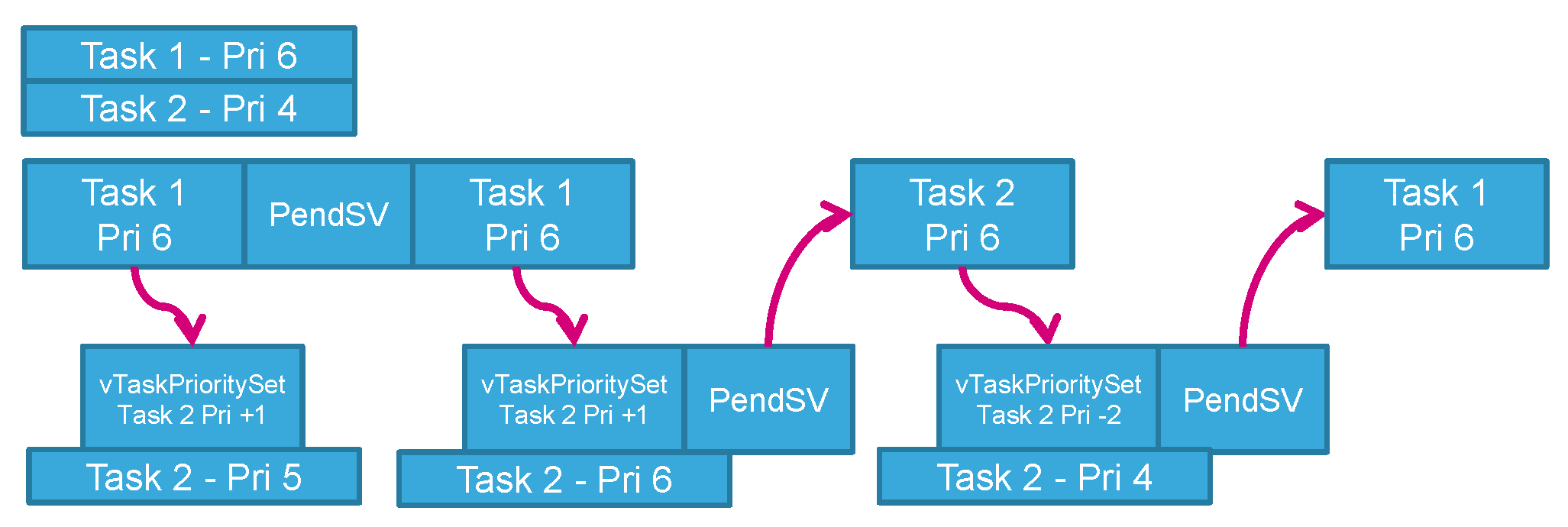
When you call vTaskPrioritySet(), the scheduler may immediately trigger a context switch if the priority change makes a different task the highest-priority ready task.
Test your understanding!
You have three tasks:
Task_A(Priority 1, Running)Task_B(Priority 2, Blocked on a delay)Task_C(Priority 3, Blocked on a delay)
Task_A calls vTaskPrioritySet(NULL, 4);. What happens immediately after this call? (Note: Passing NULL as the handle refers to the calling task itself).
Show answer
Nothing changes immediately in terms of which task is running. Task_A continues to run.
Reasoning: Task_A raised its own priority from 1 to 4. Since it was already the highest-priority task in the Ready state (and was in fact Running), and no other task became ready, it remains the highest-priority task and continues its execution. A context switch is only forced if the priority change results in a different task becoming the highest-priority task in the Ready state.
Let's watch a video that demonstrates the effect of priorities on execution.
STM32 FreeRTOS Series Part 1: Mastering Tasks & Priorities in STM32CubeIDE
This clip from the ControllersTech video shows a practical scenario where three tasks with different priorities compete for a shared UART resource.
Watch from 09:52 to 15:48. Initially, all tasks have the same priority, and access to the UART is chaotic. Notice how after assigning unique priorities (Above Normal, Normal, Below Normal), the output becomes predictable, with the highest-priority task always printing first when they are all ready.
4. Deleting a Task with vTaskDelete()
When a task is no longer needed, you can remove it from the system to free up its resources (stack and Task Control Block).
The API is vTaskDelete(TaskHandle_t xTaskToDelete).
- To delete another task: Pass its handle, e.g.,
vTaskDelete(xTaskB_Handle);. - For a task to delete itself: Pass
NULL, e.g.,vTaskDelete(NULL);.
A critical interview topic: What happens to the memory allocated to a deleted task?
This is where the Idle Task comes in.
When a task is deleted, its memory isn't freed immediately by the vTaskDelete call. The cleanup is delegated to the Idle Task. This document explains its role.
Read the section 'Idle Task'. Pay close attention to its characteristics: lowest priority and its responsibility for 'cleaning up kernel resources after a task has been deleted'.
The Idle Task runs only when no other application task is ready. It has a loop, and in that loop, it checks if there are any terminated tasks. If so, it frees the memory that was allocated for their stack and Task Control Block (TCB).
Senior-level consideration: vTaskDelete() only frees the RTOS-managed memory (stack and TCB). If your task dynamically allocated memory (e.g., using malloc()) or acquired other resources (like hardware mutexes), they will not be automatically released. This causes resource leaks.
The robust way to delete a task is to have a cleanup protocol:
- Signal the task to shut down (using a semaphore or queue, which we'll cover later).
- The task, upon receiving the signal, frees all of its own allocated resources.
- The task then calls
vTaskDelete(NULL);to delete itself.
This video gives a practical demonstration of task deletion and an important warning.
Introduction to RTOS Part 3 - Task Scheduling | Digi-Key Electronics
The Digi-Key video on task scheduling includes a concise section on managing task lifecycles, including deletion.
Watch from 08:33 to 10:16. The video shows the use of vTaskSuspend, vTaskResume, and vTaskDelete. Note the excellent advice about checking if a handle is not NULL before deleting and setting it to NULL after deletion to prevent accidental reuse.
5. Interview Preparation
Let's consolidate these concepts into likely interview questions.
-
Question: "Walk me through the parameters of
xTaskCreate. Which one is most likely to cause difficult-to-debug bugs if configured incorrectly, and why?"- Your Answer: "The most critical parameter is
usStackDepth. If set too small, the task will suffer a stack overflow, corrupting memory outside its own stack. This leads to unpredictable behavior in other tasks or data corruption, which is notoriously difficult to trace back to the offending task. It's also specified in words, not bytes, a common point of confusion."
- Your Answer: "The most critical parameter is
-
Question: "What is the role of the Idle Task in FreeRTOS, particularly concerning
vTaskDelete()?"- Your Answer: "The Idle Task is a low-priority task that runs when no other application tasks are ready. It has two main roles, one of which is cleaning up after
vTaskDelete(). When a task is deleted, its memory isn't freed immediately. Instead, it's added to a list of terminated tasks, and the Idle Task is responsible for freeing the memory for the task's stack and TCB. This ensures that memory deallocation, which can be time-consuming, doesn't happen in the context of a time-critical task."
- Your Answer: "The Idle Task is a low-priority task that runs when no other application tasks are ready. It has two main roles, one of which is cleaning up after
-
Question: "You have a task that acquires a hardware lock and then gets deleted by another, higher-priority task. What is the potential problem here?"
- Your Answer: "The problem is a resource leak.
vTaskDelete()only frees the task's stack and TCB. It does not know about the hardware lock. The lock will remain acquired forever, and no other task will be able to use it, leading to a system deadlock. The correct approach is to implement a graceful shutdown. The manager task should signal the task to be deleted. The task would then release the hardware lock and any other resources it holds before callingvTaskDelete(NULL)to terminate itself."
- Your Answer: "The problem is a resource leak.
Conclusion
Today, we've moved from the theory of task states to the practical implementation of task management in FreeRTOS. You are now equipped with the fundamental API calls and concepts to build a multitasking application.
Key Takeaways:
- A task is a C function with an infinite loop that must never return.
- Tasks are created using
xTaskCreate(), where stack size and priority are critical parameters. - Task priorities can be managed dynamically with
vTaskPrioritySet()anduxTaskPriorityGet(). - Tasks are deleted using
vTaskDelete(), and the Idle Task is responsible for freeing the associated RTOS memory. - You are responsible for managing any non-RTOS resources (like
malloc'd memory or hardware locks) to prevent leaks when a task is deleted.
Next Lesson Preview:
Now that we can create multiple tasks that run concurrently, a new challenge arises: what happens when two or more tasks need to access the same shared resource, like a global variable or a UART peripheral? Uncontrolled access leads to data corruption and race conditions. In our next lesson, you will learn to implement task synchronization using mutexes to protect shared resources and prevent race conditions.