Hello! Welcome back to our module on RTOS concepts.
In our last session, we laid the groundwork by defining the core components of an RTOS: tasks, the scheduler, and kernel objects. We briefly touched upon the different states a task can be in. Your background in AUTOSAR OS means you're already familiar with a highly structured, static RTOS environment. This lesson will deepen that understanding by focusing on the dynamic lifecycle of a task, a concept applicable across all RTOSes, including the more flexible FreeRTOS mentioned in your target job description.
Today's learning outcome is to explain task states (Ready, Running, Blocked) and the role of the scheduler in managing state transitions. We will move from simply naming the states to understanding them as a complete lifecycle, governed by the RTOS scheduler. Mastering this is crucial for designing, analyzing, and debugging any multitasking embedded system.
1. The Life of a Task: A State Machine
Think of a task's existence as a journey through different states. At any given moment, a task is in exactly one state. The scheduler's primary job is to manage the transitions between these states for all tasks in the system.
The four fundamental states for a task in an RTOS like FreeRTOS are:
- Running: The task is currently using the CPU. On a single-core processor, only one task can be in this state at a time.
- Ready: The task has everything it needs to run but is waiting for the CPU to become available. It's essentially in line, waiting for its turn.
- Blocked: The task is waiting for a specific event to occur. This could be a time delay expiring, data arriving in a queue, or a semaphore being released. A blocked task is "paused" and consumes no CPU cycles.
- Suspended: The task has been explicitly "frozen" and cannot be scheduled until it is explicitly "thawed."
This diagram provides a clear visual map of these states and the transitions between them. We will refer back to it as we explore each transition.
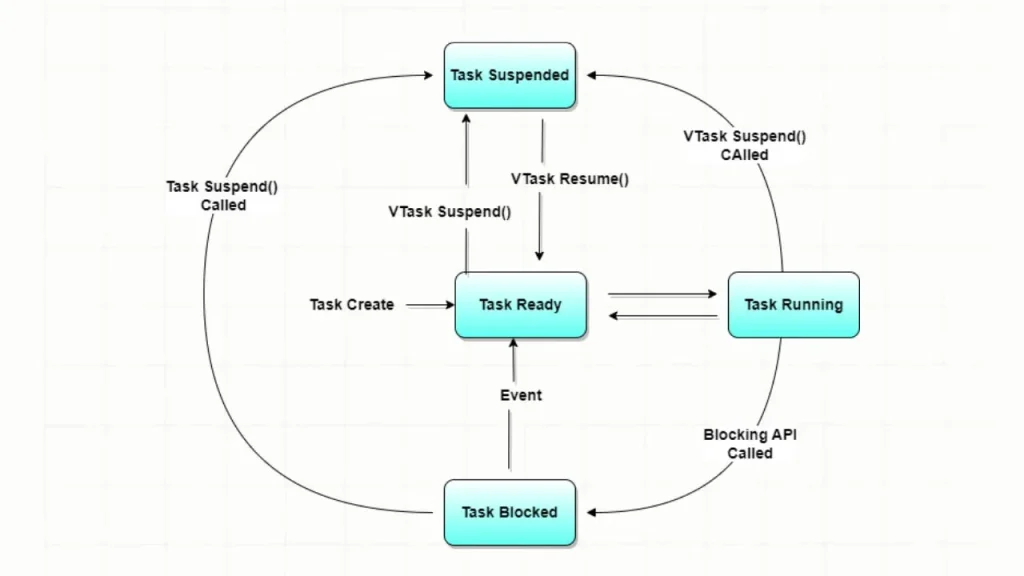
Let's watch a video that explains each of these states in detail.
Introduction to RTOS Part 3 - Task Scheduling | Digi-Key Electronics
The video 'Introduction to RTOS Part 3 - Task Scheduling' by Digi-Key provides an excellent, detailed walkthrough of the task states. It clearly explains the conditions for a task to be in each state.
Watch the segment from 04:22 to 06:20. Focus on the definitions of the Ready, Running, Blocked, and Suspended states and the key differences between them.
The distinction between the Blocked and Suspended states is a common point of confusion and a great topic for an interview question.
- A task enters the Blocked state voluntarily by calling an API function to wait for a system event (e.g.,
vTaskDelay,xQueueReceive). It will automatically be moved back to the Ready state by the RTOS once the event occurs. - A task enters the Suspended state when it (or another task) explicitly calls
vTaskSuspend(). It remains suspended indefinitely, regardless of system events, until another task makes a correspondingvTaskResume()call.
Test your understanding!
Imagine you have a task that reads from a CAN bus. If there are no new messages, the task should wait without consuming CPU time. Should this task be placed in a Blocked state or a Suspended state while waiting? Why?
Show answer
The task should be placed in the Blocked state.
Reasoning: The task is waiting for a specific, predictable event: the arrival of a CAN message. You would use an RTOS primitive like a semaphore or a queue. The task would call an API function like xSemaphoreTake() with an indefinite timeout. This call puts the task into the Blocked state. When a CAN message arrives, the CAN interrupt service routine (ISR) would give the semaphore (xSemaphoreGiveFromISR()), which would cause the RTOS to unblock the task and move it to the Ready state.
Using the Suspended state would be inappropriate because it would require another task to manually "guess" when a message has arrived and call vTaskResume(), which is inefficient and defeats the purpose of event-driven design.
2. The Scheduler: The Conductor of State Transitions
The scheduler is the engine that drives tasks through their state lifecycle. It decides which task gets to be in the Running state. Most real-time schedulers, including the one in FreeRTOS, operate on two main principles:
- Priority-Based: Every task has a priority. The scheduler will always select the highest-priority task that is currently in the Ready state to run.
- Preemptive: If a task with a higher priority becomes ready to run while a lower-priority task is running, the scheduler will immediately stop (preempt) the lower-priority task and switch to the higher-priority one.
The scheduler doesn't run continuously; it's invoked by specific events. Let's see how this works.
Introduction to RTOS Part 3 - Task Scheduling | Digi-Key Electronics
This clip from the Digi-Key video explains how the scheduler uses a periodic timer tick to make decisions and demonstrates preemption.
Watch from 00:40 to 03:15. Notice how the scheduler runs at every 'tick' to re-evaluate which task should run. Pay close attention to the example where tasks B and C preempt task A because they have a higher priority.
Triggers for State Transitions
As the video shows, transitions don't happen randomly. They are triggered in two ways:
-
Asynchronously by an Interrupt:
- The System Tick: This is a periodic interrupt (usually from a hardware timer like SysTick on ARM Cortex-M) that acts as the heartbeat of the scheduler. At every tick, the scheduler runs and may perform a context switch. It also decrements the timers for any tasks in the Blocked state due to a delay. When a task's delay expires, the tick handler moves it from Blocked -> Ready. If this newly ready task has a higher priority than the currently running task, preemption occurs immediately.
- Peripheral Interrupts: An interrupt from a peripheral (like a UART receiving a byte) can signal an event. The Interrupt Service Routine (ISR) can use an RTOS object (like a semaphore) to unblock a task that was waiting for this event, moving it from Blocked -> Ready.
-
Synchronously by a Task's API Call:
- A task calls
xTaskCreate(): A new task is created and placed in the Ready state. - A running task calls a blocking function like
vTaskDelay()orxQueueReceive(): The task moves from Running -> Blocked. The scheduler then selects the highest-priority task from the Ready list to run. - A running task calls
vTaskSuspend(): The task moves from Running -> Suspended. - A running task calls
vTaskResume()on another task: The target task moves from Suspended -> Ready.
- A task calls
This example from the official FreeRTOS documentation perfectly illustrates how priorities and state transitions play out in a real scenario.
The article 'RTOS Fundamentals' from FreeRTOS.org provides a classic example of two tasks—a high-priority control task and a low-priority keypad handler—and shows how the scheduler manages their execution.
Read the 'Example' section. Focus on the timeline diagram and the numbered points (t1 through t8) that describe why the scheduler chooses to run the vControlTask, vKeyHandlerTask, or the Idle task at each moment in time.
3. Scheduling Policies
While priority-based preemption is the most common scheduling policy for RTOSes, it's good to be aware of the broader landscape, as this can come up in system design interview questions.
How to understand real-time operating systems for ...
The article 'How to understand real-time operating systems for ...' gives a concise overview of different scheduling algorithms. This will broaden your understanding beyond the FreeRTOS default.
Read section 'b. Scheduling Algorithms' to learn about Priority-Based, Round-Robin, RMS, and EDF. Then read section 'b. Task Prioritization and Scheduling' under 'System Design Considerations' to see how this knowledge applies in practice.
In FreeRTOS specifically, you have these main options:
- Priority-Based Preemptive Scheduling: The default behavior we've discussed.
- Co-operative Scheduling: The scheduler will only switch tasks when the currently running task explicitly yields control (e.g., calls
taskYIELD()or a blocking function). Preemption is disabled. This is less common but can be useful in highly resource-constrained systems. - Round-Robin Scheduling: This is not a separate policy but an add-on to the priority-based scheduler. If multiple tasks at the same priority level are in the Ready state, the scheduler will run each one for a single time-slice before switching to the next, ensuring they share the CPU time fairly.
4. Interview Preparation
Let's consolidate this into potential interview questions.
-
Question: "Can you walk me through the lifecycle of a task in FreeRTOS, explaining the different states and what causes a task to transition between them?"
- Your Answer: "Certainly. A task begins in the Ready state upon creation. The scheduler may then move it to the Running state if it's the highest-priority ready task. While running, it can transition to the Blocked state by calling an API function to wait for an event, like
vTaskDelayorxQueueReceive. When the event occurs—for example, the delay expires or data arrives in the queue—the RTOS moves the task back to the Ready state. If a higher-priority task becomes ready, the running task is preempted and moves back to the Ready state. Finally, a task can be moved to the Suspended state via an explicitvTaskSuspendcall, and it will only become Ready again upon avTaskResumecall."
- Your Answer: "Certainly. A task begins in the Ready state upon creation. The scheduler may then move it to the Running state if it's the highest-priority ready task. While running, it can transition to the Blocked state by calling an API function to wait for an event, like
-
Question: "What is the role of the system tick interrupt in an RTOS scheduler?"
- Your Answer: "The system tick is the scheduler's heartbeat. It's a periodic interrupt that triggers the scheduler to run. Its primary roles are: first, to manage time-based events. It decrements counters for tasks that are in the Blocked state for a specific duration. When a counter reaches zero, it moves that task to the Ready state. Second, it facilitates time-slicing for tasks of equal priority, allowing the scheduler to switch between them in a round-robin fashion to ensure fairness."
-
Question: "Describe what happens during a preemption."
- Your Answer: "Preemption occurs when a task of higher priority than the currently running task becomes ready to run. For example, a high-priority task was in the Blocked state waiting for a timer, and the tick interrupt just expired that timer. The RTOS sees that a task with higher priority is now in the Ready state. It immediately suspends the execution of the lower-priority running task, saves its complete context (CPU registers, program counter, etc.) to its stack, loads the context of the high-priority task, and then resumes execution of the high-priority task. The preempted low-priority task is moved back to the Ready state."
Conclusion
Today, we've taken a deep dive into the dynamic life of an RTOS task. You now understand that tasks exist in a state machine and that the scheduler acts as the engine, driving transitions based on a clear set of rules and triggers.
Key Takeaways:
- Tasks move between four primary states: Running, Ready, Blocked, and Suspended.
- The Blocked state is for event-driven waiting, while the Suspended state is for explicit pausing/resuming.
- State transitions are triggered by API calls made by tasks or asynchronously by interrupts (especially the system tick).
- The scheduler uses a policy—typically priority-based preemptive scheduling—to decide which Ready task moves to the Running state.
- Preemption is the mechanism that ensures the highest-priority task that is ready to run always gets the CPU.
Next Lesson Preview:
We've thoroughly covered the theory of what tasks are and how they are managed. In the next lesson, we'll get our hands dirty. You will implement and manage tasks in an RTOS (e.g., FreeRTOS), including creation, deletion, and priority assignment. We'll write code to bring these state diagrams and concepts to life.