Hello! Welcome to the next lesson in your interview preparation.
In our last session, we focused on pure ARM assembly, learning how to control the program's execution flow with compare and branch instructions. While essential for understanding the processor, most modern embedded systems are written in C. Today, we'll bridge the gap between these two worlds.
This lesson addresses the learning outcome: Write and debug a simple C function with inline assembly using the __asm keyword. We will explore why and how to inject assembly code directly into your C functions—a powerful technique for performance optimization and accessing hardware features that are beyond the C language's reach.
Given your background in automotive software and functional safety, you'll find this particularly relevant. Inline assembly is often the tool of choice for implementing safety mechanisms, accessing special-purpose registers, or writing highly-optimized, time-critical routines that are common in ADAS and gateway development.
1. Why Mix C and Assembly?
While C is expressive and portable, there are times when you need to speak the processor's native language. Inline assembly allows you to do this without the overhead of creating separate assembly files and managing a complex build process.
Common use cases include:
- Accessing CPU-specific instructions: Many ARM cores have instructions for DSP operations, security features (like on ARM TrustZone), or bit manipulation (
CLZ,RBIT) that don't have a direct equivalent in standard C. - Performance-critical code: For tasks like high-speed GPIO toggling or time-sensitive protocol handling, handcrafted assembly can be more efficient than what a compiler might generate.
- Direct hardware interaction: Modifying core processor state, such as enabling/disabling interrupts or configuring the MPU, often requires specific assembly instructions.
2. The Anatomy of an Inline Assembly Statement
The GNU C Compiler (GCC), which is standard in embedded development, provides a powerful asm statement. Let's start with a simple visual.

The simplest form is just asm("instruction");, but this is rarely sufficient. The real power comes from the extended asm syntax, which allows for a clean interface between your C variables and the assembly code.
The full structure is:asm volatile ( "assembly code" : output_operands : input_operands : clobber_list );
This looks complex, so let's break it down using another visual.
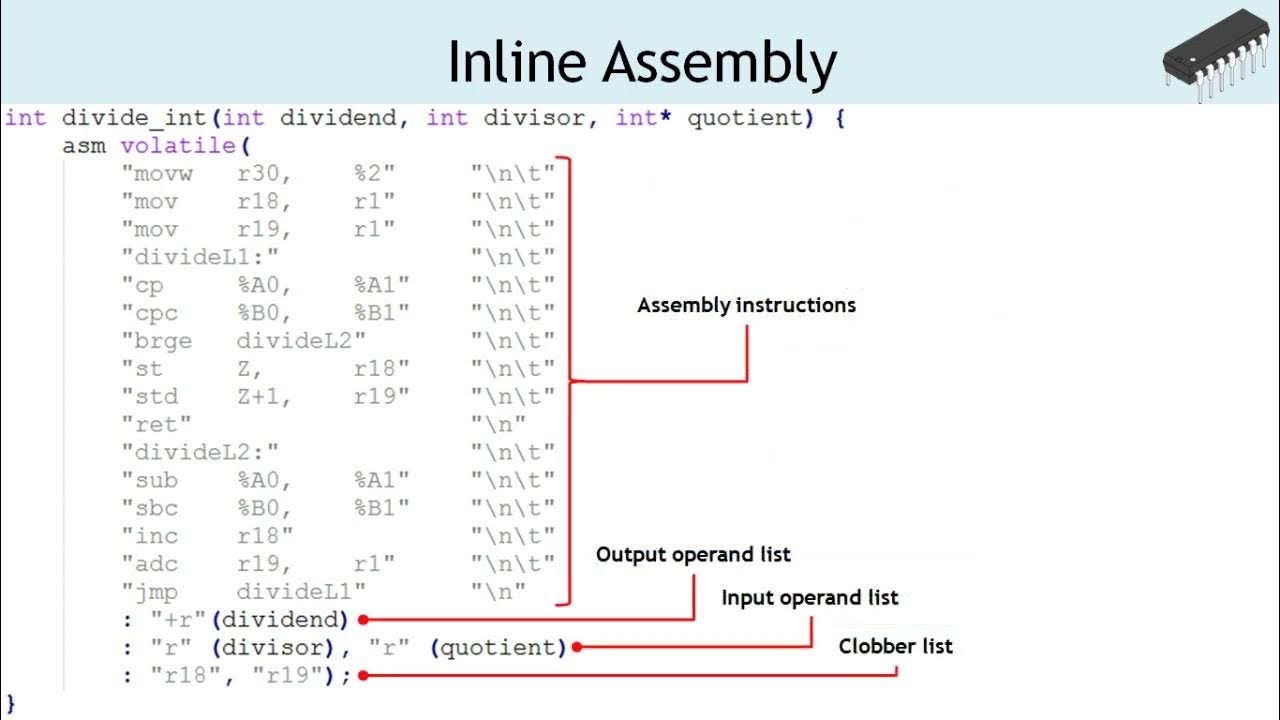
To get a formal understanding of this structure, let's turn to a guide.
ARM GCC Inline Assembler Cookbook
The 'ARM GCC Inline Assembler Cookbook' is an excellent, detailed reference for this topic. We will refer to it throughout the lesson. For now, let's focus on the basic syntax and the concept of operands.
Read the initial sections of this document, from the start down to just before the 'C code optimization' heading. Focus on understanding the four parts of the asm statement and the syntax for defining input and output operands using symbolic names like [result].
As you read, note these key points:
- Assembly Code: A string literal containing one or more assembly instructions, separated by
\n\t. - Output Operands: A comma-separated list that maps registers or memory back to C variables after the assembly code executes. Each operand has the format
[symbolic_name] "constraint" (c_variable). The"=r"constraint means "write-to-a-general-purpose-register". - Input Operands: A list that maps C variables to registers for use within the assembly code. The format is the same, and
"r"means "read-from-a-general-purpose-register". - Clobber List: We'll cover this next. It's one of the most important parts for writing correct code.
3. Taming the Optimizer: volatile and Clobbers
One of the biggest challenges with inline assembly is that the compiler's optimizer is free to change, move, or even delete your code if it can't see its side effects. This can lead to bugs that are incredibly hard to find.
There are two primary tools to prevent this: the volatile keyword and the clobber list.
-
asm volatile(...): Addingvolatiletells the compiler, "This block of code is sacred. You must not remove it, reorder it, or combine it with other instructions. It might have side effects you don't understand (like writing to a hardware register)." In embedded systems, almost all your inline assembly should bevolatile. -
The Clobber List: This list informs the compiler about which resources your assembly code has modified ("clobbered"). This is crucial for correctness.
- Register Clobbers (
"r0","r3", etc.): If your code uses a register that isn't an input or output operand, you must list it here. This tells the compiler that the value it might have cached in that register is now invalid. - Condition Codes (
"cc"): If your instruction (likecmporadds) modifies the CPSR flags, you must clobber"cc". This prevents the compiler from assuming the flags are unchanged. - Memory (
"memory"): This is the most powerful clobber. It tells the compiler that the assembly block may read or write to any location in memory. This forces the compiler to save any modified variables from registers to memory before yourasmblock and reload them after. It acts as a compiler memory barrier and is essential when your assembly interacts with hardware peripherals, DMA, or interrupt handlers.
- Register Clobbers (
This next reading section is critical. It explains why these concepts are not just suggestions, but requirements for writing robust code.
ARM GCC Inline Assembler Cookbook
Let's continue with the 'ARM GCC Inline Assembler Cookbook' to understand how to prevent the compiler from breaking our code.
Read the section titled 'C code optimization'. Pay very close attention to the examples showing how the optimizer can reorder code and why volatile and the "memory" clobber are necessary to enforce correct execution order.
Test your understanding!
You've written a piece of inline assembly to configure a peripheral register. You tested it in a debug build and it worked. However, when you created a release build with optimizations enabled (-O2), the peripheral stopped working. What are the two most likely reasons related to your inline assembly statement?
Show answer
- You forgot to use the
volatilekeyword. The optimizer saw that your assembly didn't modify any C variables it knew about and decided the code was "dead" and removed it entirely. - You forgot to use the
"memory"clobber. The compiler might have cached the value of the peripheral's memory-mapped address or the value you wanted to write. It might perform the write out of order or use a stale value, because you didn't tell it that theasmblock modifies an unknown piece of memory.
4. Code Scenario: Wrapping a Special Instruction
Let's put this together with a practical example. The ARM CLZ (Count Leading Zeros) instruction is useful for normalization and finding the position of the most significant bit. There is no standard C operator for this.
Here is how you would wrap it in a C function:
#include <stdint.h>

/**
 * @brief Counts the number of leading zeros in a 32-bit integer.
 * @param value The input value.
 * @return The number of leading zeros.
 */
uint32_t count_leading_zeros(uint32_t value) {
    uint32_t result;

    // Use inline assembly to call the CLZ instruction.
    asm volatile (
        "clz %[res], %[val]"
        : [res] "=r" (result)  // Output operand: 'result' is written to by the instruction.
        : [val] "r" (value)    // Input operand: 'value' is read by the instruction.
        : /* No clobbers needed */
    );

    return result;
}
Let's analyze this:
"clz %[res], %[val]": This is the assembly template.CLZtakes a destination and a source register.%[res]will be replaced by the register allocated for our output, and%[val]by the register for our input.[res] "=r" (result): This is the output operand.[res]: A symbolic name for this operand."=r": A constraint string. The=means it's a write-only operand. Thermeans it can be placed in any general-purpose register.(result): The C variable that will receive the value.
[val] "r" (value): This is the input operand.rmeans it's a read-only operand in a general-purpose register.- No clobber list is needed because the
CLZinstruction only affects the destination register, which we have already declared as an output. The compiler knows not to trust the old value ofresult.
5. Debugging Inline Assembly
Since the compiler is involved, debugging inline assembly requires a different approach than debugging pure assembly. Your experience with Lauterbach is a great asset here.
Common Debugging Strategy:
- Examine the Disassembly: The first step is always to look at what the compiler actually generated. In your debugger's disassembly view, find your C function. You will see the compiler-generated function prologue, your inline assembly instructions (with the chosen registers), and the epilogue. This tells you if your code is even present and what registers are being used.
- Single-Step Instructions: Use the instruction-level stepping feature of your debugger to walk through the assembly code line by line. Watch the register view to confirm that the inputs are correct and the outputs are as you expect.
- Analyze Faults: Incorrect inline assembly can easily cause a processor fault (e.g., UsageFault, BusFault). The key is to know how to trace the fault back to the offending instruction.
The following resource provides a superb, real-world example of using inline assembly to manipulate system state and then debugging the resulting fault.
How to debug a HardFault on an ARM Cortex-M MCU | Interrupt
The article 'How to debug a HardFault on an ARM Cortex-M MCU' contains a perfect example of both using and debugging inline assembly.
Read the sections 'Automating the Analysis' and 'Coprocessor Fault'. In the first section, notice how a short assembly shim (HARDFAULT_HANDLING_ASM) is used to get the stack pointer and call a C handler—a classic C-assembly interface. In the second, focus on how __asm volatile is used to intentionally disable the FPU, and then how the debugger is used to trace the resulting fault back to the vmov instruction.
This example is powerful because it shows inline assembly in a non-trivial context: manipulating system control registers. This is a common task in low-level driver development.
Interview Preparation
Be prepared to discuss both the "how" and the "why" of inline assembly.
- Question: You need to toggle a GPIO pin as fast as possible in a tight loop. Why might you choose inline assembly over standard C register access (
*REG |= BIT; *REG &= ~BIT;)?- Answer: While a modern compiler is good, it might insert extra load/store instructions or other operations between the set and clear operations. With inline assembly, I can guarantee a specific sequence of instructions, like
str,str, with no intervening operations, achieving the absolute minimum latency. I can ensure the instructions are optimal for the specific ARM core's pipeline.
- Answer: While a modern compiler is good, it might insert extra load/store instructions or other operations between the set and clear operations. With inline assembly, I can guarantee a specific sequence of instructions, like
- Question: What does the
&constraint modifier do in an output operand, for example"=&r"?- Answer: The
&modifier declares an "early clobber" operand. It tells the compiler that the assembly code will write to this output register before it has finished reading all the input operands. This prevents the compiler from allocating the same register for an input operand and an early-clobber output operand, which would cause the input's value to be destroyed before it's used. It's a safety measure for complex instructions.
- Answer: The
- Question: You use an
asmblock to call a function in a shared library whose source you don't have. This function is known to modify registersr4throughr7. How should you reflect this in yourasmstatement?- Answer: I would list
r4,r5,r6, andr7in the clobber list. This informs the compiler that the values in these registers are invalid after theasmblock, forcing it to save and restore any data it was holding in them if it's needed later.
- Answer: I would list
Conclusion
You've now learned one of the most practical skills for an advanced embedded C programmer: integrating assembly code directly into your C functions. This allows you to harness the full power of the processor while maintaining the structure and scalability of a C project.
Key Takeaways:
- Inline assembly is used for performance, accessing special instructions, and direct hardware control.
- Always use
asm volatilein an embedded context to prevent the optimizer from removing or reordering your code. - The extended
asmsyntax (code : outputs : inputs : clobbers) is the standard way to interface C variables with assembly. - The clobber list is critical for correctness. Use it to tell the compiler about all side effects on registers (
"r0","cc") and memory ("memory"). - Debugging starts with examining the disassembly and single-stepping through instructions.
Next Lesson Preview:
In our next lesson, we will put everything from this and the previous lessons together. We will focus entirely on debugging assembly code using a JTAG debugger (e.g., Lauterbach) to inspect registers and memory. We'll take code examples like the ones we've discussed, load them onto a target (or simulator), and practice the hands-on debugging techniques that are crucial for your role.