Introduction
Hello! In our last lesson, we mastered zero-downtime deployments using deployment slots, a crucial technique for maintaining professional, highly available applications. Your app is now running on a robust infrastructure, but it's still accessed via the default Azure URL, such as myfirstazurewebapp.azurewebsites.net. For any production application, the next step is to establish a branded, trustworthy presence with a custom domain name.
This lesson addresses the final learning outcome for this module: Describe conceptually how custom domains and TLS/SSL bindings are configured for an App Service app.
Since you don't own a custom domain for hands-on practice, we will approach this as a conceptual walkthrough. We will focus on understanding the complete process, the key components involved, and the "why" behind each step. This knowledge is essential for the AZ-204 exam and for architecting real-world solutions.
Today, we will cover:
- The purpose and prerequisites of using a custom domain.
- The process of mapping a domain to your App Service, including DNS record types.
- The importance of TLS/SSL certificates for enabling HTTPS.
- The different types of certificates available in Azure and how to bind them to your domain.
By the end of this lesson, you will be able to confidently describe the end-to-end process of taking an App Service from its default URL to a secure, custom-branded endpoint like https://www.yourcompany.com.
Why Use a Custom Domain?
When you create an App Service, Azure gives you a functional but unbranded domain. While this is fine for development and testing, it's not suitable for a public-facing application. A custom domain provides a professional, memorable, and credible address for your users.
To start, let's clarify the concept and benefits.
Overview of using custom domain names - Azure App Service
The Microsoft Learn article 'Overview of using custom domain names' provides a clear introduction to what custom domains are and why they're important.
Please read the short section titled 'What is a custom domain?'. It clearly contrasts the default Azure domain with a custom one and lists the primary benefits.
As the article states, using a custom domain like www.contoso.com instead of contoso.azurewebsites.net is about establishing your brand identity and building trust with your users.
The Process of Mapping a Custom Domain
Mapping a custom domain involves proving to Azure that you own the domain and then telling the Domain Name System (DNS) — the internet's phonebook — to point traffic for that domain to your Azure App Service.
Prerequisites
Just like deployment slots, custom domains are a feature of the paid App Service Plan tiers. You cannot configure a custom domain on the Free (F1) tier. You need to be on a Basic (B1), Standard (S1), Premium (P1/P2/P3), or Isolated tier.
Domain Validation and DNS Records
To prevent someone from hijacking traffic for google.com and pointing it to their own app, Azure requires you to prove ownership. You do this by creating specific DNS records with your domain registrar (the company where you bought your domain, like GoDaddy, Namecheap, etc.).
There are three key types of DNS records you'll encounter:
- A Record (Address Record): Maps a domain name directly to an IPv4 address. You would point your domain (e.g.,
contoso.com) to the public IP address of your App Service. - CNAME Record (Canonical Name Record): Maps a domain name to another domain name (an alias). For example, you could map
www.contoso.comtocontoso.azurewebsites.net. When a user requestswww.contoso.com, the DNS system looks upcontoso.azurewebsites.netto find the IP address. - TXT Record (Text Record): Allows you to associate arbitrary text with a domain. Azure uses a TXT record with a unique verification ID to confirm you have control over the domain's DNS settings.
The typical process is to add both an A record (or CNAME) to point traffic and a TXT record to prove ownership.
The following image shows the screen in the Azure portal where you'd configure this. Notice how Azure provides you with the exact values you need to create for the A and TXT records at your registrar.

To see this process in action, let's watch a video that walks through the entire flow.
Azure App Service | Deploy Custom Domain and TLS Certificate
The video 'Azure App Service | Deploy Custom Domain and TLS Certificate' by MadeForCloud provides a concise visual demonstration of the entire process. We will focus first on the domain mapping part.
Please watch the following segments: Prerequisites (00:00 - 01:31): Notice how a Production App Service Plan (S1) is chosen specifically because it supports custom domains. Adding the Custom Domain (05:24 - 07:50): Observe how the presenter adds the necessary A and TXT records at their domain registrar (IONOS in this case) and then validates it in the Azure portal.
As you saw, once the DNS records are created and propagated (which can take some time), Azure verifies ownership, and the domain is successfully mapped to your App Service. At this point, typing your custom domain into a browser would lead to your web app. However, it would be marked as "Not Secure."
Securing Your Domain with TLS/SSL
A secure connection is non-negotiable for modern applications. Transport Layer Security (TLS), the successor to Secure Sockets Layer (SSL), is the standard technology for encrypting the communication between a user's browser and your web server. This is what enables HTTPS and displays the padlock icon in the browser's address bar.
To enable HTTPS on your custom domain, you need a TLS/SSL certificate.
What Is TLS/SSL in Azure App Service?
To understand the role of TLS/SSL in App Service, let's review the official documentation.
Please read the introduction section of this page (up to 'TLS version support'). It explains the core purpose of TLS: encryption, authentication, and tamper-prevention.
Certificate Options in Azure App Service
Azure provides several flexible options for obtaining and managing TLS/SSL certificates.
What Is TLS/SSL in Azure App Service?
The same document, 'What Is TLS/SSL in Azure App Service?', outlines the different types of certificates you can use. Understanding these options is key for the AZ-204 exam.
Now, read the section titled 'TLS/SSL certificates on App Service', focusing on the subsection 'Types of certificates'. This details the three main options: App Service managed certificates, App Service certificates (ASC), and Bring your own certificate (BYOC).
To summarize the key options:
- App Service Managed Certificate: Free, auto-renewing, and fully managed by Azure. This is the simplest option for most scenarios but cannot be used outside of App Service.
- App Service Certificate: A private certificate you purchase from GoDaddy through Azure. It's stored in Azure Key Vault, giving you more control, and can be exported for use elsewhere.
- Bring Your Own Certificate (BYOC): You can purchase a certificate from any Certificate Authority (CA), and if your organization already has certificates, you can upload it (in
.pfxformat) to App Service.
Binding the Certificate
Once you have a certificate, the final step is to bind it to your custom domain in App Service. A binding is a link between a hostname (your custom domain), a port (443 for HTTPS), and a TLS/SSL certificate.
There are two types of bindings:
- SNI SSL Binding: Server Name Indication (SNI) is an extension to the TLS protocol that allows multiple HTTPS hostnames to be served from the same IP address. This is the modern, standard method and is used by most applications.
- IP-based SSL Binding: An older method that requires a dedicated IP address for each custom domain. This is less common and more expensive.
For the AZ-204 exam, you should be most familiar with SNI SSL binding.
Let's return to our video to see how a free App Service Managed Certificate is created and bound to the custom domain.
Azure App Service | Deploy Custom Domain and TLS Certificate
We'll continue with the 'Azure App Service | Deploy Custom Domain and TLS Certificate' video to see the security portion of the process.
Please watch the segment from 07:50 to 10:20. This part demonstrates: Creating a free App Service Managed Certificate. Binding this new certificate to the custom domain using an SNI SSL binding. The final result: a secure site with the padlock icon.
Enforcing HTTPS
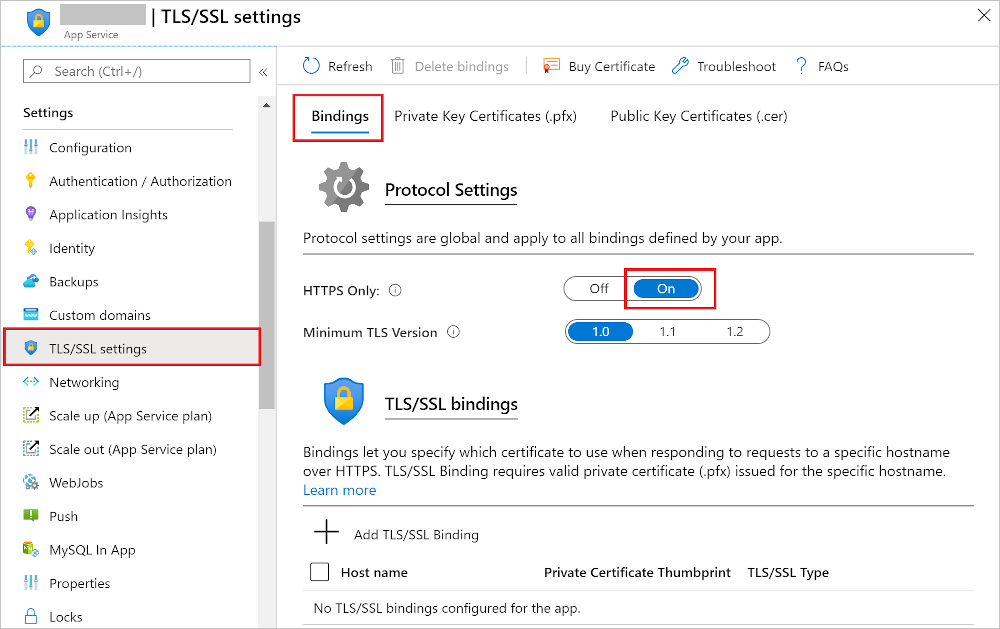
After binding a certificate, your app can be accessed via both HTTP and HTTPS. It's a security best practice to force all traffic to use HTTPS. You can do this with a simple toggle in the Azure Portal.
Conclusion
You now have a complete conceptual understanding of how to configure a custom domain for your Azure App Service and secure it with a TLS/SSL certificate. Even without performing the steps yourself, you can visualize the process and explain the key technical decisions involved.
Key Takeaways:
- Custom domains provide a branded and professional web address for your application and require a Basic tier or higher App Service Plan.
- Mapping a domain involves creating DNS records (A or CNAME, and a TXT for verification) at your domain registrar to prove ownership and point traffic to Azure.
- TLS/SSL certificates are essential for enabling HTTPS, which encrypts data and builds user trust.
- Azure offers flexible certificate options: free managed certificates, purchased App Service certificates, or bringing your own certificate (BYOC).
- A certificate is associated with a domain through a TLS/SSL binding, with SNI SSL being the most common type.
- Finally, you should always enforce HTTPS to ensure all users have a secure connection.
This lesson concludes our module on developing for Azure App Service. You've learned how to create, deploy, configure, scale, and brand a web application, covering a significant portion of the AZ-204 exam objectives.
Next Steps
In the next module, we will shift our focus from the Platform as a Service (PaaS) model of App Service to a serverless compute model. Our first lesson in Module 3, "Implementing Serverless Logic with Azure Functions," will introduce you to Azure Functions, a powerful service for running event-triggered code without managing underlying infrastructure. You'll learn about its hosting plans, triggers, and bindings, which will feel familiar yet distinct from what you've learned about App Service.