Hello! Welcome to the next lesson in our module on optimizing Azure applications.
In our previous lesson, we implemented the cache-aside pattern using Azure Cache for Redis. This is a powerful form of server-side caching, where the cache lives close to your application code to reduce database load. Today, we'll explore a different, complementary type of caching that happens much closer to your users.
This lesson addresses the learning outcome: Describe the purpose and benefits of an Azure Content Delivery Network (CDN). We will explore how a CDN can dramatically improve the user experience by reducing latency and offloading work from your origin servers, setting the stage for our next hands-on lab.
1. From Server-Side to the Edge: What is a CDN?
Imagine your web application is hosted in a single Azure region, say, West US. When a user from London tries to access it, their request has to travel across the Atlantic Ocean and back. This physical distance introduces network latency, making your application feel slow, no matter how optimized your server code is.
A Content Delivery Network (CDN) solves this problem. It's a globally distributed network of servers that caches copies of your content at strategic locations around the world. These locations are called Points of Presence (PoPs). When a user requests your content, they are automatically routed to the nearest PoP, which delivers the cached content with much lower latency.
To get a solid grasp of this concept, the following video provides an excellent overview of how CDNs work, their architecture, and their benefits beyond just speed.
What Is A CDN? How Does It Work?
This video from ByteByteGo clearly explains the fundamental concepts behind any CDN, including Points of Presence (PoPs), edge servers, and how they improve performance and security.
Watch the video from the beginning to 02:25, and then from 03:17 to the end (04:11). Focus on understanding: The core idea of bringing content closer to the user. The role of PoPs and edge servers. How caching at the edge reduces load on the 'origin server'. The additional benefits of security (DDoS protection) and availability.
2. How Azure CDN Works
Azure CDN is Microsoft's implementation of this global content delivery service. It integrates seamlessly with other Azure services like Blob Storage and App Service, which act as origin servers—the source of truth for your content.
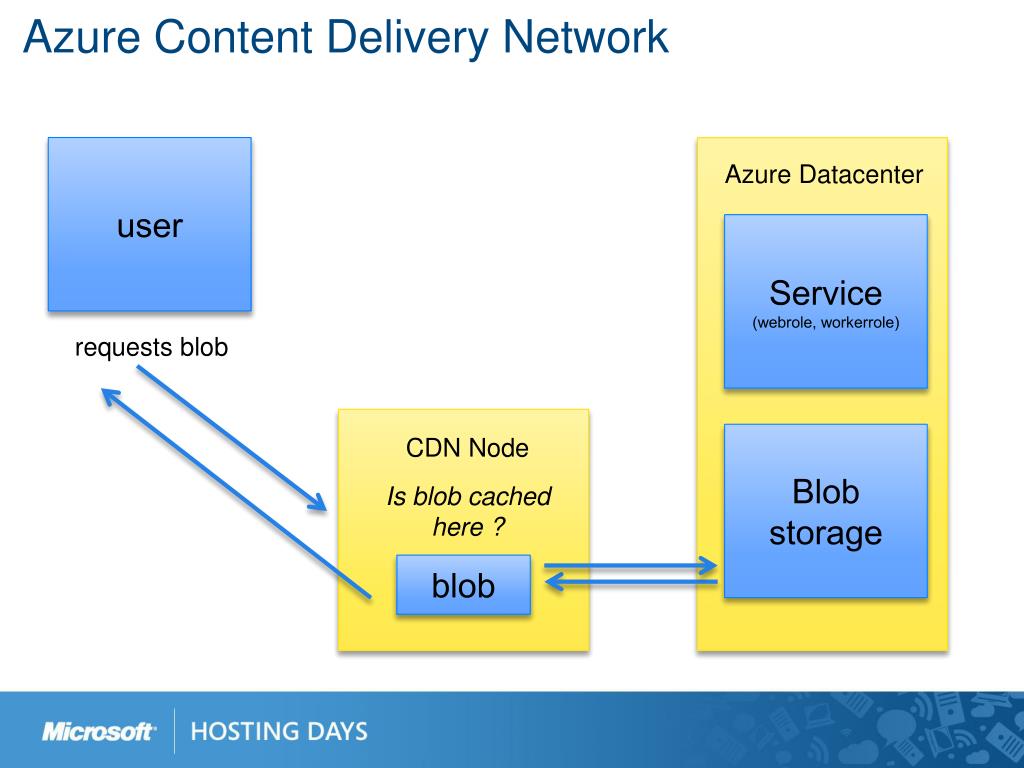
The process follows a clear request lifecycle:
- A user requests a file (e.g.,
image.jpg) from your CDN URL. - DNS routes the request to the most optimal PoP, usually the one geographically closest to the user.
- An edge server at that PoP checks its local cache for the file.
- Cache Hit: If the file is in the cache and hasn't expired, the edge server delivers it directly to the user. This is extremely fast.
- Cache Miss: If the file isn't in the cache, the edge server requests it from your configured origin server (e.g., an Azure Blob Storage container).
- The origin server sends the file to the edge server.
- The edge server caches the file for future requests and delivers it to the user.
This flow ensures that the first user in a region might experience a slight delay, but every subsequent user in that region gets a near-instant response.
3. The Purpose: Common Use Cases for a CDN
A CDN is most effective for delivering static content—files that don't change with every request. Given your background in developing web solutions, you'll recognize these as the assets that are typically the same for all users.
To learn about the most common applications of a CDN, please review the following official Microsoft documentation.
CDN guidance - Azure Architecture Center
This article from the Azure Architecture Center details the primary use cases for a CDN. It provides a clear picture of why and when you would use one.
Please read the section titled 'How and why a CDN is used'. This will give you a concrete list of scenarios where a CDN provides significant value.
As you read, the main purposes of a CDN are:
- Delivering static assets: Images, CSS stylesheets, JavaScript files, fonts, and documents.
- Streaming video files: Ensuring smooth, low-latency playback for users worldwide.
- Distributing large files: Software updates, game patches, or IoT firmware updates can be distributed efficiently without overwhelming a single server.
- Serving entire static websites: For sites built with frameworks like Angular, React, or Vue (after the build process), the entire site can be hosted on storage and served via a CDN.
4. The Benefits of Using Azure CDN
By fulfilling the purposes above, a CDN provides several major benefits to your application architecture.
- Reduced Latency & Better Performance: This is the primary benefit. By serving content from an edge server close to the user, you drastically cut down the network round-trip time, making your site feel much faster.
- Reduced Load on Origin Server: Since the CDN handles most requests for static assets, your primary application server (e.g., an Azure App Service) is freed up to handle dynamic, application-specific logic. This reduces compute costs and improves the scalability of your backend.
- Bandwidth Cost Savings: Traffic from your origin server is often more expensive than traffic delivered from the CDN. By offloading delivery to the CDN, you can significantly reduce your data egress costs.
- Enhanced Security & Availability: Azure CDN can help mitigate large-scale Distributed Denial of Service (DDoS) attacks by absorbing traffic at the edge. The distributed nature of the CDN also provides high availability; if one PoP has an issue, traffic can be rerouted to another.
The distinction between what a CDN handles (static content) and what your application server handles (dynamic content) is crucial in Azure architecture.

While CDNs are primarily for static content, some can also accelerate dynamic content through network route optimizations, but their main strength lies in caching.
5. When Not to Use a CDN
A CDN is a powerful tool, but it's not a universal solution. In some cases, it can add unnecessary complexity or cost.
- Highly Dynamic, Personalized Content: If every request generates unique content for a user (e.g., a personalized dashboard), there's nothing to cache. The request must go to the origin server every time.
- Low-Traffic or Internal-Only Applications: If your application has very few users, or all users are located in the same office network as the server, the benefits of a global CDN are minimal.
- Strict Real-Time Data: For applications where even a few seconds of stale data is unacceptable (e.g., real-time stock trading), the caching model of a CDN might not be suitable.
Understanding these limitations helps you make informed architectural decisions.
Conclusion
In this lesson, we've defined what a Content Delivery Network is and explored its fundamental role in modern web applications. You now understand how Azure CDN uses a global network of PoPs to cache content closer to users, and you can articulate the significant benefits this provides.
Key Takeaways:
- Purpose: A CDN's primary purpose is to cache and deliver static content (images, CSS, JS, video) from servers geographically close to end-users.
- Mechanism: It uses a distributed network of Points of Presence (PoPs). A user request is routed to the nearest PoP, which serves the content from its cache or fetches it from the origin if necessary.
- Benefits: The main advantages are lower latency (faster performance), reduced load and bandwidth costs for the origin server, and improved availability and security.
- Distinction: CDNs excel at static content delivery, complementing application servers that handle dynamic content.
Next Steps
Now that you've grasped the "what" and "why" of CDNs, our next lesson will move to the "how." We will take these concepts and apply them in a hands-on exercise where you will create a CDN profile and endpoint to cache content from an Azure Blob Storage account.