Hello! Welcome to the twelfth module of your AZ-204 certification path.
In our last lesson, we explored how to build a decoupled, event-driven system by implementing a queue-triggered Azure Function with Azure Queue Storage. We saw how this pattern is perfect for processing background tasks asynchronously. Now that we're becoming proficient at building these backend services, a new question arises: How do we manage, secure, publish, and monitor them effectively, especially in a large enterprise environment?
This lesson introduces the answer: Azure API Management (APIM). Our learning outcome is to describe the core components and features of Azure API Management. Think of APIM as the professional front door for all your backend APIs, whether they are Azure Functions, App Services, or even services running on-premises. Given your extensive experience with C# and developing REST APIs, you'll recognize that APIM solves many of the common, non-functional challenges associated with API lifecycle management.
1. Why Use an API Management Platform?
In your work, you've likely dealt with challenges that go beyond writing the core business logic of an API:
- Security: How do you enforce consistent authentication (like API keys or JWT tokens) across dozens of APIs?
- Monitoring: How do you know who is using your APIs, how often, and whether they are experiencing errors?
- Lifecycle Management: How do you roll out a new, breaking version of an API without disrupting existing consumers?
- Developer Onboarding: How do you provide clear documentation and a simple way for other developers (internal or external) to start using your APIs?
Handling these concerns individually for each API is repetitive and error-prone. An API Management platform centralizes these tasks. It acts as a facade or a reverse proxy that sits between your API consumers and your backend services.
To start, let's watch a short video that introduces this concept and why it's essential in an enterprise context.
Introduction to Azure API Management
This video from Houssem Dellai provides a concise overview of why a service like Azure API Management is needed and introduces its main architectural pieces.
Watch the segment from the beginning until 01:39. Pay close attention to how the API Gateway is positioned to abstract various backend services (like Functions, App Service, etc.) and provide cross-cutting features like caching, throttling, and security.
2. The Core Components of Azure API Management
As the video highlighted, Azure API Management is composed of three primary components that serve different audiences.
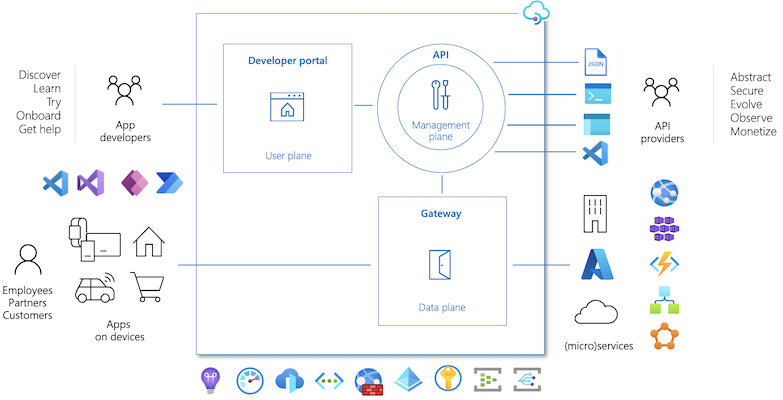
Let's break down each component:
-
API Gateway (Data Plane)
- This is the runtime engine that processes all API requests. It accepts API calls, routes them to the appropriate backend service, and returns the response.
- It is the single point of entry for all your managed APIs.
- It's responsible for enforcing security policies (validating API keys, JWTs), enforcing rate limits and quotas, caching responses to improve performance, and logging telemetry.
-
Management Plane (Control Plane)
- This is the interface where you, as the API provider, configure and manage your APIM instance. You interact with it primarily through the Azure Portal, Azure CLI, PowerShell, or REST API.
- Here, you define your API schemas (by importing OpenAPI specifications, for example), package APIs into Products, set up Policies to control behavior, manage users, and analyze usage reports.
-
Developer Portal
- This is an automatically generated, customizable website that serves as the "storefront" for your APIs.
- API consumers (app developers) visit the Developer Portal to discover your APIs, read detailed documentation, try them out using an interactive console, and sign up to get subscription keys. This self-service model is crucial for accelerating API adoption.
To solidify your understanding of these roles, the official Microsoft documentation provides the definitive explanation.
Azure API Management - Overview and Key Concepts
Please read the 'API Management components' section of this Microsoft Learn article. It provides a detailed breakdown of the Gateway, Management Plane, and Developer Portal, reinforcing what we've just discussed.
In the article, find the heading 'API Management components' and read the descriptions for 'API gateway', 'Management plane', and 'Developer portal'. This will take about 5-7 minutes and will clarify the distinct responsibilities of each component.
3. Key Features and Concepts
Beyond the three main components, several key features and concepts define how APIM works. Understanding these is essential for the AZ-204 exam and for using APIM effectively.
Policies
Policies are the heart of APIM's power. They are a collection of statements that are executed on the request or response of an API. They allow you to change the behavior of an API without writing any code in your backend service. You can think of them as being conceptually similar to middleware in an ASP.NET Core pipeline.
Common policy use cases include:
- Authentication: Validate a JWT token or check for a valid subscription key.
- Rate Limiting: Restrict the number of calls a developer can make over a certain period.
- Transformation: Convert a request body from XML to JSON, or add/remove headers.
- Caching: Store and retrieve responses from the APIM cache to reduce latency and backend load.
Products and Subscriptions
These concepts govern how APIs are exposed and consumed.
- Products: A product is a collection of one or more APIs that you present to developers. You can create different products for different audiences (e.g., a "Basic" product with limited access vs. a "Premium" product with higher rate limits).
- Subscriptions: For a developer to call the APIs within a protected product, they must first subscribe to it. A subscription provides them with the API keys (primary and secondary) needed to authenticate their calls.
Other Important Features
APIM is packed with features designed for enterprise-grade API management.
- Versioning and Revisions: Safely manage the lifecycle of your APIs. Versions allow you to offer different functionalities for an API (e.g.,
/v1/ordersand/v2/orders), while Revisions allow you to make non-breaking changes and test them before making them live. - Analytics and Monitoring: Get rich insights into API usage, performance, and errors. APIM integrates seamlessly with Azure Monitor.
- Backend Abstraction: APIM can manage APIs from various backend types, including Azure App Service, Azure Functions, Azure Logic Apps, and even services hosted on-premises or in other clouds.
The following video from the Microsoft Azure team provides a great visual walkthrough of these capabilities within the Azure portal.
Azure API Management Fundamentals: Core Capabilities Explained
This video demonstrates several of the key features we've discussed, including API types, policies, and monitoring.
Watch this video from 00:13 to 02:47. As you watch, focus on: (00:13) The different API types APIM can manage. (00:36) The concepts of Versions and Revisions. (00:46) Integration with other Azure services like Functions. (01:05) The concept of Policies and the built-in policy editor. (02:05) The ideas of Workspaces for team separation and the Monitoring capabilities.
To complete your understanding, let's return to the Microsoft Learn article to read the official definitions of these concepts.
Azure API Management - Overview and Key Concepts
Now, please read the 'Key concepts' section of the same Microsoft Learn article. This will give you the formal definitions for APIs, Products, Users/Groups, and Policies.
Find the heading 'Key concepts' and read the short descriptions for 'APIs', 'Products', 'Users and groups', and 'Policies'. This will reinforce the terminology used in the AZ-204 exam.
Conclusion
In this lesson, we've laid the conceptual groundwork for Azure API Management. You've learned how it addresses common challenges in API delivery by providing a centralized platform for security, monitoring, and lifecycle management.
Key Takeaways:
- Purpose: APIM acts as a managed facade to abstract, secure, and scale your backend APIs.
- Core Components: It consists of the API Gateway (the runtime proxy), the Management Plane (the configuration interface for providers), and the Developer Portal (the discovery and onboarding site for consumers).
- Key Features:
- Policies are powerful rules that modify API behavior without backend code changes.
- Products are bundles of APIs offered to consumers.
- Subscriptions grant access to products via API keys.
- APIM provides robust support for versioning, security, and monitoring.
This theoretical understanding is the critical first step. You now have the vocabulary and architectural context needed to start working with the service.
Next Steps
In our next lesson, we will move from theory to practice. You'll apply what you've learned today in a hands-on lab where you will create an APIM instance and import a backend API (like an Azure Function App) using its OpenAPI specification. This will be your first step in building a fully managed API solution on Azure.