Introduction
In our last lesson, you masterfully combined n8n's control flow nodes to build a workflow that could filter, branch, and process a predefined set of data. This was a crucial step in learning how to orchestrate complex logic. However, real-world automation rarely deals with static, built-in data. Your goal of automating CI/CD pipelines, for instance, will require interacting with dynamic information from services like GitHub, Jenkins, or cloud providers.
This lesson marks your entry into the world of dynamic workflows. We'll introduce the HTTP Request node, the primary tool in n8n for communicating with external services over the web. Our focus today is on the GET request, which is used to retrieve data from APIs. By the end of this lesson, you will be able to configure the HTTP Request node to fetch and display data from any public API, a foundational skill for building the advanced CI/CD automations you're aiming for.
APIs and the GET Method
Before we jump into n8n, let's briefly clarify the concepts. An API (Application Programming Interface) is a set of rules that allows different software applications to communicate with each other. For web services, these rules are often defined by the REST (Representational State Transfer) architecture, which uses standard HTTP methods to perform actions.
You'll encounter several HTTP methods, but GET and POST are by far the most common. The GET method is used for one simple purpose: to retrieve data from a server. It's like asking a library for a specific book; you're not changing the library's collection, just requesting a copy of something that's already there.
For a clear overview of the most common HTTP methods and their roles, the following video provides an excellent summary.
n8n HTTP Request Node & Tool (Connect to APIs)
The video "n8n HTTP Request Node & Tool" gives a concise breakdown of the primary HTTP methods.
Watch the segment from this overview of REST API methods. Pay close attention to the descriptions of GET (receiving data) and POST (creating data), as this distinction is fundamental.
Your First GET Request with n8n
The HTTP Request node is your universal connector to any REST API. It allows your workflows to send requests and process the responses.
Mastering the n8n HTTP Request Node: Docs, Examples, and ...
This article from Automate Genius Hub provides a solid introduction to the node's purpose.
Please read the introduction, focusing on the section What it is and why it matters. This will frame the node's importance in n8n.
Now, let's put this into practice by fetching some data from a public test API called JSONPlaceholder.
Hands-On Exercise:
- Create a new workflow. It will start with a Manual trigger node.
- Add an HTTP Request node. You can find it by clicking the
+button and searching for "HTTP Request". - Configure the node as follows:
- Method:
GET(this is the default). - URL:
https://jsonplaceholder.typicode.com/posts - Leave all other settings at their default values for now.
- Method:
- Execute the node by clicking "Execute step".
After execution, inspect the output in the right-hand panel. You should see a list of 100 items, where each item is a JSON object representing a blog post. You have successfully retrieved data from an external API.
This simple request demonstrates the core function of the node. You provided a URL (also known as an endpoint) and the GET method told the server you wanted to retrieve the resource located at that URL. The server responded with the data, which n8n then made available to your workflow.
Refining Your Request with Query Parameters
Often, you don't want all the data from an endpoint; you want to filter it. For GET requests, this is done using query parameters. These are key-value pairs added to the end of the URL that tell the server how to filter or modify the response.
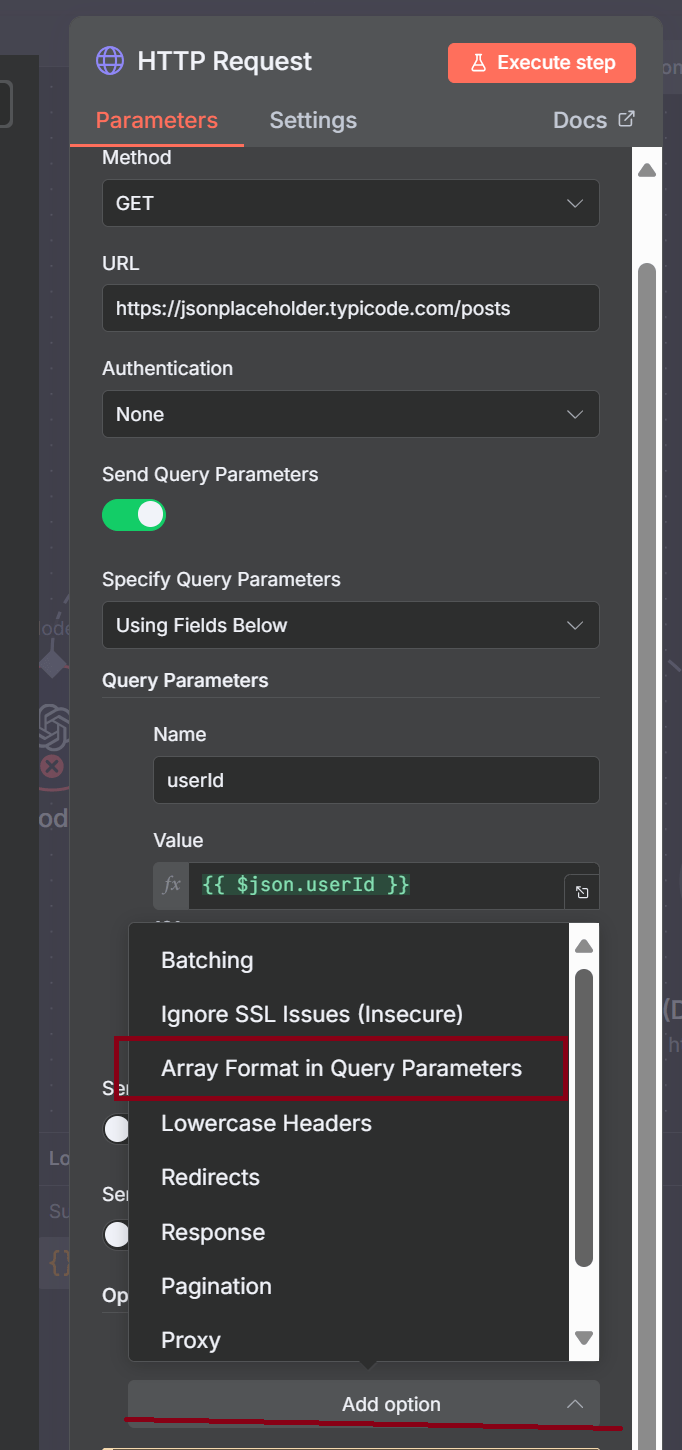
For example, the JSONPlaceholder API allows you to fetch posts for a specific user. The documentation shows that you can do this by adding ?userId=1 to the URL. In n8n, you don't have to manually edit the URL. The HTTP Request node has a dedicated section for this.
Let's refine our previous request to fetch posts only for userId 1.
- In your HTTP Request node, toggle on Send Query Parameters.
- Click Add Query Parameter.
- Set the Name to
userId. - Set the Value to
1. - Execute the node again.
Now, the output should contain only 10 items, all belonging to user 1.
The image below shows how this is configured. Notice that the value for a parameter can be a fixed value or, more powerfully, an expression referencing data from previous nodes, just as you learned in Module 3.
A Practical Example: Using a Search API
Let's try a more advanced, real-world example using SerpApi, a service that lets you programmatically perform Google searches. This is a perfect illustration of how to read API documentation and configure a request. The following video provides a fantastic, step-by-step guide.
n8n HTTP Request Node & Tool (Connect to APIs)
The "n8n HTTP Request Node & Tool" video walks through a full example of setting up a GET request to SerpApi, including using a curl command to speed up setup—a technique you might find quite efficient.
Watch this segment carefully, from the start of the example. The presenter demonstrates: Finding the API documentation. Using the curl command provided in the docs to auto-populate the n8n node. Inspecting the resulting query parameters. Switching the parameter input method from "Using Fields Below" to "JSON".
Follow along with the video to build this yourself:
- Sign up for a free account at SerpApi to get your API key.
- Create a new HTTP Request node.
- Follow the video's instructions to find the
curlcommand in the SerpApi documentation and import it into your node. - Notice how the node is automatically configured with the correct URL and query parameters, including a placeholder for your API key. Replace the
secret_api_keyplaceholder with your actual key from your SerpApi dashboard. - Execute the node. You should see the Google search results for "coffee" returned as structured JSON data.
This exercise is critical because it mirrors the exact process you'll use for integrating with CI/CD tools: read the API docs, find the correct endpoint and required parameters, and configure the HTTP Request node accordingly.
As a final point of interest, the article below shows this same node being used to call the GitHub API to fetch a repository's README file. This is a direct preview of how you will apply these skills to your CI/CD automation goals.
Using n8n to Build a Daily GitHub Trending Tracking Workflow
This blog post by Tomo Wang details a workflow that uses the HTTP Request node to interact with the GitHub API.
In the article, find the "Workflow 2" section, then the subsection "HTTP Request Node". Read the four paragraphs starting from this paragraph. Notice how it uses a GET method, a URL with an expression {{ $json.name }}, and specifies authentication. We will cover authentication and credentials properly in a future module.
Conclusion
In this lesson, you've made the leap from working with static data to fetching dynamic data from the web. You now understand the role of the GET request and can confidently use the n8n HTTP Request node to retrieve information from external APIs.
Key Takeaways:
- The HTTP Request node is n8n's tool for interacting with web services and APIs.
- The
GETmethod is used to retrieve data from a specified URL endpoint without causing side effects. - Query Parameters are used with
GETrequests to filter or customize the data you want to retrieve. They are configured in a dedicated section of the HTTP Request node. - Reading API documentation is a crucial skill for configuring requests correctly. Shortcuts like importing a
curlcommand can significantly speed up the process.
You now have the ability to pull information into your workflows. In our next lesson, we will explore the other side of the coin: using the POST, PUT, and DELETE methods to send data out from n8n to create, update, and remove resources in external systems. This will complete your fundamental toolkit for full two-way API communication.