Introduction
In our previous lesson, we established the core conceptual framework of n8n, defining nodes, connections, and executions as the fundamental architectural components. You now understand that a workflow is a sequence of operations (nodes) where data flows along defined paths (connections) during a specific run (execution).
Today, we will populate that framework with a practical "starter kit" of common built-in nodes. The goal is to identify the purpose of several key nodes you will use in nearly every workflow you build. We will focus specifically on the Set, HTTP Request, and Code nodes. Mastering these three provides a powerful combination of data manipulation, universal connectivity, and custom logic—essential capabilities for building the sophisticated CI/CD automations you're aiming for.
A Functional Map of n8n Nodes
Before diving into specific nodes, it's useful to have a mental model for categorizing them. Just as a programming language has different types of statements (declarations, control flow, I/O), n8n has different categories of nodes based on their architectural role.
An excellent article from InterviewKickstart provides a clear breakdown of these categories. Reading this will give you a high-level map for navigating n8n's extensive node library.
n8n Node Types Explained: Complete Guide for 2026
This article introduces the main functional categories of nodes, which will help you quickly understand the purpose of new nodes you encounter.
First, read the introductory section What is an n8n Node? to solidify the concept. Then, pay close attention to the table under the section Types of Nodes. This table neatly summarizes the six foundational categories.
As you saw, nodes can be broadly grouped into Triggers, Logic, Data Transformation, and so on. For this lesson, we'll focus on a few of the most versatile nodes from the "Custom," "Data Transformation," and "Logic" categories.
The Core Toolkit
While n8n offers hundreds of specialized nodes for specific applications (like GitHub or PostgreSQL), a small set of generic nodes gives you the power to build almost anything.
1. The HTTP Request Node: The Universal Connector
The HTTP Request node is arguably the most powerful node in n8n. It allows you to communicate with virtually any service on the internet that has a REST API. While dedicated app nodes (like the GitHub node) simplify common operations, they may not support every single API endpoint or option. When you need that level of control, or when a dedicated node doesn't exist for a service you use, the HTTP Request node is your tool.
For your goal of CI/CD automation, this node is indispensable. You can use it to trigger builds, check job statuses, or retrieve artifacts from any CI/CD platform with an API, such as Jenkins, CircleCI, or even specific functions within GitHub Actions that aren't covered by the standard GitHub node.
Let's look at a practical example from the n8n blog.
How to set up a no-code CI/CD pipeline with GitHub and TravisCI – n8n Blog
This section of the article demonstrates how to use the HTTP Request node to trigger a GitHub Actions workflow directly.
Please read the section titled Trigger GitHub Actions. Notice how it's configured with a method (POST), URL, and authentication headers to interact with the GitHub API.
This is a perfect illustration of the node's flexibility. It allows you to perform actions that go beyond the pre-packaged operations of dedicated nodes, giving you full control over the API interaction.
2. The Set Node: The Data Shaper
Workflows are all about moving and transforming data. Data rarely comes from an API in the exact format you need for the next step. The Set node is a fundamental data transformation tool used to add new fields, remove unnecessary ones, or change the values of existing fields.
Consider a CI/CD pipeline where a trigger contains a commit message, and you need to extract a version number from that message to create a release tag. The Set node, combined with n8n's expressions (which we will cover in detail later), is designed for precisely this kind of data shaping.
The n8n blog post on CI/CD pipelines also provides a clear example of the Set node in action.
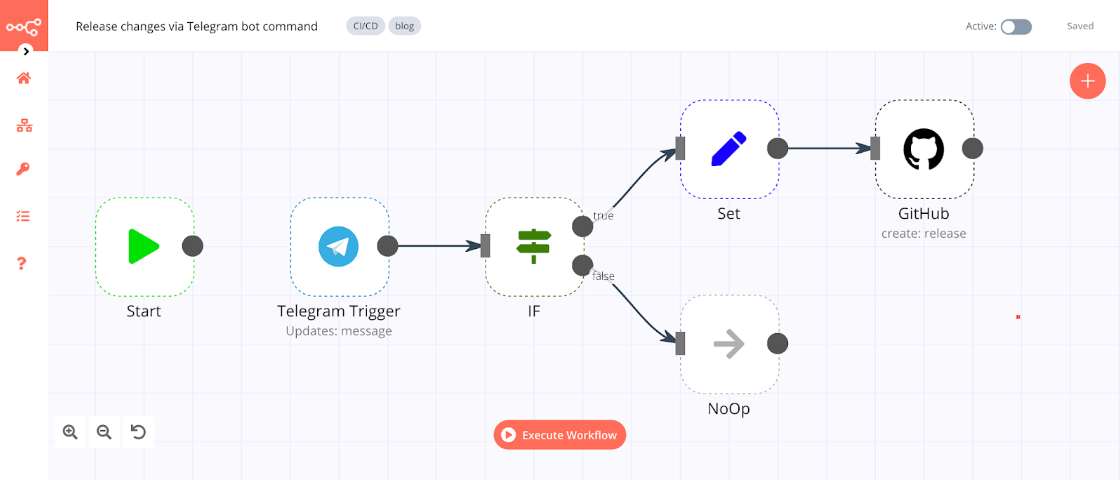
In this workflow, the Set node is used to isolate the version number from the incoming Telegram message /deploy <version>. It creates a new field named version that holds this value, which is then used by the subsequent GitHub node to create the release tag. This is a classic use case: preparing data from one node to be consumed by another.
3. The Code Node: The Custom Logic Engine
While n8n's visual interface and built-in nodes can handle a vast range of tasks, you will inevitably encounter situations that require custom logic, complex transformations, or operations not available in any other node. For these moments, there is the Code node.
Given your background in Python, this node will be your gateway to unlocking the full potential of n8n. It allows you to write and execute arbitrary Python (or JavaScript) code as a step in your workflow, with full access to the data coming from previous nodes.
The following video provides an excellent and comprehensive guide to the Code node. It covers not only how to use it but, more importantly, when and when not to use it.
build anything with the n8n code node, here’s how
This video by David Ondrej is a practical deep-dive into the Code node, explaining its purpose and providing clear use cases.
Please watch the following three segments: Start with the introduction from What is the Code node? to understand its basic function. Jump to the section on practical examples from when it makes sense to use the Code node. The examples on extending existing node functionality and utilizing full API capabilities are particularly relevant. Finally, watch the crucial section on when not to use a Code node. This part also serves as a great introduction to several other common nodes like If, Merge, and Filter.
As the video makes clear, the Code node is not a replacement for using n8n's built-in nodes. Its power lies in its ability to fill the gaps. For a Python developer, it transforms n8n from a no-code tool into a powerful, extensible automation framework. You can use it to parse complex binary file formats, perform intricate calculations, or integrate with libraries not natively supported by n8n—all within your preferred language.
Conclusion
In this lesson, we've moved from abstract concepts to concrete tools. You now have a functional map for classifying n8n's nodes and have been introduced to a powerful trio of general-purpose nodes that form the backbone of many advanced workflows.
Key Takeaways:
- Nodes can be categorized by their function, such as Triggers, Logic, and Data Transformation, which helps in understanding their role.
- The HTTP Request node provides universal connectivity to any REST API, making it essential for interacting with services that lack a dedicated n8n node or require advanced operations.
- The Set node is a fundamental tool for data shaping—renaming, creating, or modifying fields to prepare data for subsequent steps in your workflow.
- The Code node offers ultimate flexibility, allowing you to execute custom Python scripts to handle complex logic and transformations that are impractical with other nodes. It is best used to supplement, not replace, n8n's built-in functionality.
With this knowledge of what the key building blocks do, you are now ready to start assembling them. In our next lesson, we will create and run your first simple workflow, putting these nodes and concepts into practice on the n8n canvas.