In our last session, we set up a modern Python project environment using uv, establishing a solid foundation for the work ahead. We have our project directory, dependencies installed, and our OpenAI API key securely stored in a .env file. Now, it's time to write some code and make our first call to an LLM.
This lesson directly tackles your skepticism about LangChain's utility by comparing it head-to-head with the direct OpenAI API calls you're already proficient with. We will invoke a chat model using both methods. The goal is not just to see how to do it the LangChain way, but to understand why its core abstraction, the LangChain Expression Language (LCEL), is designed the way it is. By the end of this lesson, you'll have a clear, practical understanding of the fundamental trade-offs between the two approaches.
Your Baseline: The Direct OpenAI API Call
Let's start on familiar ground. We'll write a short script to call the OpenAI API directly. This will serve as our reference point.
In the lcel-quickstart project directory you created, open the src/lcel_quickstart/main.py file (or create it if uv init didn't generate one) and add the following code:
import os
from dotenv import load_dotenv
from openai import OpenAI


# Load environment variables from .env file
load_dotenv()


# Ensure the OPENAI_API_KEY is loaded
if "OPENAI_API_KEY" not in os.environ:
    raise ValueError("OPENAI_API_KEY not found in .env file")

def main():
    """
    A simple script to demonstrate a direct OpenAI API call.
    """
    client = OpenAI()

    messages = [
        {
            "role": "user",
            "content": "Tell me a short, interesting fact about quantum mechanics."
        }
    ]

    response = client.chat.completions.create(
        model="gpt-3.5-turbo",
        messages=messages,
    )

    print("--- Direct API Response ---")
    print(response.choices[0].message.content)

if __name__ == "__main__":
    main()
Now, run this script from your terminal at the root of the lcel-quickstart directory:
uv run src/lcel_quickstart/main.py
You should see a response directly from the OpenAI model. This workflow is straightforward and efficient for single-turn interactions. The code required is minimal and gives you complete control over the API request.
The article "LangChain vs OpenAI API" provides a similar baseline example. It's a useful reference for the direct-API approach.
LangChain vs OpenAI API: When Simplicity Meets Scalability
This article section shows a concise function for a direct OpenAI API call.
Review the code block under the heading Direct ChatGPT Implementation. Notice its structural similarity to the script we just wrote.
The LangChain Way: Invoking a Model with LCEL
Now, let's accomplish the exact same task using LangChain. This will introduce us to the LangChain Expression Language (LCEL), which is the primary way to build compositions in modern LangChain. LCEL uses a pipe (|) operator, familiar from shell scripting and functional programming, to chain components together.
First, let's watch a brief segment that introduces the concept of LCEL.
NEW LangChain Expression Language!!
This video from Sam Witteveen explains why LCEL was introduced and demonstrates its basic pipe syntax.
First, watch from the beginning until the introduction to understand the motivation behind LCEL. Then, skip ahead and watch the core demonstration from this timestamp, where he builds a simple chain: prompt | model | parser.
As the video showed, a basic chain consists of three parts:
- A Prompt Template: Structures the input for the model.
- A Model: The LLM itself, like
ChatOpenAI. - An Output Parser: Formats the model's output (e.g., from a message object to a string).
Let's modify our main.py file to use this pattern.
import os
from dotenv import load_dotenv


# New LangChain imports
from langchain_openai import ChatOpenAI
from langchain_core.prompts import ChatPromptTemplate
from langchain_core.output_parsers import StrOutputParser


# Load environment variables from .env file
load_dotenv()


# Ensure the OPENAI_API_KEY is loaded
if "OPENAI_API_KEY" not in os.environ:
    raise ValueError("OPENAI_API_KEY not found in .env file")

def main():
    """
    Demonstrates a simple LLM chain using LangChain Expression Language (LCEL).
    """


    # 1. Define the prompt template
    prompt = ChatPromptTemplate.from_template(
        "Tell me a short, interesting fact about {topic}."
    )


    # 2. Instantiate the model
    model = ChatOpenAI(model="gpt-3.5-turbo")


    # 3. Instantiate the output parser
    output_parser = StrOutputParser()


    # 4. Create the chain by piping components together
    chain = prompt | model | output_parser


    # 5. Invoke the chain with a topic
    response = chain.invoke({"topic": "quantum mechanics"})

    print("--- LangChain LCEL Response ---")
    print(response)


if __name__ == "__main__":
    main()
Run this updated script again with uv run src/lcel_quickstart/main.py. The output should be a clean string containing a fact about quantum mechanics.
The image below provides a great side-by-side comparison of the two approaches for a simple "tell me a joke" task, visually reinforcing the syntactic difference. Our script implements the same pattern shown on the right.
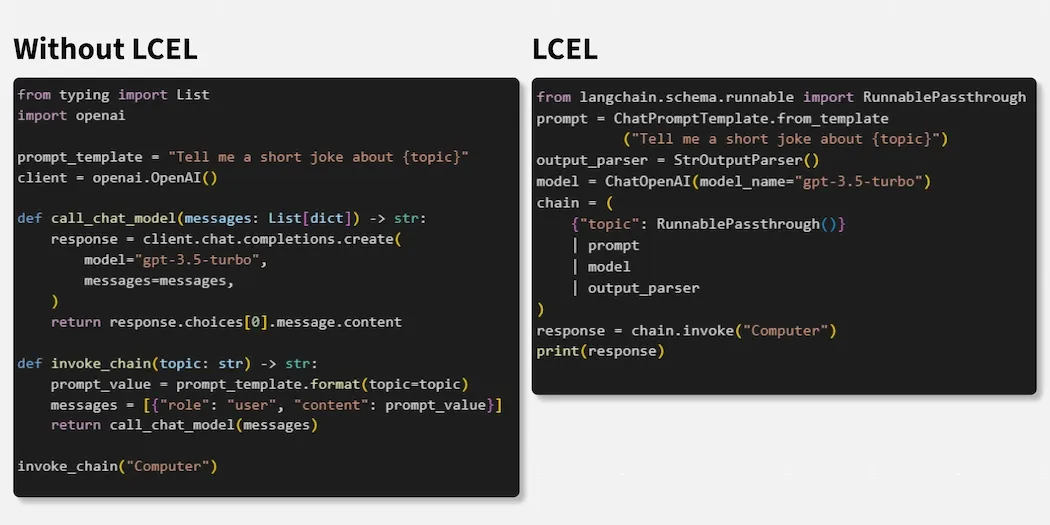
Contrasting the Approaches: Why Bother with the Abstraction?
At this point, you're likely thinking that the LangChain version seems more verbose for such a simple task. You had to learn about ChatPromptTemplate, StrOutputParser, and the invoke method. For a single API call, the direct approach is arguably cleaner. This is a valid observation.
The power of LangChain and LCEL is not in simplifying single API calls, but in composing complex, multi-step workflows. The declarative pipe syntax provides a standardized, readable way to connect different components.
This image neatly summarizes the argument:

As the diagram shows, a production-ready application involves much more than a single API call. You need to handle conversation history, manage token limits, parse outputs, and potentially chain multiple LLM calls or integrate external tools. LangChain provides pre-built, composable components for all of these tasks. The initial overhead of learning the LCEL syntax pays off by dramatically reducing boilerplate and complexity as your application grows.
The following reading provides a balanced perspective on when to choose one approach over the other.
LangChain vs OpenAI API: When Simplicity Meets Scalability
This article directly compares the two approaches and provides clear guidelines on their respective strengths.
First, read the quick overview which summarizes the core trade-off between simplicity/performance and developer experience/scalability. Then, jump to the end and read the section Deciding Between LangChain and OpenAI API. This provides a clear decision framework that aligns with our discussion.
The key takeaway is that the ChatOpenAI object isn't just a wrapper; it's a Runnable component that conforms to a standard interface. This allows it to be seamlessly piped together with hundreds of other Runnable components for document loading, retrieval, and tool use—topics we will cover in upcoming lessons.
Conclusion
In this lesson, we successfully invoked a chat model using both a direct OpenAI API call and the LangChain Expression Language. We saw that while the direct API is excellent for simple, performance-critical tasks, LangChain's LCEL provides a powerful, declarative syntax for building scalable and maintainable LLM applications.
Here are the key points:
- A direct API call gives you fine-grained control and has minimal overhead.
- LCEL uses the pipe (
|) syntax to chainRunnablecomponents, such as aChatPromptTemplate, a model (ChatOpenAI), and anStrOutputParser. - The
.invoke()method is used to execute an LCEL chain. - The value of LangChain's abstractions becomes apparent when building complex, multi-step workflows that involve more than a single model interaction.
We've just scratched the surface of LCEL. In our next lesson, we will dive deeper into its compositional power. You'll learn how to build more sophisticated sequential chains and manipulate the data flowing through them, preparing you to construct the core logic for the RAG pipeline we'll be building.