Hello! Welcome to the first lesson of our course. I'm excited to start this journey with you to bridge your extensive back-end expertise with the world of front-end and mobile development.
This first module focuses on the foundational principles of UI/UX design. Think of it as establishing the "first principles" that govern how we create effective and user-friendly interfaces. Before we can build complex layouts or manage application state, we need to understand why we're building what we're building.
Today, we'll start with the most fundamental concept of all: the User-Centered Design (UCD) process. By the end of this lesson, you will be able to describe this process and its key phases. For an engineer, thinking in terms of processes and frameworks is natural. UCD provides a systematic, repeatable framework for designing products, much like agile methodologies provide a framework for developing them.
1. What is User-Centered Design?
At its heart, User-Centered Design is a philosophy and a process that places the user—not the technology, not the business goals, not the developer's preferences—at the absolute center of every design decision. It's an iterative approach focused on understanding user behaviors, needs, and motivations.
To get a quick overview, let's start with a short video that defines UCD and its core principles.
What is user-centred design (UCD)?
This video from Jadene Designs provides a concise introduction to User-Centered Design, its benefits, and its fundamental principles.
Please watch from the beginning until 01:46. Focus on the definition of UCD and the list of core principles it is based on.
As the video highlights, UCD is about involving users from the very beginning. It's not about guessing what users want; it's about discovering it through research and validating it through testing. This approach helps reduce the risk of building the wrong product, which ultimately saves time and resources.
For a more formal definition and a clear breakdown of the process phases, let's turn to a foundational text from the Interaction Design Foundation (IxDF), a leading organization in the UX field.
What is User Centered Design (UCD)? | IxDF
This article, 'What is User Centered Design (UCD)?', provides a clear and authoritative definition of the concept and explicitly lists its four main phases.
Please read the first section, 'What is User Centered Design (UCD)?', and the section titled '4 Phases in User-centered Design'. Pay close attention to the definition of the four phases, as we will explore them in more detail next.
So, to summarize: UCD is an iterative design process where designers focus on users and their needs in each phase of the design process.
As a back-end developer, you're accustomed to building APIs that serve specific functions. UCD is the process that determines what those user-facing functions should be and how they should work to be genuinely useful and usable. Your API endpoints are the technical implementation of solutions to problems uncovered during the UCD process.
2. The Key Phases of the UCD Process
The IxDF article introduced the four core phases of the UCD process. Let's visualize this process as an iterative cycle.
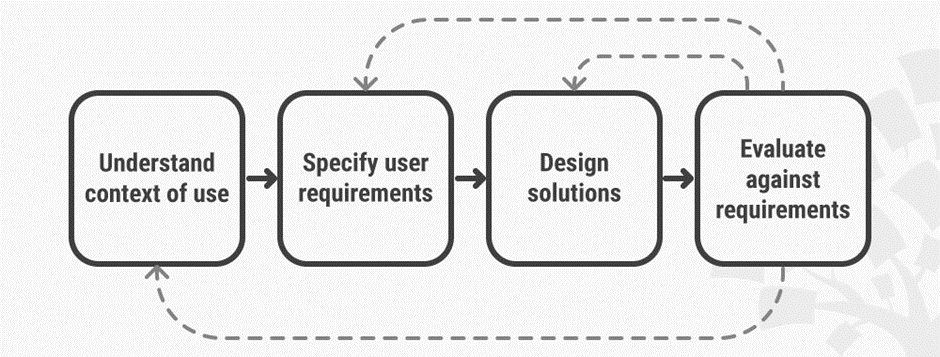
This cycle is not rigid or strictly linear. It's a loop. Insights from the evaluation phase often send you back to refine your understanding, your requirements, or your design solutions. This is very similar to the iterative nature of agile software development.
To get more depth on each phase, we'll refer to an article that breaks down the internationally recognized standard for this process, ISO 9241-210. Given your engineering background, you'll appreciate how this formal standard provides a rigorous structure for what might otherwise seem like a "soft" discipline.
How to "Do" UX Design: A Guide to the ISO 9241-210 Standard
The article 'How to "Do" UX Design: A Guide to the ISO 9241-210 Standard' provides a structured walkthrough of the human-centered design process.
Please read the sections titled 'Step 2: Understand and Specify the Context of Use', 'Step 3: Specify the User Requirements', 'Step 4: Producing Design Solutions', and 'Step 5: Evaluating the Design'. We are skipping the planning step for now to focus on the core cycle.
Let's quickly recap what each phase entails, based on the article:
-
Understand and Specify the Context of Use: This is the foundational research phase.
- Who are the users? (e.g., students, librarians, casual readers)
- What are their goals and tasks? (e.g., find a book, renew a loan, discover new authors)
- What is their environment? (e.g., on a bus using a phone, at home on a laptop, inside the library)
-
Specify the User Requirements: Here, you translate the insights from your research into concrete, testable requirements. This is where you move from "a user wants to find a book easily" to "the system must allow a user to search by title, author, and ISBN, and return results within 2 seconds." This step bridges the gap between user needs and system specifications.
-
Produce Design Solutions: This is the creative phase where you generate potential solutions. It's not about writing production-ready code. It starts with simple sketches or wireframes and evolves into more detailed mockups or interactive prototypes. The goal is to create something that can be evaluated by users.
-
Evaluate the Design: You put your design solutions in front of real users and observe their interactions.
- Can they complete the tasks successfully?
- Where do they struggle?
- Does the solution meet their needs and expectations?
The feedback gathered here is crucial—it either validates your design choices or tells you where you need to go back and iterate.
Test your understanding!
Imagine you've been tasked with designing a new mobile banking app for a major bank. Based on the four UCD phases, what would be the very first activities you would undertake, and what specific questions would you aim to answer?
Show answer
The very first activities would fall under Phase 1: Understand and Specify the Context of Use.
You wouldn't start by sketching screens or defining the technical architecture. Instead, you would focus on research to answer questions like:
- Who are our target users? (e.g., tech-savvy millennials, older customers who are less comfortable with technology, small business owners).
- What are their current banking habits? (e.g., Do they visit branches? Use the website? Call customer service?).
- What are their primary goals when interacting with the bank? (e.g., checking balances, transferring money, paying bills, applying for a loan).
- What are their pain points with the current digital or physical banking experience? (e.g., "The website is hard to navigate on my phone," "I have to call to do a simple wire transfer").
- In what context will they use the app? (e.g., quickly checking a balance while in line at a store, sitting down to pay multiple bills at home).
Only after gathering this data would you be able to move on to specifying what the app actually needs to do.
3. The Power of Iteration and Early Feedback
A common mistake is to treat the design process like a waterfall model: research, then design, then build, then test at the very end. UCD argues strongly against this. The cost of fixing a fundamental design flaw discovered after the product has been fully built is enormous.
This is analogous to software engineering: a bug caught by a unit test is trivial to fix, while a bug discovered by a customer in production can be a catastrophe.
To reinforce this point, let's watch one more clip that explains the value of the full UCD cycle over simply relying on evaluation at the end.
Human Centered Design (HCD) or User Centered Design (UCD)?
In this segment from the Interaction Design Foundation, the presenter uses a powerful analogy to explain why integrating user feedback throughout the process is far more effective than just testing the final product.
Please watch from 04:31 to 08:23. First, the speaker will walk through the cycle diagram we saw earlier. Then, he'll explain the danger of focusing only on the 'evaluation' phase.
The manufacturing analogy of producing faulty screws and only trying to improve quality by tightening the final inspection is a perfect parallel. UCD is about improving the process of design to prevent faulty "screws" (bad design decisions) from being made in the first place.
Conclusion
In this lesson, we've introduced the User-Centered Design process as a foundational framework for creating effective user interfaces.
Key Takeaways:
- User-Centered Design (UCD) is an iterative process that puts users and their needs at the center of every stage of design and development.
- The process consists of four key phases that form a continuous loop:
- Understand the context of use.
- Specify user requirements.
- Design potential solutions.
- Evaluate those solutions against the requirements with real users.
- Engaging users early and often through this iterative cycle is far more efficient and effective than building a complete product and only testing it at the end.
This process provides the "why" behind every design decision. It ensures we are solving the right problem for the right people.
Preview of the next lesson:
Now that we understand the process for discovering what users need, we can begin to explore how to translate those needs into a visual interface. In our next lesson, we will dive into visual hierarchy, learning how to strategically arrange elements on a screen to guide user attention and make interfaces intuitive to use. This is one of the first and most critical steps in the "Design Solutions" phase.