Hello! Welcome back to our course on building a production-ready rate limiter.
In the last lesson, you built the RateLimiterRuleService, the intelligent component that inspects an incoming request and selects the most specific Rule from our YAML configuration. This was a crucial step, giving us the "what" and "how much" for rate limiting.
Today, we'll build the component that acts on that rule. We will create the machinery that takes a Rule object and instantiates the correct rate-limiting algorithm, ready to enforce the limit.
Your learning outcome for this lesson:
You will implement a factory that provides the correct RateLimiter instance (in-memory vs. Redis) based on the rule. This factory will be the bridge between our abstract configuration and the concrete, executable code of our different rate-limiting strategies.
1. The Right Tool for the Job: Factory and Strategy Patterns
We've already established the Strategy pattern through our RateLimiter interface. This allows us to treat different algorithms (Fixed Window, Token Bucket) interchangeably. Now, we face a new question: how do we select and create the correct strategy instance at runtime based on our configuration?
This is the perfect use case for the Factory design pattern. A factory is an object dedicated to creating other objects. In our system, the RateLimiterFactory will:
- Receive the
Ruleselected by theRateLimiterRuleService. - Inspect the rule to determine the required algorithm (e.g.,
TOKEN_BUCKET) and storage backend (e.g.,REDIS). - Instantiate and return the corresponding
RateLimiterimplementation (e.g., aRedisTokenBucketRateLimiter).
This combination of Factory and Strategy is a powerful and common pairing in software design for creating flexible, extensible systems.
Strategy and Factory Pattern, The Best Software Design Pattern Combo
To see this combination in action, let's revisit the 'Strategy and Factory Pattern' video. It clearly illustrates how a factory is used to produce the correct strategy object based on runtime criteria.
Please watch from 00:57 to 01:54. Pay close attention to how the OrderNotifyFactory has a create method that takes a user object and returns the correct IOrderNotifier instance. Our RateLimiterFactory will do the same, but it will take a Rule object to create a RateLimiter instance.
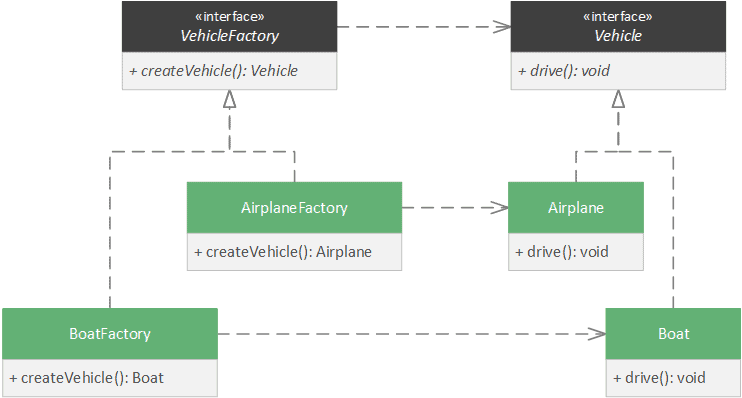
2. Managing Implementations with Spring's IoC Container
Our factory needs access to all the possible RateLimiter implementations we've built (e.g., InMemoryTokenBucket, RedisSlidingWindow, etc.). Manually instantiating them inside the factory (new InMemoryTokenBucket(...)) would tightly couple the factory to its products, which is what we want to avoid.
Instead, we can leverage Spring's Inversion of Control (IoC) container. We will declare each RateLimiter implementation as a Spring bean and give it a unique name. Then, we can ask Spring to inject all of these beans into our factory.
A powerful way to do this is to have Spring inject a Map<String, RateLimiter>, where the key is the bean's unique name and the value is the bean instance itself.
To achieve this, we'll use a combination of @Configuration, @Bean, and @Qualifier annotations.
Java Spring Boot - Bean Configuration Explained - Dependency Injection - Creating Beans
This video, 'Java Spring Boot - Bean Configuration Explained', provides an excellent guide on how to manage multiple bean implementations of the same interface.
Please watch these two segments: Defining multiple beans (04:24 - 07:06): Focus on how a @Configuration class is used with @Bean methods to create multiple implementations of the VehicleService interface. Using @Qualifier (10:36 - 14:24): This is the key part. See how @Qualifier gives a unique name to each bean, allowing for specific injection. This is exactly how we will distinguish between, for example, an 'in-memory' and a 'redis' token bucket limiter.
3. Designing the RateLimiterFactory
Now let's apply these concepts. Our goal is to create a factory that can dynamically select the correct RateLimiter bean based on a naming convention.
The article "Mastering Rate Limiting in Spring Boot" implements a very similar concept with its RateLimiterResolver. We will adopt this robust pattern for our factory.
Mastering Rate Limiting in Spring Boot
The RateLimiterResolver component in this article is a perfect real-world example of the factory pattern we're building.
Please read the section 'Step 4 : Determining the right Implementation to use per request'. Focus on these key implementation details in the RateLimiterResolver.java code: It injects final Map<String, RateLimiterHandler> rateLimiters;. This is the map of all available strategy beans. The resolve method gets the configuration for the client. It uses rateLimiters.getOrDefault(...) to look up the correct handler by name from the map, falling back to a default if none is found. This is precisely the logic our factory will implement.
Step 1: Update Configuration
First, our Rule object needs to know which storage backend to use. Let's add a storage field. Update your Rule record/class and add a corresponding storage property to your application.yml rules.
Create an enum for storage types:
public enum Storage {
    IN_MEMORY,
    REDIS
}
Update your Rule configuration record:
// in com.example.ratelimiter.config.Rule.java
public record Rule(
    String id,
    Match match,
    // Add the storage field
    Storage storage,
    Algorithm algorithm,
    Map<String, Object> params
) {}
An example rule in application.yml would now look like this:
rate-limiter:
  rules:
    - id: "api-rule"
      match: { path: "/api/**" }
      storage: "IN_MEMORY" # Can be IN_MEMORY or REDIS
      algorithm: "TOKEN_BUCKET"
      params: { capacity: 100, refill-rate: 10 }
Step 2: Create a Naming Convention
We need a consistent way to name our beans so the factory can find them. A simple and effective convention is STORAGE_ALGORITHM. For the rule above, the bean name would be IN_MEMORY_TOKEN_BUCKET.
Let's update our Algorithm enum to help with this:
// in com.example.ratelimiter.config.Algorithm.java
public enum Algorithm {
    FIXED_WINDOW,
    SLIDING_WINDOW,
    TOKEN_BUCKET;

    public String toBeanName(Storage storage) {
        return storage.name() + "_" + this.name();
    }
}
Step 3: Implement the Factory
Now we can build the RateLimiterFactory. It injects the map of all RateLimiter beans and uses the naming convention to find the right one.
import com.example.ratelimiter.config.Rule;
import com.example.ratelimiter.core.RateLimiter;
import org.springframework.stereotype.Component;

import java.util.Map;

@Component
public class RateLimiterFactory {

    private final Map<String, RateLimiter> rateLimiters;

    // Spring injects all beans of type RateLimiter into this map.
    // The key is the bean's name, and the value is the instance.
    public RateLimiterFactory(Map<String, RateLimiter> rateLimiters) {
        this.rateLimiters = rateLimiters;
    }

    /**
     * Creates a RateLimiter instance based on the provided rule.
     * @param rule The configuration rule.
     * @return The configured RateLimiter instance.
     * @throws IllegalArgumentException if no matching RateLimiter bean is found.
     */
    public RateLimiter create(Rule rule) {
        // Construct the bean name, e.g., "IN_MEMORY_TOKEN_BUCKET"
        String beanName = rule.algorithm().toBeanName(rule.storage());

        RateLimiter rateLimiter = rateLimiters.get(beanName);

        if (rateLimiter == null) {
            throw new IllegalArgumentException("No RateLimiter implementation found for bean name: " + beanName);
        }

        // In future lessons, you might pass the rule's params to the limiter
        // for initialization, but for now, returning the bean is sufficient.
        return rateLimiter;
    }
}
4. Activity: Wire Up Your Implementations
It's time to put theory into practice. You will now declare your existing rate limiter implementations as named Spring beans so your new factory can find them.
-
Modify your
Ruleconfiguration as shown in Step 1 above to include thestoragefield. -
Update your
Algorithmenum with thetoBeanNamehelper method from Step 2. -
Annotate your
RateLimiterimplementations. Go to the classes you built in previous modules (e.g.,InMemoryFixedWindowRateLimiter,RedisSlidingWindowRateLimiter, etc.). Add the@Componentannotation with the specific bean name.Example for your in-memory fixed window counter:
import org.springframework.stereotype.Component;

// The bean name must match the convention: STORAGE_ALGORITHM
@Component("IN_MEMORY_FIXED_WINDOW")
public class InMemoryFixedWindowRateLimiter implements RateLimiter {
    // ... your existing implementation from Module 3
}
Example for your lock-free token bucket:
import org.springframework.stereotype.Component;

@Component("IN_MEMORY_TOKEN_BUCKET")
public class LockFreeTokenBucketRateLimiter implements RateLimiter {
    // ... your existing implementation from Module 4
}
Do this for all the implementations you have built so far (in-memory and Redis-based).
-
Create the
RateLimiterFactory.javaclass and copy the code from Step 3.
With these changes, your application now has a factory capable of dynamically providing the correct rate limiter instance for any rule defined in your application.yml.
Conclusion
Excellent work! You have now closed the loop between configuration and execution. The RateLimiterFactory is the final, critical piece of infrastructure that makes your system truly dynamic and extensible.
Key Takeaways:
- The Factory pattern is used to create objects without exposing the creation logic to the client, decoupling the system.
- Combining the Factory and Strategy patterns provides a highly flexible architecture for managing families of algorithms.
- Spring's IoC container and dependency injection (specifically, injecting a
Mapof beans) provide an elegant way to implement the Factory pattern. - A clear naming convention for beans is essential for the factory to resolve implementations dynamically.
Next Steps
The core logic of your rate limiter is now complete! We can identify clients, resolve keys, find rules, and create the correct limiter instance. But how well does it perform? In the next module, Performance Benchmarking and Load Testing, you will learn how to use professional-grade tools like the Java Microbenchmark Harness (JMH) and custom load testers to measure throughput, latency, and correctness under pressure. This is where we prove our system is ready for production.