Introduction
In our previous lessons, we've focused on letting Spring do the heavy lifting automatically. We used component scanning with annotations like @Component, @Service, and @Repository to let Spring discover our classes and create beans from them. We then saw how Spring uses constructor injection to automatically wire these beans together. This works wonderfully for classes that are part of our own project, as we can easily add annotations to them.
But what happens when you need to create a Spring bean from a class you don't own? Imagine you want to use a class from a third-party library, like a database connection pool or a JSON mapper. You can't modify its source code to add @Component.
This lesson addresses that exact scenario. We will explore Spring's Java-based configuration, a powerful and explicit way to define beans using the @Configuration and @Bean annotations. This approach gives you full control over bean instantiation and is essential for integrating external components into your Spring application. By the end of this lesson, you will be able to define beans explicitly in a configuration class, complementing your knowledge of automatic component scanning.
The Basics: @Configuration and @Bean
The two central pieces of Java-based configuration are the @Configuration and @Bean annotations.
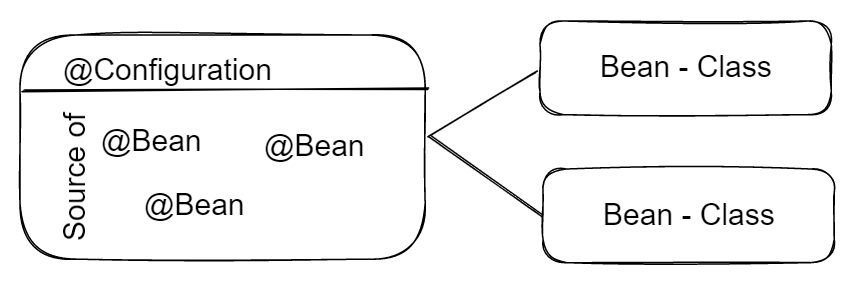
@Configuration: This is a class-level annotation. It signals to the Spring container that the primary purpose of this class is to be a source of bean definitions.@Bean: This is a method-level annotation. When you annotate a method with@Bean, you are telling Spring that this method will produce a bean to be managed by the container. The object returned by the method is the bean instance. By default, the name of the method becomes the bean's name (its unique identifier in the container).
Let's start by reading the official definitions from the Spring documentation.
Basic Concepts: @Bean and @Configuration - Spring
The official Spring documentation provides the most precise definitions for these core annotations. This will give you the foundational understanding.
Please read the initial section, 'Basic Concepts: @Bean and @Configuration'. It provides a simple code example that shows how these two annotations work together.
The relationship between these annotations can be visualized as follows: a @Configuration class acts as a factory for creating one or more beans defined by @Bean methods.
A Practical Demonstration
Theory is good, but seeing it in action makes it concrete. Let's watch a video that walks through creating beans using this explicit approach. The example involves a PaymentService interface with multiple implementations, which is a common scenario in application design.
Understanding Beans and ApplicationContext in Spring Framework
This video from CodeSnippet demonstrates how to set up a configuration class and define multiple beans that implement the same interface. It also shows you how to verify that the beans were successfully created.
Watch the segment from 00:11:53 to 00:16:16. The presenter will: Create a PaymentService interface. Create two implementations: GooglePayService and CreditCardService. Create a PaymentConfig class annotated with @Configuration. Define two beans, one for each payment service, using the @Bean annotation. Notice how the method names (creditCardPaymentService, googlePayPaymentService) become the names of the beans.
As you saw, this method gives you explicit control. You are writing the instantiation logic yourself (return new CreditCardService();), and Spring takes over the management of the returned object.
When to Use @Configuration and @Bean
So far, we have two ways to declare beans:
- Component Scanning: Using
@Component(and its specializations@Service,@Repository,@Controller) on your classes. - Java Configuration: Using
@Beanmethods inside a@Configurationclass.
When should you choose one over the other? The decision reflects important design considerations.
Understanding @Configuration in Spring Boot - DEV Community
This article from DEV Community provides a clear, concise list of scenarios where Java-based configuration is the ideal choice.
Read the section 'When is @Configuration Used?' and the two example use cases. This will solidify your understanding of the practical applications of this configuration style.
To summarize and expand on those points, you should use @Configuration and @Bean when:
- Integrating Third-Party Code: This is the most common and compelling reason. You need to create a bean from a class in an external library (e.g.,
RestTemplate,ObjectMapper, aDataSource). You can't add@Componentto that class, so you must define it yourself. - Complex Instantiation Logic: If creating an object requires complex logic, such as reading from configuration files, making decisions based on environment variables, or calling a static factory method, a
@Beanmethod is the perfect place to encapsulate this logic. - Defining Beans for Interfaces: As shown in the video, when you're working with interfaces and have multiple implementations, a configuration class can be a clean way to define which implementations should be available as beans.
- Centralizing Configuration: From a system design perspective, grouping related bean definitions into logical configuration classes (
PersistenceConfig,SecurityConfig,ApiConfig) can make the application's structure clearer and easier to manage, rather than scattering@Componentannotations across many files.
The following code example shows several of these principles in practice, defining beans for different MessageService implementations and injecting one of them into another bean.

Inter-Bean Dependencies and the Magic of CGLIB
In the image above, you saw that the messageProcessor() bean method directly calls the twitterService() method.
@Bean
public MessageProcessor messageProcessor() {
    // A direct call to another @Bean method
    return new MessageProcessor(twitterService());
}
A critical question for anyone interested in the underlying mechanics is: what happens when we call twitterService()? Does this create a new instance of TwitterService every time messageProcessor() is called, or does it correctly reuse the singleton bean that Spring is managing?
The answer lies in how Spring processes @Configuration classes. Spring creates a runtime subclass (a proxy) of your configuration class using a library called CGLIB. This proxy intercepts calls to your @Bean methods. When you call twitterService(), the proxy first checks the IoC container to see if a twitterService bean already exists.
- If it exists, the proxy returns the existing singleton instance.
- If it doesn't exist, the proxy calls the original method, creates the bean, registers it in the container, and then returns it.
This ensures that even with direct method calls between @Bean methods, Spring's singleton scope is honored.
Understanding @Configuration in Spring Boot - DEV Community
The following article explains this proxying mechanism very clearly. It also explains what happens if you omit the @Configuration annotation, which leads to a different behavior known as 'lite' mode.
Read the sections 'What Happens Without @Configuration?' and 'Internal Working (Behind the Scenes)'. This will give you a clear mental model of how Spring ensures bean scopes are respected within configuration classes.
This distinction between "full" mode (with @Configuration and proxying) and "lite" mode (without proxying) is an important detail. For most cases, you will want the "full" mode to correctly manage relationships between your beans. The Spring documentation also covers this distinction formally. You don't need to read it now, but it's good to know where to find the official explanation (LINK, section 1).
Conclusion
Today, we've added a second powerful tool to our Spring toolbox. While component scanning is excellent for its convenience and convention-over-configuration approach, Java-based configuration with @Configuration and @Bean provides the explicit control needed for more complex scenarios and third-party integrations.
Key Takeaways:
- Explicit Definition: Use
@Configurationon a class and@Beanon methods within it to explicitly define Spring beans. This is an alternative to automatic component scanning. - Primary Use Case: This method is essential for creating beans from classes you don't control, such as those from external libraries.
- Fine-Grained Control:
@Beanmethods allow you to implement custom logic for bean creation, configuration, and initialization. - Inter-Bean Dependencies: When a
@Configurationclass is used, Spring creates a proxy that intercepts calls to@Beanmethods, ensuring that singleton beans are correctly shared and not re-created on every call. - Clean Design: Grouping related beans into dedicated configuration classes (
PersistenceConfig,WebConfig) can lead to a more modular and understandable application architecture.
In the video demonstration, we created two beans (GooglePayService and CreditCardService) that both implement the PaymentService interface. This raises an interesting question: if a component needs a PaymentService injected, how does Spring know which of the two beans to provide? Resolving this ambiguity is the topic of our next lesson, where we'll explore the @Qualifier annotation.