Hello! Let's dive into the next lesson on testing in Spring.
In our last session, we built a solid foundation by learning how to write isolated unit tests for plain Java objects using JUnit 5 and Mockito. We practiced the core loop of setting up mocks, stubbing their behavior, and verifying interactions.
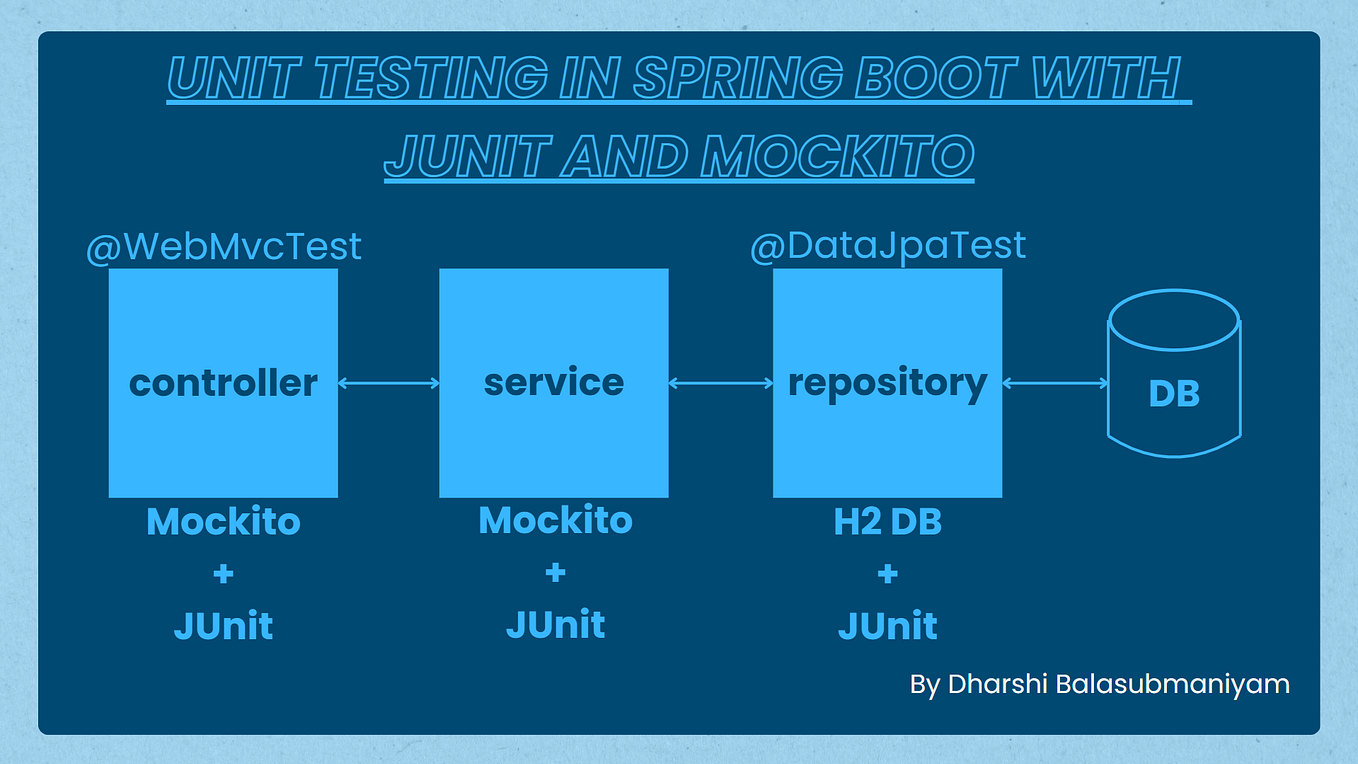
Today, we'll apply those exact skills to a core component of the Spring framework. This lesson addresses the learning outcome: Write a unit test for a @Service class by mocking its repository dependencies. You'll see that despite the Spring-specific annotations, testing the business logic inside a service class is a straightforward unit testing exercise that you are now fully equipped to handle.
1. The Goal: Isolating the Service Layer
A typical Spring application is layered. The service layer (@Service) contains the application's business logic. It coordinates tasks, performs calculations, and makes decisions. To do this, it often depends on the repository layer (@Repository) to persist and retrieve data.
When we unit test a service, our goal is to verify its business logic in isolation. We are not interested in whether the database connection works or if the SQL queries in the repository are correct. We only want to answer the question: "Does my service class behave correctly, given certain inputs from its dependencies?"
To achieve this isolation, we mock the repository.

2. The Scenario: A Service with Business Logic
Let's consider a ProductService that depends on a ProductRepository. We'll test its createProduct method, which contains a piece of business logic: it should prevent the creation of a product if another product with the same name already exists.
Here are the classes we'll be working with:
The Repository Interface (Our Dependency)
import java.util.Optional;
import org.springframework.data.jpa.repository.JpaRepository;

public interface ProductRepository extends JpaRepository<Product, Long> {
    Optional<Product> findByName(String name);
}
The Service Class (Our Unit Under Test)
import org.springframework.stereotype.Service;

@Service
public class ProductService {

    private final ProductRepository productRepository;

    public ProductService(ProductRepository productRepository) {
        this.productRepository = productRepository;
    }

    public Product createProduct(String name, double price) {
        // Business logic: Check if a product with the same name already exists.
        if (productRepository.findByName(name).isPresent()) {
            throw new IllegalStateException("Product with name '" + name + "' already exists.");
        }

        Product newProduct = new Product(name, price);

        // Delegate persistence to the repository.
        return productRepository.save(newProduct);
    }
}
Note: The Product class would be a simple JPA entity, but its details aren't important for this unit test.
Our task is to write tests that verify both the successful creation path and the failure path where a duplicate name is detected.
3. Setting Up the Test Class
As we learned in the previous lesson, we'll use Mockito's JUnit 5 extension to set up our test environment. The setup is identical to how we tested a plain Java class.
import org.junit.jupiter.api.extension.ExtendWith;
import org.mockito.InjectMocks;
import org.mockito.Mock;
import org.mockito.junit.jupiter.MockitoExtension;

// 1. Enable Mockito's integration with JUnit 5
@ExtendWith(MockitoExtension.class)
class ProductServiceTest {

    // 2. Create a mock of the dependency
    @Mock
    private ProductRepository mockProductRepository;

    // 3. Create an instance of the class under test and inject the mock(s) into it.
    // Mockito will see that ProductService needs a ProductRepository in its constructor
    // and will provide the mock instance declared above.
    @InjectMocks
    private ProductService productService;

    // ... Our test methods will go here ...
}
This is the standard, clean setup for unit testing a component with dependencies. Spring's own dependency injection container is not involved here at all; we are using Mockito to wire our test-specific object graph.
4. Testing the "Happy Path"
First, let's test the scenario where a product is created successfully. We'll follow the Arrange-Act-Assert pattern.
The following video provides a comprehensive walkthrough of building a service-layer unit test from scratch. It methodically covers each step, from handling initial null pointers to stubbing behavior and making assertions.
Unit Testing in Spring Boot with JUnit 5 and Mockito | Part 1
This video, 'Unit Testing in Spring Boot with JUnit 5 and Mockito', walks through the entire process of testing a service layer. It's a great practical demonstration of the concepts we're discussing.
Watch from 15:25 to 28:12. This segment covers: 15:25 - 19:19: Setting up the test with @Mock and @InjectMocks to resolve dependencies. 19:19 - 24:15: Using Mockito.when(...).thenReturn(...) to stub the repository's behavior. 24:15 - 28:12: Using Assertions from JUnit to verify the test's outcome.
Let's apply those steps to write our "happy path" test for createProduct.
// Inside ProductServiceTest class

import static org.junit.jupiter.api.Assertions.*;
import static org.mockito.Mockito.*;

// ...

@Test
void createProduct_shouldSaveAndReturnProduct_whenNameIsUnique() {
    // Arrange: Define the behavior of our mock repository.

    // 1. When findByName is called with "New Widget", pretend the product doesn't exist.
    when(mockProductRepository.findByName("New Widget")).thenReturn(Optional.empty());

    // 2. When save is called with ANY Product object, return a prepared product instance.
    // We use an ArgumentCaptor to capture the product passed to save() and add an ID to it,
    // simulating what a real database would do.
    Product productToSave = new Product("New Widget", 99.99);
    Product savedProduct = new Product(1L, "New Widget", 99.99); // Simulates the saved entity with an ID
    when(mockProductRepository.save(any(Product.class))).thenReturn(savedProduct);

    // Act: Call the method we are testing.
    Product result = productService.createProduct("New Widget", 99.99);

    // Assert: Verify the results and interactions.

    // 1. Check that the returned product is not null and has the expected values.
    assertNotNull(result);
    assertEquals(1L, result.getId());
    assertEquals("New Widget", result.getName());

    // 2. Verify that the repository's findByName method was called once.
    verify(mockProductRepository, times(1)).findByName("New Widget");

    // 3. Verify that the repository's save method was called once.
    verify(mockProductRepository, times(1)).save(any(Product.class));
}
This test thoroughly validates that when the name is unique, our service correctly proceeds to save the new product.
5. Testing the "Unhappy Path" (Business Logic)
Next, we must test our business rule: an exception should be thrown if the product name already exists.
Unit Testing Using Spring Boot, JUnit and Mockito - DEV Community
The article 'Unit Testing Using Spring Boot, JUnit and Mockito' provides very clear, complete code examples for testing various service methods. Let's look at their test for creating a resource.
In section 6, 'Writing Unit Tests with Mockito and JUnit 5', review the first test case, createTodo_shouldSaveAndReturnTodo. Notice how it uses when().thenReturn() and verify() in a complete, self-contained test.
Now let's write the test for the duplicate name scenario. Here, we'll use assertThrows to confirm our service throws the correct exception.
// Inside ProductServiceTest class

// ...

@Test
void createProduct_shouldThrowException_whenNameExists() {
    // Arrange: Define the mock behavior for a duplicate name scenario.

    // When findByName is called, pretend a product with that name already exists.
    Product existingProduct = new Product(1L, "Existing Widget", 50.0);
    when(mockProductRepository.findByName("Existing Widget")).thenReturn(Optional.of(existingProduct));

    // Act & Assert: Verify that calling the method throws the expected exception.
    IllegalStateException exception = assertThrows(IllegalStateException.class, () -> {
        productService.createProduct("Existing Widget", 99.99);
    });

    // Optionally, assert the exception message is correct.
    assertEquals("Product with name 'Existing Widget' already exists.", exception.getMessage());

    // Assert: Verify that the save method was NEVER called. This is crucial.
    // It confirms our business logic correctly short-circuited the operation.
    verify(mockProductRepository, never()).save(any(Product.class));
}
This test confirms our business rule is working correctly and prevents the service from proceeding with the save operation.
Conclusion
In this lesson, we successfully applied our unit testing skills to a Spring @Service component. We've demonstrated that by mocking the repository dependency, we can test the service's business logic in complete isolation, leading to fast, reliable, and focused tests.
Key Takeaways:
- Testing a Spring
@Serviceis a pure unit test focused on business logic. - The setup using
@ExtendWith(MockitoExtension.class),@Mock, and@InjectMocksis the standard and effective way to prepare your test. - You use
when(...).thenReturn(...)to control the "world" as your service sees it, allowing you to simulate any scenario (e.g., data found, data not found). - You use JUnit
Assertions(assertEquals,assertThrows) to check the outcome and Mockito'sverify(...)to ensure the service interacted with its dependencies as expected.
In our next lesson, we will shift our focus from mocking the data layer to actually testing it. We will cover the learning outcome: Write an integration test for the data layer using @DataJpaTest and an in-memory database. This will complete the picture of how to ensure your application's data persistence logic is correct.